A couple of years ago, "building an AI agent" meant writing a long prompt, wrapping it in a loop, and hoping the model behaved. The interface was almost always a chat box. That worked for demos, but it broke down the moment a product manager asked a simple question: "What exactly does this agent do, step by step?"
Nobody could answer that by scrolling a chat log.
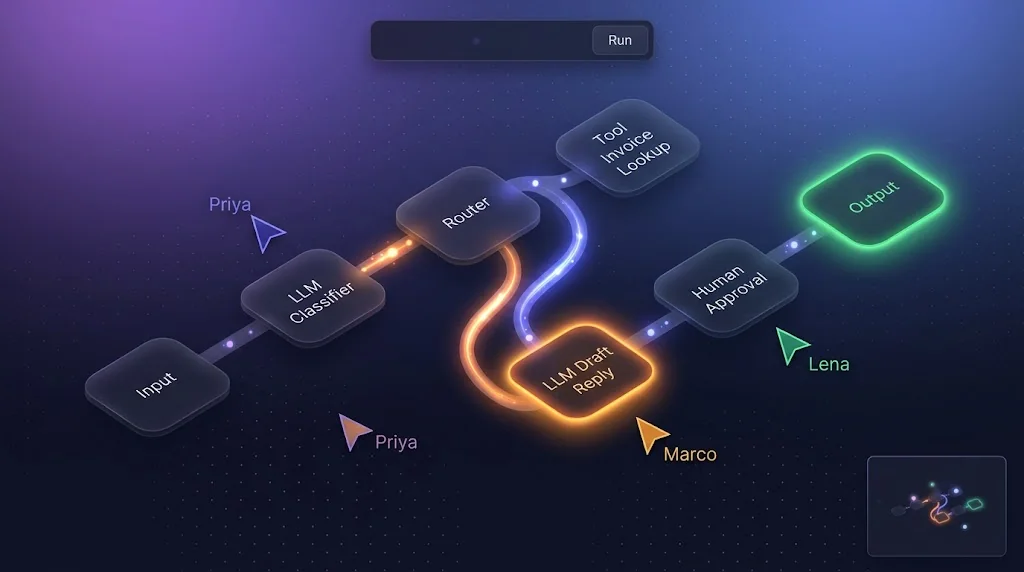
In 2026 the answer increasingly looks like a canvas. Teams want to see their agents: a researcher node feeding a summarizer, a router splitting work between specialist agents, a human-approval gate before anything gets emailed to a customer. They want to drag those boxes around together, in real time, the way they already do in Figma or Miro. And they want to press "Run" and watch the graph light up as each step executes.
This guide is a blueprint for building exactly that kind of product: a collaborative infinite-canvas SaaS where users visually wire together autonomous AI agents. We'll go from the frontend canvas all the way down to Docker images on AWS, and I'll be honest about the parts that hurt.
Here's the stack we'll use:
- Next.js 16 (App Router) with React 19 for the app shell and canvas UI
- React Flow (
@xyflow/react) for the infinite canvas, nodes, and edges - LangGraph.js as the agent execution runtime
- Ollama for local and self-hosted LLM inference
- Node.js + Socket.io for multiplayer sync, presence, and live execution events
- MongoDB for canvas documents, run history, and LangGraph checkpoints
- Stripe Billing Meters for usage-based pricing
- Docker + AWS (ECS Fargate, EC2 GPU, ElastiCache) for deployment
Let's build it.
Why Visual Agent Orchestration Is Taking Off
Before writing code, it's worth understanding why this pattern is winning, because the reasons shape the architecture.
Chat hides structure; canvases expose it
A multi-agent workflow is a graph. It has branches, loops, and shared state. A chat transcript flattens all of that into a single timeline, so debugging means reading logs. A canvas shows the topology directly, so a non-engineer can point at a node and say "this one is hallucinating."
Agents became graphs, not loops
Frameworks like LangGraph made the "agent as a state machine" model mainstream. Once your runtime is already a graph of nodes and edges, drawing it is the obvious next step. The canvas isn't a decorative layer on top; it's a one-to-one representation of the execution model.
Local models made experimentation cheap
With Ollama running capable open-weight models on a laptop or a single GPU box, users can iterate on agent graphs without watching a hosted-API bill climb. That changes product behavior: people run graphs dozens of times while designing them, which means your system must handle frequent, short, bursty executions.
Collaboration is now table stakes
AI workflows are rarely built by one person. A domain expert writes the prompts, an engineer wires the tools, and someone from compliance adds the approval gate. Multiplayer editing stopped being a "nice to have" and became a buying criterion.
High-Level Architecture
Here's the full system at a glance. Keep this picture in your head; every section that follows zooms into one box.
flowchart LR
  subgraph Client["Browser (Next.js + React Flow)"]
    UI[Infinite Canvas UI]
    Store[Zustand Canvas Store]
    SockC[Socket.io Client]
  end

  subgraph Edge["Next.js Server"]
    RSC[Server Components & Route Handlers]
    Auth[Auth / Session]
  end

  subgraph Realtime["Node.js Realtime Service"]
    IO[Socket.io Server]
    Redis[(Redis Adapter / PubSub)]
  end

  subgraph Exec["Execution Workers"]
    Queue[(BullMQ Queue)]
    Compiler[Graph Compiler]
    LG[LangGraph Runtime]
  end

  subgraph Infra["Data & Models"]
    Mongo[(MongoDB)]
    Ollama[Ollama GPU Nodes]
    Stripe[Stripe Billing Meters]
  end

  UI --> Store --> SockC
  SockC <--> IO
  IO <--> Redis
  RSC --> Mongo
  IO --> Mongo
  IO --> Queue
  Queue --> Compiler --> LG
  LG --> Ollama
  LG --> Mongo
  LG -- execution events --> Redis
  LG --> Stripe
A few deliberate decisions are baked into this diagram:
- The browser never runs agents. It edits a graph specification. Execution happens on workers.
- The realtime service is separate from Next.js. Long-lived WebSocket connections and serverless-style request handling have very different scaling profiles.
- Execution is queued. LLM inference is slow and GPU-bound; WebSocket handlers must stay fast.
- Redis is the nervous system. It fans out socket events across realtime instances and carries execution events from workers back to the right room.
The Core Idea: The Canvas Is a Compiler Input
This is the single most important concept in the whole article, so I'll state it plainly:
A canvas is source code. The server compiles it into a LangGraph StateGraph.
Each node on the canvas has a type (like llm, tool, router, or humanApproval) and a config object. Each edge connects an output handle to an input handle and may carry a condition. Together they form a JSON document we'll call a GraphSpec.
flowchart TD
  A[React Flow nodes + edges] --> B[GraphSpec JSON]
  B --> C{Zod validation}
  C -- invalid --> D[Inline canvas errors]
  C -- valid --> E[Cycle & reachability checks]
  E --> F[Node factory: type -> LangGraph node fn]
  F --> G[StateGraph with edges + conditional edges]
  G --> H[compile with MongoDB checkpointer]
  H --> I[stream run, emit events per node]
Thinking of it as a compiler pipeline gives you three huge benefits: you can validate before running, you can version specs like code, and you can unit-test the compiler without touching a browser.
Defining the GraphSpec schema
Share this schema between frontend and backend in a workspace package (for example packages/graph-spec).
// packages/graph-spec/src/schema.ts
import { z } from "zod";

export const NodeType = z.enum(["input", "llm", "tool", "router", "humanApproval", "output"]);

export const LlmConfig = z.object({
  model: z.string().default("llama3.1:8b"),
  systemPrompt: z.string().max(8000),
  temperature: z.number().min(0).max(2).default(0.2),
  outputKey: z.string().regex(/^[a-zA-Z_][a-zA-Z0-9_]*$/),
});

export const RouterConfig = z.object({
  routes: z.array(z.object({ label: z.string(), match: z.string() })).min(1),
  inputKey: z.string(),
});

export const SpecNode = z.object({
  id: z.string(),
  type: NodeType,
  position: z.object({ x: z.number(), y: z.number() }),
  config: z.record(z.string(), z.unknown()),
});

export const SpecEdge = z.object({
  id: z.string(),
  source: z.string(),
  target: z.string(),
  sourceHandle: z.string().nullable().optional(),
  label: z.string().optional(),
});

export const GraphSpec = z.object({
  id: z.string(),
  version: z.number().int().nonnegative(),
  nodes: z.array(SpecNode).max(200),
  edges: z.array(SpecEdge).max(600),
});

export type GraphSpec = z.infer<typeof GraphSpec>;
Notice the hard limits (max(200) nodes). Those aren't arbitrary. Every unbounded input in a multi-tenant system is a denial-of-service vector waiting to happen.
Building the Infinite Canvas with Next.js and React Flow
React Flow (now published as @xyflow/react) gives you panning, zooming, selection, minimap, and edge routing out of the box. Our job is to make it collaborative and fast.
Custom agent nodes
Each node type gets its own memoized component. Memoization matters: a canvas with 150 nodes re-rendering on every drag frame will feel like wading through syrup.
// apps/web/components/canvas/nodes/LlmNode.tsx
"use client";
import { memo } from "react";
import { Handle, Position, type NodeProps } from "@xyflow/react";
import { useRunStatus } from "@/stores/run-store";

type LlmNodeData = { label: string; model: string };

function LlmNodeInner({ id, data, selected }: NodeProps & { data: LlmNodeData }) {
  const status = useRunStatus(id); // "idle" | "running" | "done" | "error"

  return (
    <div
      className={`rounded-xl border bg-white px-4 py-3 shadow-sm transition
        ${selected ? "ring-2 ring-indigo-500" : ""}
        ${status === "running" ? "animate-pulse border-amber-400" : ""}
        ${status === "error" ? "border-red-500" : ""}`}
    >
      <Handle type="target" position={Position.Left} />
      <div className="text-xs font-medium uppercase text-slate-500">LLM · {data.model}</div>
      <div className="mt-1 text-sm font-semibold text-slate-900">{data.label}</div>
      <Handle type="source" position={Position.Right} />
    </div>
  );
}

export const LlmNode = memo(LlmNodeInner);
The key detail is useRunStatus(id). Execution status lives in a separate store from the graph itself. When a run streams fifty status updates per second, only the affected nodes re-render, not the entire canvas.
The canvas component
// apps/web/components/canvas/AgentCanvas.tsx
"use client";
import { ReactFlow, Background, MiniMap, Controls } from "@xyflow/react";
import "@xyflow/react/dist/style.css";
import { useCanvasStore } from "@/stores/canvas-store";
import { useCanvasSync } from "@/hooks/use-canvas-sync";
import { LlmNode } from "./nodes/LlmNode";
import { RouterNode } from "./nodes/RouterNode";
import { ToolNode } from "./nodes/ToolNode";
import { RemoteCursors } from "./RemoteCursors";

const nodeTypes = { llm: LlmNode, router: RouterNode, tool: ToolNode };

export function AgentCanvas({ canvasId }: { canvasId: string }) {
  const { nodes, edges, onNodesChange, onEdgesChange, onConnect } = useCanvasStore();
  const { emitCursor } = useCanvasSync(canvasId);

  return (
    <div className="h-[calc(100vh-56px)] w-full" onPointerMove={(e) => emitCursor(e.clientX, e.clientY)}>
      <ReactFlow
        nodes={nodes}
        edges={edges}
        nodeTypes={nodeTypes}
        onNodesChange={onNodesChange}
        onEdgesChange={onEdgesChange}
        onConnect={onConnect}
        onlyRenderVisibleElements
        fitView
      >
        <Background gap={24} />
        <MiniMap pannable zoomable />
        <Controls />
      </ReactFlow>
      <RemoteCursors />
    </div>
  );
}
Define nodeTypes outside the component. Defining it inline creates a new object on every render, and React Flow will warn you and remount every node. It's one of the most common mistakes I see in code reviews.
Loading the canvas with Server Components
Use a Server Component to fetch the initial canvas so the first paint is instant and SEO-safe for any public "template gallery" pages.
// apps/web/app/(app)/canvas/[id]/page.tsx
import { getCanvas } from "@/server/canvas-repo";
import { CanvasHydrator } from "@/components/canvas/CanvasHydrator";

export default async function CanvasPage({ params }: { params: Promise<{ id: string }> }) {
  const { id } = await params;
  const canvas = await getCanvas(id); // checks membership + returns spec
  return <CanvasHydrator initial={canvas} />;
}
Real-Time Multiplayer with Socket.io
Now the fun part: making five people edit the same graph without stepping on each other.
Three kinds of traffic, three policies
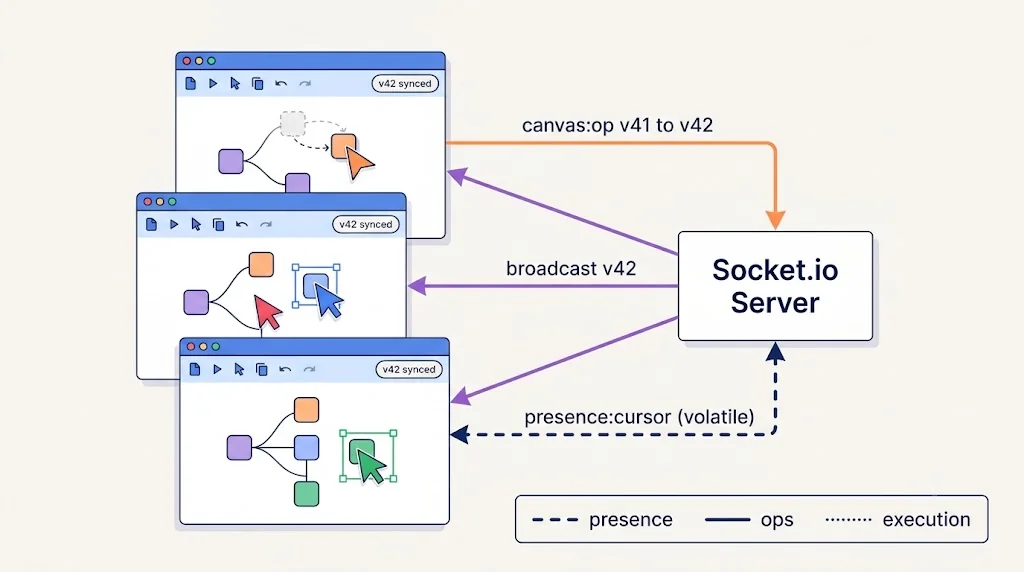
The mistake almost every first version makes is treating all real-time messages the same. They aren't.
| Traffic type | Example | Frequency | Delivery need |
|---|---|---|---|
| Presence | Cursor positions, who's online | Very high | Lossy is fine; drop stale frames |
| Canvas ops | Move node, add edge, edit prompt | Medium | Must be ordered and persisted |
| Execution events | Node started, token streamed, node finished | Bursty | Ordered per run; replayable |
Socket.io's volatile emits are perfect for presence: if the client's buffer is full, the message is dropped instead of queued. Canvas ops get acknowledgements and a server-assigned version number. Execution events are published by workers through Redis and replayable from MongoDB.
The realtime server
// apps/realtime/src/server.ts
import { createServer } from "node:http";
import { Server } from "socket.io";
import { createAdapter } from "@socket.io/redis-adapter";
import { Redis } from "ioredis";
import { verifySession } from "./auth";
import { applyCanvasOp } from "./canvas-ops";
import { enqueueRun } from "./runs";

const httpServer = createServer();
const pub = new Redis(process.env.REDIS_URL!);
const sub = pub.duplicate();

const io = new Server(httpServer, {
  cors: { origin: process.env.APP_ORIGIN, credentials: true },
  adapter: createAdapter(pub, sub),
  connectionStateRecovery: { maxDisconnectionDuration: 2 * 60 * 1000 },
});

io.use(async (socket, next) => {
  const user = await verifySession(socket.handshake.auth.token);
  if (!user) return next(new Error("unauthorized"));
  socket.data.user = user;
  next();
});

io.on("connection", (socket) => {
  socket.on("canvas:join", async ({ canvasId }, ack) => {
    if (!(await socket.data.user.canAccess(canvasId))) return ack({ ok: false });
    socket.join(`canvas:${canvasId}`);
    socket.to(`canvas:${canvasId}`).emit("presence:join", { user: socket.data.user.public });
    ack({ ok: true });
  });

  // Presence: lossy, high-frequency
  socket.on("presence:cursor", ({ canvasId, x, y }) => {
    socket.volatile.to(`canvas:${canvasId}`).emit("presence:cursor", {
      userId: socket.data.user.id, x, y,
    });
  });

  // Canvas ops: ordered, versioned, persisted
  socket.on("canvas:op", async ({ canvasId, baseVersion, op }, ack) => {
    const result = await applyCanvasOp(canvasId, baseVersion, op, socket.data.user.id);
    if (!result.ok) return ack({ ok: false, reason: result.reason, latest: result.latest });
    socket.to(`canvas:${canvasId}`).emit("canvas:op", { op, version: result.version });
    ack({ ok: true, version: result.version });
  });

  // Execution: enqueue, never run inline
  socket.on("run:start", async ({ canvasId, input }, ack) => {
    const run = await enqueueRun({ canvasId, input, userId: socket.data.user.id });
    ack(run); // { ok, runId } or { ok: false, reason: "quota_exceeded" }
  });
});

httpServer.listen(Number(process.env.PORT ?? 4000));
Resolving conflicts with optimistic versioning
applyCanvasOp uses a simple but robust approach: each canvas has a monotonically increasing version. A client sends the version its edit was based on. The server accepts the op if it doesn't conflict, bumps the version, and broadcasts.
// apps/realtime/src/canvas-ops.ts
import { canvases } from "./db";

export async function applyCanvasOp(canvasId: string, baseVersion: number, op: CanvasOp, userId: string) {
  const update = toMongoUpdate(op); // e.g. { $set: { "nodes.$[n].position": op.position } }

  const res = await canvases.findOneAndUpdate(
    { _id: canvasId, version: { $gte: baseVersion } },
    { ...update, $inc: { version: 1 }, $set: { updatedAt: new Date(), updatedBy: userId } },
    { returnDocument: "after", arrayFilters: arrayFiltersFor(op) }
  );

  if (!res) {
    const latest = await canvases.findOne({ _id: canvasId }, { projection: { version: 1 } });
    return { ok: false as const, reason: "stale", latest: latest?.version };
  }
  return { ok: true as const, version: res.version };
}
Because most ops are commutative at the node level (two people moving different nodes never conflict), this works surprisingly well. Field-level ops ("set this node's position") rather than whole-document replacement are what make it work.
When you outgrow this, typically when several people are typing into the same prompt field at once, introduce Yjs for the text-heavy fields and keep Socket.io as the transport. You don't need to rip anything out.
sequenceDiagram
  participant A as Alice (browser)
  participant S as Socket.io Server
  participant M as MongoDB
  participant B as Bob (browser)

  A->>A: Optimistically move node N1
  A->>S: canvas:op {baseVersion: 41, op: move N1}
  S->>M: findOneAndUpdate (version >= 41)
  M-->>S: ok, version 42
  S-->>A: ack {ok, version: 42}
  S->>B: canvas:op {op: move N1, version: 42}
  B->>B: Apply op, set version 42
Throttling cursors on the client
// apps/web/hooks/use-canvas-sync.ts
import { useEffect, useMemo } from "react";
import { io } from "socket.io-client";
import throttle from "lodash.throttle";
import { useCanvasStore } from "@/stores/canvas-store";
import { usePresenceStore } from "@/stores/presence-store";

export function useCanvasSync(canvasId: string) {
  const socket = useMemo(() => io(process.env.NEXT_PUBLIC_REALTIME_URL!, {
    auth: (cb) => fetch("/api/realtime-token").then((r) => r.json()).then(cb),
    transports: ["websocket"],
  }), []);

  useEffect(() => {
    socket.emit("canvas:join", { canvasId }, () => {});
    socket.on("canvas:op", ({ op, version }) => useCanvasStore.getState().applyRemote(op, version));
    socket.on("presence:cursor", (p) => usePresenceStore.getState().setCursor(p));
    socket.on("run:event", (e) => useRunStore.getState().ingest(e));
    return () => { socket.disconnect(); };
  }, [socket, canvasId]);

  const emitCursor = useMemo(
    () => throttle((x: number, y: number) => socket.volatile.emit("presence:cursor", { canvasId, x, y }), 40),
    [socket, canvasId]
  );

  return { socket, emitCursor };
}
Forty milliseconds (about 25 updates per second) is smooth enough for cursors and cheap enough to scale. Interpolate on the receiving side for buttery motion.
Compiling the Canvas into a LangGraph Pipeline
This is where the canvas becomes a real agent. The worker pulls a job from the queue, loads the GraphSpec, compiles it, and streams execution.
Shared state
LangGraph nodes communicate through a typed shared state. For a visual builder, a flexible-but-bounded state works best: a message list plus a key/value bag that nodes write into via their outputKey.
// apps/worker/src/state.ts
import { Annotation, MessagesAnnotation } from "@langchain/langgraph";

export const CanvasState = Annotation.Root({
  ...MessagesAnnotation.spec,
  vars: Annotation<Record<string, unknown>>({
    reducer: (prev, next) => ({ ...prev, ...next }),
    default: () => ({}),
  }),
  route: Annotation<string | null>({
    reducer: (_prev, next) => next,
    default: () => null,
  }),
});

export type CanvasStateT = typeof CanvasState.State;
A node factory
Each canvas node type maps to a function that returns a LangGraph node. This is the "standard library" of your product, and adding a new node type should mean adding one entry here plus one React component.
// apps/worker/src/node-factory.ts
import { ChatOllama } from "@langchain/ollama";
import { SystemMessage, HumanMessage } from "@langchain/core/messages";
import { interrupt } from "@langchain/langgraph";
import { LlmConfig, RouterConfig } from "@acme/graph-spec";
import type { CanvasStateT } from "./state";
import { tools } from "./tools";

const ollamaBase = process.env.OLLAMA_BASE_URL ?? "http://ollama:11434";

export function buildNode(node: SpecNode) {
  switch (node.type) {
    case "llm": {
      const cfg = LlmConfig.parse(node.config);
      const model = new ChatOllama({ baseUrl: ollamaBase, model: cfg.model, temperature: cfg.temperature });
      return async (state: CanvasStateT) => {
        const prompt = interpolate(cfg.systemPrompt, state.vars);
        const res = await model.invoke([new SystemMessage(prompt), ...state.messages.slice(-12)]);
        return { messages: [res], vars: { [cfg.outputKey]: res.content } };
      };
    }

    case "router": {
      const cfg = RouterConfig.parse(node.config);
      return async (state: CanvasStateT) => {
        const value = String(state.vars[cfg.inputKey] ?? "").toLowerCase();
        const hit = cfg.routes.find((r) => value.includes(r.match.toLowerCase()));
        return { route: hit?.label ?? "default" };
      };
    }

    case "tool": {
      const tool = tools[node.config.toolName as string];
      if (!tool) throw new CompileError(node.id, "Unknown tool");
      return async (state: CanvasStateT) => ({ vars: { [node.id]: await tool.invoke(state.vars) } });
    }

    case "humanApproval":
      return async (state: CanvasStateT) => {
        const decision = interrupt({ nodeId: node.id, preview: state.vars });
        return { vars: { [`${node.id}_approved`]: decision === "approve" } };
      };

    default:
      return async () => ({});
  }
}
The humanApproval node uses LangGraph's interrupt(). Execution pauses, the checkpoint is saved to MongoDB, and the canvas shows an "Approve / Reject" prompt on that node. When a user clicks, you resume the graph with a Command({ resume: "approve" }). That's a feature that would take weeks to build from scratch, and it's a few lines here.
The compiler
// apps/worker/src/compile.ts
import { StateGraph, START, END } from "@langchain/langgraph";
import { MongoDBSaver } from "@langchain/langgraph-checkpoint-mongodb";
import { GraphSpec } from "@acme/graph-spec";
import { CanvasState } from "./state";
import { buildNode } from "./node-factory";
import { mongoClient } from "./db";

const checkpointer = new MongoDBSaver({ client: mongoClient, dbName: "agents" });

export function compileSpec(raw: unknown) {
  const spec = GraphSpec.parse(raw);
  assertSingleEntry(spec);
  assertReachable(spec);
  assertBoundedCycles(spec); // every cycle must pass through a node with a max-iterations guard

  const graph = new StateGraph(CanvasState);

  for (const n of spec.nodes) {
    if (n.type === "input" || n.type === "output") continue;
    graph.addNode(n.id, buildNode(n));
  }

  const entry = spec.nodes.find((n) => n.type === "input")!;
  const terminal = new Set(spec.nodes.filter((n) => n.type === "output").map((n) => n.id));
  const resolve = (id: string) => (id === entry.id ? START : terminal.has(id) ? END : id);

  for (const n of spec.nodes.filter((x) => x.type === "router")) {
    const outgoing = spec.edges.filter((e) => e.source === n.id);
    const mapping = Object.fromEntries(outgoing.map((e) => [e.label ?? "default", resolve(e.target)]));
    graph.addConditionalEdges(n.id as any, (s) => s.route ?? "default", mapping);
  }

  for (const e of spec.edges) {
    const src = spec.nodes.find((n) => n.id === e.source)!;
    if (src.type === "router") continue;
    graph.addEdge(resolve(e.source) as any, resolve(e.target) as any);
  }

  return graph.compile({ checkpointer });
}
A quick note on the as any casts: LangGraph's TypeScript types are designed around graphs whose node names are known at compile time. In a visual builder, node names are dynamic user data, so a small, isolated cast at the compiler boundary is the pragmatic choice. Keep it contained to this one file.
Streaming execution back to the canvas
// apps/worker/src/run.ts
import { compileSpec } from "./compile";
import { publishRunEvent } from "./events";
import { recordUsage } from "./billing";

export async function executeRun(job: RunJob) {
  const app = compileSpec(job.spec);
  const config = { configurable: { thread_id: job.runId }, recursionLimit: 50 };

  let tokens = 0;
  const stream = app.streamEvents({ messages: [{ role: "user", content: job.input }] }, { ...config, version: "v2" });

  for await (const ev of stream) {
    const nodeId = ev.metadata?.langgraph_node;
    if (ev.event === "on_chain_start" && nodeId) publishRunEvent(job, { type: "node:start", nodeId });
    if (ev.event === "on_chat_model_stream" && nodeId)
      publishRunEvent(job, { type: "node:token", nodeId, chunk: ev.data.chunk.content });
    if (ev.event === "on_chat_model_end")
      tokens += ev.data.output?.usage_metadata?.total_tokens ?? 0;
    if (ev.event === "on_chain_end" && nodeId) publishRunEvent(job, { type: "node:end", nodeId });
  }

  await recordUsage(job.workspaceId, { tokens, nodeExecutions: job.spec.nodes.length });
}
publishRunEvent writes to a Redis channel that the realtime service subscribes to and forwards to canvas:${canvasId}. Every collaborator watching the canvas sees nodes pulse amber, stream tokens into a side panel, and turn green. That moment, when the whole graph lights up in sequence, is what sells this product in demos.
sequenceDiagram
  participant U as User
  participant RT as Realtime Service
  participant Q as BullMQ
  participant W as Worker (LangGraph)
  participant O as Ollama
  participant R as Redis PubSub

  U->>RT: run:start {canvasId, input}
  RT->>RT: Check quota
  RT->>Q: enqueue job
  RT-->>U: ack {runId}
  Q->>W: deliver job
  W->>W: compileSpec()
  loop each node
    W->>R: node:start
    R->>RT: forward
    RT->>U: run:event
    W->>O: chat completion (stream)
    O-->>W: tokens
    W->>R: node:token / node:end
    R->>RT: forward
    RT->>U: run:event
  end
  W->>W: recordUsage()
Running Ollama safely in production
Ollama is a joy to use locally, but in a multi-tenant SaaS you need guardrails:
- Set
OLLAMA_NUM_PARALLELto match what your GPU memory can actually handle, and setOLLAMA_MAX_LOADED_MODELSso one tenant switching models doesn't evict everyone else's. - Pin a model allowlist. Users pick from models you've pulled and tested; never pass arbitrary model names to
ollama pull. - Pre-warm models at container start with a tiny request so the first real run doesn't pay a cold-load penalty.
- Keep a hosted fallback. Abstract the chat model behind your node factory so a Pro plan can route to a hosted model when local capacity is saturated.
Persistence with MongoDB
MongoDB fits this domain naturally because a canvas is a document. Here's a schema that has held up well:
// Collections
canvases: {
  _id, workspaceId, name, version,
  nodes: [{ id, type, position, config }],
  edges: [{ id, source, target, sourceHandle, label }],
  createdAt, updatedAt, updatedBy
}

canvas_snapshots: {   // immutable, written on "Publish" or every N versions
  _id, canvasId, version, spec, createdBy, createdAt
}

runs: {
  _id, canvasId, snapshotVersion, workspaceId, status, input,
  startedAt, finishedAt, tokens, error
}

run_events: {         // TTL-indexed, for replay and debugging
  runId, seq, type, nodeId, payload, at
}

checkpoints / checkpoint_writes  // managed by MongoDBSaver
Indexes you'll want on day one:
db.canvases.createIndex({ workspaceId: 1, updatedAt: -1 });
db.runs.createIndex({ canvasId: 1, startedAt: -1 });
db.run_events.createIndex({ runId: 1, seq: 1 });
db.run_events.createIndex({ at: 1 }, { expireAfterSeconds: 60 * 60 * 24 * 14 });
The most important rule: runs always point to an immutable snapshot, never to the live canvas. Otherwise someone editing the graph mid-run creates a debugging nightmare where the logs don't match what's on screen.
Usage-Based Billing with Stripe
AI products have real marginal costs, so flat pricing gets you in trouble fast. Stripe's Billing Meters let you report usage as it happens and let Stripe aggregate it per billing period.
Create two meters in the Stripe dashboard (or via API), for example agent_tokens and node_executions, and attach metered prices to your subscription products. Then report usage from the worker:
// apps/worker/src/billing.ts
import Stripe from "stripe";
import { workspaces, usageLedger } from "./db";

const stripe = new Stripe(process.env.STRIPE_SECRET_KEY!);

export async function recordUsage(workspaceId: string, u: { tokens: number; nodeExecutions: number }) {
  const ws = await workspaces.findOne({ _id: workspaceId });
  if (!ws?.stripeCustomerId) return;

  // 1. Local ledger first: source of truth for quota enforcement
  await usageLedger.insertOne({ workspaceId, ...u, at: new Date() });

  // 2. Report to Stripe with an idempotency identifier
  await stripe.billing.meterEvents.create({
    event_name: "agent_tokens",
    identifier: `${workspaceId}-${Date.now()}-tokens`,
    payload: { stripe_customer_id: ws.stripeCustomerId, value: String(u.tokens) },
  });
}
Two practices make this robust:
- Enforce quotas locally, bill remotely. Your realtime service checks the local
usageLedgerbefore enqueuing a run. Stripe is for invoicing, not for real-time gatekeeping. - Use identifiers for idempotency. Workers retry. Without a stable identifier per event, a retried job double-bills a customer, and that's the fastest way to lose trust.
Handle customer.subscription.updated and invoice.payment_failed webhooks in a Next.js Route Handler to keep plan limits in sync and to gracefully downgrade workspaces that stop paying.
Dockerized Deployment on AWS
Each service gets its own image, which keeps scaling independent.
# apps/realtime/Dockerfile
FROM node:22-alpine AS deps
WORKDIR /app
COPY package.json pnpm-lock.yaml pnpm-workspace.yaml ./
COPY apps/realtime/package.json apps/realtime/
COPY packages/graph-spec/package.json packages/graph-spec/
RUN corepack enable && pnpm install --frozen-lockfile --filter realtime...

FROM node:22-alpine AS build
WORKDIR /app
COPY --from=deps /app ./
COPY . .
RUN corepack enable && pnpm --filter realtime build

FROM node:22-alpine
WORKDIR /app
ENV NODE_ENV=production
COPY --from=build /app/apps/realtime/dist ./dist
COPY --from=build /app/node_modules ./node_modules
USER node
EXPOSE 4000
CMD ["node", "dist/server.js"]
For local development, a single docker-compose.yml brings the whole platform up:
services:
  web:
    build: { context: ., dockerfile: apps/web/Dockerfile }
    ports: ["3000:3000"]
    env_file: .env
  realtime:
    build: { context: ., dockerfile: apps/realtime/Dockerfile }
    ports: ["4000:4000"]
    depends_on: [redis, mongo]
  worker:
    build: { context: ., dockerfile: apps/worker/Dockerfile }
    depends_on: [redis, mongo, ollama]
    environment:
      OLLAMA_BASE_URL: http://ollama:11434
  ollama:
    image: ollama/ollama:latest
    volumes: ["ollama:/root/.ollama"]
    deploy:
      resources:
        reservations:
          devices: [{ driver: nvidia, count: 1, capabilities: [gpu] }]
  redis:
    image: redis:7-alpine
  mongo:
    image: mongo:8
    volumes: ["mongo:/data/db"]
volumes: { ollama: {}, mongo: {} }
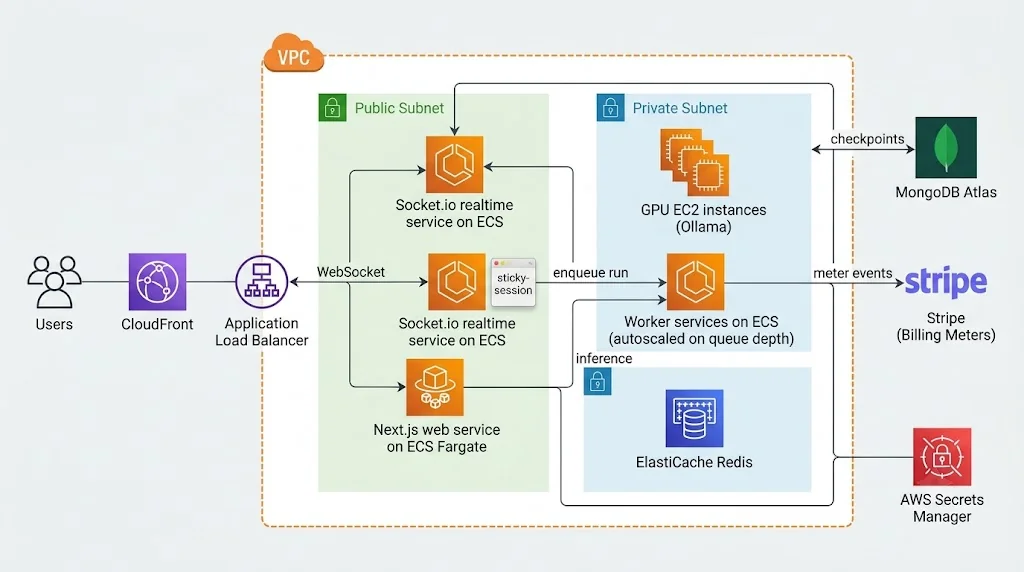
In production on AWS, a layout that works well:
- Next.js web app on ECS Fargate (or your preferred Next.js host) behind CloudFront
- Realtime service on ECS Fargate behind an Application Load Balancer with sticky sessions enabled and WebSocket idle timeouts raised
- Workers on ECS, autoscaled on BullMQ queue depth via a custom CloudWatch metric
- Ollama on GPU-backed EC2 instances in a private subnet, reachable only from workers
- ElastiCache for Redis for the Socket.io adapter and BullMQ
- MongoDB Atlas (deployed in the same AWS region) for persistence
- Secrets Manager for Stripe keys and database credentials
A Real-World Example: The "Support Triage" Canvas
To make this concrete, here's a graph one of our pilot teams built in about twenty minutes:
- Input: a raw customer support email.
- LLM "Classifier" (
llama3.1:8b): outputscategoryas billing, bug, or feature request. - Router: branches on
category. - Billing branch: a Tool node looks up the customer's invoices, then an LLM drafts a reply.
- Bug branch: an LLM extracts reproduction steps; a Tool node creates a ticket.
- Human Approval: every drafted reply pauses for a support lead.
- Output: the approved response.
flowchart LR
  In([Email Input]) --> C[LLM: Classifier]
  C --> R{Router}
  R -- billing --> T1[Tool: Invoice Lookup] --> D1[LLM: Draft Reply]
  R -- bug --> E[LLM: Extract Repro Steps] --> T2[Tool: Create Ticket] --> D2[LLM: Draft Ack]
  R -- feature --> D3[LLM: Draft Thanks]
  D1 --> H{{Human Approval}}
  D2 --> H
  D3 --> H
  H --> Out([Approved Response])
What impressed the team wasn't the AI itself. It was that the support lead, who doesn't write code, rewired the bug branch on her own when she noticed tickets were missing a priority field. That's the real value proposition of visual orchestration: the people who understand the process can change the process.
Best Practices
- Validate on both sides. Run the Zod schema in the browser for instant feedback and again on the server, because the server is the only one you can trust.
- Version everything. Canvases, snapshots, node-type definitions, and prompts. When a run misbehaves, you need to know exactly which graph produced it.
- Keep execution state out of the graph store. Graph structure changes rarely; run status changes constantly. Separate Zustand stores keep re-renders surgical.
- Bound every loop. Set LangGraph's
recursionLimitand require an explicit max-iterations guard on any user-created cycle. - Sandbox tools. Tool nodes that call external APIs or run code must execute with scoped credentials per workspace and strict timeouts.
- Make runs replayable. Persist
run_eventswith sequence numbers so a user who joins late, or reconnects, sees the full run. - Design for reconnection. Socket.io's connection state recovery helps, but your client should still re-fetch the canvas version on reconnect and reconcile.
Common Mistakes
- Executing graphs inside the WebSocket handler. One slow model call and every socket on that instance lags. Always queue.
- Broadcasting the whole canvas on every change. It works with two users and ten nodes. It collapses with ten users and two hundred nodes. Send ops, not snapshots.
- Running against the live canvas instead of a snapshot. Logs stop matching the screen, and nobody can debug anything.
- Defining
nodeTypesinside the component. It forces React Flow to remount every node on every render. - Trusting user-supplied model names or prompts blindly. Allowlist models, cap prompt lengths, and treat tool outputs as untrusted input for prompt-injection purposes.
- Billing only from Stripe data. Meter aggregation isn't instant. Enforce limits from your own ledger.
- Forgetting sticky sessions or the Redis adapter. Socket.io across multiple instances without them produces mysterious "half the room didn't get the update" bugs.
🚀 Pro Tips
- Ship a node SDK early. Define each node type as
{ schema, component, factory }in one package. Adding a node becomes a single pull request, and eventually you can open it to third-party developers as a marketplace. - Add "Run from here." LangGraph checkpoints let you resume from any node's saved state. Letting users re-run only the last three nodes while tuning a prompt saves enormous time and compute.
- Color edges by data flow. During a run, animate edges as state passes through them. It's cheap to implement and makes the graph feel alive.
- Auto-layout on import. Use a layout library like ELK or Dagre when users import a graph or generate one from a natural-language prompt, so they never start with a pile of overlapping boxes.
- Let an agent build the agent. A "describe your workflow" box that outputs a GraphSpec (validated by the same Zod schema) is a wonderful onboarding shortcut.
- Track cost per node. Show estimated tokens next to each LLM node. Users optimize what they can see.
- Load-test presence separately. Use a tool like Artillery with the Socket.io engine to simulate fifty cursors per room before launch; presence is where scaling surprises usually hide.
📌 Key Takeaways
- The canvas is a declarative spec; the server compiles it into a LangGraph
StateGraphand runs it on workers. - Split real-time traffic into presence (lossy), canvas ops (ordered and persisted), and execution events (replayable).
- Optimistic versioning with field-level ops handles most multiplayer conflicts; add Yjs only where concurrent text editing demands it.
- Ollama is great for local and self-hosted tiers when you add queuing, concurrency caps, model allowlists, and a hosted fallback.
- MongoDB maps naturally to canvas documents, and
MongoDBSavergives you durable checkpoints for pausing and resuming agents. - Stripe Billing Meters align revenue with real cost, but quota enforcement belongs in your own database.
- Separate Docker images per service let the web tier, realtime tier, workers, and GPU nodes scale independently on AWS.
Conclusion
Visual AI agent builders sit at an interesting intersection of hard problems: collaborative editing, graph compilation, long-running stateful execution, GPU scheduling, and metered billing. Any one of these is a solid engineering project. Combining them is what makes this category both challenging and genuinely defensible.
The architecture in this guide is built around one principle that keeps everything sane: separate the description of an agent from its execution. The browser edits a graph. The realtime layer keeps everyone's view of that graph consistent. Workers compile and run immutable snapshots of it. Everything else, including billing, persistence, and deployment, falls into place once that boundary is clear.
If you're starting today, don't try to build all of it at once. Get a single-player canvas compiling into LangGraph and running on Ollama first. Then add Socket.io presence, then multiplayer ops, then billing. Each layer is independently valuable, and each one will teach you something about how your users actually think about their agents.
The chat box isn't going away, but for anything more complex than a single conversation, the future of AI tooling is spatial. Now you have a blueprint to build it.
References
- React Flow (xyflow) Documentation
- LangGraph.js Documentation
- LangGraph.js: Human-in-the-loop and Interrupts
- LangChain.js Ollama Integration
- Ollama Documentation and FAQ
- Socket.io Documentation: Rooms, Volatile Events, and Connection State Recovery
- Socket.io Redis Adapter
- Next.js App Router Documentation
- MongoDB Node.js Driver Documentation
- Stripe Usage-Based Billing and Billing Meters
- BullMQ Documentation
- Yjs Documentation
- Amazon ECS Developer Guide