Introduction: The Day Your Agent Ran rm -rf on Something It Shouldn't Have
If you've shipped an autonomous coding agent in the last year, you probably have a story. Mine involved a perfectly innocent request: "write a script that cleans up old build artifacts." The model wrote it, the agent ran it, and the script's notion of "old" turned out to be far more generous than ours. Nothing catastrophic happened, because that agent was already running in a throwaway container. But it was the moment our team stopped treating sandboxing as a nice-to-have.
In 2026, AI agents don't just suggest code. They write it, run it, read the stack trace, patch it, and run it again, often dozens of times per task. That loop is what makes them useful. It is also what makes them dangerous. Every execution is a chance for a hallucinated command, a poisoned dependency, or a prompt injection hidden in a README to do real damage.
This guide walks through a production-grade architecture my team has refined over many months:
- A stateful LangGraph agent that plans, writes, executes, and debugs code
- Local Ollama models for fast, private iteration and Claude Code for heavyweight reasoning
- Ephemeral, network-restricted Docker containers on AWS Linux that run Python, C++, and JavaScript (ES6+)
- A Node.js and Express.js orchestrator plus shell scripts that own the container lifecycle
- Least-privilege OAuth and JWT execution policies
- Immutable audit trails in PostgreSQL
- Live stdout/stderr telemetry over Socket.io into a Next.js, TypeScript, Tailwind CSS, and Shadcn UI workspace
It's a lot of moving parts, so we'll build it one layer at a time, and I'll point out the mistakes we made along the way so you don't have to repeat them.
Why Sandboxing Is the Defining Agent Problem of 2026
Two years ago, the main worry with LLM output was accuracy. Today, the worry is agency. Once a model can execute code, its output becomes a set of instructions for your infrastructure.
Here's the threat model we design against:
- Hallucinated destructive commands: the model genuinely believes deleting a directory is the fix.
- Prompt injection via context: a malicious comment in a repository instructs the agent to
curlyour environment variables to an external server. - Supply-chain attacks: the model "helpfully" installs a typosquatted package.
- Resource exhaustion: fork bombs, infinite loops, or a C++ program allocating 40 GB of memory.
- Lateral movement: code that queries the EC2 instance metadata service to steal IAM credentials.
The core principle is simple: the agent is a potentially compromised user, and its code is untrusted input. Zero trust isn't a buzzword here. It's the only sane default.
The Architecture at a Glance
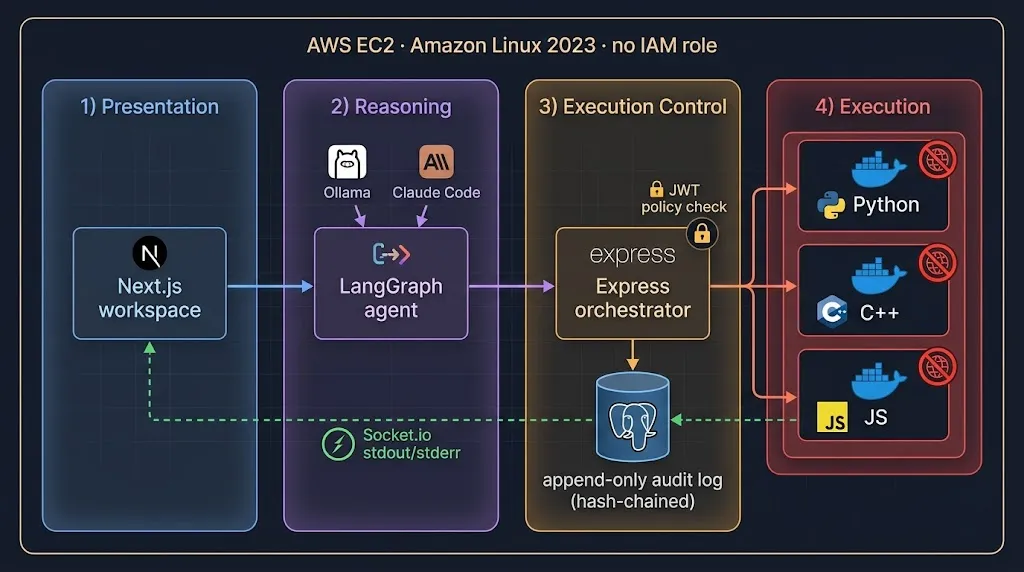
The system is split into four trust zones:
- Presentation zone (Next.js workspace): the developer submits tasks and watches live output. It holds a user session, never execution rights.
- Reasoning zone (LangGraph agent): decides what to do. It can request executions but cannot touch Docker directly.
- Execution control zone (Express orchestrator): the only component with access to the Docker socket. It validates every request against a signed policy.
- Execution zone (ephemeral containers): no network, no credentials, no persistence. Born, run, destroyed.
The PostgreSQL audit log sits beside all of this, receiving append-only events from the orchestrator.
The key design decision is that the thing that thinks is never the thing that acts. If the LLM is compromised, it still has to pass every request through a narrow API that enforces hard limits it cannot negotiate with.
Layer 1: The Ephemeral Execution Runtime
Building a Minimal, Multi-Language Sandbox Image
We use a single image for Python, C++, and Node.js to keep cold starts predictable. Resist the urge to pile in tools. Every binary you include is something an attacker can use.
# sandbox/Dockerfile
FROM debian:bookworm-slim

RUN apt-get update && apt-get install -y --no-install-recommends \
      python3 python3-pip g++ nodejs ca-certificates \
    && rm -rf /var/lib/apt/lists/* \
    # Remove tools that are useful for attackers, not for our workloads
    && rm -f /usr/bin/apt* /usr/bin/dpkg /usr/bin/wget /usr/bin/curl || true

# Non-root, no shell login, no home directory secrets
RUN useradd --uid 10001 --no-create-home --shell /usr/sbin/nologin sandbox

COPY runner.sh /usr/local/bin/runner.sh
RUN chmod 0555 /usr/local/bin/runner.sh

USER 10001:10001
WORKDIR /workspace
ENTRYPOINT ["/usr/local/bin/runner.sh"]
Pin the base image by digest in production, and rebuild it on a schedule so security patches land without anyone remembering to do it.
The Runner Script
The runner reads source code from stdin (never from environment variables, which show up in docker inspect), writes it into a tmpfs workspace, then compiles or runs it based on the language argument.
#!/bin/sh
# sandbox/runner.sh
set -eu

LANG_ID="${1:?language required}"
cd /workspace

case "$LANG_ID" in
  python)
    cat > main.py
    exec python3 -I -B main.py
    ;;
  javascript)
    cat > main.mjs
    exec node --disallow-code-generation-from-strings main.mjs
    ;;
  cpp)
    cat > main.cpp
    g++ -std=c++20 -O1 -Wall -Wextra -fsanitize=address,undefined \
        -o main main.cpp 2>&1
    exec ./main
    ;;
  *)
    echo "unsupported language: $LANG_ID" >&2
    exit 64
    ;;
esac
A couple of details worth calling out:
python3 -Iruns in isolated mode, ignoringPYTHON*environment variables and the user site directory.- Compiling C++ with AddressSanitizer and UBSan is a gift to the debugging agent. Instead of a bare "Segmentation fault," the model gets a precise stack trace pointing to the bad line.
.mjsforces ES module semantics so the agent writes modern ES6+ code by default.
Hardening the Container Run
This is the heart of the sandbox. Here's the equivalent docker run invocation, which is handy for testing on an Amazon Linux 2023 host:
#!/usr/bin/env bash
# scripts/run-sandbox.sh — manual smoke test
set -euo pipefail

echo 'print("hello from the sandbox")' | docker run --rm -i \
  --network none \
  --read-only \
  --tmpfs /workspace:rw,nosuid,nodev,size=64m,uid=10001,gid=10001 \
  --tmpfs /tmp:rw,noexec,nosuid,nodev,size=16m \
  --cap-drop ALL \
  --security-opt no-new-privileges:true \
  --pids-limit 128 \
  --memory 512m --memory-swap 512m \
  --cpus 1.0 \
  --ulimit nofile=256:256 \
  --ulimit fsize=33554432 \
  --runtime runsc \
  sandbox-runtime:2026.10 python
| Flag | What it prevents |
|---|---|
--network none | Data exfiltration, package downloads, metadata service access |
--read-only | Persistence and tampering with system binaries |
--tmpfs ... noexec on /tmp | Dropping and executing payloads in scratch space |
--cap-drop ALL | Raw sockets, mounting, ptrace, and other kernel privileges |
no-new-privileges | Escalation through setuid binaries |
--pids-limit | Fork bombs |
--memory with equal swap | Memory exhaustion and swap thrashing |
--runtime runsc | Direct host-kernel syscalls (gVisor intercepts them) |
Notice that /workspace allows execution (we need to run compiled C++ binaries) while /tmp does not. That small asymmetry closes a surprisingly common escape path.
Preparing the AWS Linux Host
On the EC2 side, a few host-level decisions matter as much as container flags:
#!/usr/bin/env bash
# scripts/bootstrap-sandbox-host.sh (Amazon Linux 2023)
set -euo pipefail

sudo dnf install -y docker
# Remap container root to an unprivileged host UID range
echo '{ "userns-remap": "default", "no-new-privileges": true, "icc": false }' \
  | sudo tee /etc/docker/daemon.json

sudo systemctl enable --now docker

# Block the instance metadata service from the docker bridge, just in case
sudo iptables -I DOCKER-USER -d 169.254.169.254 -j DROP
Also, and this one is easy to miss: run sandbox hosts with no IAM instance profile at all, and enforce IMDSv2 with a hop limit of 1. Even if every other layer fails, there are simply no credentials to steal.
Layer 2: The Container Orchestrator in Node.js and Express
The orchestrator is a small Express service that owns the Docker socket. We use dockerode and keep the code deliberately boring.
// orchestrator/src/sandbox.ts
import Docker from "dockerode";
import { PassThrough } from "node:stream";

const docker = new Docker({ socketPath: "/var/run/docker.sock" });

export type Language = "python" | "javascript" | "cpp";

export interface RunOptions {
  runId: string;
  language: Language;
  source: string;
  timeoutMs: number;
  onStdout: (chunk: string) => void;
  onStderr: (chunk: string) => void;
}

export async function runInSandbox(opts: RunOptions) {
  const container = await docker.createContainer({
    Image: "sandbox-runtime:2026.10",
    Cmd: [opts.language],
    User: "10001:10001",
    OpenStdin: true,
    StdinOnce: true,
    AttachStdin: true,
    AttachStdout: true,
    AttachStderr: true,
    Tty: false,
    NetworkDisabled: true,
    Labels: { "agent.run-id": opts.runId },
    HostConfig: {
      NetworkMode: "none",
      ReadonlyRootfs: true,
      CapDrop: ["ALL"],
      SecurityOpt: ["no-new-privileges:true"],
      PidsLimit: 128,
      Memory: 512 * 1024 * 1024,
      MemorySwap: 512 * 1024 * 1024,
      NanoCpus: 1_000_000_000,
      Runtime: "runsc",
      AutoRemove: true,
      Tmpfs: {
        "/workspace": "rw,nosuid,nodev,size=64m,uid=10001,gid=10001",
        "/tmp": "rw,noexec,nosuid,nodev,size=16m",
      },
    },
  });

  const stream = await container.attach({
    stream: true, stdin: true, stdout: true, stderr: true, hijack: true,
  });

  const stdout = new PassThrough();
  const stderr = new PassThrough();
  container.modem.demuxStream(stream, stdout, stderr);
  stdout.on("data", (b: Buffer) => opts.onStdout(b.toString("utf8")));
  stderr.on("data", (b: Buffer) => opts.onStderr(b.toString("utf8")));

  await container.start();
  stream.end(opts.source); // send code via stdin, then close it

  const started = Date.now();
  const timer = setTimeout(() => {
    container.kill({ signal: "SIGKILL" }).catch(() => {});
  }, opts.timeoutMs);

  try {
    const result = await container.wait();
    return {
      exitCode: result.StatusCode as number,
      timedOut: Date.now() - started >= opts.timeoutMs,
      durationMs: Date.now() - started,
    };
  } finally {
    clearTimeout(timer);
  }
}
Two hard-won lessons live in this file:
- Always enforce timeouts from outside the container. Never trust a
timeoutcommand inside the sandbox; the code you're sandboxing can work around it. - Label every container with its run ID. When something leaks, and eventually something will, you can find and kill it in seconds.
We pair that with a reaper script running on a systemd timer, as a belt-and-braces cleanup:
#!/usr/bin/env bash
# scripts/reap-sandboxes.sh — kills sandbox containers older than 2 minutes
set -euo pipefail
now=$(date +%s)
docker ps --filter "label=agent.run-id" --format '{{.ID}} {{.CreatedAt}}' |
while read -r id created_rest; do
  created=$(date -d "$(echo "$created_rest" | awk '{print $1" "$2}')" +%s)
  if (( now - created > 120 )); then
    docker kill "$id" >/dev/null 2>&1 || true
  fi
done
Layer 3: Least-Privilege OAuth and JWT Execution Policies
Users sign in to the Next.js workspace through your OAuth provider (Okta, Auth0, Entra ID, or Cognito all work). But the user's session token is not what authorizes code execution. Instead, the backend mints a separate, short-lived execution token for each agent run, scoped to exactly what that run needs.
// orchestrator/src/policy.ts
import { SignJWT, jwtVerify } from "jose";

const secret = new TextEncoder().encode(process.env.EXEC_JWT_SECRET!);

export interface ExecPolicy {
  sub: string;              // user id from OAuth
  runId: string;
  languages: Array<"python" | "javascript" | "cpp">;
  maxExecutions: number;    // total container launches for this run
  maxRuntimeMs: number;     // per execution
}

export async function mintExecToken(p: ExecPolicy) {
  return new SignJWT({ ...p, scope: "sandbox:execute" })
    .setProtectedHeader({ alg: "HS256" })
    .setIssuedAt()
    .setAudience("sandbox-orchestrator")
    .setIssuer("agent-control-plane")
    .setExpirationTime("10m")
    .sign(secret);
}

export async function verifyExecToken(token: string) {
  const { payload } = await jwtVerify(token, secret, {
    audience: "sandbox-orchestrator",
    issuer: "agent-control-plane",
  });
  if (payload.scope !== "sandbox:execute") throw new Error("invalid scope");
  return payload as unknown as ExecPolicy & { exp: number };
}
The Express route then enforces the policy, including a per-run execution budget tracked in the database:
// orchestrator/src/routes/execute.ts
import { Router } from "express";
import { z } from "zod";
import { verifyExecToken } from "../policy";
import { runInSandbox } from "../sandbox";
import { appendAudit, countExecutions } from "../audit";
import { io } from "../socket";

const Body = z.object({
  language: z.enum(["python", "javascript", "cpp"]),
  source: z.string().max(200_000),
});

export const executeRouter = Router();

executeRouter.post("/execute", async (req, res) => {
  try {
    const token = req.headers.authorization?.replace(/^Bearer /, "") ?? "";
    const policy = await verifyExecToken(token);
    const body = Body.parse(req.body);

    if (!policy.languages.includes(body.language)) {
      await appendAudit(policy, "exec.denied", { reason: "language" });
      return res.status(403).json({ error: "language not permitted" });
    }
    if ((await countExecutions(policy.runId)) >= policy.maxExecutions) {
      await appendAudit(policy, "exec.denied", { reason: "budget" });
      return res.status(429).json({ error: "execution budget exhausted" });
    }

    await appendAudit(policy, "exec.started", {
      language: body.language,
      sourceSha256: await sha256(body.source),
    });

    const room = `run:${policy.runId}`;
    let stdout = "";
    let stderr = "";

    const result = await runInSandbox({
      runId: policy.runId,
      language: body.language,
      source: body.source,
      timeoutMs: policy.maxRuntimeMs,
      onStdout: (c) => { stdout += c; io.to(room).emit("stdout", c); },
      onStderr: (c) => { stderr += c; io.to(room).emit("stderr", c); },
    });

    await appendAudit(policy, "exec.finished", result);
    io.to(room).emit("exit", result);

    res.json({ ...result, stdout: stdout.slice(-20_000), stderr: stderr.slice(-20_000) });
  } catch (err) {
    res.status(401).json({ error: "unauthorized" });
  }
});

async function sha256(s: string) {
  const buf = await crypto.subtle.digest("SHA-256", new TextEncoder().encode(s));
  return Buffer.from(buf).toString("hex");
}
The result is that permissions become data. When a security reviewer asks "what could this run do?", you hand them a decoded JWT instead of a shrug.
Layer 4: The Stateful LangGraph Agent
Now for the brain. LangGraph is a natural fit because the coding loop is literally a graph: plan, write, execute, then either finish or debug and loop back.
Defining the State
// agent/src/state.ts
import { Annotation } from "@langchain/langgraph";

export const AgentState = Annotation.Root({
  task: Annotation<string>(),
  language: Annotation<"python" | "javascript" | "cpp">(),
  plan: Annotation<string>(),
  source: Annotation<string>(),
  lastStdout: Annotation<string>(),
  lastStderr: Annotation<string>(),
  exitCode: Annotation<number | null>(),
  attempts: Annotation<number>({ reducer: (a, b) => a + b, default: () => 0 }),
  escalated: Annotation<boolean>({ reducer: (_, b) => b, default: () => false }),
});
Routing Between Ollama and Claude Code
Local Ollama models (we've had good results with mid-sized code-tuned models like Qwen-Coder variants) handle the fast inner loop. They're private, cheap, and fast enough that the agent can retry without anyone worrying about the bill.
When the local model fails twice, we escalate to Claude Code running in headless mode on the control plane. Critically, Claude Code is used here as a code author, not an executor. We restrict its tools so it can only read and edit files in a scratch directory, never run shell commands. All execution still goes through the sandbox.
// agent/src/models.ts
import { ChatOllama } from "@langchain/ollama";
import { spawn } from "node:child_process";
import { mkdtemp, writeFile, readFile } from "node:fs/promises";
import { tmpdir } from "node:os";
import path from "node:path";

export const localModel = new ChatOllama({
  baseUrl: process.env.OLLAMA_URL ?? "http://127.0.0.1:11434",
  model: process.env.OLLAMA_CODE_MODEL ?? "qwen2.5-coder:14b",
  temperature: 0.1,
});

// Escalation path: Claude Code in headless mode, file-edit tools only.
export async function fixWithClaudeCode(
  source: string, stderr: string, filename: string
): Promise<string> {
  const dir = await mkdtemp(path.join(tmpdir(), "cc-"));
  const file = path.join(dir, filename);
  await writeFile(file, source);

  const prompt =
    `The program in ${filename} fails with the error below. ` +
    `Fix it by editing the file. Do not run any commands.\n\n${stderr.slice(-8000)}`;

  await new Promise<void>((resolve, reject) => {
    const proc = spawn("claude", [
      "-p", prompt,
      "--allowedTools", "Read,Edit",
      "--output-format", "json",
    ], { cwd: dir, stdio: ["ignore", "pipe", "pipe"] });
    proc.on("exit", (code) => (code === 0 ? resolve() : reject(new Error(`claude exited ${code}`))));
  });

  return readFile(file, "utf8");
}
Wiring the Graph
// agent/src/graph.ts
import { StateGraph, START, END } from "@langchain/langgraph";
import { PostgresSaver } from "@langchain/langgraph-checkpoint-postgres";
import { AgentState } from "./state";
import { localModel, fixWithClaudeCode } from "./models";
import { executeInSandbox } from "./orchestratorClient";

const MAX_ATTEMPTS = 5;
const FILE = { python: "main.py", javascript: "main.mjs", cpp: "main.cpp" } as const;

async function plan(s: typeof AgentState.State) {
  const r = await localModel.invoke(
    `Write a short numbered plan to solve this in ${s.language}:\n${s.task}`
  );
  return { plan: String(r.content) };
}

async function write(s: typeof AgentState.State) {
  const r = await localModel.invoke(
    `Plan:\n${s.plan}\n\nWrite a complete ${s.language} program. ` +
    `Include self-checking asserts. Return only code, no markdown fences.`
  );
  return { source: String(r.content) };
}

async function execute(s: typeof AgentState.State) {
  const r = await executeInSandbox(s.language, s.source);
  return { exitCode: r.exitCode, lastStdout: r.stdout, lastStderr: r.stderr, attempts: 1 };
}

async function debug(s: typeof AgentState.State) {
  if (s.attempts >= 2) {
    const fixed = await fixWithClaudeCode(s.source, s.lastStderr, FILE[s.language]);
    return { source: fixed, escalated: true };
  }
  const r = await localModel.invoke(
    `This ${s.language} program failed.\n\nCODE:\n${s.source}\n\n` +
    `STDERR:\n${s.lastStderr.slice(-6000)}\n\nReturn the full corrected program only.`
  );
  return { source: String(r.content) };
}

function route(s: typeof AgentState.State) {
  if (s.exitCode === 0) return "done";
  if (s.attempts >= MAX_ATTEMPTS) return "human";
  return "debug";
}

export async function buildGraph() {
  const checkpointer = PostgresSaver.fromConnString(process.env.DATABASE_URL!);
  await checkpointer.setup();

  return new StateGraph(AgentState)
    .addNode("plan", plan)
    .addNode("write", write)
    .addNode("execute", execute)
    .addNode("debug", debug)
    .addEdge(START, "plan")
    .addEdge("plan", "write")
    .addEdge("write", "execute")
    .addConditionalEdges("execute", route, { done: END, debug: "debug", human: END })
    .addEdge("debug", "execute")
    .compile({ checkpointer });
}
The Postgres checkpointer gives you something underrated: resumability. If the agent pod restarts mid-task, the run picks up exactly where it left off, and you can replay any thread step by step when investigating an incident.
Layer 5: Immutable Audit Trails in PostgreSQL
Logs that can be edited are opinions. For an agent that executes code, you want evidence. We use an append-only table where each row includes the hash of the previous row, forming a tamper-evident chain.
-- migrations/001_audit.sql
CREATE TABLE audit_events (
  id          BIGSERIAL PRIMARY KEY,
  occurred_at TIMESTAMPTZ NOT NULL DEFAULT now(),
  actor_sub   TEXT        NOT NULL,
  run_id      UUID        NOT NULL,
  event_type  TEXT        NOT NULL,
  payload     JSONB       NOT NULL,
  prev_hash   TEXT        NOT NULL,
  row_hash    TEXT        NOT NULL UNIQUE
);

CREATE INDEX audit_events_run_idx ON audit_events (run_id, id);

-- Block any mutation of history
CREATE OR REPLACE FUNCTION audit_immutable() RETURNS trigger AS $$
BEGIN
  RAISE EXCEPTION 'audit_events is append-only';
END;
$$ LANGUAGE plpgsql;

CREATE TRIGGER audit_no_update BEFORE UPDATE OR DELETE OR TRUNCATE
  ON audit_events FOR EACH STATEMENT EXECUTE FUNCTION audit_immutable();

-- The orchestrator connects as a role that can only insert and read
CREATE ROLE audit_writer LOGIN PASSWORD 'change-me';
GRANT INSERT, SELECT ON audit_events TO audit_writer;
GRANT USAGE ON SEQUENCE audit_events_id_seq TO audit_writer;
The insert path takes an advisory lock so two concurrent writes can't fork the chain:
// orchestrator/src/audit.ts
import { Pool } from "pg";
import { createHash } from "node:crypto";
import type { ExecPolicy } from "./policy";

const pool = new Pool({ connectionString: process.env.AUDIT_DATABASE_URL });

export async function appendAudit(p: ExecPolicy, type: string, payload: unknown) {
  const client = await pool.connect();
  try {
    await client.query("BEGIN");
    await client.query("SELECT pg_advisory_xact_lock(424242)");
    const { rows } = await client.query(
      "SELECT row_hash FROM audit_events ORDER BY id DESC LIMIT 1"
    );
    const prev = rows[0]?.row_hash ?? "GENESIS";
    const body = JSON.stringify({ sub: p.sub, runId: p.runId, type, payload, prev });
    const hash = createHash("sha256").update(body).digest("hex");

    await client.query(
      `INSERT INTO audit_events (actor_sub, run_id, event_type, payload, prev_hash, row_hash)
       VALUES ($1, $2, $3, $4, $5, $6)`,
      [p.sub, p.runId, type, payload, prev, hash]
    );
    await client.query("COMMIT");
  } catch (e) {
    await client.query("ROLLBACK");
    throw e;
  } finally {
    client.release();
  }
}

export async function countExecutions(runId: string) {
  const { rows } = await pool.query(
    "SELECT count(*)::int AS n FROM audit_events WHERE run_id = $1 AND event_type = 'exec.started'",
    [runId]
  );
  return rows[0].n as number;
}
A nightly job recomputes the chain and writes the latest hash to an S3 bucket with Object Lock enabled. If anyone ever manages to alter a row, the recomputed chain won't match the anchored hash, and you'll know.
Layer 6: Streaming Live Telemetry with Socket.io
Developers don't trust what they can't see. Watching an agent's terminal output scroll in real time does more for adoption than any accuracy benchmark.
// orchestrator/src/socket.ts
import { Server } from "socket.io";
import type { Server as HttpServer } from "node:http";
import { verifySessionToken, userOwnsRun } from "./auth";

export let io: Server;

export function attachSocket(server: HttpServer) {
  io = new Server(server, {
    cors: { origin: process.env.WORKSPACE_ORIGIN, credentials: true },
    maxHttpBufferSize: 1e5,
  });

  io.use(async (socket, next) => {
    try {
      const token = socket.handshake.auth?.token as string;
      socket.data.user = await verifySessionToken(token);
      next();
    } catch {
      next(new Error("unauthorized"));
    }
  });

  io.on("connection", (socket) => {
    socket.on("subscribe", async (runId: string) => {
      if (!(await userOwnsRun(socket.data.user.sub, runId))) return;
      socket.join(`run:${runId}`);
    });
  });
}
Room membership is checked against ownership on every subscribe. Without that check, any authenticated user could watch anyone else's run, which is exactly the kind of bug that shows up in a penetration test report with your name on it.
Layer 7: The Next.js Workspace
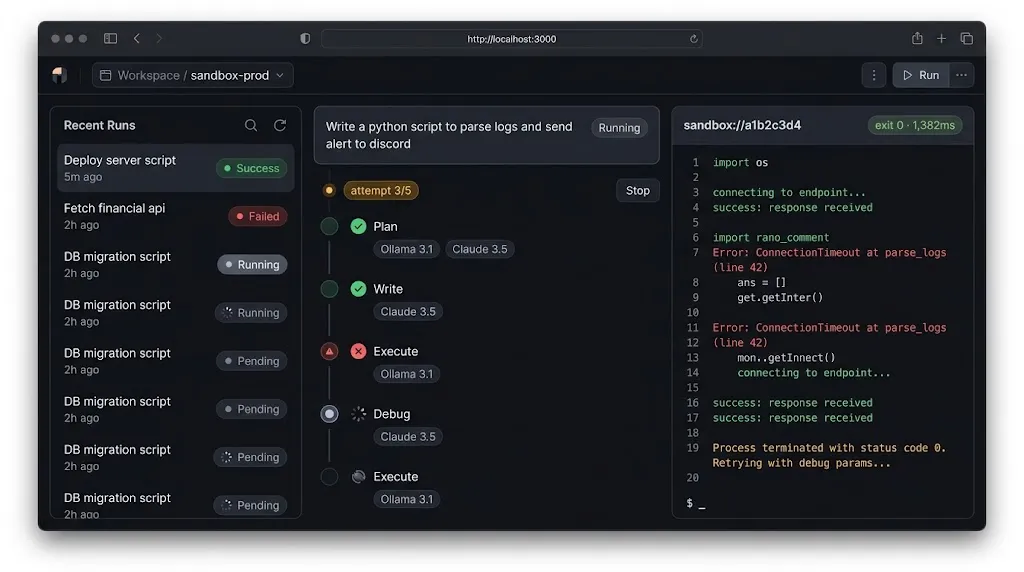
The front end is a Next.js App Router project with TypeScript, Tailwind CSS, and Shadcn UI components. The live terminal is a client component that subscribes to the run's room and renders output with color-coded streams.
// app/runs/[runId]/live-terminal.tsx
"use client";

import { useEffect, useRef, useState } from "react";
import { io, type Socket } from "socket.io-client";
import { Card, CardContent, CardHeader, CardTitle } from "@/components/ui/card";
import { Badge } from "@/components/ui/badge";
import { ScrollArea } from "@/components/ui/scroll-area";

type Line = { stream: "stdout" | "stderr" | "system"; text: string };
type ExitInfo = { exitCode: number; timedOut: boolean; durationMs: number };

export function LiveTerminal({ runId, token }: { runId: string; token: string }) {
  const [lines, setLines] = useState<Line[]>([]);
  const [exit, setExit] = useState<ExitInfo | null>(null);
  const bottomRef = useRef<HTMLDivElement>(null);

  useEffect(() => {
    const socket: Socket = io(process.env.NEXT_PUBLIC_ORCHESTRATOR_URL!, {
      auth: { token },
      transports: ["websocket"],
    });

    socket.on("connect", () => socket.emit("subscribe", runId));
    socket.on("stdout", (t: string) => setLines((l) => [...l, { stream: "stdout", text: t }]));
    socket.on("stderr", (t: string) => setLines((l) => [...l, { stream: "stderr", text: t }]));
    socket.on("exit", (info: ExitInfo) => {
      setExit(info);
      setLines((l) => [...l, { stream: "system", text: `\n[process exited ${info.exitCode}]\n` }]);
    });

    return () => { socket.disconnect(); };
  }, [runId, token]);

  useEffect(() => {
    bottomRef.current?.scrollIntoView({ behavior: "smooth" });
  }, [lines]);

  return (
    <Card className="flex h-[480px] flex-col border-zinc-800 bg-zinc-950">
      <CardHeader className="flex flex-row items-center justify-between py-3">
        <CardTitle className="font-mono text-sm text-zinc-300">sandbox://{runId.slice(0, 8)}</CardTitle>
        {exit ? (
          <Badge variant={exit.exitCode === 0 ? "default" : "destructive"}>
            {exit.timedOut ? "timed out" : `exit ${exit.exitCode}`} · {exit.durationMs}ms
          </Badge>
        ) : (
          <Badge variant="secondary" className="animate-pulse">running</Badge>
        )}
      </CardHeader>
      <CardContent className="min-h-0 flex-1 p-0">
        <ScrollArea className="h-full px-4 pb-4">
          <pre className="whitespace-pre-wrap break-words font-mono text-xs leading-relaxed">
            {lines.map((line, i) => (
              <span
                key={i}
                className={
                  line.stream === "stderr" ? "text-red-400"
                  : line.stream === "system" ? "text-amber-300"
                  : "text-emerald-300"
                }
              >
                {line.text}
              </span>
            ))}
          </pre>
          <div ref={bottomRef} />
        </ScrollArea>
      </CardContent>
    </Card>
  );
}
For very chatty programs, swap the pre block for @xterm/xterm and batch incoming chunks on a short interval. React re-rendering on every byte will melt a laptop fan faster than you'd expect.
A Real-World Walkthrough: Debugging a C++ Memory Bug
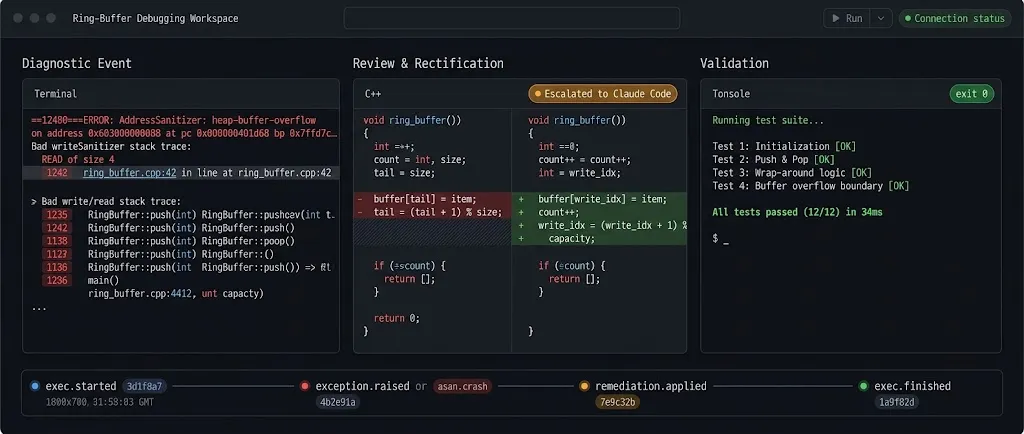
Here's a condensed trace of a real run. The task: "Implement a ring buffer in C++ with push, pop, and a test that overflows it."
- Plan (Ollama): a numbered five-step plan, including the overflow test.
- Write (Ollama): a 70-line program using a raw array and modulo indexing.
- Execute (sandbox, 1.4 s): AddressSanitizer reports a heap-buffer-overflow on the
popmethod, with the exact line number. The stderr streams to the workspace in red. - Debug (Ollama, attempt 2): the model fixes the indexing but introduces an off-by-one in the "full" check.
- Execute: an
assertfails. The test caught what the sanitizer didn't. - Debug (escalated to Claude Code, attempt 3): it rewrites the full/empty logic using a separate count field and adds two edge-case tests.
- Execute: exit code 0. Total wall time: 41 seconds, four container launches, every one of them recorded in the audit log.
What I love about this trace is how the layers cooperate. The sanitizer gave the model precise feedback, the attempt counter triggered escalation at the right moment, and the developer watched it unfold live rather than waiting on a spinner.
Best Practices
- One container per execution, never reused. Reuse is how state leaks between runs and between users.
- Send source code over stdin. Environment variables and command-line arguments are visible to anyone who can run
docker inspectorps. - Prefer gVisor or Firecracker microVMs for multi-tenant workloads. Hardened containers are good; a second kernel boundary is better.
- Keep the Docker socket in exactly one service. Mounting it into the agent container is equivalent to giving the agent root on the host.
- Make execution budgets explicit. Max executions, max runtime per execution, and max total wall time belong in the signed policy, not in a config file the agent can influence.
- Hash the source, not just the result. Recording the SHA-256 of every executed program lets you prove exactly what ran.
- Pre-install dependencies in the image. With no network,
pip installwill fail, which is the point. Curate an allowlisted set of libraries and bake them in. - Truncate output before feeding it back to the model. A program printing a million lines will blow your context window and your token budget.
Common Mistakes
- Using
--network nonebut forgetting about the host. If the agent's own process can reach the internet and also has an IAM role, the sandbox was never the weak point. - Trusting the model's own claims of success. Exit code 0 from code with no assertions proves nothing. Prompt the model to include self-checking tests, and verify they exist.
- Letting the session token double as an execution token. A stolen browser cookie should never be enough to launch containers.
- Unbounded retry loops. Without an attempt cap, a confused agent will happily burn through hundreds of executions at 3 a.m.
- Logging to a mutable table. If the same role that writes logs can update them, your audit trail is a suggestion.
- Broadcasting Socket.io events globally. Always emit to rooms, and always authorize room joins.
- Leaving
AutoRemoveoff during development "for debugging." Then forgetting to turn it back on. Use the reaper script regardless.
🚀 Pro Tips
- Warm pools cut cold starts dramatically. Pre-create a few stopped containers per language and start them on demand. Since they've never run code, they're still pristine, and you shave hundreds of milliseconds off each execution.
- Feed sanitizer output, not raw crashes, to the model. Compiling C++ with
-fsanitize=address,undefinedturns vague segfaults into actionable error reports. For Python, run with-X devto surface warnings the model would otherwise miss. - Add a "policy explainer" endpoint. Let developers click a run and see its decoded execution policy in plain English. It builds trust and catches misconfigured scopes early.
- Replay incidents from checkpoints. LangGraph's Postgres checkpointer lets you load any past thread and step through it. Pair that with the audit log's source hashes and you can reproduce a failure exactly.
- Route by task difficulty, not just failure count. A quick classification prompt on the local model can send obviously complex tasks straight to Claude Code, saving a couple of wasted local attempts.
- Canary your sandbox weekly. Run a scheduled job that deliberately tries to reach the network, write to the root filesystem, and fork-bomb. If any of those succeed, page someone.
📌 Key Takeaways
- Every piece of model-generated code is untrusted input. Run it in a fresh, network-less, read-only, capability-dropped container that lives only as long as the execution.
- Keep reasoning and execution in separate trust zones. LangGraph decides, a narrow Express orchestrator acts, and only the orchestrator ever sees the Docker socket.
- Short-lived, scoped JWT execution tokens make permissions explicit and auditable, while a hash-chained append-only PostgreSQL table makes the history tamper-evident.
- A hybrid model strategy, with Ollama for fast local iteration and Claude Code for hard escalations, keeps the debug loop both affordable and capable.
- Real-time stdout and stderr streaming over authenticated Socket.io rooms turns a black-box agent into something developers can actually watch, understand, and trust.
Conclusion
The hard part of building autonomous coding agents in 2026 isn't getting a model to write code. Modern models, both local and hosted, are remarkably good at that. The hard part is building an environment where it's safe to let them run what they write, again and again, without anyone holding their breath.
The architecture in this guide is opinionated, but each layer earns its place. Ephemeral Docker runtimes contain the blast radius. LangGraph gives the agent a structured, resumable way to think. JWT policies make every permission explicit. PostgreSQL turns activity into evidence. And Socket.io with a Next.js workspace turns all of it into something a human can watch in real time.
Start small: get one language running in a hardened container with an external timeout and an audit row per execution. Then layer on policies, streaming, and escalation. Your future self, reading an incident report that ends with "and the sandbox contained it," will thank you.
References
- LangGraph.js Documentation
- LangGraph Postgres Checkpointer
- Ollama Documentation
- Claude Code Documentation
- Docker Engine Security
- Docker Run Reference: Runtime Privilege and Resource Constraints
- gVisor Documentation
- dockerode on GitHub
- jose: JWT for JavaScript
- Socket.io Documentation
- PostgreSQL Trigger Functions
- Amazon EC2 Instance Metadata Service v2
- OWASP Top 10 for Large Language Model Applications
- Next.js Documentation
- shadcn/ui Components