A couple of years ago, I inherited an "AI automation" system that looked impressive in the demo and quietly bled money in production. Every 30 seconds, a cron job asked the CRM, the ticketing system, and the billing API the same question: "Anything new?" Ninety-eight percent of the time, the answer was no. The other two percent of the time, the answer arrived up to 30 seconds late, which is an eternity when a customer is threatening to churn in a live chat.
That system taught me a lesson I keep relearning: AI agents are only as responsive as the architecture that feeds them. You can have the smartest multi-agent graph on the planet, but if it waits on a polling loop, it is a very smart system that shows up late to every meeting.
In this guide, we are going to fix that properly. We will design an event-driven AI agent platform where:
- Business systems push events the moment something happens
- A Node.js + Express ingestion layer verifies and enqueues those events in milliseconds
- n8n and Make.com handle smart routing and enrichment
- LangGraph orchestrates a multi-agent workflow powered by Ollama local LLMs
- Socket.io streams every agent state change to a Next.js dashboard in real time
- Everything runs in Docker containers on AWS, inside your own network boundary
Let's build it the way you would build it for a real enterprise, not a weekend hackathon.
Why Polling Breaks Down for AI Agents
Polling feels simple, which is exactly why it sneaks into so many codebases. But for AI workloads, it fails in three specific ways.
1. Latency is baked in. If you poll every 30 seconds, your average reaction time is 15 seconds before the agent even starts thinking. Add LLM inference and you are well past the point where "real-time" means anything.
2. Cost scales with time, not work. Every poll costs network calls, database reads, and often third-party API quota. Your bill grows whether or not anything happened. With AI agents, teams often make it worse by sending each polled batch through a model "just to check."
3. Rate limits become your ceiling. Most SaaS APIs throttle aggressively. Poll faster to cut latency and you hit 429 errors. Poll slower and your agents go stale.
Event-driven architecture (EDA) flips the relationship. Instead of your system asking, the source system tells you. Webhooks, change data capture streams, message queues, and cloud event buses all push a small, well-defined payload when state changes. Your agents wake up only when there is real work.
The Core Concepts You Need
Before writing code, let's agree on vocabulary. These terms will come up throughout the build.
Events, Not Requests
An event is an immutable fact about something that already happened: ticket.created, invoice.overdue, lead.scored. It is not a command. That distinction matters because events can be replayed, audited, and consumed by many independent subscribers without coupling them together.
A good event envelope looks like this:
{
  "id": "evt_01JB7Q3K9X2M8N4P5R6S7T8V9W",
  "type": "ticket.created",
  "source": "zendesk",
  "occurredAt": "2026-10-20T09:14:03.211Z",
  "tenantId": "acme-corp",
  "data": {
    "ticketId": "48213",
    "subject": "Charged twice for October",
    "priority": "high",
    "customerEmail": "jane@example.com"
  }
}
The id gives you idempotency, type drives routing, and tenantId keeps multi-tenant data separated from the very first hop.
Producers, Brokers, and Consumers
- Producers emit events (your CRM, Stripe, an IoT gateway, n8n).
- Brokers durably hold events until someone processes them (Redis with BullMQ, Amazon SQS, Amazon EventBridge, Kafka).
- Consumers do the work (our LangGraph workers).
The golden rule: the component that receives an event should not be the component that does the expensive work. Receiving must be fast and boring. Processing can be slow and smart.
Stateful Agent Graphs with LangGraph
LangGraph models an agent workflow as a graph of nodes that read and update a shared, typed state. Edges, including conditional ones, decide what runs next. Two features make it a perfect fit for event-driven systems:
- Checkpointing: Every step can be persisted, so a workflow interrupted by a container restart can resume instead of starting over.
- Streaming: You can stream state updates node by node, which is exactly what we want to push to the frontend.
Sovereign AI with Ollama
"Sovereign AI" simply means you control where your models run and where your data goes. Ollama serves open-weight models through a simple HTTP API on hardware you own or rent. For regulated industries such as finance, healthcare, and government, keeping customer tickets and invoices inside your VPC is often not a nice-to-have. It is the requirement that gets the project approved.
The Reference Architecture
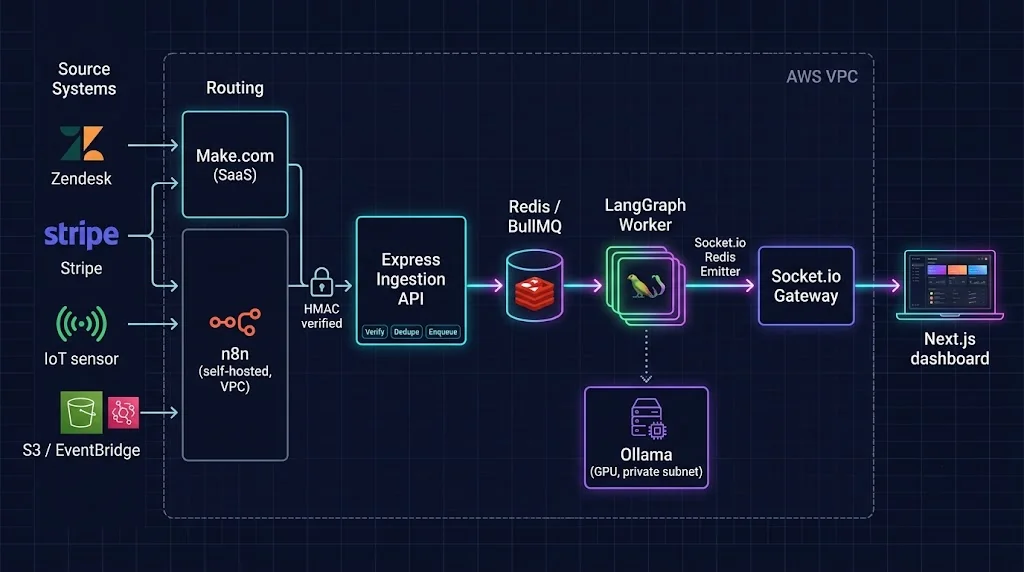
Here is the flow we are building, end to end:
- Source systems (Zendesk, Stripe, internal services) fire webhooks.
- n8n (self-hosted) or Make.com normalizes, filters, and enriches the payload, then forwards a clean event to our API.
- Express ingestion API verifies the HMAC signature, deduplicates by event ID, and enqueues a job in under 20 ms.
- BullMQ on Redis (Amazon ElastiCache) holds jobs durably with retries and backoff.
- LangGraph workers pick up jobs and run the multi-agent graph, calling Ollama on a private GPU host.
- Each graph step is broadcast through a Socket.io Redis emitter.
- Socket.io gateway pushes updates to the right room, and the Next.js dashboard renders them live.
Let's build each layer.
Step 1: Project Structure
A monorepo keeps shared types honest across the API, workers, and frontend.
event-agents/
├── apps/
│   ├── api/            # Express ingestion + Socket.io gateway
│   ├── worker/         # LangGraph agent workers
│   └── web/            # Next.js dashboard
├── packages/
│   └── shared/         # Event schemas (zod), types, constants
├── docker-compose.yml
└── package.json
Shared schemas are the contract between every service. Define them once with zod:
// packages/shared/src/events.ts
import { z } from "zod";

export const EventEnvelope = z.object({
  id: z.string().min(10),
  type: z.enum(["ticket.created", "invoice.overdue", "lead.scored"]),
  source: z.string(),
  occurredAt: z.string().datetime(),
  tenantId: z.string(),
  data: z.record(z.unknown()),
});

export type EventEnvelope = z.infer<typeof EventEnvelope>;

export const AGENT_QUEUE = "agent-events";
Step 2: A Fast, Paranoid Ingestion Layer with Express
The ingestion API has exactly three jobs: verify, deduplicate, enqueue. Nothing else. No LLM calls, no database joins, no "quick enrichment." If this endpoint is slow, upstream webhook providers will time out and retry, and you will drown in duplicate events.
// apps/api/src/server.ts
import express from "express";
import crypto from "node:crypto";
import { createServer } from "node:http";
import { Queue } from "bullmq";
import { Redis } from "ioredis";
import { EventEnvelope, AGENT_QUEUE } from "@event-agents/shared";
import { attachSocketGateway } from "./socket";

const redis = new Redis(process.env.REDIS_URL!, { maxRetriesPerRequest: null });
const queue = new Queue(AGENT_QUEUE, { connection: redis });
const app = express();

function verifySignature(rawBody: Buffer, signature: string | undefined) {
  if (!signature) return false;
  const expected = crypto
    .createHmac("sha256", process.env.WEBHOOK_SECRET!)
    .update(rawBody)
    .digest("hex");
  const a = Buffer.from(expected);
  const b = Buffer.from(signature);
  return a.length === b.length && crypto.timingSafeEqual(a, b);
}

app.post(
  "/webhooks/events",
  express.raw({ type: "application/json", limit: "256kb" }),
  async (req, res) => {
    if (!verifySignature(req.body, req.header("x-signature"))) {
      return res.status(401).json({ error: "invalid signature" });
    }

    const parsed = EventEnvelope.safeParse(JSON.parse(req.body.toString("utf8")));
    if (!parsed.success) {
      return res.status(422).json({ error: parsed.error.flatten() });
    }
    const event = parsed.data;

    // Idempotency: first writer wins, duplicates are acknowledged and ignored
    const isNew = await redis.set(`evt:${event.id}`, "1", "EX", 86_400, "NX");
    if (!isNew) return res.status(200).json({ status: "duplicate" });

    await queue.add(event.type, event, {
      jobId: event.id,
      attempts: 5,
      backoff: { type: "exponential", delay: 2_000 },
      removeOnComplete: 1_000,
      removeOnFail: 5_000,
    });

    // 202 Accepted: we have it, processing happens asynchronously
    return res.status(202).json({ status: "queued", threadId: event.id });
  }
);

app.get("/healthz", (_req, res) => res.send("ok"));

const httpServer = createServer(app);
attachSocketGateway(httpServer);
httpServer.listen(Number(process.env.PORT ?? 4000));
A few details here are worth calling out because they bite people constantly:
express.rawkeeps the exact bytes the sender signed. If you parse JSON first and re-stringify it, whitespace and key order change and signature checks fail randomly.timingSafeEqualprevents timing attacks on signature comparison.SET ... NXplus BullMQ'sjobIdgives you two layers of deduplication. Webhook providers will deliver the same event more than once. Plan for it.202 Acceptedis the honest status code. The work has not happened yet.
Step 3: Intelligent Routing with n8n and Make.com
Not every raw webhook deserves to wake up an AI agent. A Zendesk "ticket updated" event fires when someone changes a tag. You do not want a GPU spinning up for that.
This is where low-code orchestration tools shine. They sit between noisy source systems and your clean ingestion API.
When to Use n8n
Self-hosted n8n is my default for anything touching sensitive data. It runs in a container inside your VPC, so customer payloads never leave your network. A typical n8n workflow for our system looks like this:
- Webhook node receives the raw Zendesk payload.
- IF node drops events that are not new tickets or priority changes.
- HTTP Request node enriches with customer tier from your internal CRM API.
- Code node maps everything into our
EventEnvelopeshape and computes the HMAC signature. - HTTP Request node posts to
/webhooks/events.
The Code node for signing might look like this:
// n8n Code node (JavaScript), "Run Once for Each Item"
const crypto = require("crypto");

const envelope = {
  id: `evt_${$json.ticket.id}_${$json.ticket.updated_at}`,
  type: "ticket.created",
  source: "zendesk",
  occurredAt: new Date($json.ticket.created_at).toISOString(),
  tenantId: $json.account.subdomain,
  data: {
    ticketId: String($json.ticket.id),
    subject: $json.ticket.subject,
    priority: $json.ticket.priority,
    customerTier: $("Fetch CRM Tier").item.json.tier,
  },
};

const body = JSON.stringify(envelope);
const signature = crypto
  .createHmac("sha256", $env.WEBHOOK_SECRET)
  .update(body)
  .digest("hex");

return { json: { body, signature } };
Note: self-hosted n8n restricts built-in modules in Code nodes by default. Allow
cryptowith theNODE_FUNCTION_ALLOW_BUILTINenvironment variable.
Notice the deterministic id. Because it is derived from the ticket ID and update timestamp, a retried n8n execution produces the same ID, and our ingestion layer deduplicates it automatically.
When to Use Make.com
Make.com is fantastic when the operations or marketing team owns the integration, and the data is low-risk: syncing a HubSpot lead score, a Typeform submission, or a Shopify order tag. Build a scenario with a webhook trigger, a filter, a JSON-building module, and an HTTP module pointing at your API.
A pragmatic split I have seen work well in large organizations:
| Concern | n8n (self-hosted) | Make.com |
|---|---|---|
| Data sensitivity | High (PII, financial, health) | Low to moderate |
| Who owns it | Platform / engineering team | Ops, marketing, RevOps |
| Network location | Inside your VPC | Vendor cloud |
| Custom code | Full JavaScript and Python | Limited, module-based |
| Best for | Core agent triggers | Peripheral SaaS triggers |
Both tools post to the same signed endpoint. Your backend does not care who sent the event, only that it is valid.
Step 4: Building the Multi-Agent Graph with LangGraph and Ollama
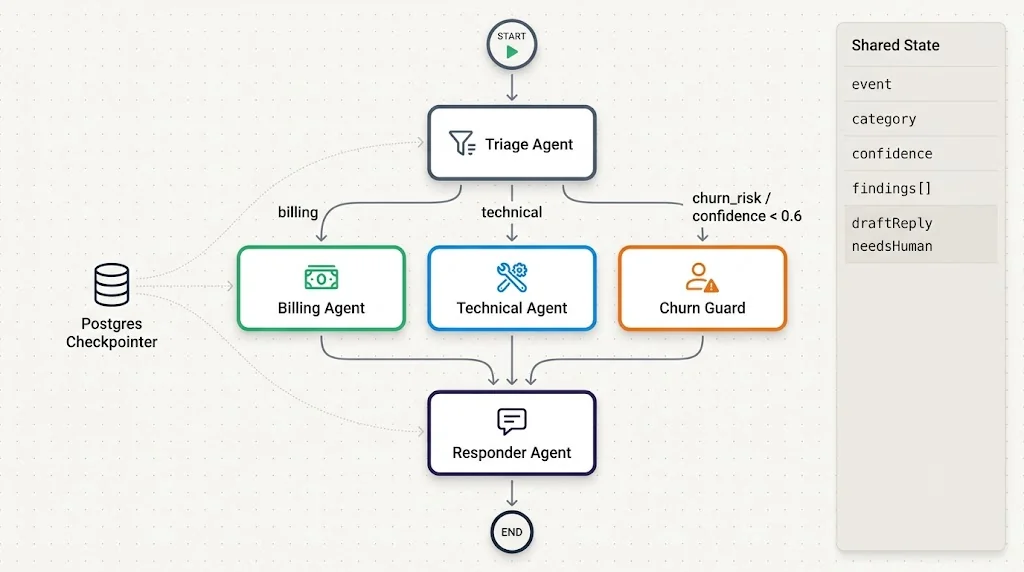
Now the fun part. Our example workflow handles inbound support tickets:
- A Triage Agent classifies the ticket (billing, technical, churn risk).
- Conditional routing sends it to a Billing Agent or a Technical Agent.
- A Churn Guard step escalates to a human when risk is high.
- A Responder Agent drafts a reply for human review.
Defining State
// apps/worker/src/graph/state.ts
import { Annotation } from "@langchain/langgraph";
import type { EventEnvelope } from "@event-agents/shared";

export const AgentState = Annotation.Root({
  event: Annotation<EventEnvelope>(),
  category: Annotation<"billing" | "technical" | "churn_risk" | undefined>(),
  confidence: Annotation<number>({ reducer: (_, b) => b, default: () => 0 }),
  findings: Annotation<string[]>({
    reducer: (a, b) => a.concat(b),
    default: () => [],
  }),
  draftReply: Annotation<string | undefined>(),
  needsHuman: Annotation<boolean>({ reducer: (_, b) => b, default: () => false }),
});

export type AgentStateType = typeof AgentState.State;
The findings reducer appends instead of overwriting, so every specialist agent can contribute notes without clobbering the others.
Connecting to Ollama
// apps/worker/src/llm.ts
import { ChatOllama } from "@langchain/ollama";

export const llm = new ChatOllama({
  baseUrl: process.env.OLLAMA_BASE_URL ?? "http://ollama:11434",
  model: process.env.OLLAMA_MODEL ?? "qwen3:8b",
  temperature: 0,
  keepAlive: "30m", // keep the model warm in GPU memory between events
});
That keepAlive setting matters more than people expect. Cold-loading a model into GPU memory can take several seconds. In an event-driven system with bursty traffic, keeping the model resident is the difference between "instant" and "why is it lagging?"
The Nodes
// apps/worker/src/graph/nodes.ts
import { z } from "zod";
import { llm } from "../llm";
import type { AgentStateType } from "./state";

const TriageSchema = z.object({
  category: z.enum(["billing", "technical", "churn_risk"]),
  confidence: z.number().min(0).max(1),
  reason: z.string(),
});

export async function triage(state: AgentStateType) {
  const classifier = llm.withStructuredOutput(TriageSchema);
  const result = await classifier.invoke([
    ["system", "You are a support triage agent. Classify the ticket. Be conservative with confidence."],
    ["human", JSON.stringify(state.event.data)],
  ]);
  return {
    category: result.category,
    confidence: result.confidence,
    findings: [`Triage: ${result.category} (${result.reason})`],
  };
}

export async function billingAgent(state: AgentStateType) {
  // In production, call a tool that queries your billing system here
  const res = await llm.invoke([
    ["system", "You are a billing specialist. Summarize the likely issue and next action in two sentences."],
    ["human", JSON.stringify(state.event.data)],
  ]);
  return { findings: [`Billing: ${res.content}`] };
}

export async function technicalAgent(state: AgentStateType) {
  const res = await llm.invoke([
    ["system", "You are a senior support engineer. Identify the probable root cause in two sentences."],
    ["human", JSON.stringify(state.event.data)],
  ]);
  return { findings: [`Technical: ${res.content}`] };
}

export async function churnGuard(state: AgentStateType) {
  const vip = state.event.data["customerTier"] === "enterprise";
  return {
    needsHuman: true,
    findings: [`Churn guard: escalated${vip ? " (enterprise account)" : ""}`],
  };
}

export async function responder(state: AgentStateType) {
  const res = await llm.invoke([
    ["system", "Draft a warm, concise customer reply using the findings. Never promise refunds."],
    ["human", state.findings.join("\n")],
  ]);
  return { draftReply: String(res.content) };
}
Wiring the Graph
// apps/worker/src/graph/index.ts
import { StateGraph, START, END } from "@langchain/langgraph";
import { AgentState, type AgentStateType } from "./state";
import { triage, billingAgent, technicalAgent, churnGuard, responder } from "./nodes";
import { checkpointer } from "./checkpointer";

function routeAfterTriage(state: AgentStateType) {
  if (state.confidence < 0.6) return "churnGuard"; // unsure? let a human look
  return state.category === "billing"
    ? "billingAgent"
    : state.category === "technical"
    ? "technicalAgent"
    : "churnGuard";
}

export const supportGraph = new StateGraph(AgentState)
  .addNode("triage", triage)
  .addNode("billingAgent", billingAgent)
  .addNode("technicalAgent", technicalAgent)
  .addNode("churnGuard", churnGuard)
  .addNode("responder", responder)
  .addEdge(START, "triage")
  .addConditionalEdges("triage", routeAfterTriage, [
    "billingAgent",
    "technicalAgent",
    "churnGuard",
  ])
  .addEdge("billingAgent", "responder")
  .addEdge("technicalAgent", "responder")
  .addEdge("churnGuard", "responder")
  .addEdge("responder", END)
  .compile({ checkpointer });
For the checkpointer, use a durable store in production. A Postgres checkpointer on Amazon RDS is a solid choice because you probably already run Postgres and it gives you an audit trail of every agent decision for free.
// apps/worker/src/graph/checkpointer.ts
import { PostgresSaver } from "@langchain/langgraph-checkpoint-postgres";

export const checkpointer = PostgresSaver.fromConnString(process.env.DATABASE_URL!);
// Call `await checkpointer.setup()` once at startup to create tables
Step 5: The Worker that Runs Graphs and Streams State
The worker consumes jobs from BullMQ, runs the graph with streaming enabled, and broadcasts each update. The key trick is the Socket.io Redis emitter: it publishes to Redis, and every Socket.io gateway instance subscribed through the Redis adapter forwards the message to connected browsers. Workers never hold a WebSocket connection.
// apps/worker/src/index.ts
import { Worker } from "bullmq";
import { Redis } from "ioredis";
import { Emitter } from "@socket.io/redis-emitter";
import { AGENT_QUEUE, type EventEnvelope } from "@event-agents/shared";
import { supportGraph } from "./graph";
import { checkpointer } from "./graph/checkpointer";

const connection = new Redis(process.env.REDIS_URL!, { maxRetriesPerRequest: null });
const emitter = new Emitter(new Redis(process.env.REDIS_URL!));

await checkpointer.setup();

const worker = new Worker<EventEnvelope>(
  AGENT_QUEUE,
  async (job) => {
    const event = job.data;
    const threadId = event.id;
    const room = `tenant:${event.tenantId}`;

    emitter.to(room).emit("agent:started", { threadId, type: event.type, at: Date.now() });

    const stream = await supportGraph.stream(
      { event },
      { configurable: { thread_id: threadId }, streamMode: "updates" }
    );

    for await (const update of stream) {
      const [node, patch] = Object.entries(update)[0];
      emitter.to(room).emit("agent:step", { threadId, node, patch, at: Date.now() });
    }

    const final = await supportGraph.getState({ configurable: { thread_id: threadId } });
    emitter.to(room).emit("agent:completed", { threadId, state: final.values, at: Date.now() });
  },
  {
    connection,
    concurrency: Number(process.env.WORKER_CONCURRENCY ?? 4),
  }
);

worker.on("failed", (job, err) => {
  if (!job) return;
  emitter.to(`tenant:${job.data.tenantId}`).emit("agent:failed", {
    threadId: job.data.id,
    error: err.message,
    attempt: job.attemptsMade,
  });
});

// Graceful shutdown so ECS task replacement does not kill in-flight graphs
process.on("SIGTERM", async () => {
  await worker.close();
  process.exit(0);
});
Because we use thread_id with a durable checkpointer, a retry after a crash resumes from the last completed node rather than re-running the whole graph. That saves GPU time and avoids double-drafted replies.
Step 6: The Socket.io Gateway
The gateway lives in the API service. It authenticates clients, puts them in tenant rooms, and relies on the Redis adapter to receive emitter messages.
// apps/api/src/socket.ts
import type { Server as HttpServer } from "node:http";
import { Server } from "socket.io";
import { createAdapter } from "@socket.io/redis-adapter";
import { Redis } from "ioredis";
import { verifyJwt } from "./auth";

export function attachSocketGateway(httpServer: HttpServer) {
  const pub = new Redis(process.env.REDIS_URL!);
  const sub = pub.duplicate();

  const io = new Server(httpServer, {
    cors: { origin: process.env.WEB_ORIGIN, credentials: true },
    adapter: createAdapter(pub, sub),
  });

  io.use(async (socket, next) => {
    try {
      const user = await verifyJwt(socket.handshake.auth.token);
      socket.data.tenantId = user.tenantId;
      next();
    } catch {
      next(new Error("unauthorized"));
    }
  });

  io.on("connection", (socket) => {
    // Clients never choose their own room: the server derives it from the JWT
    socket.join(`tenant:${socket.data.tenantId}`);
  });

  return io;
}
That comment is not decoration. Letting a client send join("tenant:other-company") is one of the most common multi-tenant data leaks I see in real-time dashboards.
Step 7: The Next.js Real-Time Dashboard
On the frontend, a small client hook subscribes to agent events and keeps a map of active runs.
// apps/web/app/agents/use-agent-stream.ts
"use client";

import { useEffect, useState } from "react";
import { io, type Socket } from "socket.io-client";

type Step = { node: string; at: number };
type Run = { threadId: string; status: "running" | "done" | "failed"; steps: Step[] };

export function useAgentStream(token: string) {
  const [runs, setRuns] = useState<Record<string, Run>>({});

  useEffect(() => {
    const socket: Socket = io(process.env.NEXT_PUBLIC_API_URL!, {
      auth: { token },
      transports: ["websocket"],
    });

    socket.on("agent:started", ({ threadId }) =>
      setRuns((r) => ({ ...r, [threadId]: { threadId, status: "running", steps: [] } }))
    );

    socket.on("agent:step", ({ threadId, node, at }) =>
      setRuns((r) => {
        const run = r[threadId] ?? { threadId, status: "running", steps: [] };
        return { ...r, [threadId]: { ...run, steps: [...run.steps, { node, at }] } };
      })
    );

    socket.on("agent:completed", ({ threadId }) =>
      setRuns((r) => ({ ...r, [threadId]: { ...r[threadId], status: "done" } }))
    );

    socket.on("agent:failed", ({ threadId }) =>
      setRuns((r) => ({ ...r, [threadId]: { ...r[threadId], status: "failed" } }))
    );

    return () => {
      socket.disconnect();
    };
  }, [token]);

  return Object.values(runs);
}
// apps/web/app/agents/live-runs.tsx
"use client";

import { useAgentStream } from "./use-agent-stream";

export function LiveRuns({ token }: { token: string }) {
  const runs = useAgentStream(token);

  return (
    <ul className="space-y-3">
      {runs.map((run) => (
        <li key={run.threadId} className="rounded-xl border p-4">
          <div className="flex justify-between text-sm">
            <span className="font-mono">{run.threadId}</span>
            <span>{run.status}</span>
          </div>
          <ol className="mt-2 flex gap-2 text-xs">
            {run.steps.map((s) => (
              <li key={s.at} className="rounded bg-neutral-100 px-2 py-1 dark:bg-neutral-800">
                {s.node}
              </li>
            ))}
          </ol>
        </li>
      ))}
    </ul>
  );
}
Keep the initial page load server-rendered (fetch recent runs from your API in a Server Component), then let the socket hook layer live updates on top. That way the dashboard is useful even before the WebSocket connects, and reconnecting clients do not see an empty screen.
Step 8: Containerizing with Docker
A single multi-stage Dockerfile pattern works for the API and worker.
# apps/worker/Dockerfile
FROM node:24-alpine AS build
WORKDIR /app
COPY package*.json ./
COPY packages ./packages
COPY apps/worker ./apps/worker
RUN npm ci && npm run build -w apps/worker

FROM node:24-alpine
WORKDIR /app
ENV NODE_ENV=production
COPY --from=build /app/node_modules ./node_modules
COPY --from=build /app/apps/worker/dist ./dist
USER node
CMD ["node", "dist/index.js"]
For local development, Docker Compose brings up the entire stack, Ollama included:
# docker-compose.yml
services:
  redis:
    image: redis:7-alpine
    ports: ["6379:6379"]

  postgres:
    image: postgres:16-alpine
    environment:
      POSTGRES_PASSWORD: dev
      POSTGRES_DB: agents
    ports: ["5432:5432"]

  ollama:
    image: ollama/ollama:latest
    volumes: ["ollama:/root/.ollama"]
    ports: ["11434:11434"]
    deploy:
      resources:
        reservations:
          devices:
            - driver: nvidia
              count: all
              capabilities: [gpu]

  n8n:
    image: n8nio/n8n:latest
    ports: ["5678:5678"]
    environment:
      WEBHOOK_SECRET: ${WEBHOOK_SECRET}
      NODE_FUNCTION_ALLOW_BUILTIN: crypto

  api:
    build: { context: ., dockerfile: apps/api/Dockerfile }
    environment:
      REDIS_URL: redis://redis:6379
      WEBHOOK_SECRET: ${WEBHOOK_SECRET}
      WEB_ORIGIN: http://localhost:3000
    ports: ["4000:4000"]
    depends_on: [redis]

  worker:
    build: { context: ., dockerfile: apps/worker/Dockerfile }
    environment:
      REDIS_URL: redis://redis:6379
      DATABASE_URL: postgres://postgres:dev@postgres:5432/agents
      OLLAMA_BASE_URL: http://ollama:11434
      OLLAMA_MODEL: qwen3:8b
    depends_on: [redis, postgres, ollama]

volumes:
  ollama:
Pull the model once with docker compose exec ollama ollama pull qwen3:8b, and you have a fully local, event-driven agent platform on your laptop.
Step 9: Deploying Securely on AWS
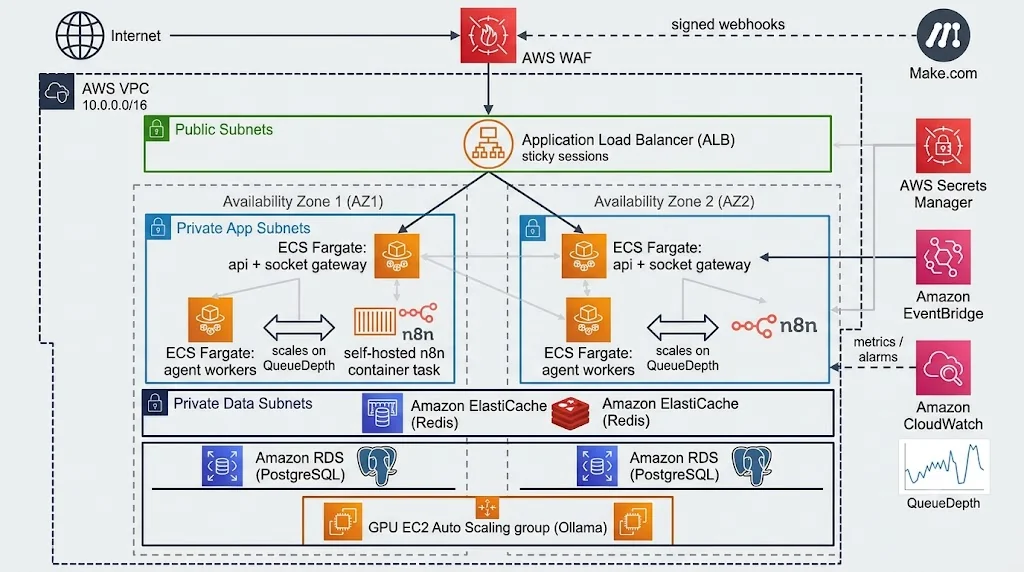
The production layout mirrors local development, with managed services replacing the stateful containers.
- Amazon ECS on Fargate runs the
apiandworkerservices. Scale workers on queue depth, not CPU. - GPU-backed EC2 instances (for example, the G-family) run Ollama in a private subnet. Fargate does not offer GPUs, so this is the one place you manage instances, ideally through an ECS capacity provider or an Auto Scaling group.
- Amazon ElastiCache for Redis backs BullMQ and the Socket.io adapter.
- Amazon RDS for PostgreSQL stores LangGraph checkpoints.
- Application Load Balancer fronts the API with sticky sessions enabled, which Socket.io needs if any client falls back to HTTP long-polling.
- AWS Secrets Manager injects
WEBHOOK_SECRET, database credentials, and JWT keys into tasks. - AWS WAF on the ALB rate-limits and filters the public webhook endpoint.
- Amazon CloudWatch collects logs and custom metrics like queue depth and per-node latency.
Need events from AWS-native sources such as S3 uploads or DynamoDB Streams? Route them through Amazon EventBridge to an API destination (your signed webhook) or to SQS that a small bridge consumes. The pattern stays the same: events in, verify, enqueue.
Autoscaling on the Right Signal
CPU is a terrible scaling signal for agent workers because they spend most of their time waiting on the LLM. Publish BullMQ's waiting-job count as a CloudWatch metric and scale on that:
// apps/worker/src/metrics.ts
import { CloudWatchClient, PutMetricDataCommand } from "@aws-sdk/client-cloudwatch";
import { Queue } from "bullmq";

const cw = new CloudWatchClient({});

export async function publishQueueDepth(queue: Queue) {
  const waiting = await queue.getWaitingCount();
  await cw.send(
    new PutMetricDataCommand({
      Namespace: "EventAgents",
      MetricData: [{ MetricName: "QueueDepth", Value: waiting, Unit: "Count" }],
    })
  );
}
Then attach a target-tracking policy to the worker service, aiming for something like a handful of waiting jobs per task. Remember the real bottleneck is GPU throughput, so scale Ollama capacity alongside workers or you will simply move the queue from Redis into Ollama.
Real-World Use Cases
This exact blueprint adapts to a surprising range of problems:
- Customer support triage: New tickets are classified, enriched, and drafted within seconds, with high-risk accounts escalated to humans before anyone has to read the queue.
- Financial operations: An
invoice.overdueevent triggers an agent that checks payment history, drafts a personalized reminder, and flags anomalies for the finance team, all without sending ledger data outside your VPC. - Security operations: Alerts from your SIEM become events. A triage agent correlates them, suppresses noise, and pushes only meaningful incidents to the on-call dashboard in real time.
- Supply chain: IoT sensor thresholds publish events, and agents reroute shipments or reorder stock while operators watch decisions unfold live.
- Sales and RevOps: Make.com forwards lead-score changes, and an agent writes context-aware follow-ups for reps the moment a prospect gets hot.
🚀 Pro Tips
- Stream tokens, not just steps. Switch
streamModeto include"messages"for nodes that write long text, and forward tokens over Socket.io. Watching a reply type itself out builds enormous user trust. - Make event IDs deterministic upstream. Derive IDs from source data (resource ID plus version or timestamp). Random UUIDs generated on retry defeat your deduplication.
- Keep models warm. Set Ollama's
keepAliveand send a lightweight warm-up request when a GPU node starts, so the first real event of the morning is not the slow one. - Use small models for routing, larger ones for writing. A compact model handles triage in a fraction of the time. Save bigger models for the responder node.
- Version your graphs. Store a
graphVersionin state. When you deploy a new graph, in-flight threads checkpointed under the old version should finish on compatible logic. - Add a human-in-the-loop interrupt. LangGraph supports interrupting before a node. Pause before anything customer-facing goes out, and resume when an agent in the dashboard clicks approve.
- Trace everything. Attach the
threadIdto every log line across API, worker, and Ollama calls. When a customer asks "why did the bot say that?", you can replay the exact path.
Best Practices
- Separate ingestion from processing. Webhook handlers should respond in milliseconds. All AI work belongs in workers.
- Validate at every boundary. Use zod schemas at ingestion and structured output at every LLM call. Treat model output as untrusted input.
- Design for at-least-once delivery. Assume every event arrives twice. Idempotent handlers and checkpointed graphs make duplicates harmless.
- Isolate tenants from the first hop. Carry
tenantIdin every event, derive socket rooms server-side, and scope every database query. - Use dead-letter handling. After retries are exhausted, move failed jobs somewhere visible and alert on them. Silent failure is the worst failure mode in automation.
- Keep the LLM in a private subnet. Ollama should never be reachable from the internet. Its API has no built-in authentication.
- Apply backpressure. Limit worker concurrency to what your GPUs can actually serve. A queue that grows gracefully beats a GPU that crashes from memory pressure.
Common Mistakes to Avoid
- Doing LLM work inside the webhook handler. The provider times out, retries, and you process the same ticket four times while paying for each.
- Parsing JSON before verifying signatures. Re-serialized bodies rarely match the original bytes, so verification fails intermittently and teams "fix" it by disabling checks.
- Letting clients pick their socket rooms. This is a direct path to leaking one customer's data to another.
- Forgetting sticky sessions or the Redis adapter. Everything works with one container and mysteriously breaks at two, because events land on an instance the browser is not connected to.
- Scaling workers on CPU. Agent workers idle while waiting for inference. You will under-scale during bursts and over-pay at night.
- Using an in-memory checkpointer in production. It works perfectly until the first deploy restarts a container mid-workflow.
- Exposing Ollama on a public IP. Open Ollama endpoints get discovered and abused quickly. Keep it private, always.
- Routing every raw event to an agent. Filter in n8n or Make.com first. Not every tag change deserves a GPU.
📌 Key Takeaways
- Events beat polling for AI agents on latency, cost, and rate-limit headroom. Let source systems push changes to you.
- A thin, paranoid Express layer that verifies, deduplicates, and enqueues is the foundation of a reliable system.
- n8n and Make.com filter and enrich noisy webhooks so agents only wake for meaningful work, with n8n keeping sensitive data inside your VPC.
- LangGraph plus Ollama gives you explicit, checkpointed, private multi-agent workflows that survive restarts and retries.
- Socket.io with a Redis adapter and emitter turns agent internals into a live, multi-tenant dashboard in Next.js.
- Docker and AWS (ECS, ElastiCache, RDS, private GPU hosts) take the same architecture from your laptop to production without rewriting it.
Conclusion
The most impressive AI systems I have worked on were not the ones with the cleverest prompts. They were the ones where the plumbing was so dependable that nobody thought about it. An event fires, the right agent wakes up, its reasoning appears on a dashboard as it happens, and a human approves the result before the customer has even refreshed their inbox.
That experience comes from architecture, not from the model. By pairing an event-driven backbone with LangGraph's stateful orchestration and Ollama's local inference, you get agents that are fast, auditable, and fully under your control. Wrap it in Docker, deploy it on AWS with sensible boundaries, and you have a platform that can grow from one support workflow to dozens of business processes.
Start small. Pick one painful polling job in your stack, replace it with a signed webhook and a single LangGraph node, and wire up the live dashboard. Once your team sees an agent react in real time for the first time, you will not want to go back to asking "anything new?" every 30 seconds.
References
- LangGraph.js documentation: https://langchain-ai.github.io/langgraphjs/
- LangChain Ollama integration (JavaScript): https://js.langchain.com/docs/integrations/chat/ollama/
- Ollama documentation and API reference: https://github.com/ollama/ollama/tree/main/docs
- Express.js documentation: https://expressjs.com/
- BullMQ documentation: https://docs.bullmq.io/
- Socket.io Redis adapter: https://socket.io/docs/v4/redis-adapter/
- Socket.io Redis emitter: https://socket.io/docs/v4/redis-emitter/
- Socket.io with multiple nodes and sticky sessions: https://socket.io/docs/v4/using-multiple-nodes/
- Next.js documentation: https://nextjs.org/docs
- n8n documentation: https://docs.n8n.io/
- Make.com help center: https://www.make.com/en/help
- Amazon ECS developer guide: https://docs.aws.amazon.com/ecs/
- Amazon EventBridge user guide: https://docs.aws.amazon.com/eventbridge/
- Amazon ElastiCache documentation: https://docs.aws.amazon.com/elasticache/
- Docker documentation: https://docs.docker.com/