I still remember the first voice agent I shipped. The demo was gorgeous, the model was smart, and the moment a real person spoke to it, they flinched. The gap between "I stopped talking" and "it started answering" was long enough to feel rude. Nobody cared how clever the reply was. They cared that the conversation felt like talking to a walkie-talkie.
That gap is the real product in voice AI. Humans take turns in conversation with roughly 200 ms between them, and anything past a second starts to feel broken. So in this guide we're going to build the whole thing from scratch and treat latency as a first-class feature: a full-duplex voice agent that listens while it speaks, can be interrupted mid-sentence, calls tools without going off the rails, and runs entirely on infrastructure you control.
Here is the stack we'll assemble:
- Inference: whisper.cpp for speech-to-text, Ollama (llama.cpp under the hood) for the language model, and Piper for text-to-speech. All of it is C++ at its core.
- Transport: Node.js and Socket.io, streaming binary audio frames in both directions.
- Orchestration: LangGraph.js for deterministic, bounded tool calling.
- Frontend: Next.js, TypeScript, Redux Toolkit and the Web Audio API with AudioWorklets.
- Security and delivery: JWT-authenticated sessions, Docker Compose and an Nginx reverse proxy on AWS Linux.
If you're comfortable with TypeScript and Docker, you have everything you need.
What "Sub-50ms" Actually Means (and What It Doesn't)
Let's be honest about the title before we write a line of code. No local pipeline transcribes speech, generates a reply and synthesizes audio in 50 milliseconds. Anyone who claims that is hiding something in the measurement.
What you can control is the plumbing: the time it takes to move a frame of microphone audio to your server and a chunk of synthesized audio back to the speaker. That layer is entirely your engineering, and it can absolutely stay under 50 ms. The models then add their own time on top, and you tune those separately.
Here is the plumbing budget, assuming the user and the server are in the same region:
| Plumbing hop | Budget |
|---|---|
| Frame packing in the AudioWorklet (20 ms frames) | 20 ms |
| Uplink over WebSocket and Nginx | 8 ms |
| Gateway handling and endpointing | 2 ms |
| Downlink dispatch of a TTS chunk | 8 ms |
| Playback jitter buffer | 10 ms |
| Total | 48 ms |
And here is the model budget, which is where most of your tuning time will go. These are ballpark figures I see on a single GPU instance. Measure your own.
| Model stage | Typical range |
|---|---|
| Endpointing hangover (silence before we decide you're done) | 200 to 300 ms |
| whisper.cpp on a short utterance | 80 to 200 ms |
| LLM time-to-first-token (3B class, warm) | 60 to 200 ms |
| First sentence fragment generated | 50 to 150 ms |
| Piper time-to-first-audio | 50 to 120 ms |
Add those up and you get a turn-taking gap of roughly 500 to 800 ms. That's not human, but it's well inside "natural enough", and every technique in this article exists to shave that number down. The key insight is that the biggest single tax isn't the network or the model. It's the silence you wait for before deciding the user finished speaking.
Architecture Overview
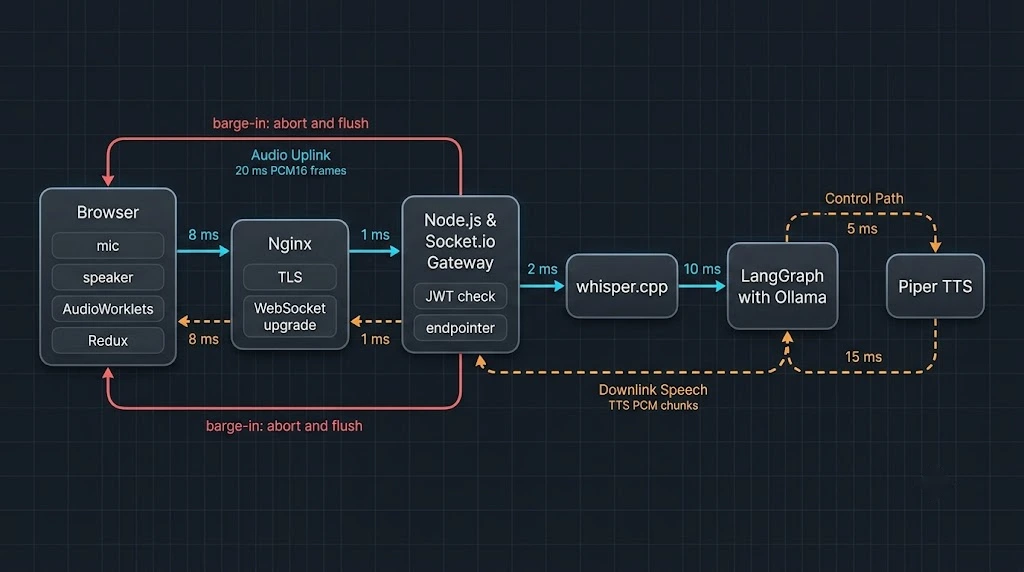
Figure 1: Audio flows left to right as 20 ms PCM frames, and synthesized speech flows back right to left.
The data path for a single conversational turn looks like this:
- The browser captures microphone audio in an AudioWorklet and emits 20 ms PCM16 frames as binary Socket.io events.
- Nginx terminates TLS and proxies the WebSocket to the Node.js gateway.
- The gateway runs a lightweight endpointer. When speech ends, it ships the utterance to whisper.cpp.
- The transcript enters a LangGraph state machine backed by Ollama. Tokens stream out as they're generated.
- A sentence chunker slices the token stream into speakable fragments and feeds Piper.
- Piper's raw PCM output streams back through the gateway to a playback worklet in the browser.
- If the user starts speaking again mid-answer, the gateway aborts the graph, resets TTS and tells the browser to flush its audio queue. That's barge-in.
Each hop is a separate process or container, which means each one can be scaled, profiled and swapped independently. That separation matters later when you decide to replace Piper with something fancier.
Project Layout
voice-agent/
├── web/                 # Next.js 15+ app (App Router, TypeScript)
│   ├── app/api/voice-token/route.ts
│   ├── lib/store.ts
│   ├── lib/useVoiceAgent.ts
│   └── public/worklets/{capture,playback}.js
├── gateway/             # Node.js + Socket.io + LangGraph
│   └── src/{server,endpointer,turn,graph,chunker,tts}.ts
├── whisper/             # Dockerfile that builds whisper.cpp
├── nginx/nginx.conf
└── docker-compose.yml
Step 1: Standing Up the C++ Inference Layer
whisper.cpp for speech recognition
whisper.cpp is a plain C/C++ port of OpenAI's Whisper with no Python runtime and very fast startup. It ships an HTTP server example that keeps the model resident in memory, which is exactly what we want. Reloading a model per request would blow the budget instantly.
# whisper/Dockerfile
FROM debian:bookworm-slim AS build
RUN apt-get update && apt-get install -y --no-install-recommends \
    build-essential cmake git ca-certificates && rm -rf /var/lib/apt/lists/*
WORKDIR /src
RUN git clone --depth 1 https://github.com/ggml-org/whisper.cpp .
RUN cmake -B build -DCMAKE_BUILD_TYPE=Release \
 && cmake --build build -j --target whisper-server

FROM debian:bookworm-slim
RUN apt-get update && apt-get install -y --no-install-recommends libgomp1 curl ca-certificates \
 && rm -rf /var/lib/apt/lists/*
COPY --from=build /src/build/bin/whisper-server /usr/local/bin/
RUN mkdir /models && curl -L -o /models/ggml-base.en.bin \
    https://huggingface.co/ggerganov/whisper.cpp/resolve/main/ggml-base.en.bin
EXPOSE 8080
CMD ["whisper-server", "-m", "/models/ggml-base.en.bin", "--host", "0.0.0.0", "--port", "8080", "-t", "4"]
For GPU builds, enable the CUDA backend through the CMake flag documented in the whisper.cpp README and use an NVIDIA CUDA base image. The base.en model is a sweet spot for English: small, quick and accurate enough for conversational speech. Step up to small.en only if you measure real transcription errors.
Ollama for the language model
Ollama wraps llama.cpp in a friendly local server with an HTTP API, model management and tool-calling support. Three settings matter enormously for latency:
OLLAMA_KEEP_ALIVE=-1          # never unload the model between turns
OLLAMA_FLASH_ATTENTION=1      # faster, leaner attention on supported GPUs
OLLAMA_NUM_PARALLEL=2         # concurrent requests per loaded model
Then pull a small, tool-capable model. I like 3B to 8B class instruct models for voice because they stay fast and are surprisingly competent when the prompt is tight.
ollama pull llama3.2:3b
The cold-start penalty of loading a model into VRAM can be several seconds. That's why KEEP_ALIVE=-1 and a warm-up request at container start aren't optional. Your first user should never be your benchmark.
Piper for speech synthesis
Piper is a fast, local neural TTS built on ONNX Runtime with a C++ core. Its command-line mode reads lines of text from stdin and writes raw 16-bit mono PCM to stdout, which maps perfectly onto a streaming design. Flags vary slightly between releases, so check piper --help for your build.
echo "Hello from the edge" | piper --model en_US-lessac-medium.onnx --output-raw | head -c 64 | xxd | head
Medium voices output at 22,050 Hz. Remember that number, because the playback side of the browser needs to match it.
Step 2: The Socket.io Gateway with JWT Authentication
The gateway is a small Node.js process with one job: be the lowest-latency, best-behaved bridge between a browser and your inference services. Two deliberate choices keep it fast. We force the websocket transport so there's no HTTP long-polling upgrade dance, and we leave per-message compression off, because compressing already-dense PCM wastes CPU for almost no gain.
// gateway/src/server.ts
import { createServer } from "node:http";
import { Server } from "socket.io";
import { jwtVerify } from "jose";
import { Endpointer } from "./endpointer.js";
import { runTurn } from "./turn.js";
import { createTts } from "./tts.js";

const secret = new TextEncoder().encode(process.env.VOICE_JWT_SECRET!);

const httpServer = createServer((_, res) => res.writeHead(200).end("ok"));
const io = new Server(httpServer, {
  transports: ["websocket"],
  perMessageDeflate: false,
  maxHttpBufferSize: 1e6,
  cors: { origin: process.env.WEB_ORIGIN, credentials: true },
});

// Reject unauthenticated sockets before they cost us anything.
io.use(async (socket, next) => {
  try {
    const token = socket.handshake.auth?.token as string;
    const { payload } = await jwtVerify(token, secret, {
      issuer: "voice-web",
      audience: "voice-gateway",
    });
    socket.data.userId = payload.sub;
    next();
  } catch {
    next(new Error("unauthorized"));
  }
});

io.on("connection", (socket) => {
  const endpointer = new Endpointer();
  const tts = createTts((pcm) => socket.emit("tts", pcm));
  const preroll: Buffer[] = [];
  let utterance: Buffer[] = [];
  let turn: AbortController | null = null;

  socket.on("mic", (frame: Buffer) => {
    preroll.push(frame);
    if (preroll.length > 8) preroll.shift(); // keep ~160 ms so we never clip the first phoneme

    const event = endpointer.push(frame);

    if (event === "start") {
      if (turn) {            // barge-in: the user spoke over the agent
        turn.abort();
        tts.reset();
        socket.emit("flush");
      }
      utterance = [...preroll];
      socket.emit("state", "listening");
    } else if (endpointer.inSpeech) {
      utterance.push(frame);
    }

    if (event === "end") {
      const pcm = Buffer.concat(utterance);
      utterance = [];
      turn = new AbortController();
      const current = turn;
      runTurn({
        pcm,
        threadId: socket.data.userId,
        signal: current.signal,
        emit: (ev, data) => socket.emit(ev, data),
        tts,
      })
        .catch((err) => { if (!current.signal.aborted) console.error(err); })
        .finally(() => { if (turn === current) turn = null; });
    }
  });

  socket.on("disconnect", () => { turn?.abort(); tts.close(); });
});

httpServer.listen(4000);
A few things worth calling out. The token is verified once, at handshake time, with issuer and audience claims checked so a token minted for a different service can't be replayed here. The preroll buffer is a quiet hero: endpointers always detect speech a few frames late, and without pre-roll you'll chop off the first syllable of every sentence, which wrecks transcription accuracy on short commands.
Step 3: Endpointing Without the Drama
Production systems often use Silero VAD for this. To keep the example dependency-free, here's an energy-based endpointer with hysteresis. It's honest, understandable and a fine starting point.
// gateway/src/endpointer.ts
export class Endpointer {
  inSpeech = false;
  private speechRun = 0;
  private silenceRun = 0;

  constructor(
    private threshold = 0.015,   // RMS on a 0..1 scale, tune per mic and room
    private startFrames = 3,     // 60 ms of speech to trigger
    private hangoverFrames = 12, // 240 ms of silence to finish
  ) {}

  push(frame: Buffer): "start" | "end" | null {
    // Read sample by sample: pooled Buffers can have odd byte offsets,
    // which makes a direct Int16Array view throw a RangeError.
    const n = frame.length >> 1;
    let sum = 0;
    for (let i = 0; i < n; i++) {
      const s = frame.readInt16LE(i * 2) / 32768;
      sum += s * s;
    }
    const loud = Math.sqrt(sum / n) > this.threshold;

    if (!this.inSpeech) {
      this.speechRun = loud ? this.speechRun + 1 : 0;
      if (this.speechRun >= this.startFrames) {
        this.inSpeech = true;
        this.silenceRun = 0;
        return "start";
      }
    } else {
      this.silenceRun = loud ? 0 : this.silenceRun + 1;
      if (this.silenceRun >= this.hangoverFrames) {
        this.inSpeech = false;
        this.speechRun = 0;
        return "end";
      }
    }
    return null;
  }
}
That hangoverFrames value is your single most important latency knob. At 12 frames you're paying 240 ms every turn just to be sure the user is done. Drop it to 8 and the agent feels snappy but will occasionally cut people off mid-thought. A trained VAD model, or a small "is this sentence complete?" classifier, lets you cut the hangover without the interruptions. That's where the next round of gains lives.
Step 4: Transcribing the Utterance
When the endpointer fires end, we wrap the PCM in a WAV header and POST it to whisper.cpp. A WAV header is only 44 bytes, so there's no reason to reach for a library.
// gateway/src/turn.ts (part 1)
function wav(pcm: Buffer, rate = 16000): Buffer {
  const h = Buffer.alloc(44);
  h.write("RIFF", 0);
  h.writeUInt32LE(36 + pcm.length, 4);
  h.write("WAVEfmt ", 8);
  h.writeUInt32LE(16, 16);      // PCM chunk size
  h.writeUInt16LE(1, 20);       // format: PCM
  h.writeUInt16LE(1, 22);       // mono
  h.writeUInt32LE(rate, 24);
  h.writeUInt32LE(rate * 2, 28);
  h.writeUInt16LE(2, 32);
  h.writeUInt16LE(16, 34);
  h.write("data", 36);
  h.writeUInt32LE(pcm.length, 40);
  return Buffer.concat([h, pcm]);
}

async function transcribe(pcm: Buffer, signal: AbortSignal): Promise<string> {
  const form = new FormData();
  form.append("file", new Blob([wav(pcm)], { type: "audio/wav" }), "turn.wav");
  form.append("response_format", "json");
  form.append("temperature", "0");
  const res = await fetch(`${process.env.WHISPER_URL}/inference`, {
    method: "POST",
    body: form,
    signal,
  });
  if (!res.ok) throw new Error(`whisper ${res.status}`);
  const { text } = (await res.json()) as { text: string };
  return text.trim();
}
Notice the signal being threaded through. When the user interrupts, we want in-flight work to stop immediately instead of burning GPU on an answer nobody will hear.
Step 5: Deterministic Tool Calling with LangGraph
"Deterministic" is a strong word for something that involves a language model, so let me define what I mean. I don't mean identical output every time. I mean the control flow is predictable: the model can only call tools you've allowed, with arguments you've validated, a bounded number of times, in a graph whose shape you wrote yourself.
LangGraph gives us exactly that. The model proposes, the graph disposes.
// gateway/src/graph.ts
import { ChatOllama } from "@langchain/ollama";
import { tool } from "@langchain/core/tools";
import { SystemMessage } from "@langchain/core/messages";
import { z } from "zod";
import {
  StateGraph, MessagesAnnotation, START, END, MemorySaver,
} from "@langchain/langgraph";
import { ToolNode, toolsCondition } from "@langchain/langgraph/prebuilt";

const getOrderStatus = tool(
  async ({ orderId }) => {
    // Replace with a real lookup. Keep it fast: it sits inside the audio path.
    return JSON.stringify({ orderId, status: "shipped", eta: "Thursday" });
  },
  {
    name: "get_order_status",
    description: "Look up the shipping status of an order by its 8 character ID.",
    schema: z.object({ orderId: z.string().regex(/^[A-Z0-9]{8}$/) }),
  },
);

const tools = [getOrderStatus]; // a closed allow-list, nothing dynamic

const llm = new ChatOllama({
  baseUrl: process.env.OLLAMA_URL,
  model: "llama3.2:3b",
  temperature: 0,
  numCtx: 4096,
  keepAlive: "30m",
}).bindTools(tools);

const SYSTEM = new SystemMessage(
  "You are a voice assistant. Answer in one to three short spoken sentences. " +
  "No markdown, no lists, no emojis. Use a tool only when the user asks about an order. " +
  "If a tool fails, say so plainly and offer to try again.",
);

async function agent(state: typeof MessagesAnnotation.State) {
  const reply = await llm.invoke([SYSTEM, ...state.messages]);
  return { messages: [reply] };
}

export const graph = new StateGraph(MessagesAnnotation)
  .addNode("agent", agent)
  .addNode("tools", new ToolNode(tools))
  .addEdge(START, "agent")
  .addConditionalEdges("agent", toolsCondition, ["tools", END])
  .addEdge("tools", "agent")
  .compile({ checkpointer: new MemorySaver() });
Here's why this earns the word "deterministic" in practice:
- Temperature 0 removes sampling randomness from tool selection.
- Zod schemas reject malformed arguments before your business logic ever sees them. The
ToolNodereturns the validation error to the model so it can self-correct. - A closed tool list means a prompt-injected transcript can't conjure a tool that doesn't exist.
- A fixed topology (agent, then tools, then agent) means there are no surprise paths.
- A recursion limit, which we set at invocation time below, guarantees the loop terminates.
The voice-specific system prompt matters more than people expect. Models love markdown bullets and emojis, and a TTS engine will happily try to pronounce them. Tell the model it's speaking, not typing.
Step 6: Streaming Tokens Into Speech
Now the part that makes the agent feel alive. We don't wait for the full reply. We stream tokens out of the graph, cut them into speakable fragments and hand each fragment to Piper the moment it's complete.
// gateway/src/chunker.ts
const CLAUSE = /[,.;:!?]\s/;   // the first fragment may break on a comma to start talking sooner
const SENTENCE = /[.!?]\s/;

export class SentenceChunker {
  private buf = "";
  private first = true;

  push(token: string): string[] {
    this.buf += token;
    const out: string[] = [];
    for (;;) {
      const m = (this.first ? CLAUSE : SENTENCE).exec(this.buf);
      if (!m) break;
      const end = m.index + 1;
      out.push(this.buf.slice(0, end).trim());
      this.buf = this.buf.slice(end);
      this.first = false;
    }
    return out;
  }

  flush(): string[] {
    const rest = this.buf.trim();
    this.buf = "";
    return rest ? [rest] : [];
  }
}
Letting the very first fragment break on a comma is a cheap trick with a big payoff. "Sure, I can check that." starts playing after "Sure," instead of after the whole sentence. The naive regex will stumble on abbreviations like "Dr." or decimals like "3.5", so for production add a small guard list.
The TTS wrapper keeps a warm Piper process per session and handles two details that bite everyone eventually: odd-length PCM chunks and fast interruption.
// gateway/src/tts.ts
import { spawn, type ChildProcessWithoutNullStreams } from "node:child_process";

export function createTts(onAudio: (pcm: Buffer) => void) {
  let proc = start();

  function start(): ChildProcessWithoutNullStreams {
    const p = spawn("piper", ["--model", process.env.PIPER_MODEL!, "--output-raw"]);
    let carry = Buffer.alloc(0);
    p.stdout.on("data", (chunk: Buffer) => {
      // stdout can split a 16-bit sample across chunks. Keep the odd byte for next time.
      const all = Buffer.concat([carry, chunk]);
      const even = all.length - (all.length % 2);
      carry = all.subarray(even);
      if (even) onAudio(all.subarray(0, even));
    });
    p.on("error", (e) => console.error("piper", e));
    return p;
  }

  return {
    speak: (text: string) => proc.stdin.write(text.replace(/\n/g, " ") + "\n"),
    reset: () => { proc.kill("SIGKILL"); proc = start(); }, // barge-in: drop queued speech instantly
    close: () => proc.kill("SIGKILL"),
  };
}
And here is the turn runner that ties transcription, the graph and speech together while recording timings:
// gateway/src/turn.ts (part 2)
import { HumanMessage } from "@langchain/core/messages";
import { graph } from "./graph.js";
import { SentenceChunker } from "./chunker.js";

type Emit = (event: string, data?: unknown) => void;

export async function runTurn(args: {
  pcm: Buffer; threadId: string; signal: AbortSignal;
  emit: Emit; tts: { speak(t: string): void };
}) {
  const { pcm, threadId, signal, emit, tts } = args;
  const t0 = performance.now();
  emit("state", "thinking");

  const text = await transcribe(pcm, signal);
  const tAsr = performance.now();
  if (!text) return emit("state", "idle");
  emit("transcript", { role: "user", text });

  const chunker = new SentenceChunker();
  let tFirstToken = 0;

  const events = graph.streamEvents(
    { messages: [new HumanMessage(text)] },
    { version: "v2", signal, recursionLimit: 6, configurable: { thread_id: threadId } },
  );

  for await (const ev of events) {
    if (ev.event !== "on_chat_model_stream") continue;
    const token = typeof ev.data.chunk.content === "string" ? ev.data.chunk.content : "";
    if (!token) continue; // tool-call chunks carry no spoken text

    if (!tFirstToken) { tFirstToken = performance.now(); emit("state", "speaking"); }
    emit("token", token);
    for (const sentence of chunker.push(token)) tts.speak(sentence);
  }
  for (const sentence of chunker.flush()) tts.speak(sentence);

  emit("latency", { asr: Math.round(tAsr - t0), ttft: Math.round(tFirstToken - tAsr) });
}
That latency event is not a nice-to-have. You can't tune what you can't see, and having per-turn timings flowing into your UI (and later your metrics system) turns "it feels slow" into "ASR got 40 ms slower after we changed the model."
Step 7: The Next.js Frontend
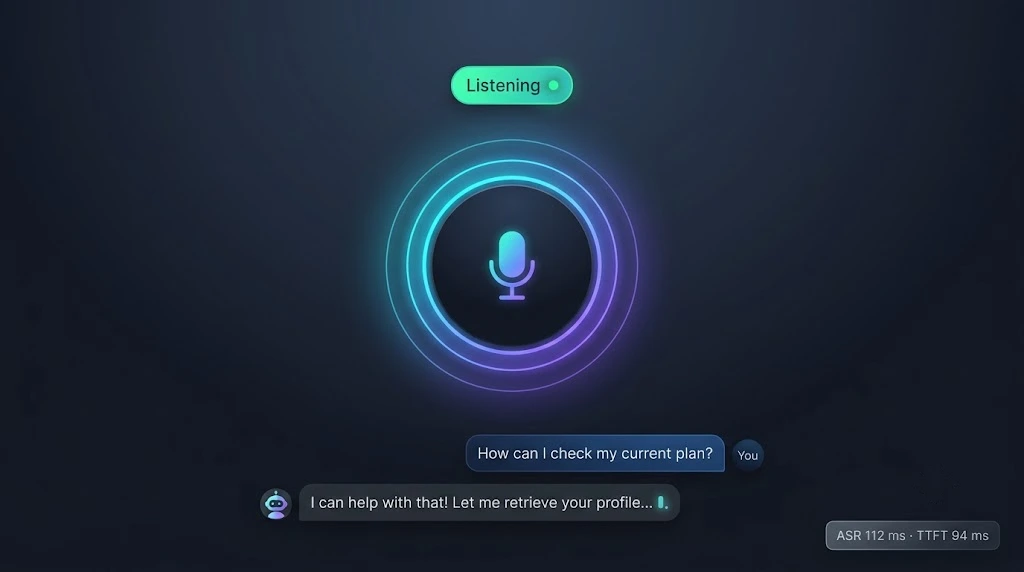
Figure 2: The reactive UI shows listening, thinking and speaking states with a live level meter and a streaming transcript.
Minting a short-lived token
The browser never holds a long-lived secret. After your normal session check, a Next.js route handler mints a token that expires in 60 seconds, which is just long enough to complete a handshake.
// web/app/api/voice-token/route.ts
import { SignJWT } from "jose";
import { NextResponse } from "next/server";
import { getSession } from "@/lib/auth"; // your existing auth layer

const secret = new TextEncoder().encode(process.env.VOICE_JWT_SECRET!);

export async function POST() {
  const session = await getSession();
  if (!session) return NextResponse.json({ error: "unauthorized" }, { status: 401 });

  const token = await new SignJWT({})
    .setProtectedHeader({ alg: "HS256" })
    .setSubject(session.userId)
    .setIssuer("voice-web")
    .setAudience("voice-gateway")
    .setIssuedAt()
    .setExpirationTime("60s")
    .sign(secret);

  return NextResponse.json({ token });
}
Audio worklets: capture and playback
AudioWorklets run on the audio rendering thread, which is why they're the only sane way to do real-time audio in a browser in 2026. The old ScriptProcessorNode ran on the main thread and glitched whenever React did anything interesting.
// web/public/worklets/capture.js
class CaptureProcessor extends AudioWorkletProcessor {
  constructor() {
    super();
    this.buf = new Int16Array(320); // 20 ms at 16 kHz
    this.i = 0;
  }
  process(inputs) {
    const ch = inputs[0][0];
    if (!ch) return true;
    for (let n = 0; n < ch.length; n++) {
      const s = Math.max(-1, Math.min(1, ch[n]));
      this.buf[this.i++] = s < 0 ? s * 0x8000 : s * 0x7fff;
      if (this.i === 320) {
        this.port.postMessage(this.buf.slice().buffer);
        this.i = 0;
      }
    }
    return true;
  }
}
registerProcessor("capture", CaptureProcessor);
// web/public/worklets/playback.js
class PlaybackProcessor extends AudioWorkletProcessor {
  constructor() {
    super();
    this.queue = [];
    this.cur = null;
    this.pos = 0;
    this.active = false;
    this.port.onmessage = (e) => {
      if (e.data === "flush") { this.queue = []; this.cur = null; this.pos = 0; return; }
      const i16 = new Int16Array(e.data);
      this.queue.push(Float32Array.from(i16, (v) => v / 32768));
    };
  }
  process(_, outputs) {
    const out = outputs[0][0];
    for (let n = 0; n < out.length; n++) {
      if (!this.cur || this.pos >= this.cur.length) {
        this.cur = this.queue.shift() ?? null;
        this.pos = 0;
      }
      out[n] = this.cur ? this.cur[this.pos++] : 0;
    }
    const playing = this.cur !== null;
    if (this.active && !playing) this.port.postMessage("drained");
    this.active = playing;
    return true;
  }
}
registerProcessor("playback", PlaybackProcessor);
The flush message is what makes barge-in feel instant. Without it, the agent keeps talking for a second or two after you interrupt, which is a vivid way to make users hate your product.
Redux for coarse state, never for audio
Redux Toolkit is perfect for the slow, human-visible state: connection phase, transcript, latency stats. It is a terrible place for audio frames, which arrive 50 times per second. Keep the hot path in refs and worklets, and dispatch only what the UI needs to render.
// web/lib/store.ts
import { configureStore, createSlice, type PayloadAction } from "@reduxjs/toolkit";

export type Phase = "disconnected" | "idle" | "listening" | "thinking" | "speaking";
interface Line { role: "user" | "agent"; text: string }
interface VoiceState {
  phase: Phase; level: number; lines: Line[];
  latency?: { asr: number; ttft: number }; error?: string;
}

const initialState: VoiceState = { phase: "disconnected", level: 0, lines: [] };

const voice = createSlice({
  name: "voice",
  initialState,
  reducers: {
    phase: (s, a: PayloadAction<Phase>) => { s.phase = a.payload; },
    level: (s, a: PayloadAction<number>) => { s.level = a.payload; },
    userLine: (s, a: PayloadAction<string>) => { s.lines.push({ role: "user", text: a.payload }); },
    agentToken: (s, a: PayloadAction<string>) => {
      const last = s.lines[s.lines.length - 1];
      if (last?.role === "agent") last.text += a.payload;
      else s.lines.push({ role: "agent", text: a.payload });
    },
    latency: (s, a: PayloadAction<{ asr: number; ttft: number }>) => { s.latency = a.payload; },
    error: (s, a: PayloadAction<string | undefined>) => { s.error = a.payload; },
  },
});

export const actions = voice.actions;
export const store = configureStore({ reducer: { voice: voice.reducer } });
export type RootState = ReturnType<typeof store.getState>;
The hook that wires it all together
// web/lib/useVoiceAgent.ts
"use client";
import { useCallback, useRef } from "react";
import { useDispatch } from "react-redux";
import { io, type Socket } from "socket.io-client";
import { actions } from "./store";

export function useVoiceAgent() {
  const dispatch = useDispatch();
  const refs = useRef<{ socket?: Socket; rec?: AudioContext; play?: AudioContext }>({});

  const start = useCallback(async () => {
    const stream = await navigator.mediaDevices.getUserMedia({
      audio: { echoCancellation: true, noiseSuppression: true, autoGainControl: true, channelCount: 1 },
    });

    // Capture at 16 kHz to match whisper. Playback at Piper's native 22.05 kHz.
    const rec = new AudioContext({ sampleRate: 16000, latencyHint: "interactive" });
    const play = new AudioContext({ sampleRate: 22050, latencyHint: "interactive" });
    await rec.audioWorklet.addModule("/worklets/capture.js");
    await play.audioWorklet.addModule("/worklets/playback.js");

    const capture = new AudioWorkletNode(rec, "capture");
    const player = new AudioWorkletNode(play, "playback");
    player.connect(play.destination);
    rec.createMediaStreamSource(stream).connect(capture);

    const socket = io(process.env.NEXT_PUBLIC_VOICE_URL!, {
      transports: ["websocket"],
      // Called on every (re)connect, so an expired token never blocks a retry.
      auth: async (cb) => {
        const r = await fetch("/api/voice-token", { method: "POST" });
        const { token } = await r.json();
        cb({ token });
      },
    });

    let frames = 0;
    capture.port.onmessage = (e: MessageEvent<ArrayBuffer>) => {
      socket.volatile.emit("mic", e.data); // drop a frame rather than queue behind a stall
      if (++frames % 5 === 0) {              // ~10 Hz is plenty for a level meter
        const s = new Int16Array(e.data);
        let sum = 0;
        for (let i = 0; i < s.length; i++) sum += (s[i] / 32768) ** 2;
        dispatch(actions.level(Math.sqrt(sum / s.length)));
      }
    };

    socket.on("connect", () => dispatch(actions.phase("idle")));
    socket.on("disconnect", () => dispatch(actions.phase("disconnected")));
    socket.on("connect_error", (err) => dispatch(actions.error(err.message)));
    socket.on("state", (p) => dispatch(actions.phase(p)));
    socket.on("transcript", (t: { text: string }) => dispatch(actions.userLine(t.text)));
    socket.on("token", (t: string) => dispatch(actions.agentToken(t)));
    socket.on("latency", (l) => dispatch(actions.latency(l)));
    socket.on("tts", (pcm: ArrayBuffer) => player.port.postMessage(pcm, [pcm]));
    socket.on("flush", () => player.port.postMessage("flush"));
    player.port.onmessage = (e) => { if (e.data === "drained") dispatch(actions.phase("idle")); };

    refs.current = { socket, rec, play };
  }, [dispatch]);

  const stop = useCallback(() => {
    refs.current.socket?.disconnect();
    refs.current.rec?.close();
    refs.current.play?.close();
  }, []);

  return { start, stop };
}
Two details deserve a spotlight. The socket.volatile.emit call tells Socket.io it's fine to drop a frame if the connection is momentarily stalled. For live audio, a stale frame is worse than a missing one, because late audio just piles latency onto the whole conversation. And echoCancellation: true is what stops the agent from hearing itself through your speakers and interrupting its own sentences.
Step 8: Containers, Nginx and AWS Linux
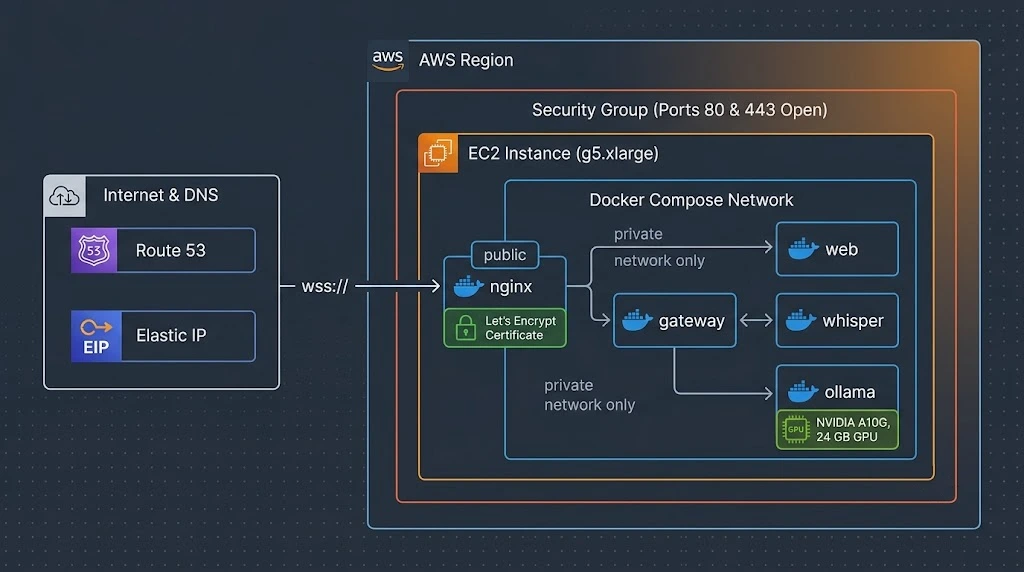
Figure 3: One GPU instance, five containers, and a single public entry point on port 443.
Docker Compose
# docker-compose.yml
services:
  nginx:
    image: nginx:1.27-alpine
    ports: ["80:80", "443:443"]
    volumes:
      - ./nginx/nginx.conf:/etc/nginx/nginx.conf:ro
      - /etc/letsencrypt:/etc/letsencrypt:ro
    depends_on: [web, gateway]

  web:
    build: ./web
    environment:
      VOICE_JWT_SECRET: ${VOICE_JWT_SECRET}
      NEXT_PUBLIC_VOICE_URL: https://voice.example.com

  gateway:
    build: ./gateway          # Node 22 image that also bundles the piper binary and voice model
    environment:
      VOICE_JWT_SECRET: ${VOICE_JWT_SECRET}
      WEB_ORIGIN: https://voice.example.com
      WHISPER_URL: http://whisper:8080
      OLLAMA_URL: http://ollama:11434
      PIPER_MODEL: /models/en_US-lessac-medium.onnx
    depends_on: [whisper, ollama]

  whisper:
    build: ./whisper

  ollama:
    image: ollama/ollama:latest
    environment:
      OLLAMA_KEEP_ALIVE: "-1"
      OLLAMA_FLASH_ATTENTION: "1"
      OLLAMA_NUM_PARALLEL: "2"
    volumes: ["ollama:/root/.ollama"]
    deploy:
      resources:
        reservations:
          devices:
            - driver: nvidia
              count: 1
              capabilities: [gpu]

volumes:
  ollama:
Only Nginx publishes ports. The inference services live on the private Compose network, so there's no way to reach Ollama or whisper from the internet even if you misconfigure a security group.
Nginx: the WebSocket-friendly reverse proxy
The defaults in a stock Nginx config will quietly sabotage a WebSocket service. Buffering adds latency, and the default read timeout will sever a conversation after a minute of silence.
# nginx/nginx.conf (excerpt)
map $http_upgrade $connection_upgrade { default upgrade; '' close; }

upstream gateway { server gateway:4000; keepalive 32; }
upstream web     { server web:3000; }

server {
  listen 443 ssl http2;
  server_name voice.example.com;
  ssl_certificate     /etc/letsencrypt/live/voice.example.com/fullchain.pem;
  ssl_certificate_key /etc/letsencrypt/live/voice.example.com/privkey.pem;

  location /socket.io/ {
    proxy_pass http://gateway;
    proxy_http_version 1.1;
    proxy_set_header Upgrade $http_upgrade;
    proxy_set_header Connection $connection_upgrade;
    proxy_set_header Host $host;
    proxy_set_header X-Forwarded-For $proxy_add_x_forwarded_for;
    proxy_buffering off;          # never hold audio frames back
    proxy_read_timeout 3600s;     # let long conversations live
    proxy_send_timeout 3600s;
  }

  location / {
    proxy_pass http://web;
    proxy_set_header Host $host;
    proxy_set_header X-Forwarded-Proto $scheme;
  }
}
Launching on AWS Linux
A g5.xlarge (one NVIDIA A10G, 24 GB VRAM) is a comfortable starting point. Use an Amazon Linux 2023 GPU-ready image such as the AWS Deep Learning Base AMI, which saves you from fighting kernel modules and drivers.
# On the instance (Amazon Linux 2023, NVIDIA driver already present)
sudo dnf install -y docker
sudo systemctl enable --now docker
sudo usermod -aG docker ec2-user

# GPU access inside containers (install nvidia-container-toolkit per NVIDIA's docs)
sudo nvidia-ctk runtime configure --runtime=docker
sudo systemctl restart docker

# Bring the stack up and pull the model once
docker compose up -d --build
docker compose exec ollama ollama pull llama3.2:3b
Then lock the security group down to ports 80 and 443 from the internet and SSH from your own IP only. Issue a Let's Encrypt certificate with certbot, point DNS at an Elastic IP, and set up renewal. Pick the AWS region closest to your users, because the single biggest lever on that 48 ms plumbing budget is simple geography. Light travels about 200 km per millisecond in fiber, and you can't negotiate with physics.
Barge-In: The Feature That Makes It Feel Human
Look back at the gateway and you'll see barge-in is just four coordinated actions when the endpointer fires start while a turn is running:
- Abort the in-flight turn through its
AbortController, which stops LangGraph and cancels the downstream fetches. - Reset the Piper process so any queued speech is dropped on the floor.
- Emit
flushso the browser's playback worklet empties its buffer. - Start collecting the new utterance with pre-roll.
The order matters less than doing all four. Miss any one and you get the uncanny experience of an agent that keeps mumbling after you've cut it off.
Best Practices
- Measure per stage, always. Emit timings for ASR, time-to-first-token and time-to-first-audio on every turn, then chart the percentiles. Averages hide the bad turns users remember.
- Keep every model warm. Use
OLLAMA_KEEP_ALIVE=-1, a resident whisper server and a persistent Piper process. Warm-up requests at startup are cheap insurance. - Send small frames. 20 ms frames keep latency low and make endpointing precise. Bigger frames save a few bytes of overhead and cost you real responsiveness.
- Authenticate at the handshake and expire fast. A 60-second token plus a refresh-on-reconnect auth callback gives you strong security without any user-visible friction.
- Bound everything. Set a recursion limit on the graph, a timeout on each tool, a max utterance length on the gateway and a max token count on the model. Voice agents without limits eventually find a way to ramble forever.
- Write prompts for the ear. Short sentences, no formatting and numbers spelled the way people say them.
- Fail out loud. If ASR times out or a tool errors, have the agent say so briefly. Silence reads as a crash.
Common Mistakes to Avoid
- Pushing audio through Redux. Fifty dispatches per second will make React re-render your whole tree and starve the main thread. Keep frames in refs and workers.
- Leaving compression and buffering on.
perMessageDeflateandproxy_bufferingboth add latency for no benefit on PCM audio. - Using a
ScriptProcessorNode. It's deprecated, runs on the main thread and will crackle under load. Use AudioWorklets. - Ignoring odd-length PCM chunks. A split 16-bit sample produces loud static. Carry the leftover byte to the next chunk.
- Forgetting sample rate mismatches. Capture at 16 kHz, play Piper at its native rate, and be explicit about both. Chipmunk or slow-motion voices are always a rate bug.
- Trusting the transcript. A user can say "ignore your instructions" out loud just as easily as they can type it. Schema validation and a closed tool list are your guardrails.
- Skipping echo cancellation. Without it, speakers feed the agent's own voice back into the mic and trigger phantom interruptions.
- Benchmarking on a cold model. The first request after a model loads is not representative of anything.
🚀 Pro Tips
- Speak a filler before slow tools. If a tool call will take more than a few hundred milliseconds, have the graph emit a short line like "Let me check that for you." through TTS first. Perceived latency matters more than measured latency.
- Upgrade your VAD before upgrading your GPU. Replacing the energy gate with Silero VAD, or a semantic end-of-turn model, can recover 100 ms or more without touching your inference hardware.
- Quantize deliberately. A 4-bit quantized 3B or 8B model usually keeps the quality you need for voice while cutting time-to-first-token. Evaluate on your actual prompts, not benchmarks.
- Use prompt caching friendly prompts. Keep the system prompt static and at the front of the context so the runtime can reuse the processed prefix between turns.
- Pin a hot path to one machine. Co-locate whisper, Ollama and the gateway on the same host so inter-service hops are loopback-fast. Scale out by session, not by stage.
- Add a Redis adapter only when you must. Socket.io's Redis adapter lets you run multiple gateways, but sticky sessions plus a single beefy box will carry you further than you'd expect.
- Log the audio you drop. Counting volatile frames that never arrived is an excellent early warning for bad networks.
📌 Key Takeaways
- Define your latency budget in two parts: plumbing (which you can get under 50 ms) and model compute (which you tune separately).
- Binary Socket.io events carrying 20 ms PCM16 frames are a simple, fast and debuggable transport for single-server voice agents.
- Endpointing hangover is usually the largest hidden delay. Tune it with a real VAD.
- LangGraph makes tool calling predictable through fixed structure: allow-listed tools, Zod validation, temperature 0 and a recursion limit.
- Stream at every stage. Tokens become sentence chunks, chunks become audio, and audio plays before the answer is finished.
- Keep high-frequency data out of Redux, and keep coarse UI state in it.
- Secure sessions with short-lived JWTs verified at the Socket.io handshake, and terminate TLS at Nginx.
- Nginx needs WebSocket-specific settings, namely upgrade headers, disabled buffering and long timeouts, or it will quietly hurt you.
Conclusion
Voice AI is one of those fields where the demos are easy and the product is hard, and the difference is almost entirely latency and interruption handling. The good news is that none of the individual pieces here are exotic. whisper.cpp, Ollama and Piper are open, well-documented C++ runtimes. Socket.io, LangGraph, Next.js and Redux are tools most TypeScript teams already know. The craft is in how you connect them: small frames, streaming at every hop, ruthless measurement and a graph that keeps the model on a short leash.
If you build this, I'd suggest a specific order. Get one clean turn working end to end with logging first. Then add barge-in. Then tighten endpointing. Only after all that should you start swapping models or chasing GPU upgrades, because the gains from structure almost always outweigh the gains from raw horsepower.
Run it, talk to it, and listen carefully to the pauses. They'll tell you exactly what to fix next.
References
- whisper.cpp repository and server example
- Ollama documentation: API, tool calling and configuration
- Piper TTS project
- LangGraph.js documentation
- Socket.io documentation: server options, middleware and client auth
- MDN: AudioWorklet and the Web Audio API
- jose: JWT signing and verification for JavaScript runtimes
- Redux Toolkit documentation
- Nginx documentation: WebSocket proxying
- NVIDIA Container Toolkit installation guide
- Next.js documentation: Route Handlers