Introduction
Every multiplayer developer remembers the first time someone cheated in their game. For me it was a harmless-looking prototype: a little arena where players ran around and collected coins. Within a day of sharing the build with friends, one of them was teleporting across the map and "collecting" every coin in half a second. He wasn't even using a fancy hack. He had simply changed a number in memory, and my client happily reported the new position to everyone else.
That was the day I learned the most important rule of online games: the client is not yours. The moment your game leaves your machine, you have to assume that anything running on a player's device can be read, modified, or replaced.
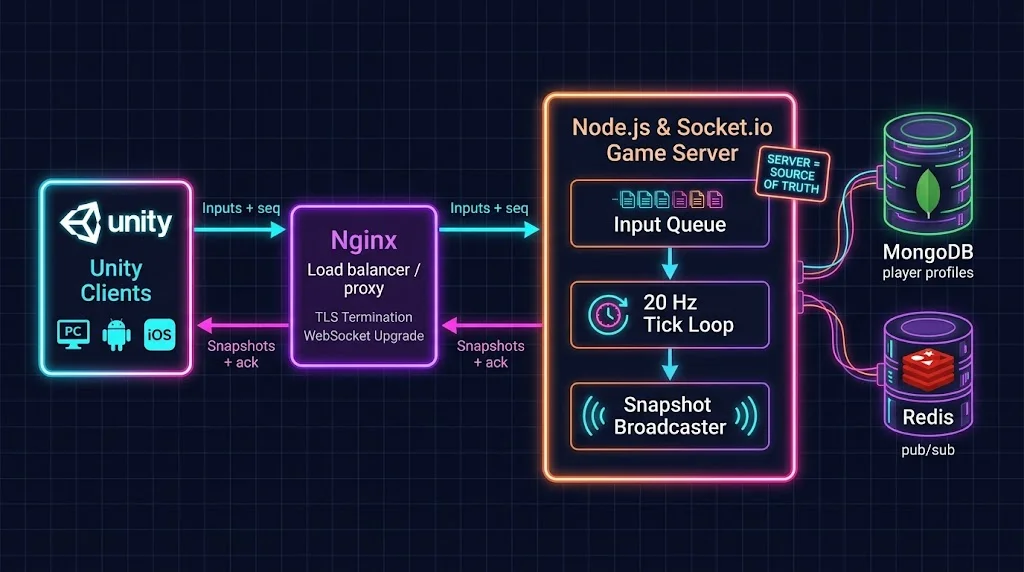
The cure is a server-authoritative architecture. Clients are reduced to controllers and renderers. They tell the server what they want to do, the server decides what actually happens, and everybody sees the same result.
In this guide we will build that kind of backend from scratch, the way a modern live-service team would in 2026:
- Node.js and Express for the HTTP surface and health checks
- Socket.io for low-latency real-time messaging over WebSockets
- A Unity C# client with prediction, reconciliation and interpolation
- MongoDB for durable player profiles
- Docker, Git, GitHub Actions and AWS Linux for a zero-downtime deployment pipeline
It is aimed at indie developers and small studios who want a scalable, cross-platform foundation without adopting a heavyweight game-server framework on day one. You should be comfortable with JavaScript and C#, and have shipped at least one small Unity project.
Why Server-Authoritative? The Core Concept
There are broadly three ways to synchronize a multiplayer game:
| Model | Who decides the truth? | Cheat resistance | Typical use |
|---|---|---|---|
| Client-authoritative | Each client | Very low | Prototypes, trusted co-op |
| Peer-to-peer lockstep | Every peer, deterministically | Medium | RTS, fighting games |
| Server-authoritative | The server | High | Most live-service titles |
In a server-authoritative design, the data flow looks like this:
- The client samples player input (move direction, jump, fire).
- It sends that input to the server, tagged with a sequence number.
- The server validates the input and applies it to its own simulation.
- On a fixed tick, the server broadcasts a snapshot of the world.
- Clients render the snapshot, and smooth over the network delay.
The trade-off is latency. If the client waited for the server before moving, every key press would feel sluggish. So we lean on two techniques that every serious netcode implementation uses:
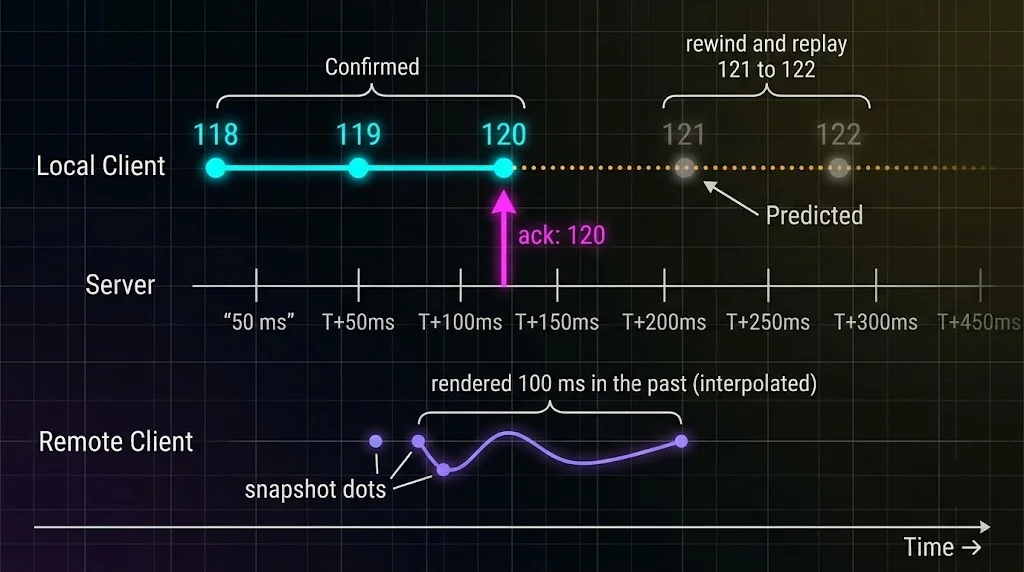
- Client-side prediction: the local player moves immediately using the same movement rules as the server, then corrects itself if the server disagrees.
- Entity interpolation: remote players are rendered slightly in the past (typically 100 ms) so we can smoothly blend between two known snapshots instead of guessing.
If you want the deeper theory, Gabriel Gambetta's series on fast-paced multiplayer is still the best introduction on the web (linked in the references).
Project Setup and Tech Stack
We will use a small but realistic setup. Imagine a 2-to-8 player arena where players run around a 3D map, collect pickups, earn XP, and keep a persistent profile between sessions.
mkdir arena-server && cd arena-server
npm init -y
npm install express socket.io helmet mongoose zod jsonwebtoken dotenv
npm install @socket.io/redis-adapter redis
npm install --save-dev vitest
Set "type": "module" in package.json so we can use modern ES module syntax, and target the current Node.js LTS (Node 24 at the time of writing).
Here is the folder layout we will use:
arena-server/
├── src/
│   ├── server.js            # Express + Socket.io bootstrap
│   ├── auth.js              # JWT handshake middleware
│   ├── handlers.js          # Socket event handlers
│   ├── game/
│   │   ├── GameRoom.js      # Fixed-tick simulation
│   │   └── RoomManager.js   # Matchmaking and room lifecycle
│   └── models/
│       └── PlayerProfile.js # MongoDB schema
├── Dockerfile
├── deploy.sh
└── .github/workflows/deploy.yml
Heads up: Unity does not ship an official Socket.io client. This guide uses the community package SocketIOUnity, which wraps socket.io-client-csharp. Method names can differ slightly between versions, so check the package README for your exact release.
Step 1: The Express and Socket.io Foundation
Let's start with the server bootstrap. Notice three deliberate choices: WebSocket-only transport, a tight payload size limit, and a health endpoint that we will lean on later for deployments.
// src/server.js
import "dotenv/config";
import http from "node:http";
import express from "express";
import helmet from "helmet";
import mongoose from "mongoose";
import { Server } from "socket.io";
import { authMiddleware } from "./auth.js";
import { registerHandlers } from "./handlers.js";
import { RoomManager } from "./game/RoomManager.js";

const app = express();
app.use(helmet());
app.use(express.json());

let draining = false;

app.get("/healthz", (_req, res) => {
  res.status(draining ? 503 : 200).json({ ok: !draining, uptime: process.uptime() });
});

const server = http.createServer(app);

const io = new Server(server, {
  transports: ["websocket"], // skip HTTP long-polling entirely
  pingInterval: 10_000,
  pingTimeout: 8_000,
  maxHttpBufferSize: 1e5,    // 100 KB is plenty for game inputs
  cors: { origin: false },   // game clients are not browsers
});

io.use(authMiddleware);

const rooms = new RoomManager(io);
io.on("connection", (socket) => registerHandlers(io, socket, rooms));

await mongoose.connect(process.env.MONGO_URI);
server.listen(process.env.PORT || 3000, () => {
  console.log("Arena server listening");
});
Forcing transports: ["websocket"] is a quiet but important win. By default, Socket.io starts with HTTP long-polling and upgrades later, which means a load balancer needs sticky sessions just to complete the handshake. A WebSocket-only server avoids that, and a native game client has no reason to use polling anyway.
Authenticating at the Handshake
Authenticate before the connection is established, not after. Your game's login service (or any identity provider) issues a short-lived JWT, and the Unity client presents it during the Socket.io handshake.
// src/auth.js
import jwt from "jsonwebtoken";

export function authMiddleware(socket, next) {
  const token = socket.handshake.auth?.token;
  if (!token) return next(new Error("AUTH_REQUIRED"));

  try {
    const claims = jwt.verify(token, process.env.JWT_PUBLIC_KEY, {
      algorithms: ["RS256"],
    });
    socket.data.userId = claims.sub;
    next();
  } catch {
    next(new Error("AUTH_INVALID"));
  }
}
Use asymmetric keys (RS256) so the game server only needs the public key. If the game server is ever compromised, attackers still cannot mint new tokens.
Step 2: The Fixed-Tick Game Loop
This is the heart of the backend. Instead of reacting to each message by immediately mutating the world, we queue inputs and consume them at a steady rhythm. A 20 Hz tick (one step every 50 ms) is a sweet spot for many genres: smooth enough, cheap enough, and friendly to mobile networks.
// src/game/GameRoom.js
export const TICK_RATE = 20;
export const DT = 1 / TICK_RATE;
const SPEED = 6;          // meters per second
const MAX_QUEUE = 8;      // drop inputs if a client floods us
const ARENA = { min: -50, max: 50 };

const clamp = (v, lo, hi) => Math.min(hi, Math.max(lo, v));
const round2 = (v) => Math.round(v * 100) / 100;

// The exact same rules must exist in the Unity client for prediction to match.
export function applyMove(p, { moveX, moveZ }) {
  const len = Math.hypot(moveX, moveZ);
  const scale = len > 1 ? 1 / len : 1; // no faster diagonal movement
  p.x = clamp(p.x + moveX * scale * SPEED * DT, ARENA.min, ARENA.max);
  p.z = clamp(p.z + moveZ * scale * SPEED * DT, ARENA.min, ARENA.max);
}

export class GameRoom {
  constructor(id, io) {
    this.id = id;
    this.io = io;
    this.players = new Map();
    this.tick = 0;
    this.timer = null;
  }

  start() {
    this.timer = setInterval(() => this.step(), 1000 / TICK_RATE);
  }

  stop() {
    clearInterval(this.timer);
  }

  addPlayer(socket, profile) {
    this.players.set(socket.id, {
      id: socket.id,
      userId: socket.data.userId,
      x: profile.position.x,
      y: profile.position.y,
      z: profile.position.z,
      xp: profile.xp,
      lastProcessedSeq: -1,
      queue: [],
    });
    socket.join(this.id);
  }

  queueInput(playerId, input) {
    const p = this.players.get(playerId);
    if (!p || p.queue.length >= MAX_QUEUE) return;
    p.queue.push(input);
  }

  step() {
    this.tick++;

    for (const p of this.players.values()) {
      const input = p.queue.shift(); // one input per tick, always
      if (!input) continue;
      applyMove(p, input);
      p.lastProcessedSeq = input.seq;
    }

    this.broadcastSnapshot();
  }

  broadcastSnapshot() {
    const players = [...this.players.values()].map((p) => ({
      id: p.id,
      x: round2(p.x),
      y: round2(p.y),
      z: round2(p.z),
      ack: p.lastProcessedSeq, // "I have processed your inputs up to here"
    }));

    // volatile: if a snapshot is late, drop it. The next one is already coming.
    this.io.to(this.id).volatile.emit("state:snapshot", { tick: this.tick, players });
  }
}
A few things deserve a closer look:
- One input per tick. A hacked client that sends 500 move commands per second cannot move 500 times faster. The queue is capped, and extra inputs are simply dropped.
- The
ackfield. Each snapshot tells every client the last input sequence number the server processed for them. This is the key that makes reconciliation possible on the Unity side. volatile.emit. Snapshots are perishable. If a client's connection is momentarily congested, there is no point queuing stale world state.
Wiring the Event Handlers
// src/handlers.js
import { z } from "zod";

const MoveInput = z.object({
  seq: z.number().int().min(0),
  moveX: z.number().min(-1).max(1),
  moveZ: z.number().min(-1).max(1),
});

export function registerHandlers(io, socket, rooms) {
  socket.on("room:join", async () => {
    const room = await rooms.joinOrCreate(socket);
    socket.data.roomId = room.id;
    socket.emit("room:joined", {
      roomId: room.id,
      playerId: socket.id,
      tickRate: room.tickRate,
    });
  });

  socket.on("input:move", (raw) => {
    if (!allow(socket)) return;                 // rate limit
    const parsed = MoveInput.safeParse(raw);    // schema validation
    if (!parsed.success) return;
    rooms.get(socket.data.roomId)?.queueInput(socket.id, parsed.data);
  });

  socket.on("disconnect", () => rooms.leave(socket));
}

// Simple per-socket token bucket: 40 messages per second
function allow(socket) {
  const now = Date.now();
  const b = (socket.data.bucket ??= { tokens: 40, last: now });
  b.tokens = Math.min(40, b.tokens + ((now - b.last) / 1000) * 40);
  b.last = now;
  if (b.tokens < 1) return false;
  b.tokens -= 1;
  return true;
}
Step 3: Validation and Anti-Cheat Basics
No backend is cheat-proof, but a server-authoritative one makes cheating expensive and boring. Use this checklist as your baseline:
- Validate every payload with a schema. Treat all incoming data as hostile, including field types, ranges and sizes.
- Send intentions, never results.
input:moveis good.set:positionis an invitation to cheat. - Simulate on the server. Speed, cooldowns, damage, ammo and collisions are all computed server-side.
- Rate limit per connection. Cheap to implement, effective against flooding.
- Log anomalies. Repeated schema failures or impossible values are useful signals for moderation tooling later.
- Expire and rotate tokens. Short-lived JWTs reduce the value of a stolen credential.
Step 4: Persisting Player State with MongoDB
Your simulation lives in memory, because that is the only way to hit a 50 ms tick. But players expect their progress to survive a crash, a redeploy, or a lunch break. That is where MongoDB comes in. Its document model maps naturally to the nested, evolving shape of player profiles: inventory, loadouts, stats, cosmetics and so on.
// src/models/PlayerProfile.js
import { Schema, model } from "mongoose";

const PlayerProfileSchema = new Schema(
  {
    userId: { type: String, required: true, unique: true },
    displayName: { type: String, default: "Rookie" },
    level: { type: Number, default: 1, min: 1 },
    xp: { type: Number, default: 0, min: 0 },
    position: {
      x: { type: Number, default: 0 },
      y: { type: Number, default: 0 },
      z: { type: Number, default: 0 },
    },
    inventory: [
      { _id: false, itemId: { type: String, required: true }, qty: { type: Number, min: 0 } },
    ],
    schemaVersion: { type: Number, default: 2 },
  },
  { timestamps: true }
);

export const PlayerProfile = model("PlayerProfile", PlayerProfileSchema);
Now the important part: when to write. A simple, resilient policy looks like this:
- Load the profile once when the player joins a room.
- Mutate the in-memory copy during gameplay.
- Flush to MongoDB on disconnect, at match end, and on a slow autosave timer.
- Write immediately for high-value events such as purchases or rare drops.
// Batched autosave: one round trip for the whole room
export async function flushProfiles(players) {
  const ops = players.map((p) => ({
    updateOne: {
      filter: { userId: p.userId },
      update: { $set: { position: { x: p.x, y: p.y, z: p.z }, xp: p.xp } },
    },
  }));
  if (ops.length) await PlayerProfile.bulkWrite(ops, { ordered: false });
}

// Economy changes use atomic operators, never read-modify-write
export async function grantItem(userId, itemId, qty) {
  const updated = await PlayerProfile.updateOne(
    { userId, "inventory.itemId": itemId },
    { $inc: { "inventory.$.qty": qty } }
  );
  if (updated.matchedCount === 0) {
    await PlayerProfile.updateOne(
      { userId },
      { $push: { inventory: { itemId, qty } } }
    );
  }
}
The schemaVersion field looks boring, but it will save you during your first big content update. When a new season changes the shape of the inventory, you can migrate lazily: check the version when loading a profile, upgrade it in memory, and save it back.
Step 5: The Unity C# Client
Now for the other half of the conversation. The Unity client has three jobs: send inputs, predict the local player's movement, and render everyone else smoothly.
First, the data contracts. Newtonsoft JSON matches field names case-insensitively, so these map cleanly to the server's payloads.
using System;

[Serializable] public class MoveInputMsg { public int seq; public float moveX; public float moveZ; }
[Serializable] public class PlayerState   { public string id; public float x, y, z; public int ack; }
[Serializable] public class Snapshot      { public int tick; public PlayerState[] players; }
[Serializable] public class JoinedMsg     { public string roomId; public string playerId; public int tickRate; }
Next, the network client with prediction and reconciliation:
using System;
using System.Collections.Generic;
using SocketIOClient;
using SocketIOClient.Newtonsoft.Json;
using UnityEngine;

public class NetworkClient : MonoBehaviour
{
    private const int TickRate = 20;
    private const float Dt = 1f / TickRate;
    private const float Speed = 6f;       // must match the server
    private const float ArenaLimit = 50f; // must match the server

    [SerializeField] private string serverUrl = "https://game.example.com";
    [SerializeField] private Transform localAvatar;
    [SerializeField] private RemoteAvatarManager remotes;

    private SocketIOUnity socket;
    private string myId;
    private int nextSeq;
    private float accumulator;
    private Vector3 predicted;
    private readonly List<MoveInputMsg> pending = new();

    public void Connect(string jwt)
    {
        socket = new SocketIOUnity(new Uri(serverUrl), new SocketIOOptions
        {
            Transport = SocketIOClient.Transport.TransportProtocol.WebSocket,
            Auth = new Dictionary<string, string> { { "token", jwt } },
            Reconnection = true,
            ReconnectionAttempts = 10,
            ReconnectionDelay = 1000
        });
        socket.JsonSerializer = new NewtonsoftJsonSerializer();

        // OnUnityThread marshals callbacks onto Unity's main thread
        socket.OnUnityThread("room:joined", res =>
        {
            var msg = res.GetValue<JoinedMsg>();
            myId = msg.playerId;
        });
        socket.OnUnityThread("state:snapshot", res => OnSnapshot(res.GetValue<Snapshot>()));

        socket.OnConnected += (_, _) => socket.Emit("room:join");
        socket.Connect();
    }

    private void Update()
    {
        if (myId == null) return;

        // Fixed-step input sampling, independent of frame rate
        accumulator += Time.deltaTime;
        while (accumulator >= Dt)
        {
            accumulator -= Dt;
            SendAndPredict();
        }

        // Soften small corrections instead of snapping
        localAvatar.position = Vector3.Lerp(localAvatar.position, predicted, 0.35f);
    }

    private void SendAndPredict()
    {
        var input = new MoveInputMsg
        {
            seq = nextSeq++,
            moveX = Input.GetAxisRaw("Horizontal"),
            moveZ = Input.GetAxisRaw("Vertical")
        };

        pending.Add(input);
        predicted = Simulate(predicted, input);
        socket.Emit("input:move", input);
    }

    // Mirrors applyMove() on the server
    private static Vector3 Simulate(Vector3 pos, MoveInputMsg i)
    {
        var dir = new Vector2(i.moveX, i.moveZ);
        if (dir.sqrMagnitude > 1f) dir.Normalize();
        pos.x = Mathf.Clamp(pos.x + dir.x * Speed * Dt, -ArenaLimit, ArenaLimit);
        pos.z = Mathf.Clamp(pos.z + dir.y * Speed * Dt, -ArenaLimit, ArenaLimit);
        return pos;
    }

    private void OnSnapshot(Snapshot snap)
    {
        foreach (var p in snap.players)
        {
            var pos = new Vector3(p.x, p.y, p.z);
            if (p.id == myId) Reconcile(p, pos);
            else remotes.PushState(p.id, pos);
        }
    }

    private void Reconcile(PlayerState auth, Vector3 serverPos)
    {
        // 1. Throw away inputs the server has already applied
        pending.RemoveAll(i => i.seq <= auth.ack);

        // 2. Start from the authoritative position
        var pos = serverPos;

        // 3. Replay inputs the server has not seen yet
        foreach (var i in pending) pos = Simulate(pos, i);

        predicted = pos;
    }
}
The reconciliation function is the elegant bit. When the server says "I've processed your inputs up to number 120 and you are at position P", the client rewinds to P and replays inputs 121 onwards. If prediction was perfect, nothing visibly changes. If the server disagreed (a wall you did not know about, a speed debuff, a cheater being corrected), the player is gently pulled to the right spot.
Interpolating Remote Players
Other players are not predicted. We simply render them about 100 ms in the past, so we always have two samples to blend between. The RemoteAvatarManager referenced above is a tiny helper of your own: it keeps a dictionary of player ID to RemoteAvatar, spawns a prefab the first time an ID appears, and forwards each position through PushState to that avatar's Push method.
using System;
using System.Collections.Generic;
using UnityEngine;

public class RemoteAvatar : MonoBehaviour
{
    private struct Sample { public double time; public Vector3 pos; }

    private const double InterpDelay = 0.1; // two ticks at 20 Hz
    private readonly List<Sample> samples = new();

    public void Push(Vector3 pos)
    {
        samples.Add(new Sample { time = Time.timeAsDouble, pos = pos });
        if (samples.Count > 20) samples.RemoveAt(0);
    }

    private void Update()
    {
        double renderTime = Time.timeAsDouble - InterpDelay;

        for (int i = samples.Count - 1; i > 0; i--)
        {
            if (samples[i - 1].time > renderTime) continue;

            var a = samples[i - 1];
            var b = samples[i];
            float t = (float)((renderTime - a.time) / Math.Max(b.time - a.time, 0.0001));
            transform.position = Vector3.Lerp(a.pos, b.pos, Mathf.Clamp01(t));
            return;
        }
    }
}
For clarity this version timestamps samples on arrival. In production you would use server tick numbers and a clock-offset estimate, which makes interpolation immune to network jitter.
A Real-World Example: An 8-Player Co-op Arena
Let's connect all of this to a concrete scenario. Suppose you are an indie studio shipping a cross-platform co-op arena game on PC, Android and iOS. Here is how a typical session flows:
- The player logs in through your account service and receives a 15-minute JWT.
- Unity connects over a secure WebSocket (
wss://), presenting the token in the handshake. - The
RoomManagerloads the player's profile from MongoDB and places them in a room with free slots. - For ten minutes, the room ticks at 20 Hz. The Unity client predicts its own movement and interpolates the other seven players.
- When the match ends, the server awards XP, flushes all profiles with one
bulkWrite, and closes the room. - If a player's phone drops off Wi-Fi mid-match, Socket.io reconnects automatically, and the server can restore their slot because the room state lives in memory for a short grace period.
Notice how little the client is trusted at every step. That is the whole point.
Scaling Beyond One Process
A single Node.js process comfortably handles a surprising number of rooms, because the work per room is small. But eventually you will want multiple processes or instances. Two concepts matter here.
Rooms are stateful, so they live on one node. The simulation for a match runs in the memory of exactly one process. Your matchmaker must route all players of a match to the same node. Do not try to split a single room across servers.
Cross-node messaging is where Redis fits. The official Redis adapter lets nodes broadcast to each other, which is ideal for global chat, friend notifications, or admin messages.
import { createAdapter } from "@socket.io/redis-adapter";
import { createClient } from "redis";

const pub = createClient({ url: process.env.REDIS_URL });
const sub = pub.duplicate();
await Promise.all([pub.connect(), sub.connect()]);

io.adapter(createAdapter(pub, sub));
Because we forced WebSocket-only transport earlier, we also avoid the sticky-session requirement that comes with long-polling. Your load balancer can route connections freely, while your matchmaker decides which node hosts which room.
Zero-Downtime CI/CD on AWS Linux
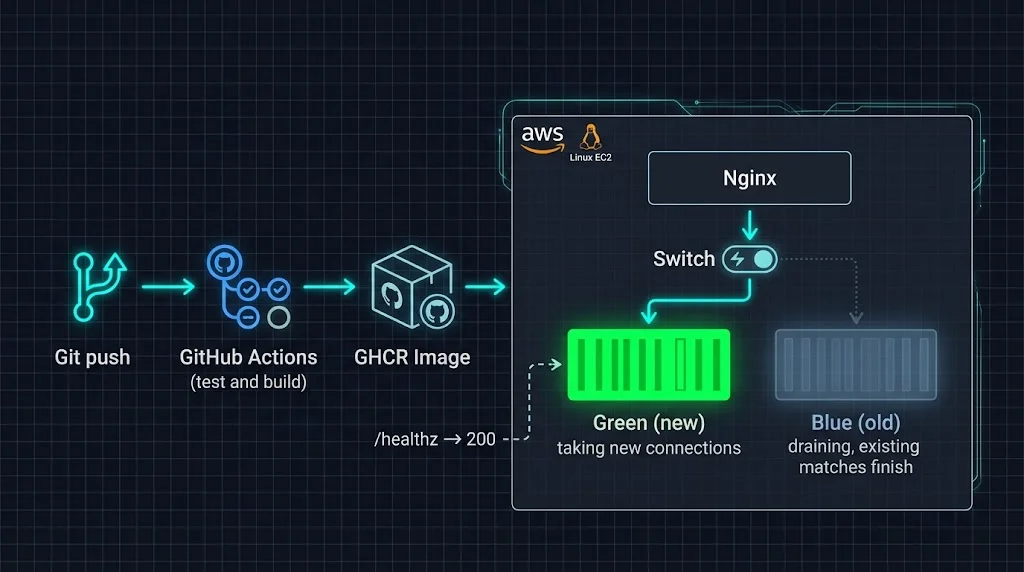
Deploying a stateless web API is easy. Deploying a server that holds live matches in memory is harder, because restarting the process kicks everyone out. The trick is to never restart the old server while players are using it.
Our strategy is blue/green on a single AWS Linux instance (Amazon Linux 2023 works well), with Nginx deciding which container receives new connections.
Containerize the Server
# Dockerfile
FROM node:24-alpine AS deps
WORKDIR /app
COPY package*.json ./
RUN npm ci --omit=dev

FROM node:24-alpine
ENV NODE_ENV=production
WORKDIR /app
RUN apk add --no-cache tini
COPY --from=deps /app/node_modules ./node_modules
COPY package.json ./
COPY src ./src
USER node
EXPOSE 3000
HEALTHCHECK --interval=15s --timeout=3s CMD wget -qO- http://localhost:3000/healthz || exit 1
ENTRYPOINT ["/sbin/tini", "--"]
CMD ["node", "src/server.js"]
tini matters more than it looks: it forwards SIGTERM correctly, which our graceful shutdown depends on.
Drain Gracefully on SIGTERM
When the old container receives a stop signal, it should stop accepting new rooms, let existing matches finish, save everything, and only then exit.
const sleep = (ms) => new Promise((r) => setTimeout(r, ms));

process.on("SIGTERM", async () => {
  draining = true;                 // /healthz now returns 503
  rooms.stopAcceptingNewRooms();

  const deadline = Date.now() + 10 * 60 * 1000; // wait up to 10 minutes
  while (rooms.activePlayers() > 0 && Date.now() < deadline) {
    await sleep(5000);
  }

  await rooms.flushAll();          // persist every profile
  await mongoose.disconnect();
  process.exit(0);
});
Nginx as the Traffic Switch
upstream game_backend {
    include /opt/arena/upstream.conf;   # contains: server 127.0.0.1:3001;
}

map $http_upgrade $connection_upgrade {
    default upgrade;
    ''      close;
}

server {
    listen 443 ssl;
    server_name game.example.com;

    location /socket.io/ {
        proxy_pass http://game_backend;
        proxy_http_version 1.1;
        proxy_set_header Upgrade $http_upgrade;
        proxy_set_header Connection $connection_upgrade;
        proxy_set_header Host $host;
        proxy_set_header X-Forwarded-For $proxy_add_x_forwarded_for;
        proxy_read_timeout 120s;
    }
}
When Nginx reloads, old worker processes keep serving their existing WebSocket connections until those close, while new workers send fresh connections to the new upstream. That behavior is exactly what makes zero-downtime possible. Just avoid setting an aggressive worker_shutdown_timeout, or you will cut players off mid-match.
The Deploy Script
#!/usr/bin/env bash
# deploy.sh <image-tag>
set -euo pipefail

IMAGE="ghcr.io/your-org/arena-server:${1:?image tag required}"
ACTIVE=$(cat /opt/arena/active_color 2>/dev/null || echo blue)
NEXT=$([ "$ACTIVE" = "blue" ] && echo green || echo blue)
PORT=$([ "$NEXT" = "blue" ] && echo 3001 || echo 3002)

docker pull "$IMAGE"
docker rm -f "arena-$NEXT" 2>/dev/null || true
docker run -d --name "arena-$NEXT" --env-file /opt/arena/.env \
  -p "127.0.0.1:${PORT}:3000" --stop-timeout 900 \
  --restart unless-stopped "$IMAGE"

# Wait for the new version to be healthy before touching traffic
for i in $(seq 1 30); do
  if curl -fs "http://127.0.0.1:${PORT}/healthz" >/dev/null; then break; fi
  if [ "$i" -eq 30 ]; then
    echo "Health check failed, rolling back"
    docker logs "arena-$NEXT" || true
    docker rm -f "arena-$NEXT"
    exit 1
  fi
  sleep 2
done

# Switch new connections to the new container
echo "server 127.0.0.1:${PORT};" > /opt/arena/upstream.conf
sudo nginx -t && sudo nginx -s reload
echo "$NEXT" > /opt/arena/active_color

# Old container drains in the background, then is removed
nohup sh -c "docker stop -t 900 arena-$ACTIVE && docker rm arena-$ACTIVE" >/dev/null 2>&1 &
The GitHub Actions Pipeline
# .github/workflows/deploy.yml
name: deploy

on:
  push:
    branches: [main]

permissions:
  contents: read
  packages: write

jobs:
  build-and-deploy:
    runs-on: ubuntu-latest
    steps:
      - uses: actions/checkout@v4

      - uses: actions/setup-node@v4
        with:
          node-version: 24
          cache: npm

      - run: npm ci
      - run: npm test

      - uses: docker/login-action@v3
        with:
          registry: ghcr.io
          username: ${{ github.actor }}
          password: ${{ secrets.GITHUB_TOKEN }}

      - uses: docker/build-push-action@v6
        with:
          push: true
          tags: ghcr.io/${{ github.repository }}:${{ github.sha }}

      - name: Deploy to AWS Linux
        uses: appleboy/ssh-action@v1
        with:
          host: ${{ secrets.EC2_HOST }}
          username: ec2-user
          key: ${{ secrets.EC2_SSH_KEY }}
          script: |
            echo "${{ secrets.GHCR_PULL_TOKEN }}" | docker login ghcr.io -u "${{ secrets.GHCR_USER }}" --password-stdin
            /opt/arena/deploy.sh ${{ github.sha }}
Pin action versions to the current major releases when you set this up. For stricter security, consider replacing SSH with AWS Systems Manager and GitHub's OIDC integration, so no long-lived keys live in your repository secrets at all.
Best Practices
- Keep the simulation deterministic and tiny. The smaller the per-tick work, the more rooms each core can host.
- Share movement rules between client and server. Constants like speed, tick rate and arena bounds should live in one source of truth, or at least one reviewed constants file for each side.
- Send deltas and compress where it counts. Once your world grows, send only entities that changed or are near the player (interest management).
- Monitor tick duration, not just CPU. If a 50 ms tick starts taking 45 ms, you are about to have a bad day. Export tick time and room counts as metrics.
- Use TLS everywhere. Connect with
wss://and terminate TLS at Nginx or your load balancer. - Version your protocol. Include a protocol version in the handshake so old clients get a friendly "please update" instead of undefined behavior.
- Load test before launch. Write a headless Node.js bot client that spawns hundreds of connections and sends realistic input.
Common Mistakes to Avoid
- Trusting client-reported results. Sending
position,damageorscorefrom the client defeats the whole architecture. - Writing to the database on every tick. It is slow, expensive and unnecessary. Batch and schedule your saves.
- Reacting to messages immediately. Mutating state inside event handlers makes timing unpredictable. Queue inputs and process them in the tick.
- Forgetting the main-thread rule in Unity. Socket callbacks arrive on background threads. Touching a
Transformfrom one will throw errors, so dispatch to the main thread (for example withOnUnityThread). - Using
setIntervaland assuming it is perfect. Node timers drift under load. Measure tick duration, and consider drift-compensated scheduling for longer sessions. - Restarting containers during live matches. Without draining, every deploy becomes a disconnect storm.
- Skipping reconnection logic. Mobile players switch networks constantly. Plan for resume, grace periods and idempotent rejoin.
- Mismatched prediction code. If the client and server differ by even a small constant, reconciliation will jitter forever. Test with artificial latency.
🚀 Pro Tips
- Simulate bad networks early. Use tools such as Linux
tc netemor Unity's network simulation to add 150 ms latency and 3 percent packet loss. Many netcode bugs only show up here. - Add a debug overlay. Show round-trip time, pending input count, and the distance between predicted and server position. It turns invisible problems into obvious ones.
- Pre-warm rooms. Creating rooms ahead of demand removes spikes when a popular event starts.
- Make the server the only place that rolls dice. Loot tables, crits and spawn randomness belong on the backend, with seeds you can log for later investigation.
- Record and replay. Persist input streams for a few matches and build a replay tool. It is the fastest way to reproduce "it only happened once" bugs.
- Set
--stop-timeoutdeliberately. Docker's default of 10 seconds will kill your draining container long before matches are done.
📌 Key Takeaways
- A server-authoritative design makes the server the single source of truth, which removes most client-side cheating by construction.
- Use a fixed tick (around 20 Hz), queue inputs, and stamp each one with a sequence number so the server can acknowledge it.
- Prediction plus reconciliation keeps the local player responsive, while interpolation keeps remote players smooth.
- Validate everything with schemas, rate limit connections, and never accept results from the client.
- Persist to MongoDB on events, disconnects and slow timers, using atomic operators for economy changes.
- Force WebSocket-only transport, authenticate in the handshake, and use Redis only for cross-node messaging.
- Ship with Docker, GitHub Actions and Nginx blue/green so deployments never interrupt a live match.
Conclusion
Building a multiplayer backend can feel intimidating, but the fundamentals are surprisingly compact. A fixed-tick loop, a validated input queue, a snapshot broadcast and a Unity client that predicts and interpolates will take you further than you might expect, and it will do so on a stack most web developers already know.
The real payoff is trust. Players trust that the match is fair because the server decides outcomes. Your team trusts that deployments are safe because old matches drain gracefully. And you can trust your data, because profiles are saved deliberately rather than hopefully.
From here, a natural next path is to add interest management for bigger worlds, introduce a dedicated matchmaking service, add observability with tick-time dashboards, and eventually evaluate whether a particular game mode needs a lower-level protocol. Until then, this architecture is a solid, scalable foundation for an indie studio's first live-service title.
Start small, test under bad network conditions, deploy often, and let the server be the referee.
References
- Socket.IO Documentation (v4)
- Socket.IO Redis Adapter
- Gabriel Gambetta, Fast-Paced Multiplayer
- Valve Developer Community, Source Multiplayer Networking
- Gaffer On Games, Networked Physics and Game Networking Articles
- SocketIOUnity (Unity wrapper)
- socket.io-client-csharp
- Mongoose Documentation
- MongoDB Manual, Bulk Write Operations
- Docker Documentation, Multi-stage Builds
- GitHub Actions Documentation
- Nginx Documentation, WebSocket Proxying
- Amazon Linux 2023 User Guide