Engineering Durable Human-in-the-Loop (HITL) AI Workflows
Let me start with a confession. The first "autonomous" finance agent I helped ship could do everything except the one thing that mattered: stop.
It read vendor invoices, matched them against purchase orders, and decided who should get paid. In the demo it was magic. In staging, a mis-parsed currency field turned a ₹45,000 invoice into a $45,000 payout suggestion, and the only reason nothing went out was that we hadn't wired up the payment API yet. That was the day our team stopped talking about "AI chatbots" and started talking about controlled systems.
In 2026, nobody serious lets an LLM move money unsupervised. But "just add a confirm button" is not an architecture. Real approvals take hours. Approvers are in meetings, on flights, asleep in another timezone. Meanwhile your containers get redeployed, autoscaled, and restarted. If your agent's state lives in a JavaScript variable, it dies with the process, and so does the half-finished payout workflow.
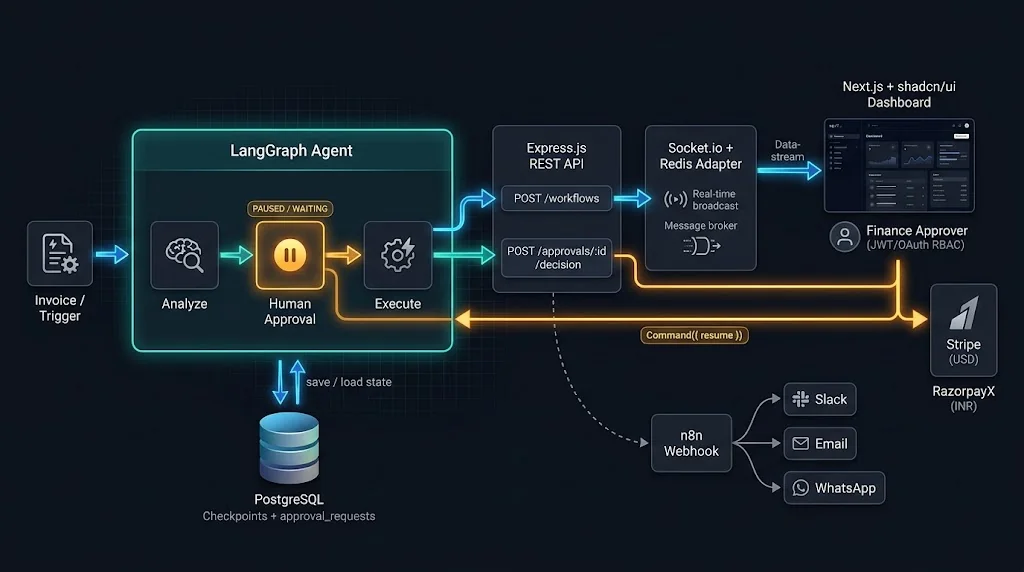
This guide walks through the architecture I now use for durable human-in-the-loop (HITL) AI workflows:
- LangGraph.js to model the agent as a graph that can pause with
interrupt() - PostgreSQL as the checkpoint store so paused agents survive restarts
- Node.js + Express as the REST API that starts and resumes workflows
- Socket.io to stream approval requests to approvers in real time
- Next.js + TypeScript + shadcn/ui for the approval dashboard
- JWT + OAuth for role-based access control
- n8n webhooks for Slack/email notifications
- Docker on Amazon Linux 2023 for deployment
By the end you'll have a mental model, working code, and a list of the mistakes I made so you don't have to.
Why Chatbot Architectures Break for Critical Actions
A typical chatbot is a request/response loop: user sends a message, the model thinks, tools run, a reply comes back, all inside one HTTP request. That's fine when the worst outcome is a bad paragraph. It falls apart when the workflow has three properties:
- It is long-running. Approvals measured in hours don't fit in an HTTP timeout.
- It has irreversible side effects. A payout cannot be "un-sent" by regenerating a response.
- It involves multiple actors. The person who triggers the workflow is often not the person allowed to approve it.
What you actually need is closer to a workflow engine than a chat loop: something that can save its exact position, wait indefinitely for an external event, and continue on any machine. LangGraph gives you that, as long as you pair it with a real persistence layer.
Core Concepts You Need to Get Right
Threads, Checkpoints, and Durable State
LangGraph models your agent as a state graph: nodes are functions, edges decide what runs next, and a shared state object flows through them. When you compile the graph with a checkpointer, LangGraph saves a snapshot of the state after every step (a "super-step"), keyed by a thread_id.
Think of a thread as one workflow instance, for example "payout request #8812". The checkpoints are its save-game files. With PostgresSaver, those files live in Postgres tables, which means:
- A crash between steps loses nothing that was already checkpointed.
- Any API instance can load thread #8812 and continue it.
- You get a full history of states for debugging and audits.
The interrupt() Primitive
Inside a node, calling interrupt(payload) does two things: it saves the current checkpoint and stops execution, surfacing payload to the caller. Later, you re-invoke the graph with new Command({ resume: value }), and interrupt() returns value as if it had been a normal function call.
Here's the detail that bites everyone exactly once: on resume, the interrupted node runs again from its first line. LangGraph does not restore a paused JavaScript stack; it replays the node and feeds the stored resume value to the interrupt() call. So anything before the interrupt() executes twice. Keep it pure, or make it idempotent.
The Approval Lifecycle
Every approval request in this system moves through a small, explicit state machine:
PENDING→ waiting for a humanAPPROVED/REJECTED/EDITED→ a decision was recordedEXECUTED/FAILED→ the downstream action finishedEXPIRED→ nobody responded within the SLA
LangGraph owns the agent's internal state. Your own approval_requests table owns the business lifecycle. Keeping them separate is what makes the system queryable, auditable, and safe from double resumes.
A Real-World Example: Vendor Payout Agent
Our running example is a vendor payout agent for a marketplace that operates in both the US and India:
- An invoice arrives (upload or webhook).
- The agent extracts line items, validates against the PO, and runs fraud heuristics.
- It drafts a payout: amount, currency, beneficiary, and rail (Stripe for USD, RazorpayX for INR).
- If the amount is under a small auto-approve threshold and risk is low, it pays.
- Otherwise it pauses and asks a finance approver. The approver can approve, reject, or edit the amount.
- On approval, it executes the payout with an idempotency key and records the result.
Let's build it.
Step 1: Modelling the Agent in LangGraph.js
First, the dependencies:
npm install @langchain/langgraph @langchain/langgraph-checkpoint-postgres \
  @langchain/anthropic zod pg stripe razorpay
Now define the state. I like using Annotation.Root with explicit reducers so nothing surprising happens when two nodes write the same key.
// src/agent/state.ts
import { Annotation } from "@langchain/langgraph";

export type PayoutDraft = {
  requestId: string;
  vendorId: string;
  amountMinor: number; // always store money in minor units (cents/paise)
  currency: "USD" | "INR";
  rail: "stripe" | "razorpay";
  riskScore: number;
  reasoning: string;
};

export type HumanDecision =
  | { action: "approve"; approverId: string }
  | { action: "reject"; approverId: string; reason: string }
  | { action: "edit"; approverId: string; amountMinor: number; note: string };

export const PayoutState = Annotation.Root({
  invoiceText: Annotation<string>(),
  draft: Annotation<PayoutDraft | null>({ reducer: (_, b) => b, default: () => null }),
  decision: Annotation<HumanDecision | null>({ reducer: (_, b) => b, default: () => null }),
  payoutResult: Annotation<{ providerId: string; status: string } | null>({
    reducer: (_, b) => b,
    default: () => null,
  }),
});
Next, the nodes. Notice that the approval node does nothing expensive before interrupt(). It reads state and returns.
// src/agent/graph.ts
import { StateGraph, START, END, interrupt } from "@langchain/langgraph";
import { PayoutState, type HumanDecision } from "./state";
import { draftPayoutWithLLM } from "./llm";
import { executePayout } from "../payments/execute";

const AUTO_APPROVE_LIMIT_MINOR = 5_000; // $50 / ₹50 equivalent policy

async function analyzeInvoice(state: typeof PayoutState.State) {
  const draft = await draftPayoutWithLLM(state.invoiceText);
  return { draft };
}

function humanApproval(state: typeof PayoutState.State) {
  // ⚠️ This whole function re-runs on resume. Keep it side-effect free.
  const decision = interrupt<object, HumanDecision>({
    type: "payout_approval",
    draft: state.draft,
    question: "Approve, reject, or edit this payout?",
  });
  return { decision };
}

async function executeNode(state: typeof PayoutState.State) {
  const draft = state.draft!;
  const decision = state.decision;
  const amountMinor =
    decision?.action === "edit" ? decision.amountMinor : draft.amountMinor;

  const payoutResult = await executePayout({ ...draft, amountMinor });
  return { payoutResult };
}

function routeAfterAnalysis(state: typeof PayoutState.State) {
  const d = state.draft!;
  const lowRisk = d.riskScore < 0.2 && d.amountMinor <= AUTO_APPROVE_LIMIT_MINOR;
  return lowRisk ? "execute" : "humanApproval";
}

function routeAfterDecision(state: typeof PayoutState.State) {
  return state.decision?.action === "reject" ? END : "execute";
}

export const builder = new StateGraph(PayoutState)
  .addNode("analyze", analyzeInvoice)
  .addNode("humanApproval", humanApproval)
  .addNode("execute", executeNode)
  .addEdge(START, "analyze")
  .addConditionalEdges("analyze", routeAfterAnalysis, ["execute", "humanApproval"])
  .addConditionalEdges("humanApproval", routeAfterDecision, ["execute", END])
  .addEdge("execute", END);
A design choice worth calling out: the payout runs in its own node, after the approval node. If you put the Stripe call inside humanApproval after interrupt(), it would still work, but you'd be mixing "decide" and "act" in one replayable unit. Separate nodes give you a checkpoint between the decision and the side effect, which makes failures far easier to reason about.
Step 2: Durable Checkpointing with PostgreSQL
Swapping the in-memory saver for Postgres is a few lines:
// src/agent/checkpointer.ts
import { PostgresSaver } from "@langchain/langgraph-checkpoint-postgres";
import { builder } from "./graph";

export const checkpointer = PostgresSaver.fromConnString(process.env.DATABASE_URL!);

export async function initAgent() {
  await checkpointer.setup(); // creates checkpoint tables if missing; run once at boot or in a migration
  return builder.compile({ checkpointer });
}
Alongside LangGraph's own tables, add a business table you control. This is your source of truth for "who needs to approve what":
-- migrations/003_approval_requests.sql
CREATE TYPE approval_status AS ENUM
  ('PENDING','APPROVED','REJECTED','EDITED','EXECUTED','FAILED','EXPIRED');

CREATE TABLE approval_requests (
  id            UUID PRIMARY KEY DEFAULT gen_random_uuid(),
  thread_id     TEXT NOT NULL UNIQUE,
  org_id        UUID NOT NULL,
  required_role TEXT NOT NULL DEFAULT 'finance_approver',
  payload       JSONB NOT NULL,
  status        approval_status NOT NULL DEFAULT 'PENDING',
  decided_by    UUID,
  decision      JSONB,
  version       INT NOT NULL DEFAULT 1,
  expires_at    TIMESTAMPTZ NOT NULL DEFAULT now() + interval '48 hours',
  created_at    TIMESTAMPTZ NOT NULL DEFAULT now(),
  decided_at    TIMESTAMPTZ
);

CREATE INDEX idx_approval_pending ON approval_requests (org_id, status)
  WHERE status = 'PENDING';
Two practical notes from production:
- Use a connection pool and set sensible limits. Each graph step writes checkpoints, so a busy agent fleet generates a lot of small writes. Put PgBouncer (transaction mode) or RDS Proxy in front of Postgres if you scale horizontally.
- Plan retention. Checkpoints accumulate. Archive or prune threads that reached
ENDmore than N days ago, but only after copying anything your auditors need intoapproval_requestsor a dedicated audit log.
Step 3: The Express.js API — Start, Inspect, Resume
The API has three jobs: start a workflow, list pending approvals, and accept decisions.
// src/server/routes/workflows.ts
import { Router } from "express";
import { Command } from "@langchain/langgraph";
import { randomUUID } from "node:crypto";
import { z } from "zod";
import { db } from "../db";
import { requireRole } from "../auth/rbac";
import { notifyApprovers } from "../realtime/notify";
import type { CompiledGraph } from "../types";

export function workflowRoutes(graph: CompiledGraph) {
  const r = Router();

  r.post("/workflows/payouts", requireRole("ap_clerk", "admin"), async (req, res) => {
    const threadId = `payout_${randomUUID()}`;
    const config = { configurable: { thread_id: threadId } };

    await graph.invoke({ invoiceText: req.body.invoiceText }, config);

    const snapshot = await graph.getState(config);
    const interrupts = snapshot.tasks.flatMap((t) => t.interrupts ?? []);

    if (interrupts.length > 0) {
      const payload = interrupts[0].value;
      const { rows } = await db.query(
        `INSERT INTO approval_requests (thread_id, org_id, payload)
         VALUES ($1, $2, $3) RETURNING *`,
        [threadId, req.user.orgId, payload]
      );
      await notifyApprovers(rows[0]);
      return res.status(202).json({ threadId, status: "PENDING_APPROVAL" });
    }

    return res.status(201).json({ threadId, status: "COMPLETED", result: snapshot.values.payoutResult });
  });

  const DecisionSchema = z.discriminatedUnion("action", [
    z.object({ action: z.literal("approve") }),
    z.object({ action: z.literal("reject"), reason: z.string().min(3) }),
    z.object({ action: z.literal("edit"), amountMinor: z.number().int().positive(), note: z.string().min(3) }),
  ]);

  r.post("/approvals/:id/decision", requireRole("finance_approver", "admin"), async (req, res) => {
    const body = DecisionSchema.parse(req.body);
    const expectedVersion = Number(req.header("If-Match"));

    // Atomic claim: only one decision can ever win.
    const { rows } = await db.query(
      `UPDATE approval_requests
          SET status = $1, decided_by = $2, decision = $3, decided_at = now(), version = version + 1
        WHERE id = $4 AND org_id = $5 AND status = 'PENDING'
          AND version = $6 AND expires_at > now()
        RETURNING thread_id`,
      [statusFor(body.action), req.user.id, body, req.params.id, req.user.orgId, expectedVersion]
    );
    if (rows.length === 0) return res.status(409).json({ error: "Already decided, expired, or stale" });

    const config = { configurable: { thread_id: rows[0].thread_id } };
    const decision = { ...body, approverId: req.user.id };

    // Respond fast; run the remainder of the graph in the background job runner.
    await enqueueResume(rows[0].thread_id, () => graph.invoke(new Command({ resume: decision }), config));
    return res.status(202).json({ status: "RESUMING" });
  });

  return r;
}

const statusFor = (a: string) => (a === "approve" ? "APPROVED" : a === "reject" ? "REJECTED" : "EDITED");
The UPDATE ... WHERE status = 'PENDING' AND version = $6 line is the most important line in this file. It's an optimistic lock: if two approvers click "Approve" at the same moment, exactly one UPDATE succeeds and the other gets a 409. The graph is only resumed by the winner.
Also notice that approverId comes from req.user, which is set by verified auth middleware, never from the request body. If a client could send approverId, a clerk could approve their own payout by impersonating a manager.
Step 4: Idempotent Payouts with Stripe and Razorpay
Because of retries, background job redelivery, and node replays, you must assume the payout function can be called more than once for the same decision. The fix is an idempotency key derived from stable values.
// src/payments/execute.ts
import Stripe from "stripe";
import type { PayoutDraft } from "../agent/state";

const stripe = new Stripe(process.env.STRIPE_SECRET_KEY!);

export async function executePayout(draft: PayoutDraft) {
  const idemKey = `payout:${draft.requestId}:${draft.amountMinor}`;

  if (draft.rail === "stripe") {
    const transfer = await stripe.transfers.create(
      {
        amount: draft.amountMinor,
        currency: draft.currency.toLowerCase(),
        destination: await stripeAccountFor(draft.vendorId),
        metadata: { requestId: draft.requestId },
      },
      { idempotencyKey: idemKey }
    );
    return { providerId: transfer.id, status: "submitted" };
  }

  // RazorpayX Payouts API supports an idempotency header for safe retries.
  const res = await fetch("https://api.razorpay.com/v1/payouts", {
    method: "POST",
    headers: {
      Authorization: `Basic ${Buffer.from(
        `${process.env.RZP_KEY_ID}:${process.env.RZP_KEY_SECRET}`
      ).toString("base64")}`,
      "Content-Type": "application/json",
      "X-Payout-Idempotency": idemKey,
    },
    body: JSON.stringify({
      account_number: process.env.RZPX_ACCOUNT_NUMBER,
      fund_account_id: await razorpayFundAccountFor(draft.vendorId),
      amount: draft.amountMinor,
      currency: "INR",
      mode: "IMPS",
      purpose: "vendor bill",
      reference_id: draft.requestId,
    }),
  });
  if (!res.ok) throw new Error(`Razorpay payout failed: ${res.status}`);
  const payout = await res.json();
  return { providerId: payout.id, status: payout.status };
}
Including amountMinor in the key is deliberate. If an approver edits the amount, it's a genuinely different payout and should get a different key. If the same approved amount is retried, the provider returns the original result instead of paying twice.
Step 5: Real-Time Approval Streaming with Socket.io
Polling an approvals endpoint every five seconds works, but it feels sluggish and wastes requests. Socket.io gives you instant delivery, automatic reconnection, and rooms, which map neatly onto organisations and roles.
// src/realtime/socket.ts
import { Server } from "socket.io";
import { createAdapter } from "@socket.io/redis-adapter";
import { verifyAccessToken } from "../auth/jwt";

export function createSocketServer(httpServer: import("http").Server, pub: any, sub: any) {
  const io = new Server(httpServer, {
    cors: { origin: process.env.DASHBOARD_ORIGIN, credentials: true },
  });
  io.adapter(createAdapter(pub, sub)); // required once you run more than one API container

  io.use(async (socket, next) => {
    try {
      const user = await verifyAccessToken(socket.handshake.auth.token);
      socket.data.user = user;
      next();
    } catch {
      next(new Error("unauthorized"));
    }
  });

  io.on("connection", (socket) => {
    const { orgId, roles } = socket.data.user;
    for (const role of roles) socket.join(`org:${orgId}:role:${role}`);
  });

  return io;
}
And the notifier the Express route calls:
// src/realtime/notify.ts
import { io } from "./instance";
import { sendToN8n } from "../integrations/n8n";

export async function notifyApprovers(request: ApprovalRow) {
  const summary = {
    id: request.id,
    version: request.version,
    amountMinor: request.payload.draft.amountMinor,
    currency: request.payload.draft.currency,
    vendorId: request.payload.draft.vendorId,
    riskScore: request.payload.draft.riskScore,
    expiresAt: request.expires_at,
  };
  io.to(`org:${request.org_id}:role:${request.required_role}`).emit("approval:new", summary);
  await sendToN8n("approval.created", summary);
}
Notice what's not in that payload: bank account numbers, full invoice text, or LLM reasoning. Sockets are a broadcast channel. Send the minimum, and let the dashboard fetch details through an authenticated REST call when the approver opens the request.
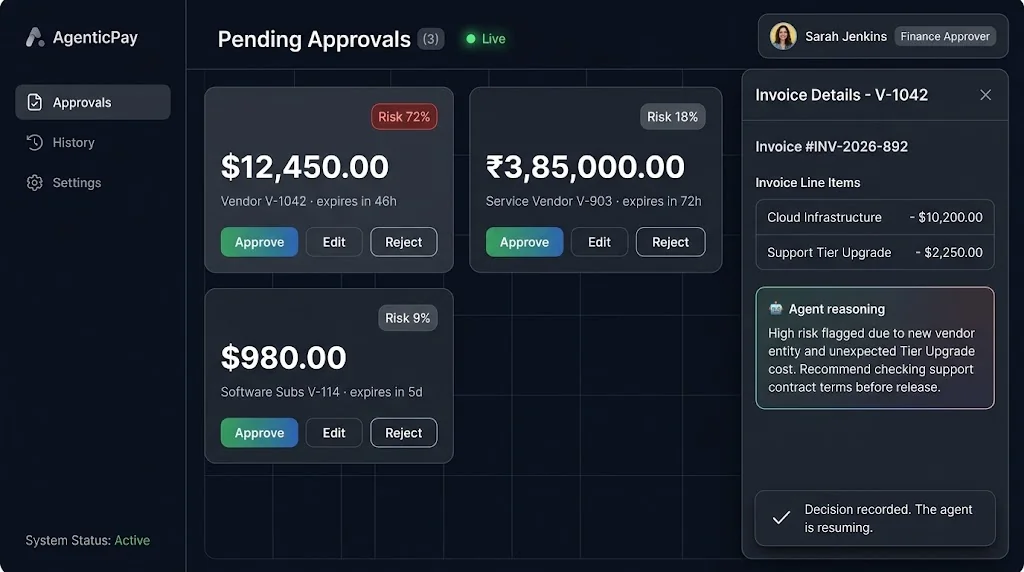
Step 6: The Next.js + shadcn/ui Approval Dashboard
On the frontend, I keep the socket logic in one small hook and render requests with shadcn/ui primitives.
// app/(dashboard)/approvals/use-approvals.ts
"use client";
import { useEffect, useState } from "react";
import { io, type Socket } from "socket.io-client";

export type ApprovalSummary = {
  id: string; version: number; amountMinor: number;
  currency: "USD" | "INR"; vendorId: string; riskScore: number; expiresAt: string;
};

export function useApprovals(token: string, initial: ApprovalSummary[]) {
  const [items, setItems] = useState(initial);

  useEffect(() => {
    const socket: Socket = io(process.env.NEXT_PUBLIC_API_URL!, { auth: { token } });
    socket.on("approval:new", (a: ApprovalSummary) =>
      setItems((prev) => (prev.some((p) => p.id === a.id) ? prev : [a, ...prev]))
    );
    socket.on("approval:resolved", ({ id }: { id: string }) =>
      setItems((prev) => prev.filter((p) => p.id !== id))
    );
    return () => { socket.disconnect(); };
  }, [token]);

  return items;
}
// app/(dashboard)/approvals/approval-card.tsx
"use client";
import { useState } from "react";
import { Card, CardHeader, CardTitle, CardContent, CardFooter } from "@/components/ui/card";
import { Badge } from "@/components/ui/badge";
import { Button } from "@/components/ui/button";
import { toast } from "sonner";
import type { ApprovalSummary } from "./use-approvals";

const fmt = (minor: number, currency: string) =>
  new Intl.NumberFormat(currency === "INR" ? "en-IN" : "en-US", { style: "currency", currency })
    .format(minor / 100);

export function ApprovalCard({ item, decide }: {
  item: ApprovalSummary;
  decide: (id: string, version: number, body: object) => Promise<Response>;
}) {
  const [busy, setBusy] = useState(false);

  async function act(body: object) {
    setBusy(true);
    const res = await decide(item.id, item.version, body);
    setBusy(false);
    if (res.status === 409) toast.warning("Someone else already handled this request.");
    else if (!res.ok) toast.error("Decision failed. Please retry.");
    else toast.success("Decision recorded. The agent is resuming.");
  }

  return (
    <Card>
      <CardHeader className="flex flex-row items-center justify-between">
        <CardTitle className="text-lg">{fmt(item.amountMinor, item.currency)}</CardTitle>
        <Badge variant={item.riskScore > 0.6 ? "destructive" : "secondary"}>
          Risk {(item.riskScore * 100).toFixed(0)}%
        </Badge>
      </CardHeader>
      <CardContent className="text-sm text-muted-foreground">
        Vendor {item.vendorId} · expires {new Date(item.expiresAt).toLocaleString()}
      </CardContent>
      <CardFooter className="gap-2">
        <Button disabled={busy} onClick={() => act({ action: "approve" })}>Approve</Button>
        <Button disabled={busy} variant="outline" onClick={() => act({ action: "reject", reason: "Needs review" })}>
          Reject
        </Button>
      </CardFooter>
    </Card>
  );
}
In a real build, "Edit" opens a shadcn Dialog with a form validated by the same Zod schema the API uses. Sharing that schema from a common package means the UI and server can never disagree about what a valid decision looks like.
Step 7: JWT and OAuth Role-Based Access Control
Authentication answers "who are you?" RBAC answers "are you allowed to move this money?" Here's the split I recommend:
- OAuth / OIDC (Google Workspace, Microsoft Entra ID, or Okta) handles login on the Next.js side, typically through Auth.js.
- After login, the backend issues a short-lived access token (JWT, 10–15 minutes) containing
sub,orgId, androles, signed with an asymmetric key (RS256 or EdDSA). - Roles come from your database, not from whatever the identity provider says, so revoking a role takes effect at the next token refresh.
// src/server/auth/rbac.ts
import type { Request, Response, NextFunction } from "express";
import { verifyAccessToken } from "./jwt";

export function requireRole(...allowed: string[]) {
  return async (req: Request, res: Response, next: NextFunction) => {
    try {
      const token = req.headers.authorization?.replace(/^Bearer /, "");
      if (!token) return res.status(401).end();
      const user = await verifyAccessToken(token); // checks signature, exp, iss, aud
      if (!user.roles.some((r: string) => allowed.includes(r))) return res.status(403).end();
      req.user = user;
      next();
    } catch {
      res.status(401).end();
    }
  };
}
Add one business rule on top of RBAC: separation of duties. The person who created the payout request must never be the one who approves it. Enforce it in the decision UPDATE by joining against the creator ID, not just in the UI.
Step 8: n8n Webhook Notifications
Not every approver lives in your dashboard. n8n is a pragmatic way to route alerts to Slack, Microsoft Teams, email, or WhatsApp without writing a connector for each one.
// src/integrations/n8n.ts
import { createHmac } from "node:crypto";

export async function sendToN8n(event: string, data: unknown) {
  const body = JSON.stringify({ event, data, sentAt: new Date().toISOString() });
  const signature = createHmac("sha256", process.env.N8N_WEBHOOK_SECRET!).update(body).digest("hex");

  await fetch(process.env.N8N_WEBHOOK_URL!, {
    method: "POST",
    headers: { "Content-Type": "application/json", "X-Signature": signature },
    body,
    signal: AbortSignal.timeout(3000),
  }).catch((err) => console.warn("n8n notify failed (non-blocking)", err));
}
In n8n, the workflow is simple: Webhook node → Code node to verify the HMAC → Switch on amount → Slack for routine approvals, Slack + Email + escalation above a threshold. Add a scheduled n8n workflow that pings an internal endpoint to expire overdue requests and escalate them to a manager.
Two rules: notifications are non-blocking (a Slack outage must never stop a workflow), and messages contain a deep link to the dashboard, not approve/reject buttons that bypass your auth.
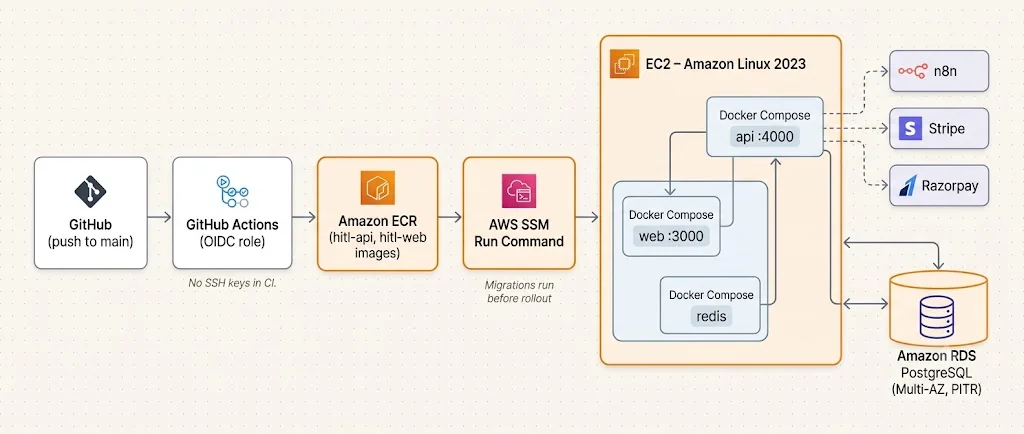
Step 9: Docker Deployment on AWS (Amazon Linux 2023)
A multi-stage Dockerfile keeps the API image lean:
# Dockerfile.api
FROM node:22-alpine AS build
WORKDIR /app
COPY package*.json ./
RUN npm ci
COPY . .
RUN npm run build && npm prune --omit=dev

FROM node:22-alpine
WORKDIR /app
ENV NODE_ENV=production
RUN addgroup -S app && adduser -S app -G app
COPY --from=build /app/node_modules ./node_modules
COPY --from=build /app/dist ./dist
USER app
EXPOSE 4000
HEALTHCHECK CMD wget -qO- http://localhost:4000/healthz || exit 1
CMD ["node", "dist/server/index.js"]
And a Compose file for a single EC2 host (fine for early stages; move to ECS or EKS as you grow):
# docker-compose.prod.yml
services:
  api:
    image: ${ECR_REGISTRY}/hitl-api:${IMAGE_TAG}
    env_file: .env.production
    ports: ["4000:4000"]
    depends_on: [redis]
    restart: unless-stopped
  web:
    image: ${ECR_REGISTRY}/hitl-web:${IMAGE_TAG}
    env_file: .env.production
    ports: ["3000:3000"]
    restart: unless-stopped
  redis:
    image: redis:7-alpine
    restart: unless-stopped
Use Amazon RDS for PostgreSQL for checkpoints rather than a Postgres container on the same box. Your whole durability story depends on that database, so it deserves automated backups, Multi-AZ, and point-in-time recovery.
A minimal GitHub Actions pipeline builds, pushes to ECR, and deploys over SSM (no SSH keys in CI):
# .github/workflows/deploy.yml
name: deploy
on: { push: { branches: [main] } }
permissions: { id-token: write, contents: read }
jobs:
  ship:
    runs-on: ubuntu-latest
    steps:
      - uses: actions/checkout@v4
      - uses: aws-actions/configure-aws-credentials@v4
        with: { role-to-assume: "${{ secrets.AWS_DEPLOY_ROLE }}", aws-region: ap-south-1 }
      - uses: aws-actions/amazon-ecr-login@v2
        id: ecr
      - run: |
          docker build -f Dockerfile.api -t ${{ steps.ecr.outputs.registry }}/hitl-api:${{ github.sha }} .
          docker push ${{ steps.ecr.outputs.registry }}/hitl-api:${{ github.sha }}
      - run: |
          aws ssm send-command --document-name AWS-RunShellScript \
            --targets Key=tag:App,Values=hitl \
            --parameters commands="cd /opt/hitl && IMAGE_TAG=${{ github.sha }} docker compose -f docker-compose.prod.yml up -d"
Run database migrations (including checkpointer.setup()) as a separate one-off step before rolling out new containers, never concurrently from every replica at boot.
Best Practices for Production HITL Agents
- Separate decide from act. Put the approval
interrupt()and the side-effecting action in different nodes so a checkpoint sits between them. - Make interrupt payloads self-contained. The approver needs enough context to decide without reading the agent's internal state: amount, beneficiary, evidence, and the model's reasoning in plain language.
- Version your graphs. If you deploy a new graph shape while threads are paused, those threads resume against new code. Keep node names stable, add new nodes rather than renaming, and record a
graphVersionon each approval request. - Store money as integers. Minor units (cents, paise) everywhere. Floating-point currency is a bug waiting to happen.
- Set expiry and escalation. Every pending approval needs a deadline and a fallback owner.
- Log every decision immutably. Who, when, what they saw, what they chose. Auditors will ask.
- Run resumes in a job queue. The HTTP request records the decision; a worker (BullMQ, SQS, or similar) resumes the graph with retries and backoff.
Common Mistakes (I've Made Most of Them)
- Side effects before
interrupt(). Sending an email or creating a DB row before the pause means it happens again on resume. Move it to a separate node or make it idempotent. - Using
MemorySaverin production. Works perfectly until the first deploy wipes every pending approval. - Reusing thread IDs. Starting a "new" workflow on an old
thread_idcontinues the old state. Generate a fresh ID per business object. - Trusting the client for identity. Approver IDs, org IDs, and roles must come from the verified token, never the request body.
- Resuming without a status check. Without the atomic
UPDATE ... WHERE status = 'PENDING', double clicks become double payouts. - Putting secrets in socket events. Rooms leak more easily than you think, especially when role assignment has a bug.
- Forgetting the Redis adapter. With two API containers, an event emitted on container A never reaches sockets connected to container B.
- Wrapping
interrupt()in try/catch. It works by throwing internally; a broad catch block can swallow the pause and let execution continue unapproved.
🚀 Pro Tips
- Give approvers an "edit" option, not just yes/no. In our deployment, a large share of "rejections" turned into quick amount corrections once editing existed, which saved a full re-run of the agent.
- Show the diff. When an approver edits, display the original LLM proposal next to the edited value in the audit log. It becomes a free labelled dataset for improving your prompts.
- Use
graph.getStateHistory()for incident reviews. Replaying the exact checkpoints of a bad decision is far better than guessing from logs. - Tier your thresholds by risk, not just amount. A small payout to a brand-new vendor account deserves more scrutiny than a large one to a vendor paid monthly for three years.
- Load-test the pause, not just the run. Create thousands of pending threads, restart every container, then resume them all. That's the real durability test.
- Rehearse the kill switch. Have a single flag that forces every workflow to require approval, regardless of thresholds, for the day something looks off.
📌 Key Takeaways
- Durable HITL is a workflow problem, not a chat problem. LangGraph's
interrupt()andCommandgive you the pause/resume primitives; PostgreSQL makes them survive the real world. - Nodes containing
interrupt()replay on resume. Design for idempotency from day one, and use provider idempotency keys for every payout. - Keep a business-level approval table next to LangGraph's checkpoints. It's what powers your dashboard, your locks, your expiry rules, and your audit trail.
- Real-time UX matters: Socket.io rooms scoped by org and role, authenticated on the handshake, make approvals feel instant without exposing sensitive data.
- Security is layered: OAuth for login, short-lived JWTs for API calls, database-sourced roles, and separation of duties enforced on the server.
- Operate it like infrastructure: managed Postgres, Redis for socket fan-out, migrations as a deploy step, and n8n for notifications that never block the core flow.
Conclusion
The shift from "AI chatbot" to "AI system you trust with money" isn't about a smarter model. It's about the boring, durable engineering around the model: saved state, explicit pauses, atomic decisions, idempotent actions, and clear ownership of who is allowed to say yes.
LangGraph gives you a clean way to express "stop here and ask a human." PostgreSQL makes that pause last as long as it needs to. Express, Socket.io, and a Next.js dashboard turn the pause into a fast, pleasant experience for the people who have to make the call. And the surrounding pieces, RBAC, n8n, Docker, and AWS, make it something you can operate on a Monday morning without anxiety.
Start small. Pick one critical action in your product, put an interrupt() in front of it, back it with Postgres, and build the approval card. Once your team sees an agent that politely waits for permission, the conversation about what else it can safely automate gets a lot more productive.
References
- LangGraph.js documentation: Persistence
- LangGraph.js documentation: Human-in-the-loop and interrupt
- @langchain/langgraph-checkpoint-postgres on npm
- Stripe API: Idempotent requests
- Stripe Connect: Transfers
- RazorpayX Payouts API: Idempotency
- Socket.io: Rooms
- Socket.io: Redis adapter
- Next.js documentation
- shadcn/ui components
- Auth.js documentation
- n8n Webhook node
- Amazon Linux 2023 user guide
- Amazon RDS for PostgreSQL
- Docker multi-stage builds