A few years ago I shipped a small mortgage calculator on a side domain. It was nothing special: three inputs, one formula, a chart. Within a few months it was pulling steady organic traffic because it answered one narrow question better than the bloated finance portals ranking above it.
That got me thinking. If one well-built calculator can rank, what happens when you build a system that produces hundreds or thousands of them, each targeting a specific, real search intent? "Concrete volume calculator for circular slabs." "Freelance day rate calculator for UK contractors." "Dog chocolate toxicity calculator by weight." These are low-competition, high-intent queries, and most of them are served badly today.
That's programmatic SEO, and in 2026 it's both more powerful and more dangerous than ever. More powerful because local LLMs make it cheap to generate structured content at scale. More dangerous because Google has gotten very good at spotting and demoting pages that exist only to soak up traffic.
In this guide I'll walk you through the architecture I'd use today to build an AI-assisted utility tool network the right way:
- Frontend: Next.js (App Router), TypeScript, Tailwind, and Shadcn UI
- API: Node.js and Express.js REST service
- AI pipeline: Ollama and LangChain for offline batch generation
- Storage: MongoDB for tool specs, metadata, and content
- Infrastructure: Docker, Nginx reverse proxy, and AWS
We'll cover the concepts, real code, best practices, the mistakes I see most often, and a few hard-earned pro tips.
What Programmatic SEO Actually Means in 2026
Programmatic SEO (pSEO) is the practice of generating many landing pages from a shared template and a structured dataset, where each page targets a distinct long-tail query.
Classic examples you've probably used:
- Travel sites with a page for every "flights from X to Y" pair
- Currency converters with a page for every currency pair
- Integration directories like "Connect App A to App B"
Utility tools are a particularly good fit for pSEO because the page is the product. Someone searching "BMI calculator for kids" doesn't want a 2,000-word essay; they want to type numbers in and get a trustworthy answer. If your page does that well, engagement metrics look great, users return, and the page earns links naturally.
The 2026 reality check
Here's the part most "pSEO goldrush" posts skip. Google's spam policies explicitly call out scaled content abuse: producing many pages primarily to manipulate rankings rather than help users, whether it's done by humans, automation, or AI. The policy doesn't ban automation. It bans uselessness at scale.
So the question you should ask for every page your system generates is simple:
If this page were the only result on Google for this query, would the searcher be happy?
If the answer is yes, you're building a tool network. If the answer is no, you're building a liability. Everything in the architecture below is designed to keep that answer at yes.
The High-Level Architecture
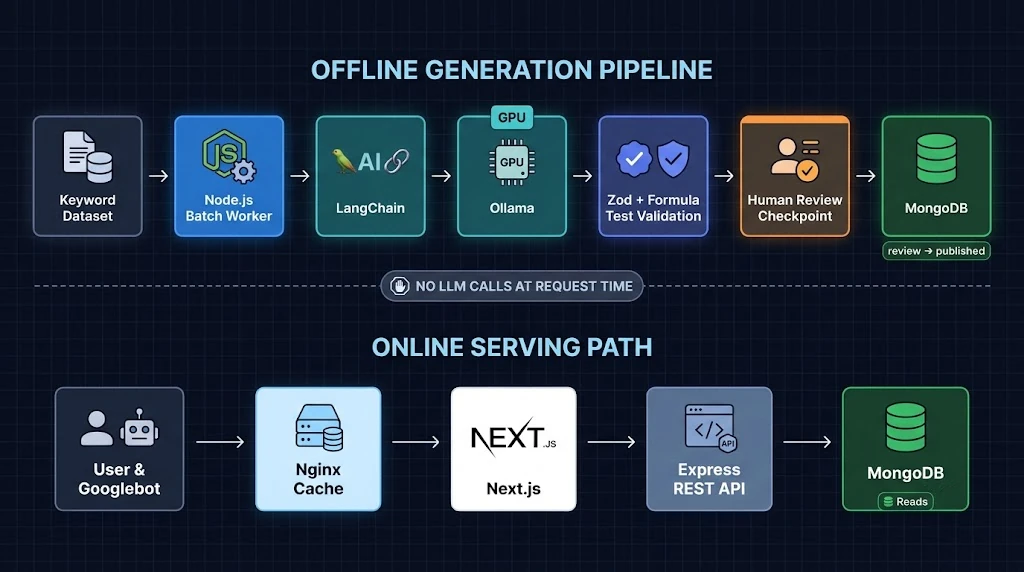
Let's break the system into two independent loops.
Loop 1: The offline generation pipeline
- Keyword research produces a dataset of candidate tools (query, intent, category, search volume).
- A Node.js batch worker reads pending candidates from MongoDB.
- LangChain builds prompts and calls a local model through Ollama.
- The model returns a structured tool spec in JSON: inputs, formula, content blocks, FAQs, and metadata.
- Zod validates the output. A formula test harness checks the math against known values.
- Valid specs are saved with
status: "review". A human (or a second-pass review step) promotes them topublished.
Loop 2: The online serving path
- A user hits
/tools/concrete-slab-volume-calculator. - Nginx serves it from cache or forwards it to Next.js.
- Next.js renders a statically generated (or ISR) page using data from the Express API.
- The calculator runs entirely in the browser using the safe, declarative formula from the spec.
The critical design decision: no LLM call ever happens at request time. AI is part of your build pipeline, not your runtime. That keeps pages fast, costs predictable, and output reviewable.
Step 1: Model the Data in MongoDB
Everything starts with a good schema. Each tool is a document that fully describes how to render and run it.
// api/src/models/Tool.ts
import { Schema, model, InferSchemaType } from "mongoose";

const InputSchema = new Schema(
  {
    key: { type: String, required: true },          // e.g. "length"
    label: { type: String, required: true },        // e.g. "Slab length"
    unit: { type: String },                         // e.g. "m"
    type: { type: String, enum: ["number", "select"], default: "number" },
    min: Number,
    max: Number,
    step: Number,
    defaultValue: Number,
    options: [{ label: String, value: Number }],
  },
  { _id: false }
);

const ToolSchema = new Schema(
  {
    slug: { type: String, required: true, unique: true, index: true },
    category: { type: String, required: true, index: true },
    primaryKeyword: { type: String, required: true },
    title: { type: String, required: true },
    metaTitle: { type: String, required: true, maxlength: 65 },
    metaDescription: { type: String, required: true, maxlength: 160 },
    inputs: { type: [InputSchema], required: true },
    formula: { type: String, required: true },      // safe expression, not JS
    resultLabel: { type: String, required: true },
    resultUnit: String,
    explanationHtml: { type: String, required: true },
    faqs: [{ q: String, a: String }],
    testCases: [{ inputs: Schema.Types.Mixed, expected: Number }],
    relatedSlugs: [String],
    status: {
      type: String,
      enum: ["pending", "review", "published", "rejected"],
      default: "pending",
      index: true,
    },
    modelVersion: String,
    publishedAt: Date,
  },
  { timestamps: true }
);

ToolSchema.index({ category: 1, status: 1 });

export type Tool = InferSchemaType<typeof ToolSchema>;
export const ToolModel = model("Tool", ToolSchema);
A few choices worth calling out:
formulais a string expression, likelength * width * (depth / 100), not executable JavaScript. We'll evaluate it safely later.testCaseslive alongside the tool. They're how we catch hallucinated math before anything goes live.statusgives you a real editorial workflow. Nothing ships just because a model produced it.modelVersionlets you trace which model and prompt generated a page, which is gold when you need to regenerate a batch.
Step 2: Batch Generation with Ollama and LangChain
Now for the fun part. We'll run a local model through Ollama and use LangChain's structured output support to get typed JSON back.
Setting up Ollama
On a GPU box (or a beefy Mac for prototyping):
# Pull an instruction-tuned model that's good at structured output
ollama pull qwen2.5:14b

# Ollama exposes an HTTP API on port 11434 by default
curl http://localhost:11434/api/tags
Pick a model based on your hardware. A 7B–14B model handles structured spec generation well; larger models give better explanatory prose. Benchmark a few on 20 sample tools before committing.
Defining the output contract with Zod
// worker/src/schema.ts
import { z } from "zod";

export const ToolSpecSchema = z.object({
  title: z.string().min(10).max(90),
  metaTitle: z.string().min(20).max(65),
  metaDescription: z.string().min(70).max(160),
  inputs: z
    .array(
      z.object({
        key: z.string().regex(/^[a-zA-Z][a-zA-Z0-9_]*$/),
        label: z.string(),
        unit: z.string().optional(),
        type: z.enum(["number", "select"]).default("number"),
        min: z.number().optional(),
        max: z.number().optional(),
        step: z.number().optional(),
        defaultValue: z.number().optional(),
      })
    )
    .min(1)
    .max(8),
  formula: z.string().min(1).max(300),
  resultLabel: z.string(),
  resultUnit: z.string().optional(),
  explanationHtml: z.string().min(400),
  faqs: z.array(z.object({ q: z.string(), a: z.string() })).min(3).max(6),
  testCases: z
    .array(z.object({ inputs: z.record(z.number()), expected: z.number() }))
    .min(2),
});

export type ToolSpec = z.infer<typeof ToolSpecSchema>;
The generation chain
// worker/src/generate.ts
import { ChatOllama } from "@langchain/ollama";
import { ChatPromptTemplate } from "@langchain/core/prompts";
import { ToolSpecSchema, type ToolSpec } from "./schema";

const llm = new ChatOllama({
  baseUrl: process.env.OLLAMA_URL ?? "http://localhost:11434",
  model: process.env.OLLAMA_MODEL ?? "qwen2.5:14b",
  temperature: 0.2, // low temperature for consistent, factual specs
});

const structuredLlm = llm.withStructuredOutput(ToolSpecSchema, {
  name: "tool_spec",
});

const prompt = ChatPromptTemplate.fromMessages([
  [
    "system",
    `You design small, accurate web calculators.
Rules:
- The formula must be a plain math expression using only the input keys,
  numbers, + - * / ^ ( ), and functions: sqrt, pow, min, max, round, abs, PI.
- Never invent facts. If a constant is needed, state its source in the explanation.
- explanationHtml uses only <h2>, <h3>, <p>, <ul>, <li>, <strong>, <table> tags.
- Write for a practical, non-expert reader. No filler, no keyword stuffing.
- Provide test cases you have verified by hand.`,
  ],
  [
    "human",
    `Create a tool spec for the search query: "{keyword}".
Category: {category}
User intent: {intent}`,
  ],
]);

export const toolChain = prompt.pipe(structuredLlm);

export async function generateSpec(input: {
  keyword: string;
  category: string;
  intent: string;
}): Promise<ToolSpec> {
  return toolChain.invoke(input);
}
Notice the prompt constrains the formula grammar. That's deliberate. You never want a model inventing arbitrary code that runs in your users' browsers.
Validating the math before saving
Schema validation tells you the shape is right. It doesn't tell you the answer is right. For that, we evaluate every test case with a safe parser like mathjs.
// worker/src/verify.ts
import { create, all } from "mathjs";
import type { ToolSpec } from "./schema";

const math = create(all);

// Lock down mathjs: no imports, no function creation, no eval tricks
const limitedEvaluate = math.evaluate.bind(math);
math.import(
  {
    import: () => { throw new Error("Disabled"); },
    createUnit: () => { throw new Error("Disabled"); },
    evaluate: () => { throw new Error("Disabled"); },
    parse: () => { throw new Error("Disabled"); },
    simplify: () => { throw new Error("Disabled"); },
    derivative: () => { throw new Error("Disabled"); },
  },
  { override: true }
);

export function verifySpec(spec: ToolSpec, tolerance = 0.01) {
  const allowedKeys = new Set(spec.inputs.map((i) => i.key));
  const failures: string[] = [];

  for (const tc of spec.testCases) {
    const unknown = Object.keys(tc.inputs).filter((k) => !allowedKeys.has(k));
    if (unknown.length) {
      failures.push(`Unknown inputs in test case: ${unknown.join(", ")}`);
      continue;
    }
    try {
      const result = Number(limitedEvaluate(spec.formula, { ...tc.inputs }));
      const diff = Math.abs(result - tc.expected);
      const relative = tc.expected === 0 ? diff : diff / Math.abs(tc.expected);
      if (!Number.isFinite(result) || relative > tolerance) {
        failures.push(`Expected ${tc.expected}, got ${result}`);
      }
    } catch (err) {
      failures.push(`Formula error: ${(err as Error).message}`);
    }
  }

  return { ok: failures.length === 0, failures };
}
One honest caveat: if the model writes both the formula and the test cases, it can be consistently wrong. For anything health, finance, or safety related, seed a few test cases from a trusted source yourself, and route those categories to human review every time.
The batch worker
// worker/src/run.ts
import mongoose from "mongoose";
import pLimit from "p-limit";
import { ToolModel } from "../../api/src/models/Tool";
import { KeywordModel } from "./models/Keyword";
import { generateSpec } from "./generate";
import { verifySpec } from "./verify";
import { toSlug } from "./slug";

const CONCURRENCY = Number(process.env.WORKER_CONCURRENCY ?? 2);

async function main() {
  await mongoose.connect(process.env.MONGO_URI!);
  const limit = pLimit(CONCURRENCY);

  const batch = await KeywordModel.find({ status: "queued" }).limit(100).lean();
  console.log(`Processing ${batch.length} keywords`);

  await Promise.all(
    batch.map((kw) =>
      limit(async () => {
        try {
          const spec = await generateSpec({
            keyword: kw.keyword,
            category: kw.category,
            intent: kw.intent,
          });
          const check = verifySpec(spec);

          await ToolModel.updateOne(
            { slug: toSlug(kw.keyword) },
            {
              $set: {
                ...spec,
                slug: toSlug(kw.keyword),
                category: kw.category,
                primaryKeyword: kw.keyword,
                status: check.ok ? "review" : "rejected",
                modelVersion: process.env.OLLAMA_MODEL,
              },
            },
            { upsert: true }
          );

          await KeywordModel.updateOne(
            { _id: kw._id },
            { $set: { status: check.ok ? "generated" : "failed", failures: check.failures } }
          );
        } catch (err) {
          console.error(`Failed: ${kw.keyword}`, err);
          await KeywordModel.updateOne({ _id: kw._id }, { $set: { status: "failed" } });
        }
      })
    )
  );

  await mongoose.disconnect();
}

main();
Keep concurrency low. A local GPU running one model doesn't benefit from 50 parallel requests; it just queues them and burns memory. Two to four concurrent requests is usually the sweet spot, and Ollama's own OLLAMA_NUM_PARALLEL setting controls how many it actually serves at once.
Step 3: The Express.js REST API
The API is the contract between your data and everything that consumes it: the Next.js frontend, an admin review dashboard, and the worker.
// api/src/server.ts
import express from "express";
import helmet from "helmet";
import compression from "compression";
import mongoose from "mongoose";
import { ToolModel } from "./models/Tool";

const app = express();
app.use(helmet());
app.use(compression());
app.use(express.json({ limit: "100kb" }));

// Public: list published slugs for static generation and sitemaps
app.get("/v1/tools/slugs", async (_req, res) => {
  const tools = await ToolModel.find({ status: "published" })
    .select("slug category updatedAt -_id")
    .lean();
  res.set("Cache-Control", "public, max-age=300");
  res.json(tools);
});

// Public: fetch a single published tool
app.get("/v1/tools/:slug", async (req, res) => {
  const tool = await ToolModel.findOne({
    slug: req.params.slug,
    status: "published",
  })
    .select("-testCases -modelVersion -__v")
    .lean();

  if (!tool) return res.status(404).json({ error: "Not found" });
  res.set("Cache-Control", "public, max-age=300, stale-while-revalidate=86400");
  res.json(tool);
});

// Health check for load balancers and Docker
app.get("/healthz", (_req, res) => res.json({ ok: true }));

const port = Number(process.env.PORT ?? 4000);
mongoose.connect(process.env.MONGO_URI!).then(() => {
  app.listen(port, () => console.log(`API listening on ${port}`));
});
Keep the public API read-only and only expose published documents. Admin routes for approving or rejecting tools should live behind authentication, ideally on a separate router that isn't reachable from the public internet at all.
Step 4: The Next.js Frontend
This is where thousands of documents become thousands of fast, indexable pages.
Dynamic routes with static generation
// web/app/tools/[slug]/page.tsx
import { notFound } from "next/navigation";
import type { Metadata } from "next";
import { getTool, getAllSlugs } from "@/lib/api";
import { Calculator } from "@/components/calculator";
import { JsonLd } from "@/components/json-ld";

export const revalidate = 86400; // ISR: refresh at most once a day
export const dynamicParams = true; // new tools render on first request

export async function generateStaticParams() {
  // Pre-render your highest-value tools at build time
  const slugs = await getAllSlugs({ limit: 500, sort: "priority" });
  return slugs.map(({ slug }) => ({ slug }));
}

type Props = { params: Promise<{ slug: string }> };

export async function generateMetadata({ params }: Props): Promise<Metadata> {
  const { slug } = await params;
  const tool = await getTool(slug);
  if (!tool) return {};

  const url = `https://example.com/tools/${tool.slug}`;
  return {
    title: tool.metaTitle,
    description: tool.metaDescription,
    alternates: { canonical: url },
    openGraph: {
      title: tool.metaTitle,
      description: tool.metaDescription,
      url,
      type: "website",
      images: [`/og/${tool.slug}.png`],
    },
  };
}

export default async function ToolPage({ params }: Props) {
  const { slug } = await params;
  const tool = await getTool(slug);
  if (!tool) notFound();

  return (
    <main className="mx-auto max-w-3xl px-4 py-10">
      <h1 className="text-3xl font-bold tracking-tight">{tool.title}</h1>

      <Calculator
        inputs={tool.inputs}
        formula={tool.formula}
        resultLabel={tool.resultLabel}
        resultUnit={tool.resultUnit}
      />

      <article
        className="prose prose-neutral mt-10 dark:prose-invert"
        dangerouslySetInnerHTML={{ __html: tool.explanationHtml }}
      />

      <JsonLd tool={tool} />
    </main>
  );
}
Two important notes:
- Sanitize
explanationHtmlbefore storing it. Run it through something likesanitize-htmlin the worker with an allowlist of tags. Never trust model output as safe HTML. - Pre-render your top pages only. Building 10,000 pages on every deploy is slow and pointless. Pre-render the top few hundred and let ISR handle the long tail on first request.
The calculator component with Shadcn UI
// web/components/calculator.tsx
"use client";

import { useMemo, useState } from "react";
import { evaluate } from "mathjs";
import { Card, CardContent, CardHeader, CardTitle } from "@/components/ui/card";
import { Input } from "@/components/ui/input";
import { Label } from "@/components/ui/label";

type ToolInput = {
  key: string;
  label: string;
  unit?: string;
  min?: number;
  max?: number;
  step?: number;
  defaultValue?: number;
};

type Props = {
  inputs: ToolInput[];
  formula: string;
  resultLabel: string;
  resultUnit?: string;
};

export function Calculator({ inputs, formula, resultLabel, resultUnit }: Props) {
  const [values, setValues] = useState<Record<string, number>>(() =>
    Object.fromEntries(inputs.map((i) => [i.key, i.defaultValue ?? 0]))
  );

  const result = useMemo(() => {
    try {
      const r = Number(evaluate(formula, { ...values }));
      return Number.isFinite(r) ? r : null;
    } catch {
      return null;
    }
  }, [formula, values]);

  return (
    <Card className="mt-6">
      <CardHeader>
        <CardTitle className="text-lg">Enter your values</CardTitle>
      </CardHeader>
      <CardContent className="grid gap-4 sm:grid-cols-2">
        {inputs.map((input) => (
          <div key={input.key} className="grid gap-2">
            <Label htmlFor={input.key}>
              {input.label} {input.unit ? `(${input.unit})` : ""}
            </Label>
            <Input
              id={input.key}
              type="number"
              inputMode="decimal"
              min={input.min}
              max={input.max}
              step={input.step ?? "any"}
              value={values[input.key]}
              onChange={(e) =>
                setValues((v) => ({ ...v, [input.key]: Number(e.target.value) }))
              }
            />
          </div>
        ))}
        <div
          className="rounded-lg bg-muted p-4 sm:col-span-2"
          aria-live="polite"
        >
          <p className="text-sm text-muted-foreground">{resultLabel}</p>
          <p className="text-3xl font-semibold">
            {result === null ? "—" : result.toLocaleString(undefined, { maximumFractionDigits: 4 })}
            {resultUnit ? ` ${resultUnit}` : ""}
          </p>
        </div>
      </CardContent>
    </Card>
  );
}
The aria-live="polite" region means screen readers announce the result as it updates. Accessibility is not just the right thing to do; it's also a quality signal for users, and good tools get bookmarked and shared.
If bundle size matters (and on ad-monetized pages it really does), import only the parts of mathjs you need, or swap in a lighter parser like expr-eval.
Structured data that actually matches the page
// web/components/json-ld.tsx
export function JsonLd({ tool }: { tool: any }) {
  const data = [
    {
      "@context": "https://schema.org",
      "@type": "WebApplication",
      name: tool.title,
      url: `https://example.com/tools/${tool.slug}`,
      applicationCategory: "UtilitiesApplication",
      operatingSystem: "Any",
      offers: { "@type": "Offer", price: "0", priceCurrency: "USD" },
    },
    {
      "@context": "https://schema.org",
      "@type": "FAQPage",
      mainEntity: tool.faqs.map((f: { q: string; a: string }) => ({
        "@type": "Question",
        name: f.q,
        acceptedAnswer: { "@type": "Answer", text: f.a },
      })),
    },
  ];

  return (
    <script
      type="application/ld+json"
      dangerouslySetInnerHTML={{ __html: JSON.stringify(data) }}
    />
  );
}
Only mark up FAQs that are visibly rendered on the page. Hidden FAQ schema is a fast way to lose rich result eligibility.
Sitemaps at scale
Search engines cap a single sitemap at 50,000 URLs, so split by category from day one.
// web/app/sitemap.ts
import type { MetadataRoute } from "next";
import { getAllSlugs } from "@/lib/api";

export default async function sitemap(): Promise<MetadataRoute.Sitemap> {
  const tools = await getAllSlugs({ limit: 45000 });
  return tools.map((t) => ({
    url: `https://example.com/tools/${t.slug}`,
    lastModified: t.updatedAt,
    changeFrequency: "monthly",
    priority: 0.7,
  }));
}
For larger networks, use Next.js's generateSitemaps to emit one sitemap per category and reference them from a sitemap index.
Step 5: Internal Linking and Topical Clusters
A thousand orphan pages is a thousand pages Google may never find or trust. Internal linking turns your tool set into a topical cluster.

A practical structure:
- Category hubs like
/tools/constructionwith a curated intro and a list of every tool in the category - Related tools on each page, computed by category plus shared input types (e.g. both use area)
- Breadcrumbs with
BreadcrumbListschema - Contextual links inside explanations ("Need to convert cubic meters to bags? Use our concrete bag calculator.")
You can compute relatedSlugs in the worker using simple heuristics, or embed each tool's title and description with a local embedding model through Ollama and pick nearest neighbors with MongoDB Atlas Vector Search. The embedding approach produces noticeably more natural "related tools" lists.
Step 6: Docker, Nginx, and AWS
Docker Compose for the whole stack
# docker-compose.yml
services:
  web:
    build: ./web
    environment:
      - API_URL=http://api:4000
    depends_on: [api]
    restart: unless-stopped

  api:
    build: ./api
    environment:
      - MONGO_URI=${MONGO_URI}
      - PORT=4000
    healthcheck:
      test: ["CMD", "wget", "-qO-", "http://localhost:4000/healthz"]
      interval: 30s
      retries: 3
    restart: unless-stopped

  nginx:
    image: nginx:1.27-alpine
    ports:
      - "80:80"
      - "443:443"
    volumes:
      - ./nginx/nginx.conf:/etc/nginx/nginx.conf:ro
      - ./nginx/certs:/etc/nginx/certs:ro
      - nginx_cache:/var/cache/nginx
    depends_on: [web]
    restart: unless-stopped

volumes:
  nginx_cache:
Notice there's no Ollama container here. The generation pipeline runs on a separate GPU machine (or your workstation) and only writes to MongoDB. Your production web servers stay small and cheap.
For the Next.js image, use output: "standalone" in next.config.ts and a multi-stage Dockerfile so the final image contains only the compiled server, not your entire node_modules.
Nginx as reverse proxy and cache
# nginx/nginx.conf
events {}

http {
  proxy_cache_path /var/cache/nginx levels=1:2 keys_zone=pages:50m
                   max_size=2g inactive=7d use_temp_path=off;

  upstream nextjs { server web:3000; keepalive 32; }

  server {
    listen 80;
    server_name example.com www.example.com;
    return 301 https://example.com$request_uri;
  }

  server {
    listen 443 ssl;
    http2 on;
    server_name example.com;

    ssl_certificate     /etc/nginx/certs/fullchain.pem;
    ssl_certificate_key /etc/nginx/certs/privkey.pem;

    gzip on;
    gzip_types text/css application/javascript application/json image/svg+xml;

    location /_next/static/ {
      proxy_pass http://nextjs;
      expires 1y;
      add_header Cache-Control "public, immutable";
    }

    location / {
      proxy_pass http://nextjs;
      proxy_http_version 1.1;
      proxy_set_header Connection "";
      proxy_set_header Host $host;
      proxy_set_header X-Forwarded-For $proxy_add_x_forwarded_for;
      proxy_set_header X-Forwarded-Proto $scheme;

      proxy_cache pages;
      proxy_cache_valid 200 10m;
      proxy_cache_use_stale error timeout updating http_500 http_502 http_503;
      proxy_cache_background_update on;
      add_header X-Cache-Status $upstream_cache_status;
    }
  }
}
proxy_cache_use_stale is the unsung hero here. If your Next.js container restarts during a deploy, Nginx keeps serving cached pages instead of 502 errors, which is exactly what you want when Googlebot happens to crawl during a release.
A sensible AWS layout
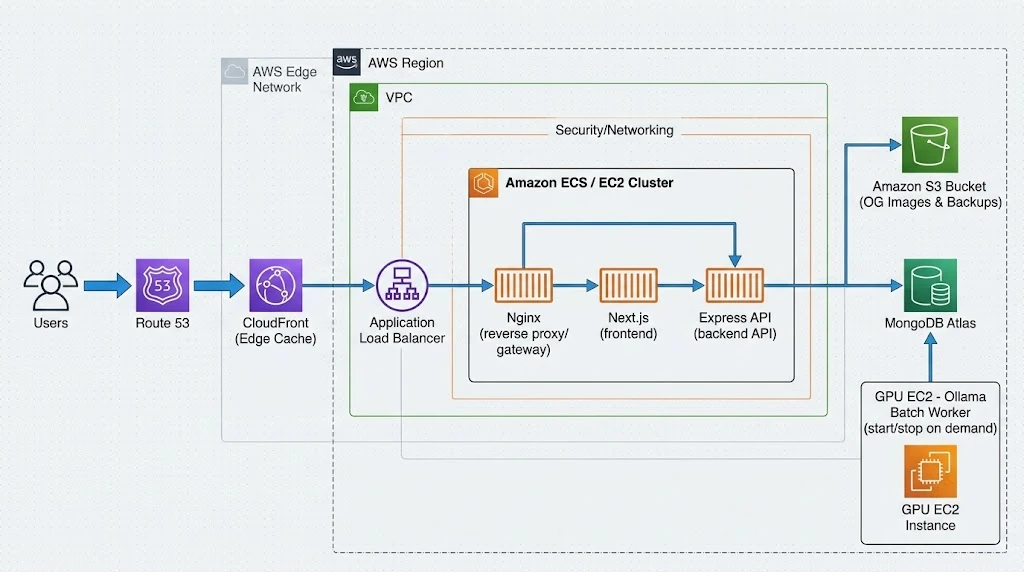
For most tool networks, this is plenty:
- Route 53 for DNS
- CloudFront in front of everything for global edge caching and TLS
- ECS on Fargate or EC2 running the
web,api, andnginxcontainers - MongoDB Atlas deployed in the same AWS region to keep latency low
- A GPU EC2 instance (G-family) for Ollama, started only when you run a batch and stopped afterward
- S3 for generated OG images and backups
The GPU instance is your biggest potential cost. Script it so a batch job starts the instance, runs the worker, and shuts it down. Leaving a GPU running idle for a weekend can cost more than a month of serving traffic.
Real-World Example: A Construction Calculator Network
Let's make this concrete. Say you target the home improvement niche.
- Keyword research surfaces 1,200 long-tail queries: "concrete for 10x10 slab," "how many bags of mortar per brick," "deck stain coverage calculator."
- You cluster them. Many queries share one tool ("concrete for 10x10 slab" and "concrete for 12x12 slab" are the same calculator with different defaults). After clustering, you have about 180 genuinely distinct tools.
- Your worker generates 180 specs. About 150 pass validation. You review all of them, fix 20 by hand, reject 10.
- You launch 140 tools across 8 category hubs.
- Six weeks later, Search Console shows 120 indexed and steady impressions. You check which tools users actually interact with, then generate the next batch from adjacent queries in the winning categories.
The key insight: clustering reduced 1,200 keywords to 180 pages. Making a separate page for "10x10" and "12x12" would have been textbook doorway pages. A single, excellent concrete calculator with sensible defaults ranks for both.
Best Practices
- Cluster intent before you generate. One great page per intent beats ten near-duplicates.
- Keep AI out of the request path. Generate offline, review, then publish static data.
- Validate everything. Zod for shape, test cases for math, an HTML sanitizer for markup.
- Add something a model can't. Original charts, real-world examples, unit conversions, comparison tables, or data you collected. This is your moat.
- Write unique metadata per page. Titles and descriptions should reflect the specific tool, not a template with one swapped word.
- Protect Core Web Vitals. Reserve space for ad slots to avoid layout shift, lazy-load below-the-fold ads, and keep client JavaScript minimal.
- Launch in batches. Grow based on indexing and engagement data, not on how many pages your GPU can spit out.
- Version your prompts and models. When you improve a prompt, you'll want to regenerate only the pages produced by the old one.
- Show authorship and methodology. A short "How we calculate this" section with sources builds trust with both users and reviewers.
Common Mistakes
1. Publishing straight from the model. The fastest way to ship wrong formulas and confidently incorrect health or finance advice. Always gate on validation and review.
2. Running eval() on generated formulas.
This turns your content pipeline into a code injection vector. Use a constrained expression parser.
3. Creating doorway pages. "Calculator for X in City Y" for 3,000 cities, where the output never changes, is exactly what scaled content abuse policies target.
4. Calling the LLM at request time. Slow pages, unpredictable bills, inconsistent content between crawls. Pre-generate.
5. Ignoring crawl budget. Faceted URLs, query parameters, and infinite pagination can waste crawls. Use canonical URLs and keep URL structure flat and clean.
6. Building 10,000 pages on every deploy. Builds take forever and fail randomly. Pre-render the head, let ISR handle the tail.
7. Ad overload. Stuffing five ad units above the calculator kills engagement and Core Web Vitals. One well-placed unit near the result often earns more than five that push the tool off screen.
8. Leaving the GPU running. Batch jobs should start and stop their own infrastructure.
🚀 Pro Tips
- Use a two-model review loop. Generate with one model, then ask a different local model to critique the spec ("Is this formula correct for the stated query? List any errors."). Flag disagreements for human review. It catches a surprising number of subtle mistakes.
- Seed defaults from the query. If the keyword is "concrete for 10x10 slab," prefill the inputs with 10 and 10. The user gets an instant answer, which is a great engagement signal.
- Generate OG images at build time. Use Next.js's
ImageResponseto render a branded social card per tool. Shared links with a proper preview get clicked far more often. - Track "result viewed" events. Pageviews tell you nothing about a tool. Log when users actually change an input and see a result; that's your true quality metric for deciding what to scale.
- Embed for related tools. Use a local embedding model via Ollama and MongoDB vector search to power related-tool links. It reads like an editor curated it.
- Prune ruthlessly. Every quarter, review pages with zero impressions after six months. Improve them, merge them, or remove them with a 301 redirect to the closest relevant tool. A smaller, stronger site outranks a bloated one.
- Store the prompt hash with each document. When Google rolls out an update and a batch drops, you can trace exactly which prompt and model produced it.
📌 Key Takeaways
- Programmatic SEO is about scaling usefulness, not scaling pages. Every generated page must genuinely solve the searcher's problem.
- Ollama plus LangChain makes large batch generation affordable and private, but AI belongs in your build pipeline, never in your request path.
- A declarative tool spec in MongoDB, validated with Zod and tested against known values, is far safer than letting a model write executable code.
- Next.js App Router features like
generateStaticParams, ISR, andgenerateMetadataturn one template into thousands of fast, unique, indexable pages. - Nginx caching, Docker, and a lean AWS layout keep serving costs low and uptime high, which protects your rankings and ad revenue.
- Grow in measured batches, driven by indexing and engagement data from Search Console and your own analytics.
Conclusion
The tooling for programmatic SEO has never been better. A single developer with a GPU, a Next.js template, and a well-designed MongoDB schema can now produce what used to take a content team and a year of work.
But the bar for what ranks has gone up just as fast. The networks that win in 2026 aren't the ones with the most pages. They're the ones where each page is a small, sharp, trustworthy tool that someone would happily bookmark.
So treat the LLM as a very fast junior developer: great at drafting, unreliable without review. Build validation into the pipeline, keep the runtime simple and static, cluster intent before you generate, and let real user behavior tell you where to grow next.
Start with fifty great tools. Measure. Then scale what works. That's how a side project becomes an organic traffic engine that lasts beyond the next algorithm update.
References
- Google Search Central: Spam policies for Google web search (scaled content abuse)
- Google Search Central: Creating helpful, reliable, people-first content
- Google Search Central: Build and submit a sitemap
- Next.js Documentation: generateStaticParams
- Next.js Documentation: generateMetadata
- Next.js Documentation: sitemap.xml
- Ollama Documentation and API reference
- LangChain.js: Structured output
- Shadcn UI Documentation
- Mongoose Documentation
- MongoDB Atlas Vector Search
- Zod Documentation
- math.js: Security considerations
- Nginx: ngx_http_proxy_module
- Docker Compose Documentation
- Schema.org: WebApplication