Let me start with a confession. The first "production" RAG system I shipped looked brilliant in the demo and fell apart in week two.
A user from the finance team asked a simple-sounding question: "Which vendors that supply the Berlin plant are also covered by the contract Legal flagged in March?" The vector search returned five beautifully relevant chunks about Berlin, five about vendor contracts, and nothing that actually connected them. The model did what models do when they lack the connecting fact. It improvised. Confidently.
That question is a multi-hop question. The answer lives in the relationships between facts, not in any single paragraph. And that is exactly the class of question that pushed many of us toward GraphRAG — Graph Retrieval-Augmented Generation.
In this guide, I will walk you through a complete, production-shaped GraphRAG system that I would be comfortable putting in front of an enterprise customer in 2026:
- Python + LangChain to extract entities and relationships from documents
- PostgreSQL + pgvector to store both the knowledge graph and its embeddings
- Node.js + Express.js to serve grounded answers through a secure REST API
- Next.js + TypeScript + Redux Toolkit + Shadcn UI for a clean, responsive frontend
- JWT + OAuth for authentication, and Docker to tie it all together
This is not a toy. It is a blueprint. Grab a coffee.
Why Vector Search Alone Hits a Wall
Classic RAG works like this: chunk your documents, embed each chunk, store the vectors, and at query time fetch the top-k chunks closest to the question's embedding. It is simple, and for "find me the paragraph about X" questions, it is fantastic.
The trouble starts when questions require reasoning across documents:
- Multi-hop questions: "Who manages the team that owns the service that caused last week's outage?"
- Aggregation questions: "Which suppliers appear in more than three risk reports?"
- Disambiguation: "Apollo" the project, "Apollo" the vendor, and "Apollo" the internal GraphQL gateway are three very different things.
- Global questions: "What are the main themes across all our incident postmortems?"
Vector similarity measures how alike two pieces of text sound. It does not know that "Jane Ortiz" in one memo and "J. Ortiz, VP Platform" in another are the same person, or that she manages a team that owns a service. That knowledge is structural. It lives in a graph.
What GraphRAG Actually Is
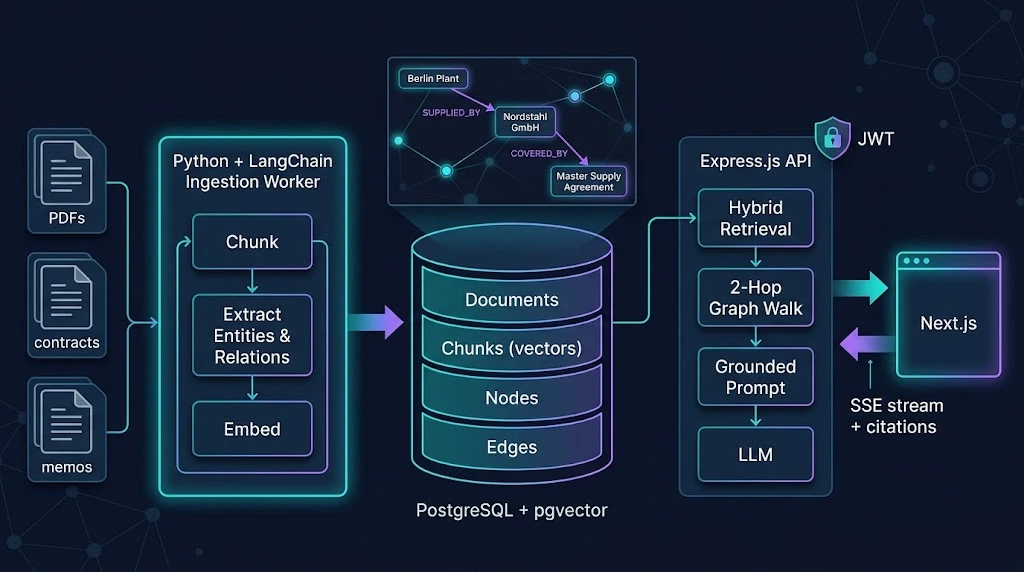
GraphRAG adds an explicit knowledge layer between your raw documents and your LLM. Instead of only storing chunks, you also store:
- Entities (nodes): people, teams, products, vendors, contracts, locations.
- Relationships (edges):
MANAGES,OWNS,SUPPLIES,COVERED_BY,LOCATED_IN. - Provenance: which chunk each entity and edge was extracted from.
- Embeddings: for chunks and for entity descriptions, so you can still enter the graph through semantic search.
At query time, the retrieval flow becomes:
- Embed the question and find the most relevant entities and chunks.
- Use those entities as seed nodes and expand one or two hops across the graph.
- Collect the facts (triples) and their source chunks.
- Rank, trim, and hand a compact, structured context to the LLM.
- Require the model to cite the facts it used.
A real-world example
Imagine an internal knowledge assistant at a manufacturing company. The documents include supplier contracts, plant reports, and legal memos. After extraction, a tiny slice of the graph might look like this:
(Berlin Plant) -[SUPPLIED_BY]-> (Nordstahl GmbH)
(Berlin Plant) -[SUPPLIED_BY]-> (Kessler Polymers)
(Nordstahl GmbH) -[COVERED_BY]-> (Master Supply Agreement 2024)
(Legal Memo 2026-03) -[FLAGS]-> (Master Supply Agreement 2024)
Now the finance question from my intro becomes a two-hop traversal with a filter. No guessing. The model receives the exact facts, plus links back to the source documents, and its job shrinks from "invent a plausible answer" to "phrase the verified answer clearly." That is the whole game.
The Architecture at a Glance
Here is the system we will build, split into clear responsibilities:
| Layer | Technology | Responsibility |
|---|---|---|
| Ingestion worker | Python, LangChain | Chunk, extract entities and relations, embed, upsert |
| Storage | PostgreSQL 17, pgvector | Chunks, nodes, edges, embeddings, access control |
| API | Node.js, Express.js, TypeScript | Auth, retrieval, graph expansion, LLM call, streaming |
| Frontend | Next.js, Redux Toolkit, Shadcn UI | Chat UI, citations panel, auth flow |
| Auth | OAuth 2.0 / OIDC, JWT | Sign-in, short-lived access tokens, scopes |
| Runtime | Docker, Docker Compose | Reproducible local and production environments |
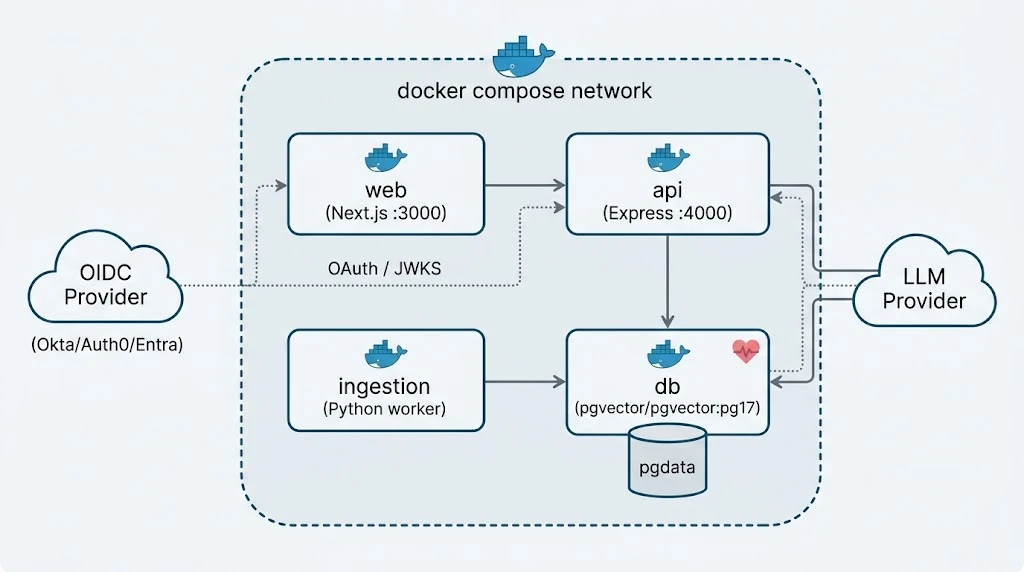
The single most important decision here is separating ingestion from serving. Extraction is slow, expensive, and batch-friendly. Serving is latency-sensitive and must never be blocked by a 40-page PDF someone just uploaded.
Step 1: Designing the Graph Schema in PostgreSQL
A lot of teams assume GraphRAG requires a dedicated graph database. For most enterprise workloads, it does not. PostgreSQL with pgvector gives you transactions, row-level security, mature backups, and vectors in one place — and your ops team already knows how to run it.
-- db/schema.sql
CREATE EXTENSION IF NOT EXISTS vector;
CREATE EXTENSION IF NOT EXISTS pg_trgm;

CREATE TABLE documents (
  id           UUID PRIMARY KEY DEFAULT gen_random_uuid(),
  title        TEXT NOT NULL,
  source_uri   TEXT,
  tenant_id    UUID NOT NULL,
  acl_groups   TEXT[] NOT NULL DEFAULT '{}',
  created_at   TIMESTAMPTZ NOT NULL DEFAULT now()
);

CREATE TABLE chunks (
  id           UUID PRIMARY KEY DEFAULT gen_random_uuid(),
  document_id  UUID NOT NULL REFERENCES documents(id) ON DELETE CASCADE,
  content      TEXT NOT NULL,
  embedding    vector(1536) NOT NULL,
  token_count  INT NOT NULL
);

CREATE TABLE nodes (
  id           UUID PRIMARY KEY DEFAULT gen_random_uuid(),
  tenant_id    UUID NOT NULL,
  label        TEXT NOT NULL,          -- e.g. 'Vendor', 'Person', 'Contract'
  name         TEXT NOT NULL,          -- canonical name
  description  TEXT,
  embedding    vector(1536),
  UNIQUE (tenant_id, label, name)
);

CREATE TABLE edges (
  id           UUID PRIMARY KEY DEFAULT gen_random_uuid(),
  source_id    UUID NOT NULL REFERENCES nodes(id) ON DELETE CASCADE,
  target_id    UUID NOT NULL REFERENCES nodes(id) ON DELETE CASCADE,
  relation     TEXT NOT NULL,          -- e.g. 'SUPPLIED_BY'
  weight       REAL NOT NULL DEFAULT 1.0,
  chunk_id     UUID REFERENCES chunks(id) ON DELETE SET NULL,
  UNIQUE (source_id, target_id, relation)
);

-- Provenance: which chunks mention which nodes
CREATE TABLE node_mentions (
  node_id   UUID REFERENCES nodes(id) ON DELETE CASCADE,
  chunk_id  UUID REFERENCES chunks(id) ON DELETE CASCADE,
  PRIMARY KEY (node_id, chunk_id)
);

-- Indexes that actually matter
CREATE INDEX chunks_embedding_hnsw ON chunks USING hnsw (embedding vector_cosine_ops);
CREATE INDEX nodes_embedding_hnsw  ON nodes  USING hnsw (embedding vector_cosine_ops);
CREATE INDEX nodes_name_trgm       ON nodes  USING gin (name gin_trgm_ops);
CREATE INDEX edges_source_idx      ON edges (source_id);
CREATE INDEX edges_target_idx      ON edges (target_id);
A few deliberate choices worth calling out:
UNIQUE (tenant_id, label, name)gives us idempotent upserts and a natural place for entity resolution.chunk_idon edges means every relationship can be traced back to the sentence that produced it. This is what makes citations honest.- HNSW indexes on both chunks and nodes let us enter the graph semantically.
pg_trgmhelps with fuzzy entity matching when users type "Nordsthal" instead of "Nordstahl".
Step 2: Extracting Entities and Relationships with LangChain
The ingestion worker is where the graph is born. LangChain's LLMGraphTransformer turns text into structured graph documents. The key to quality is constraining the schema — never let the model invent relation types freely, or you will end up with SUPPLIES, SUPPLIER_OF, PROVIDES_MATERIALS_TO, and IS_A_VENDOR_FOR all meaning the same thing.
# ingestion/extract.py
from langchain_openai import ChatOpenAI, OpenAIEmbeddings
from langchain_experimental.graph_transformers import LLMGraphTransformer
from langchain_text_splitters import RecursiveCharacterTextSplitter
from langchain_core.documents import Document

ALLOWED_NODES = ["Person", "Team", "Vendor", "Plant", "Contract", "Product", "Memo"]
ALLOWED_RELATIONSHIPS = [
    ("Plant", "SUPPLIED_BY", "Vendor"),
    ("Vendor", "COVERED_BY", "Contract"),
    ("Memo", "FLAGS", "Contract"),
    ("Person", "MANAGES", "Team"),
    ("Team", "OWNS", "Product"),
]

llm = ChatOpenAI(model="gpt-4.1-mini", temperature=0)
embeddings = OpenAIEmbeddings(model="text-embedding-3-small")

transformer = LLMGraphTransformer(
    llm=llm,
    allowed_nodes=ALLOWED_NODES,
    allowed_relationships=ALLOWED_RELATIONSHIPS,
    node_properties=["description"],
    strict_mode=True,
)

splitter = RecursiveCharacterTextSplitter(chunk_size=1200, chunk_overlap=150)


def extract(doc_text: str, metadata: dict):
    chunks = splitter.split_documents([Document(page_content=doc_text, metadata=metadata)])
    graph_docs = transformer.convert_to_graph_documents(chunks)
    return chunks, graph_docs
Model names change fast. Treat the ones above as placeholders and pin whatever your organization has approved. The pattern matters more than the model.
Entity resolution: the step everyone skips
Extraction alone gives you duplicates. "Nordstahl GmbH", "Nordstahl", and "NORDSTAHL" will become three nodes unless you resolve them. A pragmatic approach that works well in practice:
# ingestion/resolve.py
import re
from rapidfuzz import fuzz

SUFFIXES = r"\b(gmbh|inc|ltd|llc|corp|ag|plc)\.?$"

def canonicalize(name: str) -> str:
    cleaned = re.sub(SUFFIXES, "", name.strip().lower()).strip(" ,.")
    return re.sub(r"\s+", " ", cleaned)

def resolve(name: str, label: str, existing: dict[str, str], threshold: int = 92) -> str:
    """Return the canonical name an entity should merge into."""
    key = canonicalize(name)
    for canon in existing.get(label, []):
        if fuzz.token_sort_ratio(key, canonicalize(canon)) >= threshold:
            return canon
    existing.setdefault(label, []).append(name)
    return name
For high-value entities (customers, vendors, employees), go further: match against your system of record (CRM, HRIS, ERP) and use its ID as the canonical key. String matching gets you 80% of the way; authoritative IDs get you the rest.
Writing to PostgreSQL idempotently
# ingestion/store.py
import psycopg
from pgvector.psycopg import register_vector

UPSERT_NODE = """
INSERT INTO nodes (tenant_id, label, name, description, embedding)
VALUES (%s, %s, %s, %s, %s)
ON CONFLICT (tenant_id, label, name)
DO UPDATE SET description = COALESCE(EXCLUDED.description, nodes.description)
RETURNING id;
"""

UPSERT_EDGE = """
INSERT INTO edges (source_id, target_id, relation, chunk_id)
VALUES (%s, %s, %s, %s)
ON CONFLICT (source_id, target_id, relation)
DO UPDATE SET weight = edges.weight + 1
RETURNING id;
"""

def store_graph(conn, tenant_id, chunk_ids, graph_docs, embed):
    register_vector(conn)
    with conn.transaction():
        for chunk_id, gdoc in zip(chunk_ids, graph_docs):
            node_ids = {}
            for node in gdoc.nodes:
                desc = node.properties.get("description", "")
                vec = embed.embed_query(f"{node.type}: {node.id}. {desc}")
                node_id = conn.execute(
                    UPSERT_NODE, (tenant_id, node.type, node.id, desc, vec)
                ).fetchone()[0]
                node_ids[(node.type, node.id)] = node_id
                conn.execute(
                    "INSERT INTO node_mentions VALUES (%s, %s) ON CONFLICT DO NOTHING",
                    (node_id, chunk_id),
                )
            for rel in gdoc.relationships:
                src = node_ids[(rel.source.type, rel.source.id)]
                tgt = node_ids[(rel.target.type, rel.target.id)]
                conn.execute(UPSERT_EDGE, (src, tgt, rel.type, chunk_id))
Notice how repeated evidence increases edge weight. A relationship mentioned in twelve documents is more trustworthy than one mentioned once, and we will use that during ranking.
Step 3: Graph-Aware Retrieval in SQL
This is the heart of GraphRAG. We combine semantic seeding with a bounded graph walk, all in one round trip to PostgreSQL.
-- db/retrieve.sql  ($1 = query embedding, $2 = tenant_id, $3 = user groups)
WITH RECURSIVE seeds AS (
  SELECT n.id, 1 - (n.embedding <=> $1) AS score
  FROM nodes n
  WHERE n.tenant_id = $2
  ORDER BY n.embedding <=> $1
  LIMIT 8
),
walk AS (
  SELECT s.id AS node_id, 0 AS depth, s.score
  FROM seeds s
  UNION
  SELECT CASE WHEN e.source_id = w.node_id THEN e.target_id ELSE e.source_id END,
         w.depth + 1,
         w.score * 0.7 * LEAST(e.weight, 5) / 5
  FROM walk w
  JOIN edges e ON e.source_id = w.node_id OR e.target_id = w.node_id
  WHERE w.depth < 2
)
SELECT src.name AS source, src.label AS source_label,
       e.relation,
       tgt.name AS target, tgt.label AS target_label,
       c.id AS chunk_id, d.title AS doc_title,
       MAX(w.score) AS relevance
FROM walk w
JOIN edges e   ON e.source_id = w.node_id OR e.target_id = w.node_id
JOIN nodes src ON src.id = e.source_id
JOIN nodes tgt ON tgt.id = e.target_id
JOIN chunks c  ON c.id = e.chunk_id
JOIN documents d ON d.id = c.document_id
WHERE d.acl_groups && $3            -- access control at retrieval time
GROUP BY src.name, src.label, e.relation, tgt.name, tgt.label, c.id, d.title
ORDER BY relevance DESC
LIMIT 40;
What this query does, in plain English:
- Finds the eight entities most semantically similar to the question.
- Walks up to two hops outward, decaying the score at each hop and boosting well-evidenced edges.
- Returns facts as readable triples with their source chunk and document title.
- Filters by the user's access groups — the user never even sees facts from documents they cannot open.
Two hops is a deliberate ceiling. Three hops on a dense enterprise graph can explode into thousands of loosely related facts, which hurts both latency and answer quality.
Step 4: A Secure Express.js API
The API is a TypeScript Express service. It authenticates the user, runs hybrid retrieval, builds a grounded prompt, and streams the answer back.
JWT verification middleware
We accept access tokens issued by an OIDC provider (Auth0, Okta, Entra ID, Keycloak — pick yours) and verify them against the provider's JWKS endpoint.
// api/src/middleware/auth.ts
import { createRemoteJWKSet, jwtVerify, type JWTPayload } from "jose";
import type { Request, Response, NextFunction } from "express";

const JWKS = createRemoteJWKSet(new URL(process.env.OIDC_JWKS_URL!));

export interface AuthedRequest extends Request {
  user?: JWTPayload & { tenant_id: string; groups: string[] };
}

export async function requireAuth(req: AuthedRequest, res: Response, next: NextFunction) {
  const header = req.headers.authorization ?? "";
  const token = header.startsWith("Bearer ") ? header.slice(7) : null;
  if (!token) return res.status(401).json({ error: "missing_token" });

  try {
    const { payload } = await jwtVerify(token, JWKS, {
      issuer: process.env.OIDC_ISSUER,
      audience: process.env.OIDC_AUDIENCE,
    });
    req.user = payload as AuthedRequest["user"];
    next();
  } catch {
    return res.status(401).json({ error: "invalid_token" });
  }
}
The retrieval and answer route
// api/src/routes/ask.ts
import { Router } from "express";
import { z } from "zod";
import { pool } from "../db";
import { embedQuery, streamAnswer } from "../llm";
import { requireAuth, type AuthedRequest } from "../middleware/auth";
import { RETRIEVE_SQL } from "../sql";

const AskSchema = z.object({ question: z.string().min(3).max(2000) });

export const askRouter = Router();

askRouter.post("/ask", requireAuth, async (req: AuthedRequest, res) => {
  const parsed = AskSchema.safeParse(req.body);
  if (!parsed.success) return res.status(400).json({ error: "invalid_input" });

  const { question } = parsed.data;
  const { tenant_id, groups } = req.user!;

  const vector = await embedQuery(question);
  const { rows: facts } = await pool.query(RETRIEVE_SQL, [
    JSON.stringify(vector), tenant_id, groups,
  ]);

  if (facts.length === 0) {
    return res.json({ answer: null, reason: "insufficient_context", citations: [] });
  }

  const context = facts
    .map((f, i) => `[F${i + 1}] (${f.source}) -[${f.relation}]-> (${f.target}) | source: ${f.doc_title}`)
    .join("\n");

  res.setHeader("Content-Type", "text/event-stream");
  res.setHeader("Cache-Control", "no-cache");

  res.write(`event: citations\ndata: ${JSON.stringify(facts)}\n\n`);
  for await (const token of streamAnswer(question, context)) {
    res.write(`data: ${JSON.stringify({ token })}\n\n`);
  }
  res.write("event: done\ndata: {}\n\n");
  res.end();
});
The grounding prompt
This is where "hallucination-free" stops being marketing and becomes engineering. The prompt is short, strict, and testable.
// api/src/llm.ts
import { ChatOpenAI, OpenAIEmbeddings } from "@langchain/openai";
import { ChatPromptTemplate } from "@langchain/core/prompts";

const embeddings = new OpenAIEmbeddings({ model: "text-embedding-3-small" });
const model = new ChatOpenAI({ model: "gpt-4.1", temperature: 0, streaming: true });

const prompt = ChatPromptTemplate.fromMessages([
  ["system",
   `You answer questions using ONLY the facts provided.
Rules:
- Every claim must cite at least one fact id, like [F3].
- If the facts do not answer the question, say "I don't have enough information" and stop.
- Never use outside knowledge. Never guess names, dates, or numbers.
- Prefer short, direct answers. Use bullet points for lists.`],
  ["human", "Facts:\n{context}\n\nQuestion: {question}"],
]);

export const embedQuery = (q: string) => embeddings.embedQuery(q);

export async function* streamAnswer(question: string, context: string) {
  const stream = await prompt.pipe(model).stream({ question, context });
  for await (const chunk of stream) {
    if (typeof chunk.content === "string") yield chunk.content;
  }
}
Hardening the app
// api/src/server.ts
import express from "express";
import helmet from "helmet";
import cors from "cors";
import rateLimit from "express-rate-limit";
import { askRouter } from "./routes/ask";

const app = express();
app.use(helmet());
app.use(cors({ origin: process.env.WEB_ORIGIN, credentials: true }));
app.use(express.json({ limit: "32kb" }));
app.use("/api", rateLimit({ windowMs: 60_000, limit: 30, standardHeaders: "draft-7" }));
app.use("/api", askRouter);
app.get("/healthz", (_req, res) => res.json({ ok: true }));

app.listen(4000, () => console.log("GraphRAG API listening on :4000"));
Small body limits, strict CORS, rate limiting, and Zod validation are boring. Boring is exactly what you want guarding an endpoint that spends money on every call.
Step 5: The Next.js Frontend with Redux Toolkit and Shadcn UI
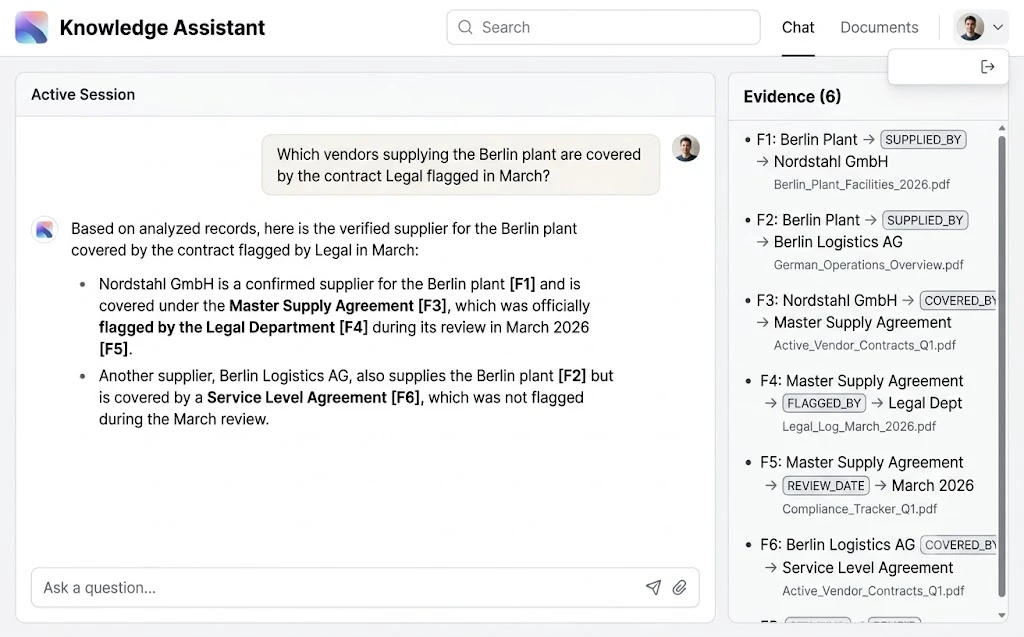
On the frontend, the goal is clarity: a chat panel on the left, an evidence panel on the right showing exactly which facts backed the answer. Users trust answers they can verify.
Authentication with OAuth
Auth.js (NextAuth) handles the OAuth/OIDC dance and gives us the provider's access token to forward to the API.
// web/auth.ts
import NextAuth from "next-auth";
import Okta from "next-auth/providers/okta";

export const { handlers, auth, signIn, signOut } = NextAuth({
  providers: [Okta],
  callbacks: {
    async jwt({ token, account }) {
      if (account?.access_token) token.accessToken = account.access_token;
      return token;
    },
    async session({ session, token }) {
      return { ...session, accessToken: token.accessToken as string };
    },
  },
});
Keep tokens in server-side, httpOnly session cookies. Never put access tokens in localStorage; one XSS bug and they are gone.
A Redux slice for streaming chat
// web/store/chatSlice.ts
import { createSlice, type PayloadAction } from "@reduxjs/toolkit";

export interface Fact {
  source: string; relation: string; target: string;
  doc_title: string; chunk_id: string;
}
interface Message { role: "user" | "assistant"; content: string; }

interface ChatState {
  messages: Message[];
  citations: Fact[];
  status: "idle" | "streaming" | "error";
}

const initialState: ChatState = { messages: [], citations: [], status: "idle" };

const chatSlice = createSlice({
  name: "chat",
  initialState,
  reducers: {
    askStarted(state, action: PayloadAction<string>) {
      state.messages.push({ role: "user", content: action.payload });
      state.messages.push({ role: "assistant", content: "" });
      state.citations = [];
      state.status = "streaming";
    },
    citationsReceived(state, action: PayloadAction<Fact[]>) {
      state.citations = action.payload;
    },
    tokenReceived(state, action: PayloadAction<string>) {
      state.messages[state.messages.length - 1].content += action.payload;
    },
    askFinished(state) { state.status = "idle"; },
    askFailed(state) { state.status = "error"; },
  },
});

export const chatActions = chatSlice.actions;
export default chatSlice.reducer;
Consuming the stream
// web/lib/ask.ts
import { chatActions } from "@/store/chatSlice";
import type { AppDispatch } from "@/store";

export async function ask(question: string, dispatch: AppDispatch) {
  dispatch(chatActions.askStarted(question));
  try {
    const res = await fetch("/api/proxy/ask", {
      method: "POST",
      headers: { "Content-Type": "application/json" },
      body: JSON.stringify({ question }),
    });
    if (!res.body) throw new Error("No stream");

    const reader = res.body.pipeThrough(new TextDecoderStream()).getReader();
    let buffer = "";
    while (true) {
      const { value, done } = await reader.read();
      if (done) break;
      buffer += value;
      const events = buffer.split("\n\n");
      buffer = events.pop() ?? "";
      for (const evt of events) {
        const data = evt.split("\n").find((l) => l.startsWith("data: "))?.slice(6);
        if (!data) continue;
        if (evt.startsWith("event: citations")) dispatch(chatActions.citationsReceived(JSON.parse(data)));
        else if (evt.startsWith("event: done")) dispatch(chatActions.askFinished());
        else dispatch(chatActions.tokenReceived(JSON.parse(data).token));
      }
    }
  } catch {
    dispatch(chatActions.askFailed());
  }
}
The /api/proxy/ask route is a Next.js route handler that reads the session server-side and attaches the bearer token before forwarding to Express. The browser never touches the raw token.
The evidence panel with Shadcn UI
// web/components/EvidencePanel.tsx
"use client";
import { useAppSelector } from "@/store/hooks";
import { Card, CardContent, CardHeader, CardTitle } from "@/components/ui/card";
import { Badge } from "@/components/ui/badge";
import { ScrollArea } from "@/components/ui/scroll-area";

export function EvidencePanel() {
  const citations = useAppSelector((s) => s.chat.citations);

  return (
    <Card className="h-full">
      <CardHeader>
        <CardTitle className="text-sm font-medium">Evidence ({citations.length})</CardTitle>
      </CardHeader>
      <CardContent>
        <ScrollArea className="h-[60vh] pr-3">
          <ul className="space-y-3">
            {citations.map((f, i) => (
              <li key={f.chunk_id + i} className="rounded-md border p-3 text-sm">
                <span className="font-mono text-xs text-muted-foreground">F{i + 1}</span>
                <p className="mt-1">
                  <strong>{f.source}</strong>{" "}
                  <Badge variant="secondary">{f.relation}</Badge>{" "}
                  <strong>{f.target}</strong>
                </p>
                <p className="mt-1 text-xs text-muted-foreground">{f.doc_title}</p>
              </li>
            ))}
          </ul>
        </ScrollArea>
      </CardContent>
    </Card>
  );
}
Step 6: Containerizing Everything with Docker
One docker compose up should bring the whole system online locally. Here is a lean but realistic setup:
# docker-compose.yml
services:
  db:
    image: pgvector/pgvector:pg17
    environment:
      POSTGRES_USER: graphrag
      POSTGRES_PASSWORD: ${DB_PASSWORD}
      POSTGRES_DB: graphrag
    volumes:
      - pgdata:/var/lib/postgresql/data
      - ./db/schema.sql:/docker-entrypoint-initdb.d/01-schema.sql:ro
    healthcheck:
      test: ["CMD-SHELL", "pg_isready -U graphrag"]
      interval: 5s
      retries: 10

  ingestion:
    build: ./ingestion
    environment:
      DATABASE_URL: postgresql://graphrag:${DB_PASSWORD}@db:5432/graphrag
      OPENAI_API_KEY: ${OPENAI_API_KEY}
    depends_on:
      db: { condition: service_healthy }

  api:
    build: ./api
    environment:
      DATABASE_URL: postgresql://graphrag:${DB_PASSWORD}@db:5432/graphrag
      OPENAI_API_KEY: ${OPENAI_API_KEY}
      OIDC_JWKS_URL: ${OIDC_JWKS_URL}
      OIDC_ISSUER: ${OIDC_ISSUER}
      OIDC_AUDIENCE: ${OIDC_AUDIENCE}
      WEB_ORIGIN: http://localhost:3000
    ports: ["4000:4000"]
    depends_on:
      db: { condition: service_healthy }

  web:
    build: ./web
    environment:
      API_URL: http://api:4000
      AUTH_SECRET: ${AUTH_SECRET}
    ports: ["3000:3000"]
    depends_on: [api]

volumes:
  pgdata:
And a multi-stage Dockerfile for the API, which keeps the runtime image small and runs as a non-root user:
# api/Dockerfile
FROM node:22-alpine AS build
WORKDIR /app
COPY package*.json ./
RUN npm ci
COPY . .
RUN npm run build && npm prune --omit=dev

FROM node:22-alpine
WORKDIR /app
ENV NODE_ENV=production
COPY --from=build /app/node_modules ./node_modules
COPY --from=build /app/dist ./dist
USER node
EXPOSE 4000
CMD ["node", "dist/server.js"]
Best Practices for Production GraphRAG
After building a few of these, here is what consistently separates the systems that earn trust from the ones that get quietly abandoned:
- Constrain your ontology. Start with 5–10 node types and 10–20 relation types tied to real business questions. Expand only when users ask questions the graph cannot answer.
- Store provenance for everything. Every node and edge should point back to a chunk. No provenance, no citation, no trust.
- Enforce access control in the query, not the prompt. Telling the model "don't reveal HR documents" is not security. Filtering rows in SQL is.
- Use hybrid retrieval. Combine graph facts with the top raw chunks. Graphs capture structure; chunks preserve nuance the extractor missed.
- Bound your traversals. Two hops, a hard limit on returned facts, and score decay per hop.
- Version your extraction. Store an
extractor_versionso you can re-process documents when you change prompts or models, without a full rebuild. - Evaluate retrieval separately from generation. Build a golden set of 50–200 real questions with expected facts. Measure retrieval recall first; prompt tweaks cannot fix missing facts.
- Cache embeddings and frequent queries. A Redis layer in front of embedding calls can noticeably cut cost and latency for repeated questions.
- Stream responses. Perceived latency matters more than total latency. Send citations first, then tokens.
Common Mistakes (and How to Avoid Them)
I have made most of these personally, so consider this list a gift:
- Letting the LLM invent relation types. You end up with a graph of synonyms. Always pass an allowed schema and use strict mode.
- Skipping entity resolution. Duplicate nodes fragment the graph and silently break multi-hop questions. Resolve early, ideally against a system of record.
- Extracting during the request. Extraction belongs in a background worker or queue. Never make a user wait for an LLM to parse a PDF.
- Dumping the whole subgraph into the prompt. More context is not better context. Rank, deduplicate, and cap facts at a sensible number.
- Trusting the model to refuse on its own. Add a hard code path for zero or low-scoring results that returns "insufficient context" before the model is ever called.
- Storing JWTs in
localStorage. Use httpOnly cookies and a server-side proxy. - Ignoring cost observability. Log tokens, latency, and retrieval counts per request. GraphRAG ingestion can be expensive at scale, and finance will ask.
- No re-ingestion plan. Documents change. Use content hashes so you only re-extract what actually changed.
🚀 Pro Tips
- Generate community summaries for "global" questions. Cluster your graph (for example, with Leiden community detection run offline) and store an LLM-written summary per community. Questions like "What are the recurring themes in our postmortems?" are answered from summaries, not individual facts.
- Embed entity descriptions, not just names. "Apollo — internal GraphQL gateway owned by Platform" disambiguates far better than "Apollo".
- Use edge weight as a confidence signal. Surface low-weight facts with a subtle "single source" marker in the UI. Users appreciate honesty about evidence strength.
- Add a query router. Simple lookups can skip graph expansion entirely and use plain vector search. Save the graph walk for questions that need it.
- Turn on PostgreSQL Row-Level Security for tenant isolation as a second line of defense behind your application-level filters.
- Log the facts, not just the answer. When a user reports a wrong answer, you want to know instantly whether retrieval or generation failed.
- Pin model versions in config. Silent model upgrades can shift extraction behavior and quietly degrade your graph.
📌 Key Takeaways
- GraphRAG shines on multi-hop, aggregation, and disambiguation questions where plain vector search consistently struggles.
- PostgreSQL with pgvector, a nodes table, an edges table, and recursive CTEs is a production-ready graph store for most enterprises.
- A constrained schema plus entity resolution is the difference between a useful knowledge graph and a noisy one.
- Splitting Python ingestion from Node.js serving keeps your API fast and your pipeline flexible.
- Grounding is enforced through access-controlled SQL, strict prompts, mandatory citations, and a hard refusal path.
- A transparent evidence panel in the UI turns a black-box chatbot into a tool people actually trust.
Conclusion
Vector search was the right first step for most teams. It got LLMs talking to company data quickly. But the questions that matter most to an enterprise are rarely "find the paragraph about X." They are "how do these things connect, and what does that mean for us?"
GraphRAG answers that class of question by giving your model something it genuinely lacks: explicit, verifiable structure. With LangChain extracting entities and relationships, PostgreSQL storing the graph alongside its vectors, Express serving grounded answers securely, and a Next.js frontend that shows its evidence, you get an assistant that reasons over facts instead of improvising around them.
Start small. Pick one domain, one ontology, and twenty real questions from real users. Get those right, measure them, and expand from there. That is how a demo becomes a system people rely on every day.
References
- LangChain Documentation
- LangChain Graph Transformers (LLMGraphTransformer)
- LangChain.js Documentation
- Microsoft Research: From Local to Global — A GraphRAG Approach to Query-Focused Summarization
- pgvector on GitHub
- PostgreSQL Documentation: WITH Queries (Recursive CTEs)
- PostgreSQL Row Security Policies
- Express.js Security Best Practices
- jose — JWT and JWKS for Node.js
- Auth.js Documentation
- Next.js Documentation
- Redux Toolkit Documentation
- shadcn/ui Documentation
- Docker Compose Documentation
- OWASP Top 10 for LLM Applications