Introduction
A few years ago, building an AI feature meant picking a hosted API, pasting in a key, and hoping your legal team didn't ask too many questions. In 2026, that conversation has changed. Customers ask where their data goes. Regulators ask who processed it. Engineers ask why a support chatbot needs to ship contract text to a third party at all.
The answer, increasingly, is that it doesn't. Open-weight models are good enough, local runtimes are mature, and orchestration frameworks have caught up. You can now build a genuinely capable assistant that never leaves your network.
In this guide, we'll build exactly that: a privacy-first agentic RAG system with:
- Ollama to run the language model and the embedding model locally
- LangGraph to orchestrate a self-reflective, multi-step agent
- PostgreSQL + pgvector for document embeddings and persistent long-term memory
- Next.js (App Router) + TypeScript + Shadcn UI for the REST API and the chat interface
- Docker Compose to package the whole thing for repeatable deployment
By the end, you'll have a working architecture, the key code, and a list of the mistakes that will cost you hours if you don't know about them in advance.
What "Sovereign AI" Actually Means
"Sovereign AI" sounds like marketing, so let's make it concrete. A sovereign setup has three properties:
- Data residency: prompts, documents, and embeddings stay on infrastructure you control.
- Model control: you choose the model, pin the version, and decide when to upgrade.
- Operational independence: the system keeps working if a vendor changes pricing, deprecates a model, or has an outage.
This isn't just for banks and hospitals. Any team handling customer contracts, internal wikis, source code, or HR documents has a good reason to care.
Understanding Agentic RAG
Classic RAG in one paragraph
Classic Retrieval-Augmented Generation works like this: embed the question, fetch the top-k similar chunks, stuff them into a prompt, and ask the model to answer. It's simple and it works surprisingly well, until it doesn't. Ambiguous questions retrieve irrelevant chunks. Irrelevant chunks produce confident nonsense. And the pipeline has no way to notice.
What changes with agents
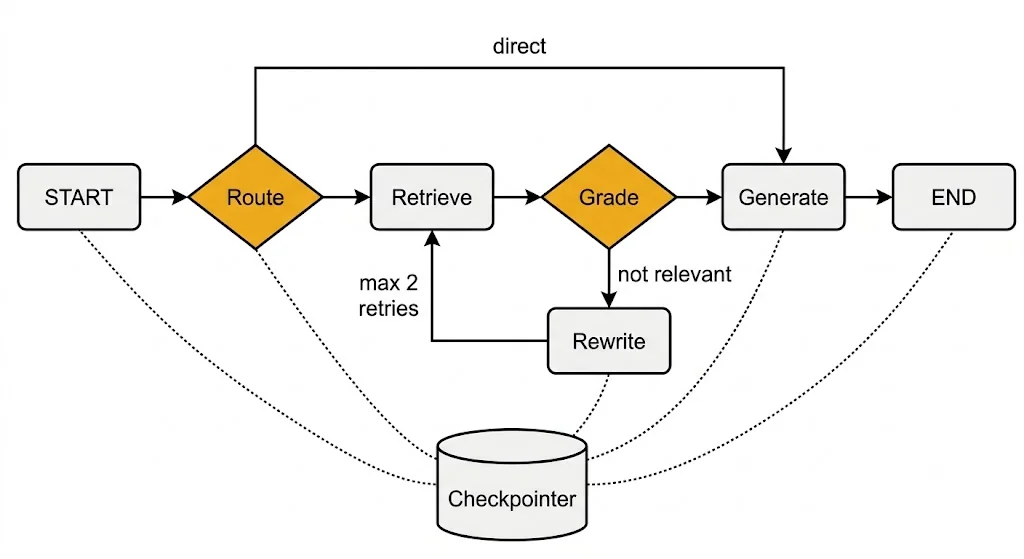
Agentic RAG adds a decision loop around retrieval. Instead of a straight line, you get a graph:
- Route: does this question even need documents, or is it small talk?
- Retrieve: fetch candidate chunks from PostgreSQL.
- Grade: is the retrieved context actually relevant to the question?
- Rewrite: if not, reformulate the query and try again (with a retry cap).
- Generate: answer using only the vetted context, and say so when the context is thin.
This pattern is often called self-reflective or corrective RAG. The model is not magically smarter. The system is simply allowed to check its own work before speaking.
Why LangGraph
You could hand-roll this with a while loop, and for a toy project that's fine. LangGraph earns its place when you need:
- Explicit state that every node reads and writes
- Conditional edges that make routing logic visible and testable
- Checkpointing so conversations survive restarts
- Streaming of intermediate steps to the UI
It models your agent as a state machine, which is exactly what it is.
Architecture Overview
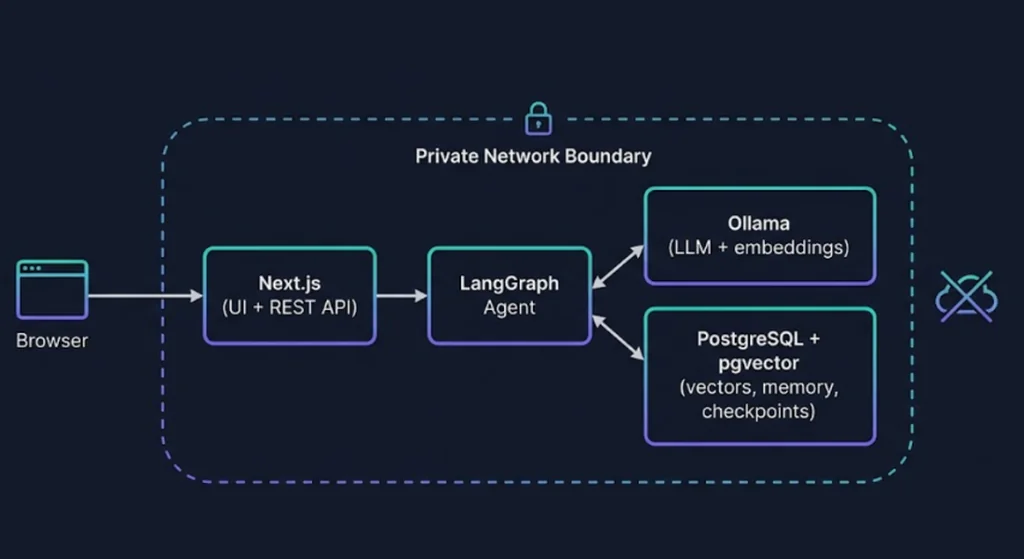
Here's the request flow we're building:
- The browser sends a message to a Next.js route handler (
POST /api/chat). - The route invokes a compiled LangGraph with a
thread_id. - Graph nodes call Ollama for chat and embeddings, and PostgreSQL for vector search.
- The PostgreSQL checkpointer saves state after each node.
- Tokens stream back to the browser, where Shadcn UI renders them.
Everything runs in three containers: web, ollama, and postgres.
Prerequisites
- Node.js 22 or later and
pnpm - Docker and Docker Compose
- A machine with at least 16 GB RAM (a GPU helps, but is not mandatory for smaller models)
- Basic comfort with TypeScript and React
Step 1: Run Ollama and Pull Your Models
Install Ollama and pull a chat model plus an embedding model:
ollama pull llama3.1:8b
ollama pull nomic-embed-text
Swap in whichever instruction-tuned model suits your hardware. For agent workflows, prioritise reliable structured output over raw benchmark scores. A model that returns clean JSON every time beats a larger one that occasionally rambles.
Quick sanity check:
curl http://localhost:11434/api/tags
If you see both models listed, Ollama is ready.
Step 2: Set Up PostgreSQL with pgvector
We'll use one database for three jobs: vectors, chat history, and LangGraph checkpoints.
Docker Compose (data layer first)
# docker-compose.yml
services:
  postgres:
    image: pgvector/pgvector:pg17
    environment:
      POSTGRES_USER: agent
      POSTGRES_PASSWORD: ${POSTGRES_PASSWORD}
      POSTGRES_DB: agentic_rag
    ports:
      - "5432:5432"
    volumes:
      - pgdata:/var/lib/postgresql/data
      - ./db/init.sql:/docker-entrypoint-initdb.d/init.sql

  ollama:
    image: ollama/ollama:latest
    ports:
      - "11434:11434"
    volumes:
      - ollama_models:/root/.ollama

volumes:
  pgdata:
  ollama_models:
Schema
-- db/init.sql
CREATE EXTENSION IF NOT EXISTS vector;

CREATE TABLE IF NOT EXISTS documents (
  id          BIGSERIAL PRIMARY KEY,
  source      TEXT NOT NULL,
  content     TEXT NOT NULL,
  metadata    JSONB DEFAULT '{}'::jsonb,
  embedding   VECTOR(768),
  created_at  TIMESTAMPTZ DEFAULT now()
);

-- Approximate nearest neighbour index for cosine distance
CREATE INDEX IF NOT EXISTS documents_embedding_idx
  ON documents USING hnsw (embedding vector_cosine_ops);

-- Distilled long-term memory facts per user
CREATE TABLE IF NOT EXISTS user_memories (
  id          BIGSERIAL PRIMARY KEY,
  user_id     TEXT NOT NULL,
  fact        TEXT NOT NULL,
  embedding   VECTOR(768),
  created_at  TIMESTAMPTZ DEFAULT now()
);

CREATE INDEX IF NOT EXISTS user_memories_user_idx ON user_memories (user_id);
The vector dimension (768) must match your embedding model. This is one of the most common setup bugs, and we'll come back to it in the mistakes section.
Step 3: Scaffold the Next.js App
pnpm create next-app@latest agentic-rag --typescript --app --tailwind
cd agentic-rag
pnpm dlx shadcn@latest init
pnpm dlx shadcn@latest add button input card scroll-area
pnpm add @langchain/langgraph @langchain/ollama @langchain/core \
  @langchain/langgraph-checkpoint-postgres pg zod
pnpm add -D @types/pg
Add your environment variables:
# .env.local
DATABASE_URL=postgresql://agent:yourpassword@localhost:5432/agentic_rag
OLLAMA_BASE_URL=http://localhost:11434
CHAT_MODEL=llama3.1:8b
EMBED_MODEL=nomic-embed-text
Step 4: Create the Model and Database Clients
Keep infrastructure code in one place so it's easy to mock in tests.
// lib/clients.ts
import { Pool } from "pg";
import { ChatOllama, OllamaEmbeddings } from "@langchain/ollama";

export const pool = new Pool({ connectionString: process.env.DATABASE_URL });

export const chatModel = new ChatOllama({
  baseUrl: process.env.OLLAMA_BASE_URL,
  model: process.env.CHAT_MODEL ?? "llama3.1:8b",
  temperature: 0,
});

export const embeddings = new OllamaEmbeddings({
  baseUrl: process.env.OLLAMA_BASE_URL,
  model: process.env.EMBED_MODEL ?? "nomic-embed-text",
});
Notice temperature: 0. For routing and grading steps, you want deterministic behaviour. You can create a second, warmer model instance for the final answer if you like.
Step 5: Ingest Documents
Before the agent can retrieve anything, you need data. A minimal ingestion function chunks text, embeds each chunk, and inserts it:
// lib/ingest.ts
import { pool, embeddings } from "./clients";

function chunkText(text: string, size = 800, overlap = 120): string[] {
  const chunks: string[] = [];
  for (let i = 0; i < text.length; i += size - overlap) {
    chunks.push(text.slice(i, i + size));
  }
  return chunks;
}

export async function ingestDocument(source: string, text: string) {
  const chunks = chunkText(text);
  const vectors = await embeddings.embedDocuments(chunks);

  for (let i = 0; i < chunks.length; i++) {
    await pool.query(
      `INSERT INTO documents (source, content, embedding)
       VALUES ($1, $2, $3::vector)`,
      [source, chunks[i], JSON.stringify(vectors[i])]
    );
  }
}
This character-based chunker is intentionally simple. For production, split on semantic boundaries such as headings and paragraphs, and store the heading path in metadata so you can cite sources later.
Step 6: Build the Retrieval Function
// lib/retrieve.ts
import { pool, embeddings } from "./clients";

export async function searchDocuments(query: string, k = 4) {
  const vector = await embeddings.embedQuery(query);
  const { rows } = await pool.query(
    `SELECT content, source, 1 - (embedding <=> $1::vector) AS score
       FROM documents
      ORDER BY embedding <=> $1::vector
      LIMIT $2`,
    [JSON.stringify(vector), k]
  );
  return rows as { content: string; source: string; score: number }[];
}
The <=> operator is cosine distance in pgvector, so 1 - distance gives us a similarity score we can log and threshold.
Step 7: Design the LangGraph Agent
Now for the interesting part. We'll define the shared state, then the nodes.
State
// lib/agent/state.ts
import { Annotation, MessagesAnnotation } from "@langchain/langgraph";

export const AgentState = Annotation.Root({
  ...MessagesAnnotation.spec,
  question: Annotation<string>(),
  context: Annotation<string[]>({
    reducer: (_prev, next) => next,
    default: () => [],
  }),
  route: Annotation<"retrieve" | "direct">(),
  relevant: Annotation<boolean>(),
  retries: Annotation<number>({
    reducer: (_prev, next) => next,
    default: () => 0,
  }),
});
Nodes
Each node is a plain async function that takes state and returns a partial update. That makes them trivial to unit test.
// lib/agent/nodes.ts
import { z } from "zod";
import { AIMessage } from "@langchain/core/messages";
import { chatModel } from "../clients";
import { searchDocuments } from "../retrieve";
import { AgentState } from "./state";

type State = typeof AgentState.State;

const RouteSchema = z.object({ route: z.enum(["retrieve", "direct"]) });
const GradeSchema = z.object({ relevant: z.boolean() });

export async function routeQuestion(state: State) {
  const last = state.messages[state.messages.length - 1];
  const question = String(last.content);

  const decision = await chatModel
    .withStructuredOutput(RouteSchema)
    .invoke([
      {
        role: "system",
        content:
          "Decide if the question needs the private knowledge base. " +
          "Answer 'direct' for greetings or general chit-chat, otherwise 'retrieve'.",
      },
      { role: "user", content: question },
    ]);

  return { question, route: decision.route };
}

export async function retrieve(state: State) {
  const docs = await searchDocuments(state.question, 4);
  return { context: docs.map((d) => `[${d.source}] ${d.content}`) };
}

export async function gradeContext(state: State) {
  if (state.context.length === 0) return { relevant: false };

  const verdict = await chatModel
    .withStructuredOutput(GradeSchema)
    .invoke([
      {
        role: "system",
        content:
          "You grade retrieval quality. Return relevant=true only if the " +
          "context contains information that directly helps answer the question.",
      },
      {
        role: "user",
        content: `Question: ${state.question}\n\nContext:\n${state.context.join("\n---\n")}`,
      },
    ]);

  return { relevant: verdict.relevant };
}

export async function rewriteQuery(state: State) {
  const rewritten = await chatModel.invoke([
    {
      role: "system",
      content:
        "Rewrite the user's question as a concise search query that would " +
        "match technical documentation. Return only the query.",
    },
    { role: "user", content: state.question },
  ]);

  return { question: String(rewritten.content).trim(), retries: state.retries + 1 };
}

export async function generate(state: State) {
  const grounded = state.route === "retrieve" && state.relevant;

  const system = grounded
    ? "Answer using ONLY the context below. Cite sources in square brackets. " +
      "If the context is insufficient, say you don't know.\n\n" +
      state.context.join("\n---\n")
    : state.route === "direct"
      ? "You are a friendly, concise assistant."
      : "The knowledge base has no reliable answer. Say so honestly and " +
        "suggest what information would help.";

  const response = await chatModel.invoke([
    { role: "system", content: system },
    ...state.messages,
  ]);

  return { messages: [new AIMessage(String(response.content))] };
}
A detail worth calling out: the fallback branch. If the grader says the context is irrelevant after the retry budget is spent, the agent admits it. That single behaviour is responsible for a huge share of the trust you'll earn from users.
Wiring the graph with a Postgres checkpointer
// lib/agent/graph.ts
import { StateGraph, START, END } from "@langchain/langgraph";
import { PostgresSaver } from "@langchain/langgraph-checkpoint-postgres";
import { AgentState } from "./state";
import {
  routeQuestion,
  retrieve,
  gradeContext,
  rewriteQuery,
  generate,
} from "./nodes";

const MAX_RETRIES = 2;

const checkpointer = PostgresSaver.fromConnString(process.env.DATABASE_URL!);
let ready: Promise<void> | null = null;

export async function getGraph() {
  // Creates the checkpoint tables on first run
  ready ??= checkpointer.setup();
  await ready;

  return new StateGraph(AgentState)
    .addNode("route", routeQuestion)
    .addNode("retrieve", retrieve)
    .addNode("grade", gradeContext)
    .addNode("rewrite", rewriteQuery)
    .addNode("generate", generate)
    .addEdge(START, "route")
    .addConditionalEdges("route", (s) => s.route, {
      retrieve: "retrieve",
      direct: "generate",
    })
    .addEdge("retrieve", "grade")
    .addConditionalEdges(
      "grade",
      (s) => (s.relevant || s.retries >= MAX_RETRIES ? "generate" : "rewrite"),
      { generate: "generate", rewrite: "rewrite" }
    )
    .addEdge("rewrite", "retrieve")
    .addEdge("generate", END)
    .compile({ checkpointer });
}
Read the conditional edge on grade carefully. It encodes the whole self-reflective idea in one line: move on if the context is good or if we're out of retries; otherwise rewrite and loop. The retry cap is not optional. Without it, a stubborn question can spin forever.
Step 8: Long-Term Memory Beyond a Single Thread
The checkpointer gives you short-term, per-thread memory: the full state of one conversation. But users also expect an assistant to remember durable facts across sessions, such as their preferred language, their project, or their role.
A practical pattern is to distil facts after a conversation ends and store them in user_memories:
// lib/memory.ts
import { pool, chatModel, embeddings } from "./clients";

export async function rememberFacts(userId: string, transcript: string) {
  const result = await chatModel.invoke([
    {
      role: "system",
      content:
        "Extract up to 3 durable, non-sensitive facts about the user from " +
        "this conversation. Return one fact per line. Return nothing if none.",
    },
    { role: "user", content: transcript },
  ]);

  const facts = String(result.content)
    .split("\n")
    .map((f) => f.trim())
    .filter(Boolean);

  for (const fact of facts) {
    const vector = await embeddings.embedQuery(fact);
    await pool.query(
      `INSERT INTO user_memories (user_id, fact, embedding)
       VALUES ($1, $2, $3::vector)`,
      [userId, fact, JSON.stringify(vector)]
    );
  }
}
At the start of a new conversation, retrieve the top few memories for that user and prepend them to the system prompt. Because the memories live in the same PostgreSQL instance, "forget me" becomes a single DELETE statement. That's a privacy feature you get almost for free.
Step 9: Expose the Agent Through a REST API
The Next.js route handler is the boundary between UI and agent. It validates input, runs the graph, and streams the answer.
// app/api/chat/route.ts
import { NextRequest } from "next/server";
import { z } from "zod";
import { HumanMessage } from "@langchain/core/messages";
import { getGraph } from "@/lib/agent/graph";

export const runtime = "nodejs"; // pg and local Ollama need the Node runtime
export const dynamic = "force-dynamic";

const Body = z.object({
  message: z.string().min(1).max(4000),
  threadId: z.string().min(8),
});

export async function POST(req: NextRequest) {
  const parsed = Body.safeParse(await req.json());
  if (!parsed.success) {
    return Response.json({ error: "Invalid request" }, { status: 400 });
  }

  const { message, threadId } = parsed.data;
  const graph = await getGraph();

  const stream = await graph.stream(
    { messages: [new HumanMessage(message)] },
    { configurable: { thread_id: threadId }, streamMode: "updates" }
  );

  const encoder = new TextEncoder();
  const body = new ReadableStream({
    async start(controller) {
      try {
        for await (const update of stream) {
          const [node, payload] = Object.entries(update)[0] as [string, any];

          // Surface progress so the UI can show "Retrieving...", "Grading..."
          controller.enqueue(
            encoder.encode(JSON.stringify({ type: "step", node }) + "\n")
          );

          if (node === "generate" && payload?.messages?.[0]) {
            controller.enqueue(
              encoder.encode(
                JSON.stringify({
                  type: "answer",
                  text: String(payload.messages[0].content),
                }) + "\n"
              )
            );
          }
        }
      } catch (err) {
        controller.enqueue(
          encoder.encode(JSON.stringify({ type: "error" }) + "\n")
        );
      } finally {
        controller.close();
      }
    },
  });

  return new Response(body, {
    headers: { "Content-Type": "application/x-ndjson" },
  });
}
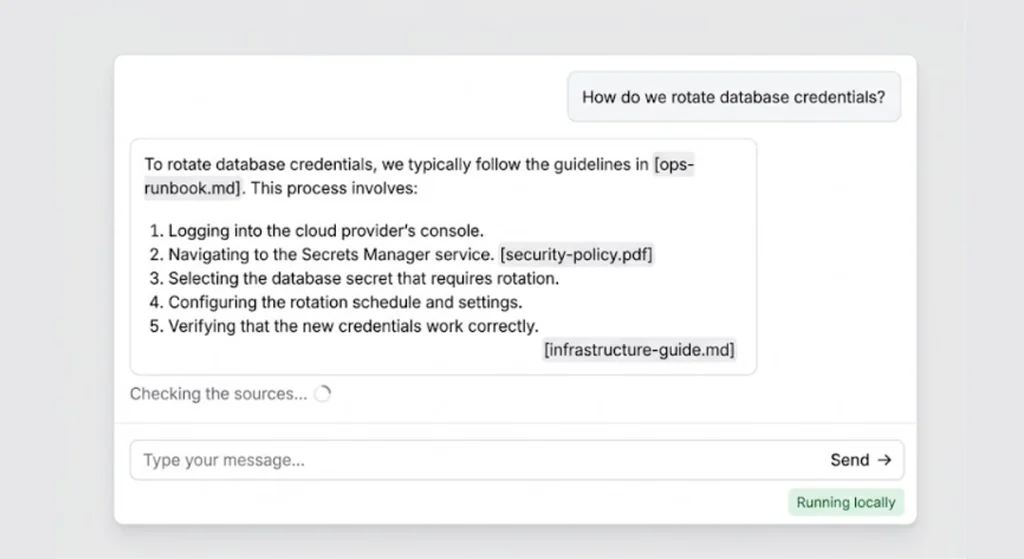
We stream newline-delimited JSON, which is easy to parse in the browser and lets us show the agent's progress, not just its final text. Users are far more patient with a local model when they can see that something is happening.
Step 10: Build the Chat UI with Shadcn UI
Here's a compact client component. It sends the message, reads the NDJSON stream, and shows the current agent step.
// components/chat.tsx
"use client";

import { useRef, useState } from "react";
import { Button } from "@/components/ui/button";
import { Input } from "@/components/ui/input";
import { Card } from "@/components/ui/card";
import { ScrollArea } from "@/components/ui/scroll-area";

type Msg = { role: "user" | "assistant"; text: string };

const STEP_LABELS: Record<string, string> = {
  route: "Understanding your question",
  retrieve: "Searching the knowledge base",
  grade: "Checking the sources",
  rewrite: "Refining the search",
  generate: "Writing the answer",
};

export function Chat() {
  const [messages, setMessages] = useState<Msg[]>([]);
  const [input, setInput] = useState("");
  const [step, setStep] = useState<string | null>(null);
  const threadId = useRef(crypto.randomUUID());

  async function send() {
    const text = input.trim();
    if (!text) return;
    setInput("");
    setMessages((m) => [...m, { role: "user", text }]);

    const res = await fetch("/api/chat", {
      method: "POST",
      headers: { "Content-Type": "application/json" },
      body: JSON.stringify({ message: text, threadId: threadId.current }),
    });

    const reader = res.body!.getReader();
    const decoder = new TextDecoder();
    let buffer = "";

    while (true) {
      const { value, done } = await reader.read();
      if (done) break;
      buffer += decoder.decode(value, { stream: true });

      const lines = buffer.split("\n");
      buffer = lines.pop() ?? "";

      for (const line of lines.filter(Boolean)) {
        const evt = JSON.parse(line);
        if (evt.type === "step") setStep(evt.node);
        if (evt.type === "answer") {
          setMessages((m) => [...m, { role: "assistant", text: evt.text }]);
          setStep(null);
        }
      }
    }
  }

  return (
    <Card className="mx-auto flex h-[600px] max-w-2xl flex-col p-4">
      <ScrollArea className="flex-1 pr-3">
        {messages.map((m, i) => (
          <p
            key={i}
            className={m.role === "user" ? "mb-3 text-right" : "mb-3 text-left"}
          >
            {m.text}
          </p>
        ))}
        {step && (
          <p className="text-sm text-muted-foreground">{STEP_LABELS[step]}...</p>
        )}
      </ScrollArea>
      <form
        className="mt-3 flex gap-2"
        onSubmit={(e) => {
          e.preventDefault();
          send();
        }}
      >
        <Input
          value={input}
          onChange={(e) => setInput(e.target.value)}
          placeholder="Ask about your documents..."
        />
        <Button type="submit">Send</Button>
      </form>
    </Card>
  );
}
The threadId is the key to persistent memory. Store it in a cookie or tie it to a user session in a real app, and the conversation will continue exactly where it left off, even after a server restart.
Step 11: Containerise the Whole Stack
Add the web service to your Compose file with a multi-stage Dockerfile.
# Dockerfile
FROM node:22-alpine AS deps
WORKDIR /app
RUN corepack enable
COPY package.json pnpm-lock.yaml ./
RUN pnpm install --frozen-lockfile

FROM node:22-alpine AS build
WORKDIR /app
RUN corepack enable
COPY --from=deps /app/node_modules ./node_modules
COPY . .
RUN pnpm build

FROM node:22-alpine AS run
WORKDIR /app
ENV NODE_ENV=production
COPY --from=build /app/.next/standalone ./
COPY --from=build /app/.next/static ./.next/static
COPY --from=build /app/public ./public
USER node
EXPOSE 3000
CMD ["node", "server.js"]
Set output: "standalone" in next.config.ts, then extend docker-compose.yml:
  web:
    build: .
    environment:
      DATABASE_URL: postgresql://agent:${POSTGRES_PASSWORD}@postgres:5432/agentic_rag
      OLLAMA_BASE_URL: http://ollama:11434
      CHAT_MODEL: llama3.1:8b
      EMBED_MODEL: nomic-embed-text
    ports:
      - "3000:3000"
    depends_on:
      - postgres
      - ollama
Inside the Compose network, services reach each other by name, so ollama and postgres replace localhost. Forgetting this is the number one reason "it works on my machine" fails in Docker.
For a truly private deployment, publish only port 3000 (or put it behind a reverse proxy) and remove the host port mappings for Postgres and Ollama.
Best Practices
Architecture and agent design
- Keep nodes small and single-purpose. One node, one decision. It makes debugging and evaluation dramatically easier.
- Use structured output for control flow. Never parse free text to decide an edge. Use Zod schemas so routing is typed and validated.
- Cap every loop. Retries, tool calls, and total graph steps all need hard limits.
- Make the "I don't know" path a first-class citizen. Honest refusal beats a polished hallucination.
Retrieval quality
- Use the same embedding model for ingestion and queries, and record its name in your database so future migrations are safe.
- Store metadata (source, section, updated date) and use it for filtering and citations.
- Consider hybrid search. Combining pgvector similarity with PostgreSQL full-text search often beats either alone, especially for product names and error codes.
Privacy and security
- Disable outbound telemetry in every tool in your stack and verify with a network monitor.
- Encrypt at rest and in transit, even inside your own network.
- Scope memories by user ID and enforce it in every query. Consider row-level security in PostgreSQL.
- Treat retrieved documents as untrusted input. Prompt injection can hide inside a PDF. Keep system instructions separate and never let retrieved text grant the agent new permissions.
- Log carefully. Debug logs full of raw prompts quietly undo your privacy work.
Performance
- Warm the models. The first request after a cold start can be painfully slow. Send a tiny request on boot or set a longer keep-alive in Ollama.
- Use a small model for grading and routing, and reserve the larger one for answer generation.
- Batch your embeddings during ingestion instead of embedding chunks one at a time.
Common Mistakes (And How to Avoid Them)
- Mismatched vector dimensions. If your table says
VECTOR(768)but your embedding model outputs 1024 dimensions, inserts will fail. Always check the model's output size first. - Infinite rewrite loops. A grader that is too strict plus no retry cap equals an agent that never answers.
- Using
localhostinside containers. Inside Docker,localhostis the container itself. Use service names. - Running on the Edge runtime. The
pgdriver and long-lived local connections need the Node.js runtime. Setruntime = "nodejs"explicitly. - Creating a new connection pool per request. In development, hot reloading can multiply pools until Postgres runs out of connections. Cache the pool on
globalThisduring development. - Skipping evaluation. If you can't measure answer quality, you can't improve it. Build a small test set of real questions with expected sources from day one.
- Over-trusting small models on complex prompts. If a node's output is unreliable, simplify the prompt or split the node. Don't just add more instructions.
- Ignoring concurrency. A local model serves a limited number of simultaneous requests. Add a queue or rate limit before launch, not after your first incident.
🚀 Pro Tips
- Log every graph step with the
thread_id. When a user says "it gave a weird answer yesterday," you'll be able to replay the exact path the agent took. - Add a similarity threshold. If the top result's score is below a cutoff, skip the grader and go straight to rewrite. It saves a model call on obvious misses.
- Cache embeddings for repeated queries. A small in-memory or Postgres-backed cache cuts latency for FAQs.
- Use
EXPLAIN ANALYZEon your vector queries once the table grows, and tune HNSW parameters against your recall target. - Version your prompts. Keep them in files with version numbers so you can tie quality changes to prompt changes.
- Add human-in-the-loop checkpoints for risky actions. LangGraph's interrupt support makes it straightforward to pause the graph and wait for approval.
- Pin model tags (for example
llama3.1:8b) instead oflatestso behaviour doesn't shift under you.
📌 Key Takeaways
- A local stack of Ollama, PostgreSQL, and Next.js keeps your data inside your own boundary without sacrificing a modern developer experience.
- Agentic RAG adds routing, grading, and query rewriting around retrieval, which meaningfully reduces hallucinations.
- LangGraph's explicit state and conditional edges make agent logic readable, testable, and resumable through the PostgreSQL checkpointer.
- One PostgreSQL instance can handle vectors, checkpoints, and long-term user memory, keeping operations simple.
- Always cap loops, validate inputs with Zod, treat retrieved text as untrusted, and measure quality with a real evaluation set.
- Docker Compose makes the whole system reproducible, but plan for GPU memory, cold starts, and concurrency early.
Conclusion
Privacy-first AI is no longer a compromise you accept in exchange for control. With Ollama running capable open models, LangGraph giving structure to agent behaviour, and PostgreSQL quietly handling storage, memory, and search, you can ship an assistant that is genuinely useful and genuinely yours.
The most important lesson from building systems like this is that the architecture matters more than the model. A mid-sized local model inside a well-designed loop of route, retrieve, grade, rewrite, and generate will usually outperform a bigger model called once with a stuffed prompt. Give your agent the ability to doubt itself, and it will earn your users' trust.
From here, good next steps include adding authentication, building an evaluation harness, experimenting with hybrid search, and introducing tool-using nodes for tasks like SQL queries or document summarisation. Start small, measure everything, and keep the data at home.
References
- LangGraph.js Documentation
- LangGraph Persistence and Checkpointers
- Ollama Documentation and Model Library
- pgvector: Open-Source Vector Similarity Search for PostgreSQL
- Next.js App Router Documentation
- Shadcn UI Components
- Docker Compose Documentation
- Self-RAG: Learning to Retrieve, Generate, and Critique through Self-Reflection (Asai et al.)
- Corrective Retrieval Augmented Generation (Yan et al.)