A couple of years ago, "AI in the CRM" meant a sidebar chatbot that summarized an email thread if you asked it nicely. Useful, sure. But it still needed a salesperson to notice the lead, open the account, ask the question, copy the answer, and decide what to do next. The human was still the assembly line, and the AI was just a power tool.
In 2026 the conversation has shifted. Enterprise teams are building Agent-to-Agent (A2A) workflows: chains of specialized agents that pass work to each other the way stations on a factory floor do. An inbound lead lands, a research agent enriches it, a strategy agent builds a deal plan, a writer drafts the outreach, a compliance agent checks it. A human watches the whole line and only reaches in when something looks risky.
I've spent most of this year building and reviewing systems like this for B2B SaaS teams. The good news is that the stack has matured. You no longer need a research lab to ship one. The bad news is that the failure modes are subtle: tenant data leaking into prompts, runs that die halfway with no way to resume, dashboards that show stale state, and "autonomous" systems that quietly email the wrong customer a 40% discount.
This guide is the blueprint I wish I'd had at the start. We'll build an autonomous enterprise CRM with:
- LangGraph (Python) to orchestrate a multi-agent "digital assembly line"
- PostgreSQL with
pgvectorand row-level security for multi-tenant GraphRAG - Node.js + Socket.io as a real-time gateway that streams agent state
- Next.js + Tailwind CSS for a responsive, human-on-the-loop dashboard
- Docker Compose to tie it all together
Let's get into it.
What "Agent-to-Agent" Actually Means in 2026
The term gets used loosely, so let's pin it down. There are really two layers of A2A you'll deal with:
- Intra-application A2A. Agents inside your own product collaborate through shared state. One agent's output becomes another agent's input, and an orchestrator (LangGraph, in our case) decides who goes next.
- Inter-application A2A. Your agents talk to agents owned by other systems, such as your ERP's billing agent or a partner's provisioning agent. This is where the open A2A protocol (started by Google and now governed under the Linux Foundation) comes in, giving agents a standard way to discover each other through Agent Cards and exchange tasks over HTTP.
Most teams need both. You orchestrate your own agents tightly and expose a clean, standards-based surface to the outside world.
From Chatbots to Digital Assembly Lines
The mental model that helped me most is the assembly line:
| Chatbot Model | Digital Assembly Line Model |
|---|---|
| One general-purpose agent | Many narrow, specialized agents |
| Triggered by a human prompt | Triggered by business events (new lead, stalled deal) |
| Output is text for a human | Output is structured data for the next agent |
| State lives in the chat window | State is checkpointed in a database |
| Human approves everything | Human supervises and intervenes by policy |
Narrow agents are easier to prompt, evaluate, and replace. A "deal strategist" that only produces a JSON deal plan is far easier to test than a do-everything assistant.
Human-in-the-Loop vs. Human-on-the-Loop
This distinction matters for product design:
- Human-in-the-loop: a person approves every step. Safe, but it doesn't scale, and people start clicking "approve" without reading.
- Human-on-the-loop: agents act on their own within guardrails. A person watches a live feed and is pulled in only when a policy says so: a high discount, a strategic account, a low-confidence classification.
We're building the second one. The trick is making the "pull in" moment cheap to implement and impossible to bypass.
The Architecture at a Glance
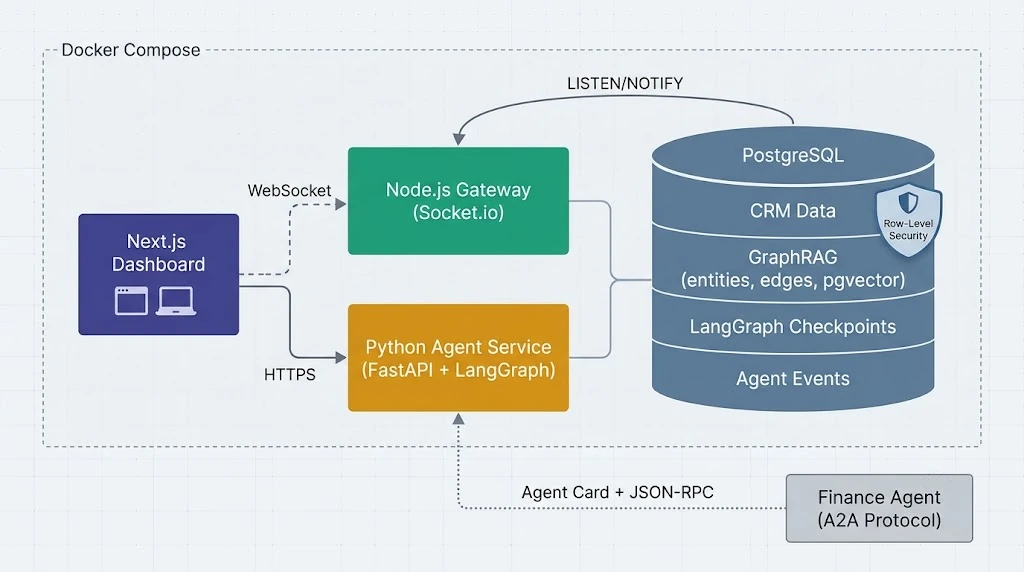
Here's how the pieces fit:
- Next.js dashboard shows live runs, agent timelines, and approval cards. It talks to the gateway over WebSockets and to the agent API over HTTPS.
- Node.js gateway (Socket.io) authenticates users, puts them into tenant-scoped rooms, and pushes agent events as they happen.
- Python agent service (FastAPI + LangGraph) runs the multi-agent graph, checkpoints state in Postgres, and writes every meaningful event to an append-only
agent_eventstable. - PostgreSQL is the single source of truth: CRM records, GraphRAG entities and edges, embeddings, LangGraph checkpoints, and the event log. Row-level security (RLS) enforces tenant isolation.
- LISTEN/NOTIFY connects Postgres to the gateway, so a committed event becomes a WebSocket message within milliseconds.
Why not have Python push straight to the browser? Because LLM calls are slow and bursty, while WebSocket connections are many and long-lived. Keeping them in separate processes means a 30-second model call never affects 5,000 open dashboard sessions. It also gives you a durable log in the middle, which turns out to be your best debugging tool.
Step 1: A Multi-Tenant GraphRAG Data Layer in PostgreSQL
Plain vector RAG retrieves chunks that sound similar to the question. That's fine for "what's our refund policy?" It's poor for CRM questions like "who else at this company has bought from us, and which of our products do they already use?" Those questions are about relationships, and that's where GraphRAG shines.
You don't need a separate graph database to get there. Postgres handles this pattern comfortably.
The Schema
CREATE EXTENSION IF NOT EXISTS vector;
CREATE EXTENSION IF NOT EXISTS pgcrypto;

CREATE TABLE tenants (
  id   uuid PRIMARY KEY DEFAULT gen_random_uuid(),
  name text NOT NULL
);

-- Nodes: accounts, contacts, deals, products, tickets...
CREATE TABLE kg_entities (
  id          uuid PRIMARY KEY DEFAULT gen_random_uuid(),
  tenant_id   uuid NOT NULL REFERENCES tenants(id),
  kind        text NOT NULL,
  name        text NOT NULL,
  properties  jsonb NOT NULL DEFAULT '{}'::jsonb,
  embedding   vector(1536),
  updated_at  timestamptz NOT NULL DEFAULT now()
);

-- Edges: WORKS_AT, OWNS_DEAL, USES_PRODUCT, RAISED_TICKET...
CREATE TABLE kg_edges (
  id          uuid PRIMARY KEY DEFAULT gen_random_uuid(),
  tenant_id   uuid NOT NULL REFERENCES tenants(id),
  src         uuid NOT NULL REFERENCES kg_entities(id) ON DELETE CASCADE,
  dst         uuid NOT NULL REFERENCES kg_entities(id) ON DELETE CASCADE,
  relation    text NOT NULL,
  weight      real NOT NULL DEFAULT 1.0,
  evidence    text
);

-- Raw text chunks (emails, call notes, docs) linked back to entities
CREATE TABLE kg_chunks (
  id          uuid PRIMARY KEY DEFAULT gen_random_uuid(),
  tenant_id   uuid NOT NULL REFERENCES tenants(id),
  entity_id   uuid REFERENCES kg_entities(id) ON DELETE SET NULL,
  source_uri  text NOT NULL,
  content     text NOT NULL,
  embedding   vector(1536)
);

CREATE INDEX ON kg_entities USING hnsw (embedding vector_cosine_ops);
CREATE INDEX ON kg_chunks   USING hnsw (embedding vector_cosine_ops);
CREATE INDEX ON kg_edges (tenant_id, src);
CREATE INDEX ON kg_edges (tenant_id, dst);
Enforcing Tenant Isolation with Row-Level Security
This is the part people skip, and it's the part that gets you a very uncomfortable incident review. Never rely on the agent code to remember a WHERE tenant_id = ... clause. LLM-generated tool calls, a forgotten filter in a helper, a refactor six months from now: any of these can leak another customer's pipeline into a prompt.
Push isolation into the database:
DO $$
DECLARE t text;
BEGIN
  FOREACH t IN ARRAY ARRAY['kg_entities','kg_edges','kg_chunks','agent_events']
  LOOP
    EXECUTE format('ALTER TABLE %I ENABLE ROW LEVEL SECURITY', t);
    EXECUTE format('ALTER TABLE %I FORCE ROW LEVEL SECURITY', t);
    EXECUTE format($p$
      CREATE POLICY tenant_isolation ON %I
        USING (tenant_id = current_setting('app.tenant_id', true)::uuid)
        WITH CHECK (tenant_id = current_setting('app.tenant_id', true)::uuid)
    $p$, t);
  END LOOP;
END $$;

-- The application connects as a role that cannot bypass RLS
CREATE ROLE crm_app LOGIN PASSWORD 'change-me' NOSUPERUSER NOBYPASSRLS;
GRANT SELECT, INSERT, UPDATE, DELETE ON ALL TABLES IN SCHEMA public TO crm_app;
On every transaction, the agent service sets the tenant before touching data:
# db.py
from contextlib import asynccontextmanager
from psycopg_pool import AsyncConnectionPool

pool = AsyncConnectionPool(conninfo=DATABASE_URL, open=False, max_size=20)

@asynccontextmanager
async def tenant_tx(tenant_id: str):
    async with pool.connection() as conn:
        async with conn.transaction():
            # `true` scopes the setting to this transaction only,
            # so a pooled connection can't leak it to the next request.
            await conn.execute(
                "SELECT set_config('app.tenant_id', %s, true)", (tenant_id,)
            )
            yield conn
If the setting is missing, current_setting('app.tenant_id', true) returns NULL and the policy matches nothing. That fail-closed behaviour is exactly what you want.
The GraphRAG Retrieval Query
Retrieval works in two phases: find seed entities by vector similarity, then walk the graph a bounded number of hops to pull in related context.
-- $1 = query embedding, $2 = max hops (keep this at 2 or 3)
WITH RECURSIVE seeds AS (
  SELECT id
  FROM kg_entities
  ORDER BY embedding <=> $1::vector
  LIMIT 8
),
walk AS (
  SELECT id, 0 AS depth FROM seeds
  UNION
  SELECT CASE WHEN e.src = w.id THEN e.dst ELSE e.src END, w.depth + 1
  FROM walk w
  JOIN kg_edges e ON e.src = w.id OR e.dst = w.id
  WHERE w.depth < $2
)
SELECT ent.id, ent.kind, ent.name, ent.properties, min(walk.depth) AS distance
FROM walk
JOIN kg_entities ent ON ent.id = walk.id
GROUP BY ent.id, ent.kind, ent.name, ent.properties
ORDER BY distance, ent.kind
LIMIT 60;
Notice there's no tenant filter in that query. RLS applies it for you on every table touched, including inside the recursive part. That's the payoff of doing it in the database.
The Python wrapper turns the subgraph into a compact, prompt-friendly context block:
# retrieval.py
async def graph_context(tenant_id: str, question: str, hops: int = 2) -> str:
    vec = await embed(question)
    async with tenant_tx(tenant_id) as conn:
        rows = await (await conn.execute(GRAPH_QUERY, (vec, hops))).fetchall()

    lines = [
        f"[{r['kind']}] {r['name']} (hop {r['distance']}): "
        f"{summarize_props(r['properties'])}"
        for r in rows
    ]
    return "\n".join(lines)
Step 2: Orchestrating the Digital Assembly Line with LangGraph
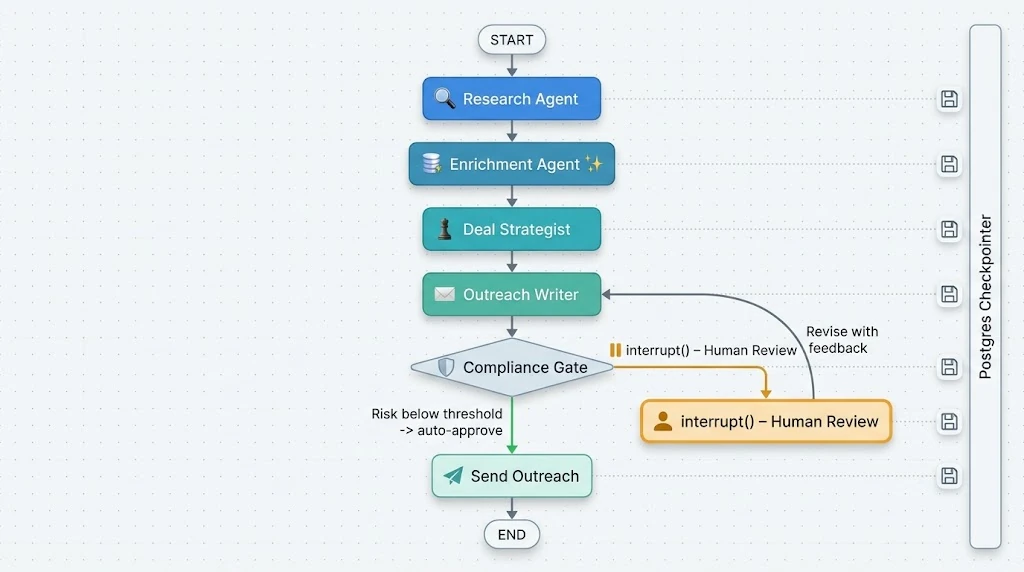
LangGraph has become the default choice for production agent orchestration for a few practical reasons: explicit graphs you can reason about, first-class persistence through checkpointers, and interrupt() for pausing a run until a human responds. Those three features are basically the requirements list for an enterprise A2A system.
Defining Shared State
Every agent reads from and writes to one typed state object. Think of it as the conveyor belt.
# state.py
import operator
from typing import Annotated, TypedDict

class CRMState(TypedDict):
    tenant_id: str
    run_id: str
    lead: dict                                    # raw inbound lead
    account_context: str                          # GraphRAG output
    research_notes: Annotated[list[str], operator.add]
    deal_plan: dict | None                        # structured strategy
    outreach_draft: dict | None                   # subject, body, channel
    risk_score: float
    decisions: Annotated[list[dict], operator.add]  # audit of human actions
The Annotated[..., operator.add] reducers matter. They tell LangGraph to append when several agents contribute notes, rather than having the last writer silently overwrite the others.
Building Specialized Agents
Each agent is a node with one job and a structured output. Here's the deal strategist:
# agents/strategist.py
from pydantic import BaseModel, Field
from langchain.chat_models import init_chat_model
from langgraph.config import get_stream_writer

class DealPlan(BaseModel):
    segment: str
    recommended_products: list[str]
    proposed_discount_pct: float = Field(ge=0, le=50)
    next_best_action: str
    confidence: float = Field(ge=0, le=1)
    rationale: str

llm = init_chat_model("anthropic:claude-sonnet-5-5", temperature=0)
planner = llm.with_structured_output(DealPlan)

async def deal_strategist(state: CRMState) -> dict:
    writer = get_stream_writer()
    writer({"agent": "deal_strategist", "status": "thinking"})

    plan = await planner.ainvoke([
        ("system", STRATEGIST_PROMPT),
        ("user", f"Lead:\n{state['lead']}\n\n"
                 f"Account graph:\n{state['account_context']}\n\n"
                 f"Research:\n" + "\n".join(state["research_notes"])),
    ])

    writer({"agent": "deal_strategist", "status": "done",
            "confidence": plan.confidence})
    return {"deal_plan": plan.model_dump()}
The research and enrichment agents follow the same shape. The research agent calls graph_context() and a web or firmographics tool. The enrichment agent normalizes company size, industry, and tech stack. The outreach writer turns the deal plan into a draft.
The Human-on-the-Loop Compliance Gate
This node is the heart of the "on-the-loop" design. It scores risk deterministically, auto-approves anything under the tenant's threshold, and only interrupts when a human really needs to look.
# agents/compliance.py
from typing import Literal
from langgraph.types import Command, interrupt

def score_risk(plan: dict, draft: dict, policy: dict) -> tuple[float, list[str]]:
    reasons, score = [], 0.0
    if plan["proposed_discount_pct"] > policy["max_auto_discount"]:
        score += 0.5; reasons.append("Discount above auto-approve limit")
    if plan["confidence"] < 0.6:
        score += 0.3; reasons.append("Low strategist confidence")
    if draft.get("account_tier") == "strategic":
        score += 0.4; reasons.append("Strategic account")
    return min(score, 1.0), reasons

async def compliance_gate(
    state: CRMState,
) -> Command[Literal["send_outreach", "outreach_writer", "__end__"]]:
    policy = await load_policy(state["tenant_id"])
    risk, reasons = score_risk(state["deal_plan"], state["outreach_draft"], policy)

    if risk < policy["auto_approve_below"]:
        return Command(goto="send_outreach", update={"risk_score": risk})

    # Pauses the run, checkpoints state, and surfaces this payload to the UI.
    decision = interrupt({
        "type": "approval_required",
        "risk": risk,
        "reasons": reasons,
        "deal_plan": state["deal_plan"],
        "draft": state["outreach_draft"],
    })

    audit = {"by": decision["user_id"], "action": decision["action"], "risk": risk}

    if decision["action"] == "approve":
        return Command(goto="send_outreach", update={"decisions": [audit]})
    if decision["action"] == "edit":
        return Command(
            goto="send_outreach",
            update={"outreach_draft": decision["draft"], "decisions": [audit]},
        )
    if decision["action"] == "revise":
        return Command(goto="outreach_writer", update={
            "research_notes": [f"Reviewer feedback: {decision['feedback']}"],
            "decisions": [audit],
        })
    return Command(goto="__end__", update={"decisions": [audit]})
Two things I want to call out:
- Risk is scored by code, not by the LLM. Let the model propose. Let deterministic policy decide whether a human must look. An LLM asked "is this risky?" will be wrong in creative ways.
- "Revise" loops back with feedback. Reviewers rarely want a binary yes/no. Letting them send the draft back with a note keeps humans in a coaching role, not a rubber-stamp role.
Wiring the Graph with a Postgres Checkpointer
# graph.py
from langgraph.graph import StateGraph, START, END
from langgraph.checkpoint.postgres.aio import AsyncPostgresSaver

def build_graph(checkpointer):
    g = StateGraph(CRMState)
    g.add_node("research", research_agent)
    g.add_node("enrichment", enrichment_agent)
    g.add_node("deal_strategist", deal_strategist)
    g.add_node("outreach_writer", outreach_writer)
    g.add_node("compliance_gate", compliance_gate)
    g.add_node("send_outreach", send_outreach)

    g.add_edge(START, "research")
    g.add_edge("research", "enrichment")
    g.add_edge("enrichment", "deal_strategist")
    g.add_edge("deal_strategist", "outreach_writer")
    g.add_edge("outreach_writer", "compliance_gate")
    g.add_edge("send_outreach", END)
    return g.compile(checkpointer=checkpointer)

async def init_graph():
    saver_cm = AsyncPostgresSaver.from_conn_string(CHECKPOINT_DB_URL)
    saver = await saver_cm.__aenter__()
    await saver.setup()  # creates checkpoint tables on first run
    return build_graph(saver), saver_cm
I've kept the edges linear for clarity. In production you'll often swap the fixed edges between research and enrichment for a supervisor node that routes dynamically. For example, it can skip enrichment for existing customers, or send a lead straight to a "disqualify" agent. The compliance gate already shows the pattern: return a Command(goto=...) and LangGraph follows it.
Because state is checkpointed after every node, a crashed container doesn't lose the run. When the worker restarts, you resume the same thread_id and the graph picks up from the last completed step.
Exposing the Graph Through an API and Streaming Events
# api.py
import asyncio, json
from uuid import uuid4
from fastapi import FastAPI, Depends
from langgraph.types import Command

app = FastAPI()

@app.post("/runs")
async def start_run(body: StartRun, tenant_id: str = Depends(auth_tenant)):
    run_id = str(uuid4())
    initial = {"tenant_id": tenant_id, "run_id": run_id, "lead": body.lead,
               "research_notes": [], "decisions": [], "risk_score": 0.0}
    asyncio.create_task(execute(run_id, tenant_id, initial))
    return {"run_id": run_id}

@app.post("/runs/{run_id}/resume")
async def resume_run(run_id: str, decision: Decision,
                     tenant_id: str = Depends(auth_tenant)):
    await assert_run_belongs_to(run_id, tenant_id)
    asyncio.create_task(execute(run_id, tenant_id, Command(resume=decision.model_dump())))
    return {"status": "resumed"}

async def execute(run_id: str, tenant_id: str, payload):
    config = {"configurable": {"thread_id": run_id}}
    async for mode, chunk in graph.astream(
        payload, config, stream_mode=["updates", "custom"]
    ):
        if mode == "updates" and "__interrupt__" in chunk:
            interrupt_obj = chunk["__interrupt__"][0]
            await emit(tenant_id, run_id, "approval_required", interrupt_obj.value)
        elif mode == "updates":
            for node, delta in chunk.items():
                await emit(tenant_id, run_id, "node_completed",
                           {"node": node, "keys": list((delta or {}).keys())})
        else:
            await emit(tenant_id, run_id, "progress", chunk)

async def emit(tenant_id: str, run_id: str, kind: str, data: dict):
    async with tenant_tx(tenant_id) as conn:
        row = await (await conn.execute(
            """INSERT INTO agent_events (tenant_id, run_id, kind, data)
               VALUES (%s, %s, %s, %s) RETURNING id""",
            (tenant_id, run_id, kind, json.dumps(data)),
        )).fetchone()
        # NOTIFY fires on commit, so subscribers never see uncommitted events.
        await conn.execute(
            "SELECT pg_notify('agent_events', %s)",
            (json.dumps({"id": row["id"], "tenant_id": tenant_id, "run_id": run_id}),),
        )
The events table is simple and append-only:
CREATE TABLE agent_events (
  id         bigserial PRIMARY KEY,
  tenant_id  uuid NOT NULL REFERENCES tenants(id),
  run_id     uuid NOT NULL,
  kind       text NOT NULL,
  data       jsonb NOT NULL,
  created_at timestamptz NOT NULL DEFAULT now()
);
CREATE INDEX ON agent_events (tenant_id, run_id, id);
We send only a small pointer through pg_notify. Postgres caps notification payloads at around 8 KB, and an LLM draft can easily exceed that.
Step 3: Crossing the Boundary with the A2A Protocol
Your deal strategist will eventually need something your CRM doesn't own, like live contract terms from the finance system. Instead of a one-off integration, call the finance team's agent through the A2A protocol.
A remote agent publishes an Agent Card, typically at /.well-known/agent-card.json, describing its skills:
{
  "name": "Finance Contract Agent",
  "description": "Returns active contract terms, renewal dates, and approved pricing bands.",
  "url": "https://finance.internal.example.com/a2a",
  "version": "1.4.0",
  "capabilities": { "streaming": true },
  "defaultInputModes": ["text/plain", "application/json"],
  "defaultOutputModes": ["application/json"],
  "skills": [
    {
      "id": "contract-lookup",
      "name": "Contract lookup",
      "description": "Look up active contracts and pricing bands for an account domain."
    }
  ]
}
Your agent then sends it a task over JSON-RPC:
# a2a_client.py
import httpx
from uuid import uuid4

async def ask_finance_agent(domain: str, token: str) -> dict:
    payload = {
        "jsonrpc": "2.0",
        "id": str(uuid4()),
        "method": "message/send",
        "params": {
            "message": {
                "role": "user",
                "messageId": str(uuid4()),
                "parts": [{"kind": "text",
                           "text": f"Active contracts and pricing band for {domain}"}],
            }
        },
    }
    async with httpx.AsyncClient(timeout=30) as client:
        r = await client.post(FINANCE_A2A_URL, json=payload,
                              headers={"Authorization": f"Bearer {token}"})
        r.raise_for_status()
        return r.json()["result"]
Wrap that in a LangGraph tool and give it to the strategist. The important habit is to treat remote agent output as untrusted input. Validate it against a schema, never paste it raw into a system prompt, and log every cross-boundary call with the tenant and run ID.
Step 4: The Real-Time Gateway with Node.js and Socket.io
The gateway has three jobs: authenticate, route events to the right rooms, and replay anything a client missed.
// gateway/server.ts
import { createServer } from "node:http";
import { Server } from "socket.io";
import pg from "pg";
import { jwtVerify, createRemoteJWKSet } from "jose";

const JWKS = createRemoteJWKSet(new URL(process.env.JWKS_URL!));
const pool = new pg.Pool({ connectionString: process.env.GATEWAY_DB_URL });
const httpServer = createServer();
const io = new Server(httpServer, {
  cors: { origin: process.env.WEB_ORIGIN, credentials: true },
});

// 1. Authenticate every socket with a short-lived JWT
io.use(async (socket, next) => {
  try {
    const { payload } = await jwtVerify(socket.handshake.auth.token, JWKS, {
      audience: "crm-realtime",
    });
    socket.data.tenantId = payload.tenant_id as string;
    socket.data.userId = payload.sub as string;
    next();
  } catch {
    next(new Error("unauthorized"));
  }
});

async function fetchEvents(tenantId: string, runId: string, afterId = 0) {
  const client = await pool.connect();
  try {
    await client.query("BEGIN");
    await client.query("SELECT set_config('app.tenant_id', $1, true)", [tenantId]);
    const { rows } = await client.query(
      `SELECT id, kind, data, created_at FROM agent_events
       WHERE run_id = $1 AND id > $2 ORDER BY id`,
      [runId, afterId],
    );
    await client.query("COMMIT");
    return rows;
  } finally {
    client.release();
  }
}

// 2. Rooms per run, with replay for reconnecting clients
io.on("connection", (socket) => {
  socket.join(`tenant:${socket.data.tenantId}`);

  socket.on("run:subscribe", async ({ runId, lastEventId }, ack) => {
    const missed = await fetchEvents(socket.data.tenantId, runId, lastEventId ?? 0);
    socket.join(`run:${socket.data.tenantId}:${runId}`);
    ack({ ok: true, missed });
  });
});

// 3. LISTEN for committed events and fan them out
const listener = new pg.Client({ connectionString: process.env.GATEWAY_DB_URL });
await listener.connect();
await listener.query("LISTEN agent_events");
listener.on("notification", async (msg) => {
  const { id, tenant_id, run_id } = JSON.parse(msg.payload!);
  const [event] = await fetchEvents(tenant_id, run_id, id - 1);
  if (event) io.to(`run:${tenant_id}:${run_id}`).emit("agent:event", event);
});

httpServer.listen(4000);
Notice the room name includes the tenant ID, and the gateway reads events through the same RLS policies as everything else. Even if a malicious client guesses another tenant's runId, it gets nothing back.
When you scale the gateway horizontally, add the Socket.io Redis or Postgres adapter so that an event received by one instance reaches sockets on all instances.
Step 5: The Human-on-the-Loop Dashboard in Next.js
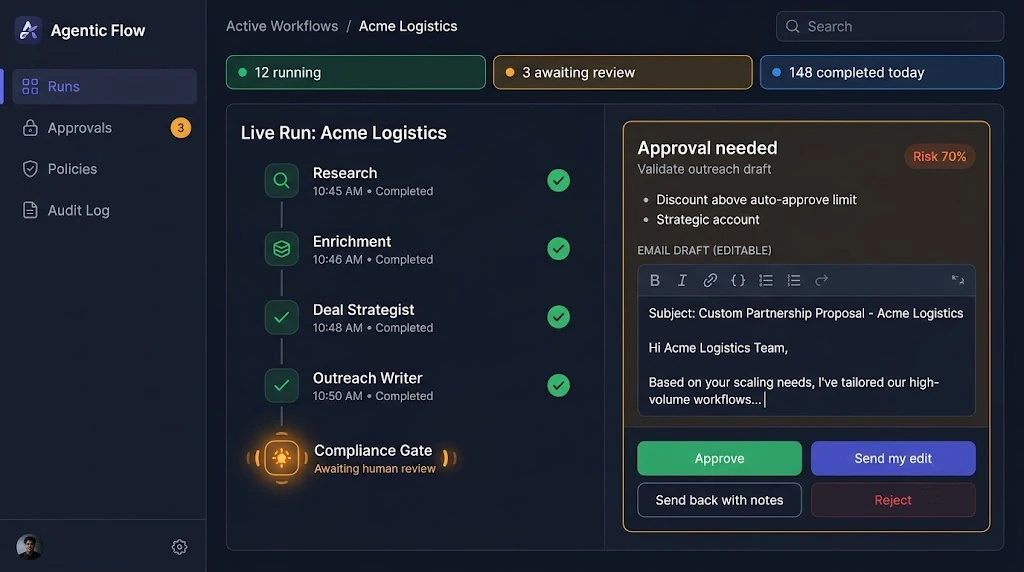
The dashboard should answer three questions at a glance: What are the agents doing right now? What needs me? What did we decide and why?
A Hook for Live Runs
// app/runs/[runId]/use-agent-run.ts
"use client";
import { useEffect, useRef, useState } from "react";
import { io, Socket } from "socket.io-client";

export type AgentEvent = {
  id: number;
  kind: "progress" | "node_completed" | "approval_required";
  data: Record<string, any>;
  created_at: string;
};

export function useAgentRun(runId: string) {
  const [events, setEvents] = useState<AgentEvent[]>([]);
  const lastId = useRef(0);

  useEffect(() => {
    let socket: Socket | undefined;

    (async () => {
      const { token } = await fetch("/api/realtime-token").then((r) => r.json());
      socket = io(process.env.NEXT_PUBLIC_GATEWAY_URL!, { auth: { token } });

      const subscribe = () =>
        socket!.emit(
          "run:subscribe",
          { runId, lastEventId: lastId.current },
          ({ missed }: { missed: AgentEvent[] }) => append(missed),
        );

      const append = (incoming: AgentEvent[]) => {
        const fresh = incoming.filter((e) => e.id > lastId.current);
        if (!fresh.length) return;
        lastId.current = fresh[fresh.length - 1].id;
        setEvents((prev) => [...prev, ...fresh]);
      };

      socket.on("connect", subscribe); // also fires on reconnect
      socket.on("agent:event", (e: AgentEvent) => append([e]));
    })();

    return () => {
      socket?.disconnect();
    };
  }, [runId]);

  const pending = [...events].reverse().find((e) => e.kind === "approval_required");
  const resolved = pending && events.some(
    (e) => e.id > pending.id && e.kind === "node_completed",
  );

  return { events, pendingApproval: resolved ? undefined : pending };
}
Deduplicating by event ID is what makes reconnects painless. A laptop that wakes up after an hour asks for everything after its last ID and slots in cleanly.
The Approval Card
// app/runs/[runId]/approval-card.tsx
"use client";
import { useState } from "react";

export function ApprovalCard({ runId, payload }: { runId: string; payload: any }) {
  const [draft, setDraft] = useState(payload.draft.body);
  const [busy, setBusy] = useState(false);

  async function decide(action: "approve" | "edit" | "revise" | "reject") {
    setBusy(true);
    await fetch(`/api/runs/${runId}/resume`, {
      method: "POST",
      headers: { "Content-Type": "application/json" },
      body: JSON.stringify({
        action,
        draft: { ...payload.draft, body: draft },
        feedback: action === "revise" ? draft : undefined,
      }),
    });
    setBusy(false);
  }

  const riskPct = Math.round(payload.risk * 100);

  return (
    <section className="rounded-2xl border border-amber-300 bg-amber-50 p-5 shadow-sm dark:border-amber-500/40 dark:bg-amber-950/30">
      <header className="mb-3 flex items-center justify-between">
        <h3 className="text-base font-semibold text-slate-900 dark:text-slate-100">
          Approval needed
        </h3>
        <span className="rounded-full bg-amber-200 px-3 py-1 text-xs font-medium text-amber-900">
          Risk {riskPct}%
        </span>
      </header>

      <ul className="mb-4 list-disc space-y-1 pl-5 text-sm text-slate-700 dark:text-slate-300">
        {payload.reasons.map((r: string) => <li key={r}>{r}</li>)}
      </ul>

      <label className="mb-1 block text-xs font-medium uppercase tracking-wide text-slate-500">
        Draft ({payload.deal_plan.proposed_discount_pct}% discount proposed)
      </label>
      <textarea
        value={draft}
        onChange={(e) => setDraft(e.target.value)}
        rows={8}
        className="w-full rounded-lg border border-slate-300 bg-white p-3 text-sm focus:outline-none focus:ring-2 focus:ring-indigo-500 dark:border-slate-700 dark:bg-slate-900"
      />

      <div className="mt-4 flex flex-wrap gap-2">
        <button disabled={busy} onClick={() => decide("approve")}
          className="rounded-lg bg-emerald-600 px-4 py-2 text-sm font-medium text-white hover:bg-emerald-700 disabled:opacity-50">
          Approve
        </button>
        <button disabled={busy} onClick={() => decide("edit")}
          className="rounded-lg bg-indigo-600 px-4 py-2 text-sm font-medium text-white hover:bg-indigo-700 disabled:opacity-50">
          Send my edit
        </button>
        <button disabled={busy} onClick={() => decide("revise")}
          className="rounded-lg border border-slate-300 px-4 py-2 text-sm font-medium hover:bg-slate-100 disabled:opacity-50 dark:border-slate-600 dark:hover:bg-slate-800">
          Send back with notes
        </button>
        <button disabled={busy} onClick={() => decide("reject")}
          className="rounded-lg px-4 py-2 text-sm font-medium text-rose-600 hover:bg-rose-50 disabled:opacity-50">
          Reject
        </button>
      </div>
    </section>
  );
}
The /api/runs/[runId]/resume route handler runs on the server. It reads the user's session, attaches the user_id, and forwards the decision to the Python API. The browser never talks to the agent service directly with raw credentials.
Showing the reasons next to the risk score sounds minor, but it's the single most effective thing I've seen for building reviewer trust. People approve faster and more carefully when they know exactly why they were pulled in.
Step 6: Containerizing the Stack with Docker
# docker-compose.yml
services:
  db:
    image: pgvector/pgvector:pg17
    environment:
      POSTGRES_PASSWORD: ${POSTGRES_PASSWORD}
      POSTGRES_DB: crm
    volumes:
      - pgdata:/var/lib/postgresql/data
      - ./db/init:/docker-entrypoint-initdb.d:ro
    healthcheck:
      test: ["CMD-SHELL", "pg_isready -U postgres -d crm"]
      interval: 5s
      retries: 10

  agents:
    build: ./agents
    environment:
      DATABASE_URL: postgresql://crm_app:${APP_DB_PASSWORD}@db:5432/crm
      CHECKPOINT_DB_URL: postgresql://crm_app:${APP_DB_PASSWORD}@db:5432/crm
      ANTHROPIC_API_KEY: ${ANTHROPIC_API_KEY}
    depends_on:
      db: { condition: service_healthy }

  gateway:
    build: ./gateway
    environment:
      GATEWAY_DB_URL: postgresql://crm_gateway:${GATEWAY_DB_PASSWORD}@db:5432/crm
      JWKS_URL: ${JWKS_URL}
      WEB_ORIGIN: http://localhost:3000
    ports: ["4000:4000"]
    depends_on:
      db: { condition: service_healthy }

  web:
    build: ./web
    environment:
      AGENTS_API_URL: http://agents:8000
      NEXT_PUBLIC_GATEWAY_URL: http://localhost:4000
    ports: ["3000:3000"]
    depends_on: [agents, gateway]

volumes:
  pgdata:
Keep the agent service off the public network. Only web and gateway publish ports, and the gateway uses its own database role with read-only access to agent_events.
A Real-World Walkthrough: From Inbound Lead to Approved Outreach
Let's run a realistic scenario through the line. A VP of Operations at a 900-person logistics company fills in a demo request at 11:42 PM.
- Trigger. The web form webhook calls
POST /runs. A run ID comes back immediately, and the event appears on the sales manager's live board. - Research agent. GraphRAG finds that two people at the same domain filed support tickets last quarter for a competitor integration. It also finds that a sister company under the same parent already uses your analytics add-on. That context only shows up because of the graph walk, since vector search alone would have missed the parent-subsidiary edge.
- Enrichment agent. It normalizes headcount, region, and tech stack, and tags the lead as mid-market.
- Deal strategist. It calls the finance team's agent over A2A, learns the sister company's renewal is in 60 days, and proposes a bundled offer with an 18% discount, with 0.72 confidence.
- Outreach writer. It drafts a short, specific email referencing the integration pain point.
- Compliance gate. The tenant's auto-approve discount limit is 15%, so the risk score crosses the threshold. The run pauses, and an approval card pops up on the dashboard with two clear reasons.
- Human-on-the-loop. The next morning, the sales manager trims the discount to 15%, tweaks one sentence, and clicks "Send my edit." The run resumes from its checkpoint, sends the email, and logs who changed what.
Total human effort: about 40 seconds. Total agent effort: several minutes of research nobody would have done at midnight. That's the assembly line working as intended.
Best Practices for Production A2A Systems
- Make every agent's output structured. Pydantic models between agents turn vague handoffs into contracts you can validate, version, and test.
- Keep policy in code and data, not prompts. Discount limits, restricted accounts, and approval thresholds belong in a per-tenant
policiestable that the compliance gate reads. - Checkpoint everything. Use the Postgres checkpointer from day one. Retrofitting resumability is painful.
- Use a durable job queue in production.
asyncio.create_taskis fine for a demo. In production, put runs on a queue (Postgres-backed queues likepgmq, or a broker you already operate) so restarts and deploys don't orphan work. - Write an append-only event log. It powers the live UI, reconnect replay, audit, and offline evaluation datasets, all from one table.
- Isolate tenants in the database. RLS with
FORCE ROW LEVEL SECURITYand a non-bypass role is your last line of defence when application code makes a mistake. - Bound your graph walks. Two or three hops with a row limit keeps latency predictable and prompts small.
- Evaluate agents individually. Build small golden datasets per agent (for example, 50 leads with expected deal plans) and run them in CI whenever prompts or models change.
- Set per-run budgets. Cap tokens, tool calls, and wall-clock time per run. Autonomous loops without budgets will eventually surprise your finance team.
Common Mistakes to Avoid
- Building one giant "do everything" agent. It's hard to test, hard to debug, and every prompt change risks breaking unrelated behaviour.
- Letting the LLM decide whether it needs approval. Models are not reliable judges of their own risk. Use deterministic scoring.
- Filtering tenants only in application code. One missing
WHEREclause and an agent summarizes another customer's pipeline. Use RLS. - Pushing large payloads through
pg_notify. You'll hit the payload limit with the first long draft. Send IDs, then fetch. - Streaming directly from the agent worker to browsers. It couples slow LLM work to fragile client connections and makes horizontal scaling painful.
- Ignoring reconnects. If your dashboard can't replay missed events, users will see runs stuck "in progress" that actually finished ten minutes ago.
- Trusting external A2A agents blindly. Remote agent output is untrusted input. Validate it and keep it out of system prompts.
- Forgetting the audit trail. Enterprise buyers will ask who approved a given email and why. If you can't answer from the event log, you'll lose the deal.
🚀 Pro Tips
- Show the "why" before the "what." On approval cards, put the triggering reasons above the draft. Reviewers make better decisions when they know what to look for.
- Use
get_stream_writer()for progress, not just node completions. Small "searching account graph..." updates make a 40-second run feel responsive instead of broken. - Version your prompts like code. Store a
prompt_versionon every event. When quality dips, you can pinpoint which change caused it. - Turn reviewer edits into training signal. Every "Send my edit" is a labeled before-and-after pair. Feed them into your evaluation set and few-shot examples.
- Start with one assembly line. Lead-to-outreach is a great first workflow because the value is obvious and the blast radius is manageable. Add renewals and churn-risk lines once the platform is stable.
- Give tenants a "pause the line" switch. A single flag that forces every run to interrupt before external actions is a cheap way to earn trust during rollout and incidents.
- Cache GraphRAG context per run. Several agents often need the same account context. Compute it once in the research agent and keep it in state.
📌 Key Takeaways
- A2A workflows turn AI from a chatbot into a digital assembly line of narrow agents that pass structured work through shared, checkpointed state.
- LangGraph gives you explicit orchestration, durable checkpoints in Postgres, and
interrupt()for clean human-on-the-loop approvals. - PostgreSQL with
pgvector, recursive CTEs, and forced RLS is a capable, secure foundation for multi-tenant GraphRAG. - An append-only event table, LISTEN/NOTIFY, and Socket.io together deliver real-time dashboards with replay and a built-in audit trail.
- The open A2A protocol is how your agents should talk to agents in other systems, with their output treated as untrusted input.
- Humans stay in control through policy-driven gates, not by approving every step.
Conclusion
The shift from chatbots to autonomous agent workflows isn't really about smarter models. It's about architecture. The teams getting real value in 2026 are the ones who treat agents like services on an assembly line: narrow responsibilities, typed contracts, durable state, strict tenant boundaries, and a clear, policy-driven moment where a human steps in.
The stack in this guide is deliberately boring in the best way. LangGraph handles orchestration, PostgreSQL holds the knowledge graph, checkpoints, and audit log, Node.js and Socket.io handle real-time delivery, and Next.js gives humans a calm place to supervise. None of these choices are exotic, and that's exactly why the system is easy to operate, debug, and explain to a security reviewer.
Start with one workflow. Instrument it heavily. Let your reviewers teach the system through their edits. Once the first line runs smoothly, adding the second one is mostly configuration, and that's when your CRM starts to feel less like a database and more like a team.
References
- LangGraph Documentation — StateGraph, persistence, and human-in-the-loop with
interrupt() - LangGraph Postgres Checkpointer (langgraph-checkpoint-postgres)
- Agent2Agent (A2A) Protocol Specification
- A2A Protocol GitHub Repository
- pgvector: Open-source vector similarity search for Postgres
- PostgreSQL Docs: Row Security Policies
- PostgreSQL Docs: NOTIFY
- PostgreSQL Docs: WITH Queries (Recursive CTEs)
- Microsoft Research: From Local to Global, A Graph RAG Approach to Query-Focused Summarization
- Socket.io Documentation: Rooms and Adapters
- Next.js Documentation: App Router and Route Handlers
- Tailwind CSS Documentation
- Docker Compose Documentation