You ship an agent. It works beautifully in the demo. Then a real user asks it to book a meeting, your locally hosted 8B model decides that duration_minutes should be the string "half an hour", and the whole run dies with a stack trace the user was never supposed to see.
If you have built agents on top of smaller or quantized open-weight models, you already know this pain. The model is almost right. The intent is correct, the tool choice is correct, and one argument is slightly broken. Yet most agent loops treat that tiny mistake as fatal.
In this guide, we will build something better: a self-healing tool call execution loop in LangGraph.js. We will intercept every tool call the model produces, validate it against strict Zod schemas, and route failures to a dedicated correction node that feeds the exact validation error back to the model. The model gets a chance to debug itself in the background, and in the vast majority of cases the user never notices anything happened.
By the end, you will have a production-ready pattern with typed state, bounded retries, graceful fallbacks, and tests you can run without a GPU.
Why Tool Calls Fail in the First Place
Before writing any code, it helps to understand the failure modes. Tool calling looks like a clean API, but underneath it is a language model generating text that happens to look like JSON. Anything that can go wrong with text generation can go wrong here.
Here are the most common failures we see with smaller local models:
- Missing required parameters. The model calls
search_flightswith a destination but forgets the date. - Wrong types. A number arrives as
"3", a boolean as"yes", or an array as a comma-separated string. - Hallucinated parameter names. You asked for
city, the model sentlocation. - Invalid enum values. Your schema allows
"low" | "medium" | "high"and the model sends"urgent". - Malformed JSON. Trailing commas, unescaped quotes, or JSON wrapped in markdown fences and chatty prose.
- Semantic violations. The JSON is valid, but the value makes no sense, such as a negative quantity or an end date before the start date.
Quantization makes this worse. A Q4 version of a 7B or 8B model has measurably less headroom for strict format adherence than its full-precision sibling. Long contexts and large tool lists add even more pressure.
You could switch to a bigger model, and sometimes you should. But often you cannot. Privacy requirements, latency budgets, cost ceilings, or air-gapped deployments keep you on a local model. In that world, resilience is not optional. It is an engineering requirement.
The Core Idea: Treat Validation Errors as Feedback, Not Failures
Most agent frameworks follow a simple pipeline: the model emits a tool call, the framework executes it, and if something throws, the run fails or returns a generic error.
A self-healing loop changes the contract. A validation error is no longer an exception. It is information, and it is exactly the kind of information a language model is good at using.
Think about how a developer fixes a bug. They read the error message, find the offending line, and patch it. Zod gives us a precise, human-readable error message that says which field failed and why. If we hand that message back to the model, we are effectively giving it a compiler error to fix.
The flow looks like this:
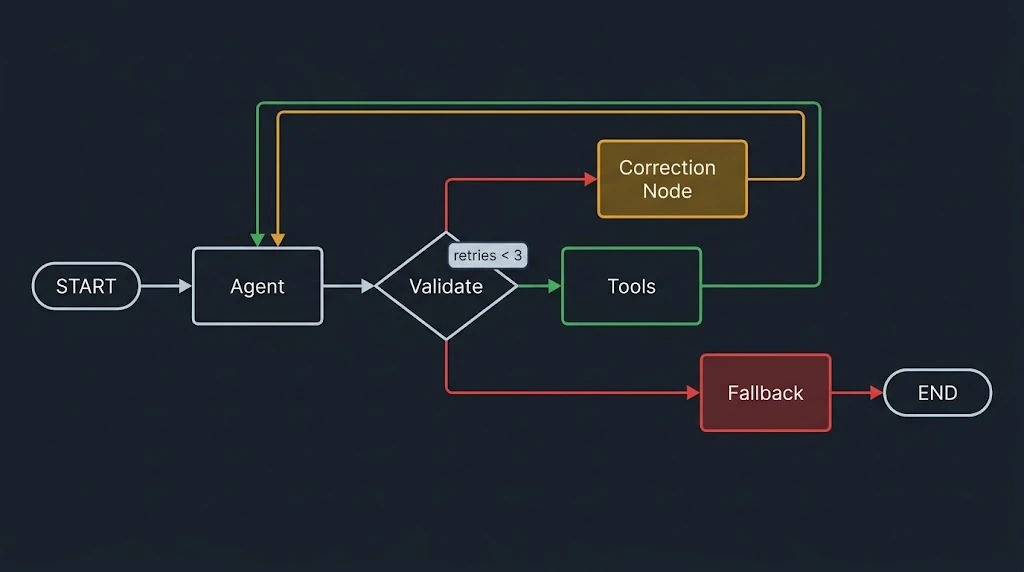
- The agent node calls the model, which may return tool calls.
- The validation node parses each call's arguments with the matching Zod schema.
- If everything is valid, the tool node executes the calls using the parsed, typed arguments.
- If anything is invalid, the correction node adds the Zod errors to the conversation and sends control back to the agent node.
- A retry counter ensures we stop after a few attempts and hand off to a fallback node.
The user only ever sees the final, successful answer, or a polite fallback if repair genuinely fails.
Prerequisites and Project Setup
This tutorial assumes you are comfortable with TypeScript and have a basic understanding of LangGraph.js concepts like state, nodes, and edges. We will use Ollama to run a local model, but nothing here is Ollama specific.
Create a project and install the dependencies:
mkdir self-healing-agent && cd self-healing-agent
npm init -y
npm install @langchain/langgraph @langchain/core @langchain/ollama zod
npm install -D typescript tsx vitest @types/node
npx tsc --init --target ES2022 --module NodeNext --moduleResolution NodeNext --strict
Pull a small model so you can reproduce real-world flakiness:
ollama pull llama3.1:8b
A quick note on versions. This guide uses Zod 4 and a current LangGraph.js release. Package APIs evolve quickly, so check the official docs linked in the references if a method name has shifted.
Step 1: Define Tools with Strict Zod Schemas
Your schemas are the contract between your application and the model. The stricter and more descriptive they are, the better the validation errors will be, and the better the model will understand how to fix itself.
Create src/tools.ts:
import { tool } from "@langchain/core/tools";
import { z } from "zod";

export const bookMeetingSchema = z.object({
  title: z
    .string()
    .min(3, "Title must be at least 3 characters")
    .describe("Short meeting title"),
  attendees: z
    .array(z.string().email("Each attendee must be a valid email address"))
    .min(1, "At least one attendee is required")
    .describe("Attendee email addresses"),
  startsAt: z
    .string()
    .datetime({ message: "startsAt must be an ISO 8601 datetime" })
    .describe("Start time in ISO 8601 format, e.g. 2026-10-05T14:00:00Z"),
  durationMinutes: z
    .number()
    .int("durationMinutes must be a whole number")
    .min(15, "Meetings must be at least 15 minutes")
    .max(240, "Meetings cannot exceed 240 minutes")
    .describe("Meeting length in minutes"),
  priority: z
    .enum(["low", "medium", "high"])
    .default("medium")
    .describe("Meeting priority"),
});

export const bookMeeting = tool(
  async (args) => {
    // In a real app, call your calendar API here.
    return JSON.stringify({
      status: "confirmed",
      meetingId: "mtg_" + Math.random().toString(36).slice(2, 8),
      ...args,
    });
  },
  {
    name: "book_meeting",
    description: "Books a calendar meeting with the given attendees.",
    schema: bookMeetingSchema,
  }
);

export const lookupOrderSchema = z.object({
  orderId: z
    .string()
    .regex(/^ORD-\d{6}$/, "orderId must look like ORD-123456"),
});

export const lookupOrder = tool(
  async ({ orderId }) =>
    JSON.stringify({ orderId, status: "shipped", eta: "2026-10-08" }),
  {
    name: "lookup_order",
    description: "Looks up the shipping status of an order by its ID.",
    schema: lookupOrderSchema,
  }
);

export const tools = [bookMeeting, lookupOrder];
export const toolsByName = Object.fromEntries(tools.map((t) => [t.name, t]));
A few design choices are worth calling out:
- Custom error messages. Notice the second argument on
.min(),.email(), and.regex(). These messages are what the model will read. Write them as if you were explaining the fix to a junior developer. .describe()on every field. These descriptions flow into the JSON schema the model sees, which reduces mistakes before validation even happens.- Constrained formats. Regexes, enums, and numeric bounds catch semantic errors that plain types would miss.
Step 2: Design the Graph State
A self-healing loop needs more than a list of messages. It needs to remember how many repair attempts have happened and which calls failed. We will extend MessagesAnnotation with a few extra channels.
Create src/state.ts:
import { Annotation, MessagesAnnotation } from "@langchain/langgraph";

export interface ValidationIssue {
  toolCallId: string;
  toolName: string;
  message: string;
}

export const AgentState = Annotation.Root({
  ...MessagesAnnotation.spec,
  // Calls that failed validation in the latest pass
  issues: Annotation<ValidationIssue[]>({
    reducer: (_, next) => next,
    default: () => [],
  }),
  // Number of correction attempts for the current user turn
  retries: Annotation<number>({
    reducer: (_, next) => next,
    default: () => 0,
  }),
});

export type AgentStateType = typeof AgentState.State;
Both custom channels use a "last write wins" reducer. That keeps the state predictable: each node simply overwrites the previous value.
Step 3: Build the Agent Node
The agent node is the familiar part. It binds tools to the model and invokes it with the current conversation.
Create src/nodes.ts and start with the agent:
import { ChatOllama } from "@langchain/ollama";
import {
  AIMessage,
  SystemMessage,
  ToolMessage,
} from "@langchain/core/messages";
import { z } from "zod";
import { tools, toolsByName } from "./tools.js";
import type { AgentStateType } from "./state.js";

export const MAX_RETRIES = 3;

const model = new ChatOllama({
  model: "llama3.1:8b",
  temperature: 0,
}).bindTools(tools);

export async function agentNode(state: AgentStateType) {
  const response = await model.invoke(state.messages);
  return { messages: [response] };
}
Setting temperature: 0 is a small but meaningful choice for tool calling. Lower randomness reduces creative deviations from your schema. It also makes correction behavior easier to reason about, though it can make the model repeat the same mistake. We will deal with that in the best practices section.
Step 4: The Validation Node (The Interceptor)
This is the heart of the pattern. The validation node reads the last AI message, finds every tool call, and checks its arguments against the registered Zod schema.
Add this to src/nodes.ts:
function lastAiMessage(state: AgentStateType): AIMessage {
  const last = state.messages[state.messages.length - 1];
  return last as AIMessage;
}

export async function validateNode(state: AgentStateType) {
  const ai = lastAiMessage(state);
  const issues = [];

  for (const call of ai.tool_calls ?? []) {
    const registered = toolsByName[call.name];

    // The model invented a tool that does not exist
    if (!registered) {
      issues.push({
        toolCallId: call.id ?? call.name,
        toolName: call.name,
        message:
          `Unknown tool "${call.name}". Available tools: ` +
          Object.keys(toolsByName).join(", "),
      });
      continue;
    }

    const result = registered.schema.safeParse(call.args);

    if (!result.success) {
      issues.push({
        toolCallId: call.id ?? call.name,
        toolName: call.name,
        // Zod 4 produces a readable, multi-line summary of every problem
        message: z.prettifyError(result.error),
      });
    }
  }

  return { issues };
}
Two things deserve attention here.
First, we use safeParse instead of parse. Exceptions are for exceptional situations. A bad tool call from a small model is routine, and safeParse lets us handle it as ordinary data flow.
Second, we collect all issues in one pass rather than stopping at the first failure. If the model emitted three tool calls and two are broken, we want to report both so it can fix them in a single retry.
If you are using an older Zod version, replace z.prettifyError(result.error) with a manual formatter that maps result.error.issues into lines like startsAt: must be an ISO 8601 datetime. The principle is identical.
Step 5: The Correction Node (The Self-Healing Core)
Now for the part that makes the loop self-healing. The correction node converts the validation issues into messages the model can learn from, and it increments the retry counter.
export async function correctionNode(state: AgentStateType) {
  const ai = lastAiMessage(state);

  // 1. Answer every tool call so the message history stays protocol-valid.
  const toolMessages = state.issues.map(
    (issue) =>
      new ToolMessage({
        tool_call_id: issue.toolCallId,
        name: issue.toolName,
        status: "error",
        content: `Validation failed for ${issue.toolName}:\n${issue.message}`,
      })
  );

  // 2. Some calls may have been valid. Tell the model nothing ran.
  const failedIds = new Set(state.issues.map((i) => i.toolCallId));
  const skipped = (ai.tool_calls ?? [])
    .filter((c) => !failedIds.has(c.id ?? c.name))
    .map(
      (c) =>
        new ToolMessage({
          tool_call_id: c.id ?? c.name,
          name: c.name,
          content:
            "Not executed. Another tool call in this batch was invalid. " +
            "Resend this call together with the corrected one.",
        })
    );

  // 3. Give explicit repair instructions.
  const instruction = new SystemMessage(
    [
      "Your previous tool call arguments were rejected by schema validation.",
      "Read the errors above, fix ONLY the invalid arguments, and call the tool again.",
      "Rules:",
      "- Return arguments that strictly match the tool schema.",
      "- Do not apologize or explain. Just emit the corrected tool call.",
      "- Do not invent values the user never provided. If information is missing, ask the user a short question instead of guessing.",
    ].join("\n")
  );

  return {
    messages: [...toolMessages, ...skipped, instruction],
    retries: state.retries + 1,
    issues: [],
  };
}
Let us unpack the reasoning behind each part.
ToolMessages for every call. Chat protocols from OpenAI, Anthropic, and others expect each tool_call to receive a matching tool result. If you skip this step, many providers will reject the next request outright, and even tolerant local servers may behave strangely. Pairing each failed call with an error ToolMessage keeps the history consistent and puts the Zod error right next to the call that caused it.
The skipped calls branch. When a model emits a batch of tool calls and only one is broken, you should not execute the good ones in isolation. Partial execution can produce side effects that depend on the failed call. Telling the model that nothing ran lets it resend the whole batch cleanly.
The system message. This is the explicit instruction layer. It tells the model what happened and, just as importantly, what not to do. The "do not invent values" rule prevents a nasty failure mode where the model fixes a missing email by fabricating one. We will return to that in the common mistakes section.
A practical caveat: some local chat templates, especially older ones, only expect a system message at the very start of the conversation. If your model ignores or mishandles a mid-conversation system message, send the same text as a HumanMessage instead. The graph logic does not change.
Step 6: The Tool Execution Node
If validation passes, we execute the tools. A subtle but valuable improvement is to run the tool with the parsed output of Zod rather than the raw model arguments. Parsing applies defaults (like our priority: "medium") and strips unknown keys, so your tool code always receives clean, typed input.
export async function toolNode(state: AgentStateType) {
  const ai = lastAiMessage(state);
  const results: ToolMessage[] = [];

  for (const call of ai.tool_calls ?? []) {
    const registered = toolsByName[call.name];
    const parsed = registered.schema.parse(call.args); // safe: already validated

    try {
      const output = await registered.invoke(parsed);
      results.push(
        new ToolMessage({
          tool_call_id: call.id ?? call.name,
          name: call.name,
          content: typeof output === "string" ? output : JSON.stringify(output),
        })
      );
    } catch (err) {
      // Runtime failures are a different category from validation failures.
      results.push(
        new ToolMessage({
          tool_call_id: call.id ?? call.name,
          name: call.name,
          status: "error",
          content: `Tool execution failed: ${(err as Error).message}`,
        })
      );
    }
  }

  // Successful execution resets the repair budget for the next step.
  return { messages: results, retries: 0 };
}
Notice the separation of concerns. Validation errors mean the model's input was wrong, and we route them through the correction loop. Runtime errors, like a calendar API timeout, mean the world misbehaved. Those are returned to the model as ordinary tool errors so it can decide whether to retry, apologize, or choose a different approach. Mixing the two leads to confusing agent behavior.
Step 7: The Fallback Node
Self-healing is not magic. Sometimes the model simply cannot fix itself. When the retry budget is exhausted, we want a graceful exit instead of an infinite loop or a crash.
export async function fallbackNode(state: AgentStateType) {
  // Log the details for engineers, not for users.
  console.error("Self-healing exhausted", {
    retries: state.retries,
    issues: state.issues,
  });

  return {
    messages: [
      new AIMessage(
        "I couldn't complete that request reliably. Could you rephrase it or share the missing details, such as the exact date, time, and attendee emails?"
      ),
    ],
    issues: [],
    retries: 0,
  };
}
This is also the ideal place to escalate. You might call a larger hosted model, open a support ticket, or ask the user a targeted follow-up question based on the unresolved issues.
Step 8: Wire Everything Together in LangGraph.js
With all nodes defined, the graph itself is short and readable. The routing functions encode the policy of the loop.
Create src/graph.ts:
import { StateGraph, START, END } from "@langchain/langgraph";
import { AgentState, type AgentStateType } from "./state.js";
import {
  agentNode,
  validateNode,
  correctionNode,
  toolNode,
  fallbackNode,
  MAX_RETRIES,
} from "./nodes.js";
import type { AIMessage } from "@langchain/core/messages";

function routeAfterAgent(state: AgentStateType) {
  const last = state.messages[state.messages.length - 1] as AIMessage;
  return last.tool_calls?.length ? "validate" : END;
}

function routeAfterValidate(state: AgentStateType) {
  if (state.issues.length === 0) return "tools";
  return state.retries < MAX_RETRIES ? "correct" : "fallback";
}

export const graph = new StateGraph(AgentState)
  .addNode("agent", agentNode)
  .addNode("validate", validateNode)
  .addNode("correct", correctionNode)
  .addNode("tools", toolNode)
  .addNode("fallback", fallbackNode)
  .addEdge(START, "agent")
  .addConditionalEdges("agent", routeAfterAgent, ["validate", END])
  .addConditionalEdges("validate", routeAfterValidate, [
    "tools",
    "correct",
    "fallback",
  ])
  .addEdge("correct", "agent")
  .addEdge("tools", "agent")
  .addEdge("fallback", END)
  .compile();
Read the routing functions slowly, because they are the entire policy:
- After the agent speaks, no tool calls means we are done. Tool calls mean we validate.
- After validation, zero issues means execute. Issues with retries remaining means correct. Issues with no retries remaining means fallback.
- Correction and tool execution both return to the agent so the model can continue reasoning.
Step 9: Run It and Watch It Heal
Create src/run.ts:
import { HumanMessage } from "@langchain/core/messages";
import { graph } from "./graph.js";

const result = await graph.invoke({
  messages: [
    new HumanMessage(
      "Book a 30 minute high priority sync with sam@example.com tomorrow at 2pm UTC, call it Roadmap Sync."
    ),
  ],
});

for (const m of result.messages) {
  console.log(`[${m.getType()}]`, m.content);
}
Run it with npx tsx src/run.ts. With a small model, a realistic trace looks like this:
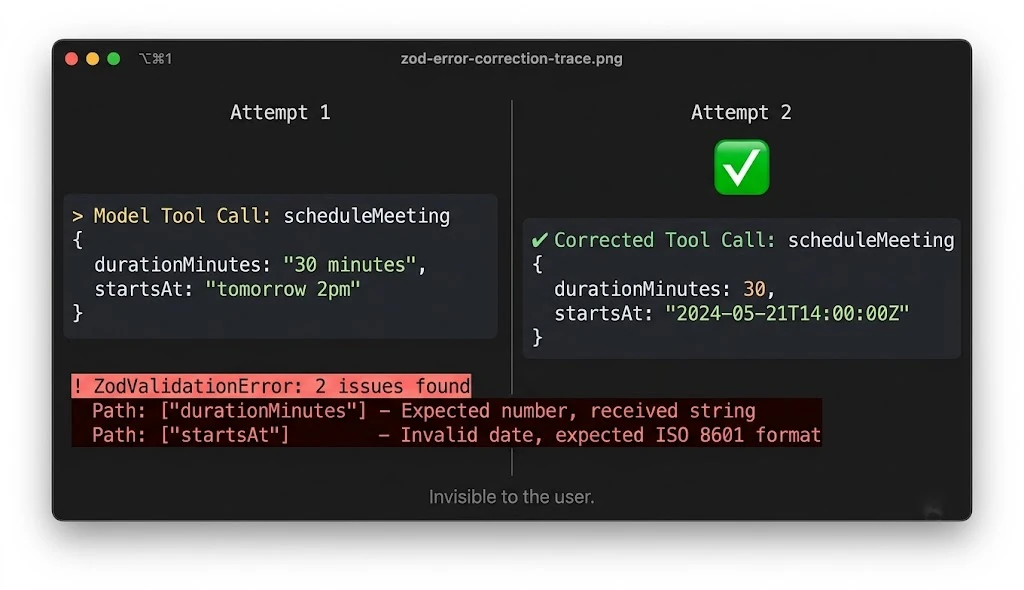
- The model calls
book_meetingwithdurationMinutes: "30 minutes"andstartsAt: "tomorrow 2pm". - The validation node reports two problems: a non-numeric duration and a non-ISO datetime.
- The correction node sends both errors back as a ToolMessage plus repair instructions.
- On the second attempt, the model returns
durationMinutes: 30and a proper ISO timestamp. - Validation passes, the tool runs, and the user receives a clean confirmation.
From the user's point of view, they asked a question and got an answer. The two failed attempts are visible only in your logs and traces.
One detail to flag: the model needs to know what "tomorrow" means. Inject the current date and timezone into your system prompt at the start of the conversation. Self-healing can fix formatting, but it cannot conjure context the model was never given.
A Real-World Example: A Support Agent on a Local Model
Imagine a customer support agent running on an on-premise 8B model because customer data cannot leave your network. It has three tools: lookup_order, issue_refund, and update_address.
A customer writes: "Where is my order 48213? Also refund the shipping cost."
The model calls lookup_order with orderId: "48213". Your schema demands the format ORD-123456, so validation fails with a message like orderId must look like ORD-123456. Without the loop, the agent would either crash or, worse, send a malformed ID to your order system and return a confusing database error.
With the loop, the correction message reaches the model. But notice what a good model does here: it cannot know the real six-digit ID from "48213" alone. A well-prompted model will ask the customer to confirm the full order ID rather than guessing. That is why the "do not invent values" rule in the correction prompt matters so much. The loop should produce either a valid call or a clarifying question, never a fabricated one.
For the issue_refund call, you would add extra safeguards. Refunds are side-effecting and financially sensitive, so pair strict Zod validation with a human approval step using LangGraph's interrupt mechanism. Validation guarantees that arguments are well-formed. It does not guarantee that the action is wise.
Testing the Loop Without a GPU
A resilience feature that you cannot test is just a hope. The good news is that this graph is easy to test deterministically, because the model is the only non-deterministic part. Swap it for a scripted fake that fails on purpose.
import { describe, it, expect } from "vitest";
import { validateNode } from "../src/nodes.js";
import { AIMessage, HumanMessage } from "@langchain/core/messages";

describe("validateNode", () => {
  it("flags a string duration and a malformed datetime", async () => {
    const state: any = {
      messages: [
        new HumanMessage("book it"),
        new AIMessage({
          content: "",
          tool_calls: [
            {
              id: "call_1",
              name: "book_meeting",
              args: {
                title: "Roadmap Sync",
                attendees: ["sam@example.com"],
                startsAt: "tomorrow 2pm",
                durationMinutes: "30 minutes",
              },
            },
          ],
        }),
      ],
      issues: [],
      retries: 0,
    };

    const { issues } = await validateNode(state);

    expect(issues).toHaveLength(1);
    expect(issues[0].message).toContain("startsAt");
    expect(issues[0].message).toContain("durationMinutes");
  });

  it("accepts a valid call and returns no issues", async () => {
    const state: any = {
      messages: [
        new AIMessage({
          content: "",
          tool_calls: [
            {
              id: "call_2",
              name: "lookup_order",
              args: { orderId: "ORD-123456" },
            },
          ],
        }),
      ],
      issues: [],
      retries: 0,
    };

    const { issues } = await validateNode(state);
    expect(issues).toHaveLength(0);
  });
});
For an end-to-end test, build a fake chat model that returns a broken tool call on the first invocation and a correct one on the second, then assert that the final state contains a successful ToolMessage and that retries ended at zero. Also write a test where the fake model never repairs itself, and assert that the graph lands in the fallback node after exactly MAX_RETRIES attempts. That second test protects you from infinite loops.
Observability: Measure Your Healing Rate
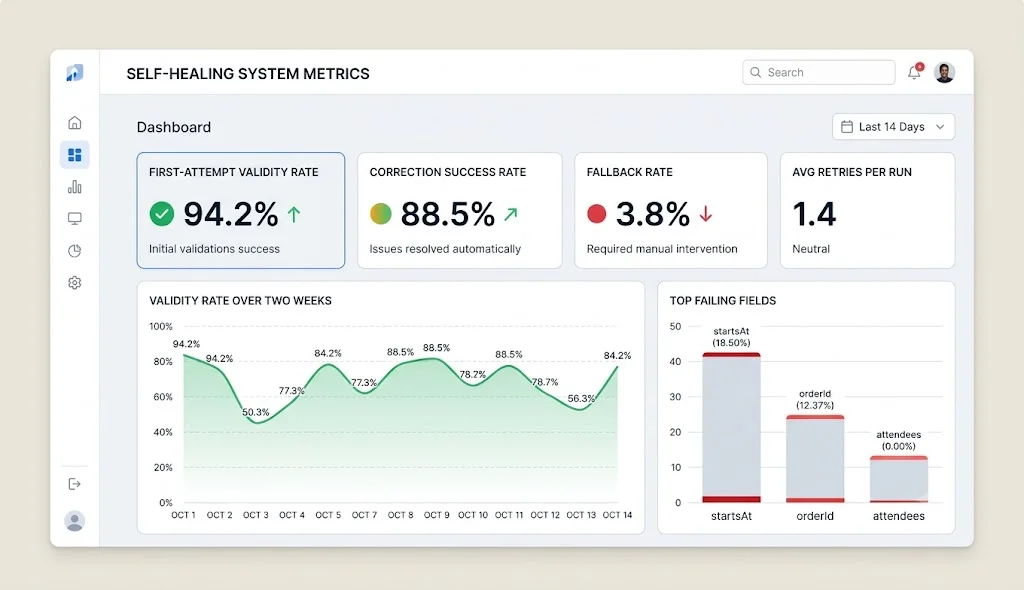
Once this loop is in production, you will want to know whether it is actually helping. Track a handful of metrics:
- First-attempt validity rate. The percentage of tool calls that pass validation without any correction. This is your raw model quality signal.
- Correction success rate. Of the calls that failed, how many were repaired within the retry budget.
- Fallback rate. How often the loop gave up. A rising number often signals a model change, a prompt regression, or a schema that is too strict.
- Average retries per run. Useful for estimating the latency and token overhead of healing.
- Top failing fields. Group Zod issues by tool and field path. If
startsAtfails constantly, your description or your prompt needs work.
Emit these from the validation and correction nodes, or attach them to your tracing tool of choice. Those failure logs are also a goldmine: they tell you exactly which schemas confuse your model, and they make a great dataset for improving prompts or fine-tuning later.
Best Practices for Production Self-Healing Loops
Write schemas for the model, not just the compiler. Descriptions and error messages are prompt engineering. "Expected string, received number" helps less than "startsAt must be an ISO 8601 datetime like 2026-10-05T14:00:00Z".
Cap retries and make the cap configurable. Two or three attempts is usually enough. Keep the limit in config so you can tune it per model.
Prefer precise errors over long ones. Smaller models have limited attention. Return the failing field paths and the fix, not a wall of JSON schema.
Combine with constrained decoding where you can. If your inference server supports JSON schema or grammar-constrained output, turn it on. It reduces how often the loop must activate, and Zod remains your safety net for semantic rules.
Vary behavior across retries. If the model repeats the same mistake at temperature 0, slightly raise the temperature on correction attempts, or add a stronger hint on the final retry.
Escalate intelligently. On the last retry, consider routing to a stronger model. A small model handles 95 percent of traffic cheaply, and the large model only sees the hard cases.
Keep side effects behind validation. Only the tool node should touch external systems, and it should only run after a clean validation pass. That ordering is what makes retries safe.
Log everything, show nothing. Keep correction messages out of the user-facing stream. Stream only the final assistant message, or a neutral status like "Working on it".
Common Mistakes to Avoid
- Forgetting ToolMessages for failed calls. Providers expect every tool call to have a response. Skipping them causes cryptic API errors or confused models.
- Using
parseinstead ofsafeParsein the validator. A thrown exception inside a node bypasses your routing logic and brings the crash right back. - Retrying forever. Without a counter and a fallback, a stubborn model can burn tokens indefinitely.
- Letting the model fabricate missing data. If you tell it only to fix the error, it may invent an email address or an order ID. Always allow "ask the user" as a valid outcome.
- Executing valid calls from a partially invalid batch. This can create inconsistent state. Reject the batch and ask for a full resend.
- Passing raw model arguments to your tools. Use the Zod-parsed output so defaults, coercions, and stripped keys are applied consistently.
- Vague error messages. If your Zod errors say only "Invalid input", the model has nothing to work with. Add custom messages.
- Treating runtime errors like validation errors. They need different handling. One means bad input, the other means a bad environment.
- Never testing the failure path. Scripted fake models make this easy. Do it before you ship.
- Ignoring context. Dates, timezones, and user identity must be present in the prompt. No amount of self-healing replaces missing context.
🚀 Pro Tips
- Use
z.coerceselectively. For fields like numbers that small models often send as strings,z.coerce.number()can heal trivial mistakes silently, without even needing a correction round trip. Use it only where coercion is unambiguous. Never coerce booleans from arbitrary strings, since"false"is truthy in JavaScript. - Add a pre-parse repair step for malformed JSON. If a provider returns raw strings for arguments, a small repair pass (stripping markdown fences, removing trailing commas) can fix syntax errors before Zod even sees the value.
- Show the model a valid example. On the final retry, append a concrete valid example call for that tool. Small models imitate examples far better than they follow abstract rules.
- Generate JSON schema from Zod. Zod 4 can produce JSON schema directly, so your validator and the schema you show the model never drift apart.
- Persist state with a checkpointer. LangGraph checkpointing lets you resume a conversation, inspect failed runs, and replay them against a newer model.
- Build a regression suite from real failures. Every production validation failure is a free test case. Save the raw tool call and the schema, then assert that your loop repairs it.
- Gate dangerous tools. Combine validation with human-in-the-loop approval for refunds, deletions, and payments.
📌 Key Takeaways
- Smaller local models regularly produce invalid tool arguments, so crashing on the first error is not an acceptable default.
- Zod schemas act as a strict contract. Custom messages and descriptions make that contract understandable to the model.
- A dedicated validation node intercepts every tool call before execution, using
safeParseso failures are data rather than exceptions. - A correction node returns the exact Zod error to the model through ToolMessages and a system instruction, which lets the model debug its own JSON.
- Retry budgets, a fallback node, and escalation paths keep the loop bounded and trustworthy.
- Measure first-attempt validity, correction success, and fallback rates so you know whether healing is working.
Conclusion
Reliable agents are rarely built by hoping the model gets everything right. They are built by assuming it will occasionally get something wrong and designing the system so that those mistakes are cheap, quiet, and recoverable.
The self-healing loop we built is small: one validator, one corrector, a retry counter, and a fallback. Yet it changes the character of your agent. A malformed argument stops being an outage and becomes a two-second detour. Local models become far more viable for real workloads, because the gap between "almost correct" and "correct" is closed by the graph instead of by the user's patience.
If you take one idea away, make it this: validation errors are feedback. Zod already writes excellent bug reports. LangGraph.js gives you the control flow to deliver them. And language models, flawed as they are, are surprisingly good at fixing a bug once someone tells them exactly where it is.
Start with a single tool and a retry cap of two. Watch your first-attempt validity rate for a week. Then expand the pattern to the rest of your toolset, and enjoy the quiet satisfaction of an agent that fixes itself before anyone notices.
References
- LangGraph.js documentation: https://langchain-ai.github.io/langgraphjs/
- LangChain.js tools and tool calling guides: https://js.langchain.com/docs/
- Zod documentation, including error formatting and JSON schema support: https://zod.dev
- Ollama model library and tool calling support: https://ollama.com
- Vitest testing framework: https://vitest.dev
- JSON Schema specification: https://json-schema.org