Not long ago, "adding AI" to an enterprise workflow meant wiring up a big cloud API, crossing your fingers, and then watching the monthly invoice climb. That works fine for prototypes. It gets uncomfortable when a support team is pushing two million tickets a month through the same prompt, your compliance officer is asking where the data goes, and latency spikes every time a provider has a bad afternoon.
In 2026, there's a more grown-up option: train a Small Language Model (SLM) on your own domain, run it on hardware you control, and put a proper API and dashboard around it. The tooling is finally mature enough that one developer can build the whole thing in a week.
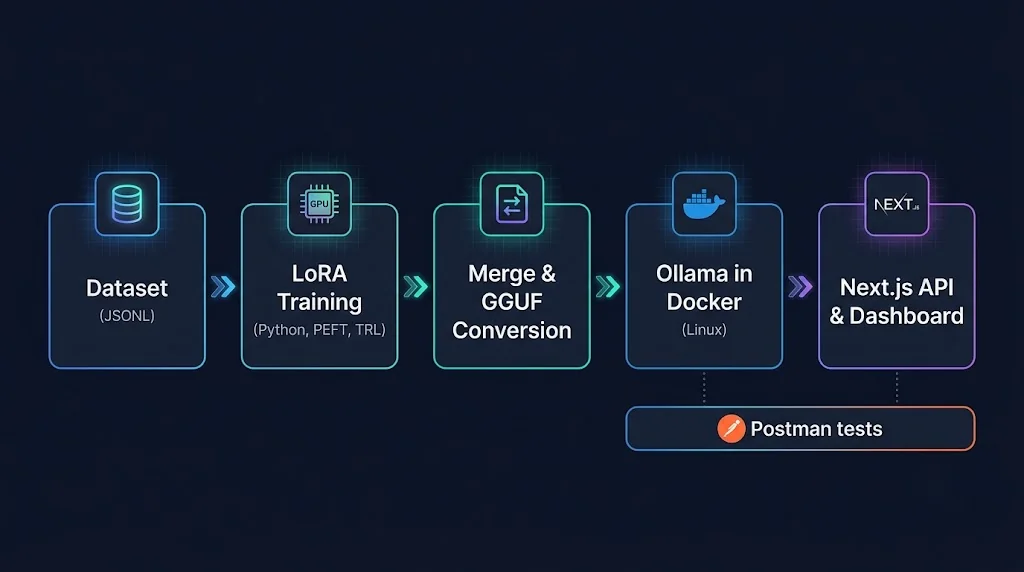
This guide walks through a complete, full-stack pipeline. We'll prepare a dataset, fine-tune with LoRA using Python, convert the result to GGUF, serve it with Ollama inside Docker on Linux, validate the REST layer with Postman, and build a real-time observability dashboard with Next.js, React, and Tailwind CSS.
Why Small Language Models Make Sense for Enterprise Work
A general-purpose frontier model is like hiring a brilliant polymath to sort your mail. It will do the job, but you're paying polymath rates for a task that needs consistency, not brilliance.
Most enterprise AI workloads are narrow and repetitive:
- Classifying and routing support tickets
- Extracting fields from invoices, contracts, or clinical notes
- Rewriting text into a fixed house style
- Answering questions over a bounded internal knowledge base
- Generating structured JSON from messy human input
For these jobs, a fine-tuned SLM has real advantages:
- Cost: Inference on a 1B to 4B parameter model is cheap, and the cost is mostly fixed (your hardware) rather than variable (per token).
- Latency: Small models respond fast, and local network hops beat internet round trips.
- Privacy and sovereignty: Sensitive data never leaves your infrastructure, which makes audits much simpler.
- Predictability: You pin the model version. Nobody silently swaps it out from under you.
- Format discipline: Fine-tuning teaches the model your exact output schema, so you rely less on long, fragile prompts.
The trade-off is honest and worth stating: an SLM will not write you a sonnet about Kubernetes and then debug your Rust. It's a specialist. That's the point.
A rough look at the economics
Let's do some back-of-the-envelope math. The numbers below are illustrative assumptions, not quotes. Swap in your own.
Imagine a workload of 2 million requests per month, averaging 750 tokens each (prompt plus completion). That's roughly 1.5 billion tokens a month.
| Approach | Illustrative cost model | Rough monthly cost |
|---|---|---|
| Frontier cloud API | Blended price of about $3 per 1M tokens | About $4,500 |
| Mid-tier cloud API | Blended price of about $0.60 per 1M tokens | About $900 |
| Self-hosted SLM | One GPU server, amortized hardware plus power | A few hundred dollars, mostly fixed |
The self-hosted number barely moves as traffic grows, until you saturate the GPU. The API numbers scale linearly. That's the whole story: the more steady, high-volume, and narrow your workload, the better the case for owning the model. If your traffic is tiny or unpredictable, stay on the API and be happy about it.
The Pipeline at a Glance
Before diving into code, here's the flow we'll build:
- Prepare data: Clean, deduplicate, and format examples as chat-style JSONL.
- Fine-tune: Train LoRA adapters on a base SLM using PEFT and TRL.
- Evaluate: Measure format validity and accuracy on a held-out set.
- Merge and convert: Fold the adapter into the base model, export to GGUF, and quantize.
- Serve: Package it with an Ollama
Modelfileand run it in Docker. - Validate: Test the REST contract with Postman.
- Observe: Build a Next.js dashboard showing latency, throughput, and error rates.
Our running example is an IT support ticket triage assistant. It reads a raw ticket and returns strict JSON: a category, a priority, and a one-line summary. It's small, realistic, and easy to evaluate.
Step 1: Dataset Preparation (Where Most Projects Are Won or Lost)
If you remember one thing from this article, let it be this: your model can only be as good as your data. LoRA is forgiving about compute. It is not forgiving about messy labels.
Pick a format that matches inference
Use the same chat structure at training time that you'll use at inference time. A JSONL file where each line contains a messages array works with most modern trainers:
{"messages": [
  {"role": "system", "content": "You are a ticket triage assistant. Reply with JSON only."},
  {"role": "user", "content": "VPN keeps disconnecting every 10 minutes since the update. Whole sales team affected."},
  {"role": "assistant", "content": "{\"category\": \"network\", \"priority\": \"high\", \"summary\": \"Recurring VPN drops affecting the sales team after an update.\"}"}
]}
Clean, dedupe, split
Here's a practical preparation script. It validates the assistant output, removes near-duplicates, and creates train and validation splits.
# prepare_dataset.py
import json
import random
import hashlib
from pathlib import Path

ALLOWED_CATEGORIES = {"network", "hardware", "software", "access", "other"}
ALLOWED_PRIORITIES = {"low", "medium", "high", "critical"}

def is_valid(example: dict) -> bool:
    try:
        assistant = example["messages"][-1]["content"]
        payload = json.loads(assistant)
        return (
            payload["category"] in ALLOWED_CATEGORIES
            and payload["priority"] in ALLOWED_PRIORITIES
            and isinstance(payload["summary"], str)
            and 5 < len(payload["summary"]) < 200
        )
    except (KeyError, IndexError, json.JSONDecodeError, TypeError):
        return False

def fingerprint(example: dict) -> str:
    user_text = example["messages"][1]["content"].lower().strip()
    return hashlib.sha1(user_text.encode("utf-8")).hexdigest()

def main(src="raw_tickets.jsonl", out_dir="data", val_ratio=0.1, seed=42):
    random.seed(seed)
    seen, kept = set(), []

    for line in Path(src).read_text(encoding="utf-8").splitlines():
        ex = json.loads(line)
        fp = fingerprint(ex)
        if fp in seen or not is_valid(ex):
            continue
        seen.add(fp)
        kept.append(ex)

    random.shuffle(kept)
    split = int(len(kept) * (1 - val_ratio))
    train, val = kept[:split], kept[split:]

    Path(out_dir).mkdir(exist_ok=True)
    for name, rows in (("train", train), ("val", val)):
        with open(f"{out_dir}/{name}.jsonl", "w", encoding="utf-8") as f:
            for row in rows:
                f.write(json.dumps(row, ensure_ascii=False) + "\n")

    print(f"kept={len(kept)} train={len(train)} val={len(val)}")

if __name__ == "__main__":
    main()
A few hard-won lessons about data:
- Strip personal data first. Names, emails, and account numbers have a way of being memorized.
- Balance your classes. If 80% of tickets are "software," the model will happily guess "software" forever.
- Include hard and ugly examples. Typos, mixed languages, and vague tickets are what production actually looks like.
- Keep a golden set. Hold out a few hundred reviewed examples that never touch training. This is your truth source.
Step 2: Fine-Tuning with PEFT and LoRA
What LoRA actually does
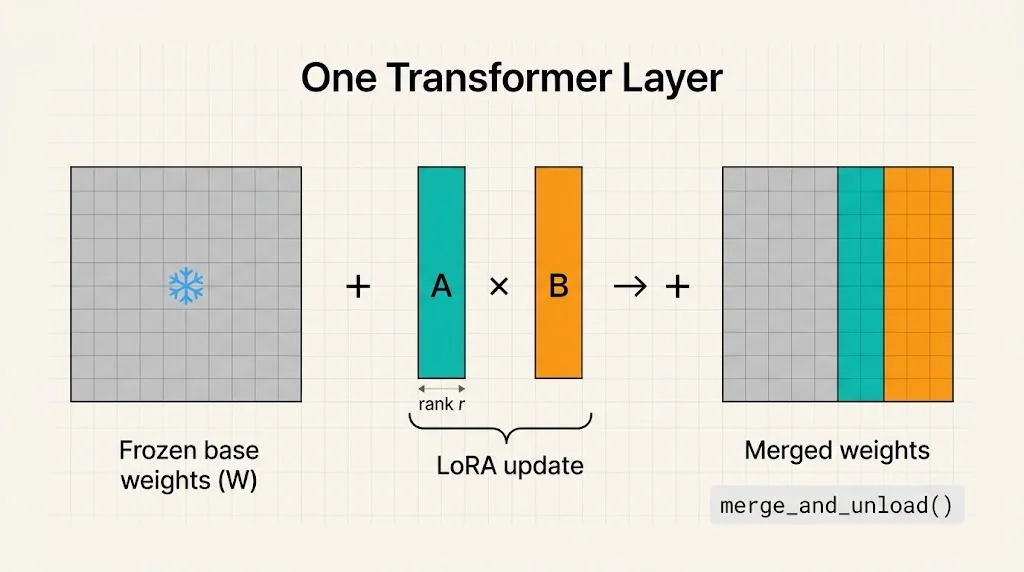
Full fine-tuning updates every weight in the model, which is slow and memory-hungry. LoRA (Low-Rank Adaptation) freezes the original weights and injects small trainable matrices into selected layers. Instead of learning a giant update matrix, it learns two skinny ones whose product approximates the change. You end up training often well under 1% of the parameters.
QLoRA goes one step further by loading the frozen base model in 4-bit precision, so the memory footprint shrinks dramatically while the adapters still train in higher precision.
The knobs you'll tune most often:
r(rank): The capacity of the adapter. 8 to 32 covers most cases.lora_alpha: A scaling factor, commonly set to 1x to 2x the rank.target_modules: Which layers get adapters. Targeting all linear projection layers usually performs best.lora_dropout: Light regularization, typically 0.05.
The training script
We'll use Qwen/Qwen2.5-1.5B-Instruct as the base because it's small, permissively licensed, and punches above its weight. You can swap in another instruct-tuned SLM, such as a Llama 3.2 or Phi variant, as long as you check its license.
Install dependencies and pin the versions you tested, since the Hugging Face ecosystem moves quickly:
python -m venv .venv && source .venv/bin/activate
pip install torch transformers peft trl datasets accelerate bitsandbytes
pip freeze > requirements.lock.txt
# train_lora.py
import torch
from datasets import load_dataset
from peft import LoraConfig
from transformers import AutoModelForCausalLM, AutoTokenizer, BitsAndBytesConfig
from trl import SFTConfig, SFTTrainer

BASE_MODEL = "Qwen/Qwen2.5-1.5B-Instruct"
OUTPUT_DIR = "outputs/ticket-triage-lora"

bnb_config = BitsAndBytesConfig(
    load_in_4bit=True,
    bnb_4bit_quant_type="nf4",
    bnb_4bit_compute_dtype=torch.bfloat16,
    bnb_4bit_use_double_quant=True,
)

tokenizer = AutoTokenizer.from_pretrained(BASE_MODEL)
if tokenizer.pad_token is None:
    tokenizer.pad_token = tokenizer.eos_token

model = AutoModelForCausalLM.from_pretrained(
    BASE_MODEL,
    quantization_config=bnb_config,
    device_map="auto",
)

lora_config = LoraConfig(
    r=16,
    lora_alpha=32,
    lora_dropout=0.05,
    bias="none",
    task_type="CAUSAL_LM",
    target_modules=[
        "q_proj", "k_proj", "v_proj", "o_proj",
        "gate_proj", "up_proj", "down_proj",
    ],
)

dataset = load_dataset(
    "json",
    data_files={"train": "data/train.jsonl", "validation": "data/val.jsonl"},
)

training_args = SFTConfig(
    output_dir=OUTPUT_DIR,
    num_train_epochs=3,
    per_device_train_batch_size=4,
    gradient_accumulation_steps=4,
    learning_rate=2e-4,
    lr_scheduler_type="cosine",
    warmup_ratio=0.03,
    logging_steps=10,
    eval_strategy="steps",
    eval_steps=100,
    save_strategy="steps",
    save_steps=100,
    save_total_limit=2,
    bf16=True,
    gradient_checkpointing=True,
    max_length=1024,
    report_to="none",
)

trainer = SFTTrainer(
    model=model,
    args=training_args,
    train_dataset=dataset["train"],
    eval_dataset=dataset["validation"],
    peft_config=lora_config,
    processing_class=tokenizer,
)

trainer.train()
trainer.save_model(OUTPUT_DIR)
tokenizer.save_pretrained(OUTPUT_DIR)
Run it with python train_lora.py and watch the validation loss. If training loss keeps dropping while validation loss climbs, you're overfitting. Reduce epochs, lower the rank, or add more varied data.
Merge the adapter into the base model
Ollama needs a standalone model, so fold the LoRA weights back into the base. Load the base in 16-bit (not 4-bit) for a clean merge:
# merge_adapter.py
import torch
from peft import PeftModel
from transformers import AutoModelForCausalLM, AutoTokenizer

BASE_MODEL = "Qwen/Qwen2.5-1.5B-Instruct"
ADAPTER_DIR = "outputs/ticket-triage-lora"
MERGED_DIR = "outputs/ticket-triage-merged"

base = AutoModelForCausalLM.from_pretrained(BASE_MODEL, torch_dtype=torch.bfloat16)
model = PeftModel.from_pretrained(base, ADAPTER_DIR)
merged = model.merge_and_unload()

merged.save_pretrained(MERGED_DIR, safe_serialization=True)
AutoTokenizer.from_pretrained(ADAPTER_DIR).save_pretrained(MERGED_DIR)
print("Merged model saved to", MERGED_DIR)
Step 3: Evaluate Before You Ship
Never skip this. A model that "feels good" in a few manual tries can still fail 15% of the time in production. Build a small evaluation script that checks two things on your golden set: is the output valid JSON that matches the schema, and is the label correct.
# evaluate.py
import json
import requests

OLLAMA_URL = "http://localhost:11434/api/chat"
MODEL = "ticket-triage"

def predict(ticket: str) -> dict | None:
    r = requests.post(OLLAMA_URL, json={
        "model": MODEL,
        "stream": False,
        "format": "json",
        "options": {"temperature": 0.1},
        "messages": [
            {"role": "system", "content": "You are a ticket triage assistant. Reply with JSON only."},
            {"role": "user", "content": ticket},
        ],
    }, timeout=60)
    r.raise_for_status()
    try:
        return json.loads(r.json()["message"]["content"])
    except json.JSONDecodeError:
        return None

def main(path="data/val.jsonl"):
    total = valid = correct = 0
    for line in open(path, encoding="utf-8"):
        ex = json.loads(line)
        gold = json.loads(ex["messages"][-1]["content"])
        pred = predict(ex["messages"][1]["content"])
        total += 1
        if pred and {"category", "priority", "summary"} <= pred.keys():
            valid += 1
            if pred["category"] == gold["category"]:
                correct += 1
    print(f"format_valid={valid/total:.1%}  category_accuracy={correct/total:.1%}  n={total}")

if __name__ == "__main__":
    main()
Track these numbers for the base model (with a good prompt) and for your fine-tuned model. The gap between them is the business case for the whole project.
Step 4: Convert to GGUF and Quantize
Ollama runs models through llama.cpp, which uses the GGUF format. Conversion is a two-step process: export to a full-precision GGUF, then quantize.
# One-time setup
git clone https://github.com/ggml-org/llama.cpp
cd llama.cpp
pip install -r requirements.txt
cmake -B build && cmake --build build --config Release -j

# 1) Convert the merged Hugging Face model to an f16 GGUF
python convert_hf_to_gguf.py ../outputs/ticket-triage-merged \
  --outfile ../outputs/ticket-triage-f16.gguf \
  --outtype f16

# 2) Quantize to a compact 4-bit variant
./build/bin/llama-quantize \
  ../outputs/ticket-triage-f16.gguf \
  ../outputs/ticket-triage-q4_k_m.gguf \
  Q4_K_M
How do you pick a quantization level? Here's a simple mental model:
- Q4_K_M: The popular default. Small, fast, and quality is usually close to the original for focused tasks.
- Q5_K_M: A bit larger, a bit more faithful. Good when your task is sensitive to subtle wording.
- Q8_0: Near-lossless, but larger and slower. Useful as a quality reference.
Because your use case is narrow, run your evaluation script against more than one quantization level. You may find Q4_K_M is more than good enough, and that saves real memory and money at scale.
Step 5: Package with Ollama and Run in Docker on Linux
An Ollama Modelfile describes how to run your GGUF: the template, default parameters, and system prompt. Qwen-family models use a ChatML-style template:
# Modelfile
FROM ./ticket-triage-q4_k_m.gguf

TEMPLATE """{{- if .System }}<|im_start|>system
{{ .System }}<|im_end|>
{{ end }}<|im_start|>user
{{ .Prompt }}<|im_end|>
<|im_start|>assistant
"""

SYSTEM """You are a ticket triage assistant. Reply with JSON only."""

PARAMETER temperature 0.1
PARAMETER num_ctx 2048
PARAMETER stop "<|im_end|>"
Always double-check that the template matches the one the base model was trained with. A mismatch here is the most common reason a great fine-tune behaves strangely after deployment.
Now containerize the runtime. On a Linux host with an NVIDIA GPU and the NVIDIA Container Toolkit installed, a docker-compose.yml like this keeps everything reproducible:
# docker-compose.yml
services:
  ollama:
    image: ollama/ollama:latest
    container_name: slm-ollama
    ports:
      - "11434:11434"
    volumes:
      - ollama_data:/root/.ollama
      - ./models:/models:ro
    deploy:
      resources:
        reservations:
          devices:
            - driver: nvidia
              count: all
              capabilities: [gpu]
    restart: unless-stopped
    healthcheck:
      test: ["CMD", "ollama", "list"]
      interval: 15s
      timeout: 5s
      retries: 5

  dashboard:
    build: ./dashboard
    container_name: slm-dashboard
    environment:
      - OLLAMA_URL=http://ollama:11434
      - OLLAMA_MODEL=ticket-triage
    ports:
      - "3000:3000"
    depends_on:
      ollama:
        condition: service_healthy
    restart: unless-stopped

volumes:
  ollama_data:
Place your Modelfile and the .gguf file in ./models, bring the stack up, and register the model once:
docker compose up -d ollama
docker exec -it slm-ollama sh -c "cd /models && ollama create ticket-triage -f Modelfile"
docker exec -it slm-ollama ollama run ticket-triage "Printer on floor 3 won't connect to Wi-Fi."
No GPU? Remove the deploy block. Quantized SLMs run acceptably on modern CPUs for lower-volume workloads, just with fewer tokens per second.
Step 6: Validate the REST API with Postman
Ollama exposes a REST API, and our Next.js app will wrap it with a cleaner, business-specific endpoint. Both deserve contract tests.
Create a Postman collection with a POST {{baseUrl}}/api/triage request:
{
  "ticket": "Cannot log in to the HR portal after password reset. Payroll closes today."
}
Then add this script on the Tests tab:
pm.test("status is 200", () => pm.response.to.have.status(200));

pm.test("responds within latency budget", () => {
  pm.expect(pm.response.responseTime).to.be.below(3000);
});

const body = pm.response.json();

pm.test("has a valid triage object", () => {
  pm.expect(body).to.have.property("triage");
  pm.expect(["network", "hardware", "software", "access", "other"])
    .to.include(body.triage.category);
  pm.expect(["low", "medium", "high", "critical"])
    .to.include(body.triage.priority);
  pm.expect(body.triage.summary).to.be.a("string").and.not.empty;
});

pm.test("exposes performance metadata", () => {
  pm.expect(body.metrics).to.have.property("tokensPerSecond");
  pm.expect(body.metrics.latencyMs).to.be.a("number");
});
Add a second request that sends an empty or oversized ticket and asserts a 400 response. Negative tests catch the ugly bugs that happy paths never will. Once the collection feels solid, run it in CI with Newman:
npx newman run slm-triage.postman_collection.json \
  --env-var baseUrl=http://localhost:3000
Step 7: Build the Observability Dashboard with Next.js, React, and Tailwind
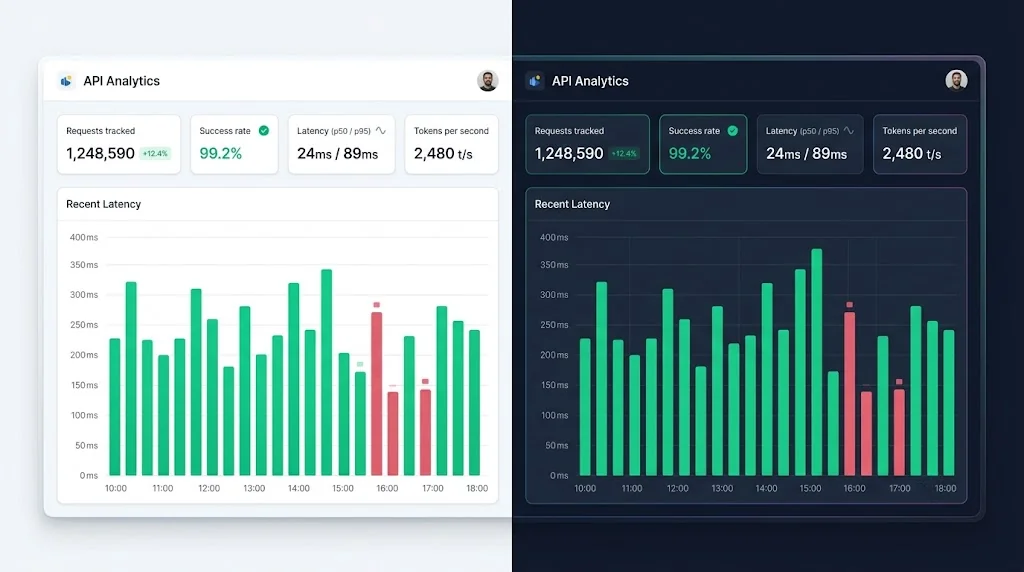
A model you can't observe is a model you can't trust. We'll build a small dashboard that answers the questions on-call engineers actually ask: Is it up? Is it fast? Is it returning valid output?
A lightweight metrics store
Ollama's non-streaming responses include helpful timing fields, such as eval_count (tokens generated) and eval_duration (in nanoseconds). We can derive tokens per second from them.
// lib/metrics.ts
export type Sample = {
  at: number;
  latencyMs: number;
  tokensPerSecond: number;
  ok: boolean;
};

const MAX_SAMPLES = 500;
const samples: Sample[] = [];

export function record(sample: Sample) {
  samples.push(sample);
  if (samples.length > MAX_SAMPLES) samples.shift();
}

function percentile(sorted: number[], p: number) {
  if (sorted.length === 0) return 0;
  const idx = Math.min(sorted.length - 1, Math.floor((p / 100) * sorted.length));
  return sorted[idx];
}

export function summarize() {
  const latencies = samples.map((s) => s.latencyMs).sort((a, b) => a - b);
  const okCount = samples.filter((s) => s.ok).length;
  const avgTps =
    samples.length === 0
      ? 0
      : samples.reduce((sum, s) => sum + s.tokensPerSecond, 0) / samples.length;

  return {
    total: samples.length,
    successRate: samples.length ? okCount / samples.length : 1,
    p50: percentile(latencies, 50),
    p95: percentile(latencies, 95),
    avgTokensPerSecond: Number(avgTps.toFixed(1)),
    recent: samples.slice(-30),
  };
}
This in-memory store is perfect for a single-instance demo. For multi-instance production setups, push the same data to Prometheus, OpenTelemetry, or a time-series database instead.
The triage API route
// app/api/triage/route.ts
import { NextResponse } from "next/server";
import { z } from "zod";
import { record } from "@/lib/metrics";

const OLLAMA_URL = process.env.OLLAMA_URL ?? "http://localhost:11434";
const MODEL = process.env.OLLAMA_MODEL ?? "ticket-triage";

const BodySchema = z.object({ ticket: z.string().min(5).max(4000) });

const TriageSchema = z.object({
  category: z.enum(["network", "hardware", "software", "access", "other"]),
  priority: z.enum(["low", "medium", "high", "critical"]),
  summary: z.string().min(1),
});

export async function POST(req: Request) {
  const parsed = BodySchema.safeParse(await req.json().catch(() => null));
  if (!parsed.success) {
    return NextResponse.json({ error: "Invalid request body" }, { status: 400 });
  }

  const started = performance.now();

  try {
    const res = await fetch(`${OLLAMA_URL}/api/chat`, {
      method: "POST",
      headers: { "Content-Type": "application/json" },
      body: JSON.stringify({
        model: MODEL,
        stream: false,
        format: "json",
        options: { temperature: 0.1 },
        messages: [
          { role: "system", content: "You are a ticket triage assistant. Reply with JSON only." },
          { role: "user", content: parsed.data.ticket },
        ],
      }),
      signal: AbortSignal.timeout(30_000),
    });

    if (!res.ok) throw new Error(`Ollama responded with ${res.status}`);

    const data = await res.json();
    const latencyMs = Math.round(performance.now() - started);
    const tokensPerSecond =
      data.eval_duration > 0 ? data.eval_count / (data.eval_duration / 1e9) : 0;

    const triage = TriageSchema.safeParse(JSON.parse(data.message.content));
    record({ at: Date.now(), latencyMs, tokensPerSecond, ok: triage.success });

    if (!triage.success) {
      return NextResponse.json(
        { error: "Model returned an invalid structure" },
        { status: 502 },
      );
    }

    return NextResponse.json({
      triage: triage.data,
      metrics: { latencyMs, tokensPerSecond: Number(tokensPerSecond.toFixed(1)) },
    });
  } catch (err) {
    record({
      at: Date.now(),
      latencyMs: Math.round(performance.now() - started),
      tokensPerSecond: 0,
      ok: false,
    });
    return NextResponse.json({ error: "Inference failed" }, { status: 503 });
  }
}
Notice that we validate the model's output with Zod before trusting it. Even a well-tuned SLM can occasionally produce something odd, and your API should never pass that along blindly.
// app/api/metrics/route.ts
import { NextResponse } from "next/server";
import { summarize } from "@/lib/metrics";

export const dynamic = "force-dynamic";

export function GET() {
  return NextResponse.json(summarize());
}
The real-time dashboard component
// app/dashboard/MetricsPanel.tsx
"use client";

import { useEffect, useState } from "react";

type Summary = {
  total: number;
  successRate: number;
  p50: number;
  p95: number;
  avgTokensPerSecond: number;
  recent: { at: number; latencyMs: number; ok: boolean }[];
};

function StatCard({ label, value, hint }: { label: string; value: string; hint?: string }) {
  return (
    <div className="rounded-2xl border border-slate-200 bg-white p-5 shadow-sm dark:border-slate-800 dark:bg-slate-900">
      <p className="text-sm font-medium text-slate-500">{label}</p>
      <p className="mt-2 text-3xl font-semibold tracking-tight text-slate-900 dark:text-slate-50">
        {value}
      </p>
      {hint && <p className="mt-1 text-xs text-slate-400">{hint}</p>}
    </div>
  );
}

export default function MetricsPanel() {
  const [data, setData] = useState<Summary | null>(null);
  const [error, setError] = useState(false);

  useEffect(() => {
    let active = true;

    async function load() {
      try {
        const res = await fetch("/api/metrics", { cache: "no-store" });
        if (!res.ok) throw new Error("bad status");
        const json = (await res.json()) as Summary;
        if (active) {
          setData(json);
          setError(false);
        }
      } catch {
        if (active) setError(true);
      }
    }

    load();
    const id = setInterval(load, 2000);
    return () => {
      active = false;
      clearInterval(id);
    };
  }, []);

  if (!data) {
    return <p className="p-6 text-slate-500">Loading live metrics…</p>;
  }

  const maxLatency = Math.max(1, ...data.recent.map((s) => s.latencyMs));

  return (
    <section className="space-y-6 p-6">
      {error && (
        <p className="rounded-lg bg-amber-50 px-4 py-2 text-sm text-amber-800">
          Connection hiccup. Showing the last known values.
        </p>
      )}

      <div className="grid gap-4 sm:grid-cols-2 lg:grid-cols-4">
        <StatCard label="Requests tracked" value={String(data.total)} />
        <StatCard label="Success rate" value={`${(data.successRate * 100).toFixed(1)}%`} />
        <StatCard label="Latency p50 / p95" value={`${data.p50} / ${data.p95} ms`} />
        <StatCard label="Tokens per second" value={String(data.avgTokensPerSecond)} hint="Average across recent requests" />
      </div>

      <div className="rounded-2xl border border-slate-200 bg-white p-5 dark:border-slate-800 dark:bg-slate-900">
        <h2 className="mb-4 text-sm font-semibold text-slate-700 dark:text-slate-200">
          Recent request latency
        </h2>
        <div className="flex h-32 items-end gap-1">
          {data.recent.map((s) => (
            <div
              key={s.at}
              title={`${s.latencyMs} ms`}
              style={{ height: `${(s.latencyMs / maxLatency) * 100}%` }}
              className={`w-full rounded-t ${s.ok ? "bg-emerald-500" : "bg-rose-500"}`}
            />
          ))}
        </div>
      </div>
    </section>
  );
}
Polling every two seconds is simple, reliable, and perfectly adequate here. If you later need sub-second updates across many viewers, switch the metrics route to Server-Sent Events.
Finally, a small multi-stage Dockerfile for the dashboard (enable output: "standalone" in next.config.ts first):
# dashboard/Dockerfile
FROM node:22-alpine AS deps
WORKDIR /app
COPY package*.json ./
RUN npm ci

FROM node:22-alpine AS builder
WORKDIR /app
COPY --from=deps /app/node_modules ./node_modules
COPY . .
RUN npm run build

FROM node:22-alpine AS runner
WORKDIR /app
ENV NODE_ENV=production
COPY --from=builder /app/.next/standalone ./
COPY --from=builder /app/.next/static ./.next/static
COPY --from=builder /app/public ./public
EXPOSE 3000
CMD ["node", "server.js"]
Real-World Example: Putting It All Together
Picture a mid-sized logistics company with an internal IT desk handling around 60,000 tickets a month. Their first version used a hosted frontier model with a long prompt full of examples. It worked, but the prompt cost added up, latency varied, and security wasn't thrilled about ticket text containing employee details leaving the network.
They collected about 4,000 historical tickets, had two senior agents relabel a few hundred for quality, and followed the pipeline above. After fine-tuning a 1.5B model, the typical outcomes teams report in this kind of setup look like this:
- Output format validity jumps close to 100% because the schema is baked into the weights, not begged for in the prompt.
- Prompt length shrinks dramatically since the long instructions and few-shot examples are no longer needed.
- Median latency drops because the model is small and sits one network hop away.
- The monthly bill turns into a mostly fixed infrastructure cost.
Treat those as directional, not guaranteed. Your own evaluation set is the only number that matters.
Best Practices
- Start with the smallest model that could work. Move up in size only when your evaluation proves you need to.
- Version everything. Datasets, adapters, GGUF files,
Modelfiles, and evaluation results should all be traceable to a Git commit or a registry tag. - Prefer instruct-tuned bases for chat-style tasks. They adapt faster and need less data.
- Keep the prompt at inference identical to the format you trained on, including the system message.
- Use low temperature (0.0 to 0.2) for extraction and classification tasks.
- Constrain output. Ollama's
format: "json"option and schema validation on your side give you two layers of protection. - Run evaluations in CI. Every new adapter should beat the previous one on your golden set before it ships.
- Plan for rollback. Keep the previous model tag registered in Ollama so you can switch back with one config change.
- Secure the runtime. Don't expose port 11434 to the internet. Put it on a private Docker network and let only your API layer talk to it.
Common Mistakes to Avoid
- Training on unreviewed, auto-generated labels. If a larger model labeled your data, spot-check it. Errors in labels become errors in your model.
- Leaking validation data into training. Duplicates across splits make your metrics look fantastic and your production results look sad.
- Mismatched chat templates. Training with one format and serving with another silently degrades quality.
- Over-training. More epochs aren't always better. Watch validation loss, not just training loss.
- Judging by vibes. Five impressive demo prompts are not an evaluation.
- Quantizing blindly. Always re-run your evaluation after quantization. Occasionally a particular task is more sensitive than expected.
- Ignoring context length. Setting
num_ctxtoo high wastes memory, and too low truncates inputs. Match it to your real ticket sizes. - No observability. Without latency, error, and throughput metrics, you'll find out about problems from angry users.
- Forgetting the license. Check that your base model's license permits your commercial use case.
🚀 Pro Tips
- Mix in a little general data (a small percentage of generic instruction examples) to reduce "catastrophic forgetting" if you need the model to stay conversational.
- Use rejection sampling for data growth. Generate extra training examples with a stronger model, then keep only the ones that pass your validators and a human spot check.
- Keep adapters separate during experimentation. Train several LoRA adapters for different tasks on the same base and compare them before you merge anything.
- Warm the model on startup. Send a dummy request when the container boots so the first real user doesn't pay the model-load penalty. Ollama's
keep_alivesetting also helps keep the model resident in memory. - Log prompts and outputs carefully. Captured production failures are the best raw material for your next training round, as long as you scrub sensitive fields first.
- Benchmark on your target hardware. Tokens per second on a developer laptop says very little about your production server.
- Add a confidence fallback. If the model returns an invalid structure or an "other" category too often, route the ticket to a human or a larger model rather than guessing.
📌 Key Takeaways
- Small Language Models are the pragmatic choice for narrow, high-volume enterprise tasks, offering lower cost, lower latency, and stronger data control.
- Dataset quality is the biggest lever. Clean, deduplicated, well-labeled examples beat sheer volume every time.
- LoRA and QLoRA make fine-tuning accessible on a single GPU by training small adapters instead of the full model.
- Merge your adapter, convert to GGUF with llama.cpp, and quantize to deploy through Ollama on modest hardware.
- Docker gives you a reproducible, portable runtime, and Postman contract tests keep your REST layer honest.
- A Next.js and Tailwind observability dashboard turns your model from a black box into something your team can operate confidently.
Conclusion
The shift from rented intelligence to owned intelligence isn't about ideology. It's about fit. When the task is narrow and the volume is steady, a small, well-trained model running on your own hardware is often faster, cheaper, and easier to govern than a giant general-purpose API.
The good news is that the path is now well-paved. A clean dataset, a LoRA training run, a GGUF export, an Ollama container, a handful of Postman tests, and a simple dashboard together form a pipeline that one engineer can stand up in days, not quarters. Start small. Pick one painful workflow, measure the baseline, fine-tune, and let the numbers speak for you.
If you build this yourself, I'd love to hear what you learn, especially about the data. It's always the data.
References
- Hu, E. et al. (2021). LoRA: Low-Rank Adaptation of Large Language Models. arXiv:2106.09685
- Dettmers, T. et al. (2023). QLoRA: Efficient Finetuning of Quantized LLMs. arXiv:2305.14314
- Hugging Face PEFT documentation: huggingface.co/docs/peft
- Hugging Face TRL documentation: huggingface.co/docs/trl
- llama.cpp project and GGUF tooling: github.com/ggml-org/llama.cpp
- Ollama documentation and API reference: github.com/ollama/ollama
- Next.js documentation (App Router and Route Handlers): nextjs.org/docs
- Tailwind CSS documentation: tailwindcss.com/docs
- Postman Learning Center (tests and Newman): learning.postman.com
- Docker Compose documentation: docs.docker.com/compose