A year ago, if your product team said "let's add an AI summary button to every page," the next conversation was about the inference budget. Every click meant a round trip to a hosted model, a few hundred tokens of prompt, a few hundred more of output, and a line item that grew linearly with your success.
That conversation is changing. Laptops and phones now ship with GPUs and NPUs that sit idle most of the day, and the browser finally has a sane way to reach them. With WebGPU available across all the major engines, and runtimes like WebLLM, Transformers.js v4, LiteRT.js and Chrome's built-in Prompt API maturing fast, a quantized Small Language Model (SLM) can now run inside a browser tab at interactive speeds.
In this deep-dive, I'll walk through how this actually works in production: how to pick a runtime, how to load and cache models without wrecking your users' bandwidth, how to squeeze time-to-first-token (TTFT), how to fall back to WebAssembly SIMD when WebGPU isn't there, and how to architect a privacy-first, offline-capable app that costs you nothing per inference.

Why In-Browser Inference Is Taking Off
Three forces are pushing AI workloads from the data center to the client.
1. Cost. Server-side inference has a marginal cost per token. Client-side inference has a marginal cost of roughly zero for you. If your feature is high-volume and low-complexity, like classification, rewriting, autocomplete, extraction or short summaries, paying a cloud provider for every call is hard to justify.
2. Privacy and compliance. When the model runs on the device, the user's text never has to leave it. For health, finance, legal and enterprise tools, that removes a whole category of data-processing agreements and risk reviews.
3. Latency and offline support. No network round trip means no network jitter. Once weights are cached, the feature works on a plane, in a basement, or behind a flaky hotel Wi-Fi.
The catch is that the browser is a hostile place to run a neural network. You're dealing with download sizes, memory caps, GPU driver bugs, tab throttling and a wide spread of hardware. The rest of this article is about handling those constraints well.
The Building Blocks
WebGPU: The Hardware Gateway
WebGPU is the successor to WebGL. Where WebGL was designed for drawing triangles, WebGPU exposes compute shaders and storage buffers as first-class concepts. That's exactly what matrix multiplication, the core of transformer inference, needs.
A few features matter in particular for LLMs:
- Compute pipelines written in WGSL (WebGPU Shading Language) run the matmuls, attention and normalization kernels.
- The
shader-f16feature enables half-precision math, which roughly halves memory bandwidth for activations and is a big win on most GPUs. - Device limits such as
maxBufferSizeandmaxStorageBufferBindingSizedecide how large a single weight tensor can be. These limits are why some models load on one machine and fail on another.
You rarely write WGSL yourself. The runtimes below compile or ship optimized kernels for you. But you do need to understand the capabilities, because they decide which model you can load.
// gpu-capabilities.ts
export interface GpuProfile {
  supported: boolean;
  f16: boolean;
  maxBufferMB: number;
  maxBindingMB: number;
  vendor?: string;
}

export async function probeGpu(): Promise<GpuProfile> {
  if (!("gpu" in navigator)) {
    return { supported: false, f16: false, maxBufferMB: 0, maxBindingMB: 0 };
  }

  const adapter = await navigator.gpu.requestAdapter({
    powerPreference: "high-performance",
  });

  if (!adapter) {
    return { supported: false, f16: false, maxBufferMB: 0, maxBindingMB: 0 };
  }

  const toMB = (n: number) => Math.round(n / (1024 * 1024));

  return {
    supported: true,
    f16: adapter.features.has("shader-f16"),
    maxBufferMB: toMB(adapter.limits.maxBufferSize),
    maxBindingMB: toMB(adapter.limits.maxStorageBufferBindingSize),
    vendor: adapter.info?.vendor,
  };
}
Small Language Models and Quantization
A "small" language model in 2026 usually means somewhere between 135M and 4B parameters. Families like Qwen, Llama 3.2, Phi, Gemma, SmolLM and LFM have all shipped variants in this range that are surprisingly capable at focused tasks.
Parameter count alone doesn't tell you what fits in a browser. Quantization does. Storing weights as 4-bit integers instead of 16-bit floats shrinks a model by roughly 4x.
| Model size | FP16 weights | 4-bit (q4) weights | Realistic target |
|---|---|---|---|
| 0.5B | ~1.0 GB | ~300–400 MB | Phones, low-end laptops |
| 1.5B | ~3.0 GB | ~0.9–1.1 GB | Mid-range laptops |
| 3B | ~6.0 GB | ~1.8–2.2 GB | Desktops, recent MacBooks |
| 7–8B | ~15 GB | ~4.5–5 GB | Enthusiast hardware only |
You'll see quantization names like q4f16_1 (WebLLM/MLC: 4-bit weights, fp16 activations) or q4, q4f16 and q8 (Transformers.js dtype options). Rule of thumb: 4-bit weights with fp16 compute is the sweet spot for browser LLMs when shader-f16 is available; fall back to q4 with fp32 compute when it isn't.
The Runtime Landscape
Four options cover almost every use case today.
WebLLM (MLC) compiles models ahead of time into optimized WebGPU kernels using Apache TVM. It exposes an OpenAI-compatible chat.completions API, which makes it the most natural fit for chat and agent-style features. It's LLM-focused and very fast at decode.
Transformers.js v4 (Hugging Face) is the generalist. Version 4 rebuilt its WebGPU backend in C++ together with the ONNX Runtime team, so the same code runs in browsers, Node.js, Bun and Deno. It covers text generation plus embeddings, speech recognition, vision, TTS and much more, and the 4.x line has added tool calling, structured output and WebGPU support for Safari 26+.
LiteRT.js (Google) brings the LiteRT runtime (formerly TensorFlow Lite) to the web via WebAssembly, with WebGPU acceleration through Google's ML Drift and an experimental WebNN path. It's the natural choice if your team already ships .tflite models to Android and iOS, and its companion LiteRT-LM.js handles language models.
Chrome's Prompt API is different from the others: you don't ship a model at all. Chrome downloads Gemini Nano once and shares it across sites, and you talk to it through the global LanguageModel object. It became stable for the web in Chrome 148, but it's currently desktop-only, has hardware requirements (around 22 GB of free disk and a GPU with more than 4 GB of VRAM), and other browser vendors have pushed back on the design, so treat it as a progressive enhancement rather than a baseline.
flowchart TD
    A[New AI feature] --> B{Is Gemini Nano quality enough<br/>and Chrome desktop coverage OK?}
    B -- Yes --> P[Chrome Prompt API<br/>no model to ship]
    B -- No --> C{Chat or agent-style<br/>text generation?}
    C -- Yes --> W[WebLLM<br/>OpenAI-compatible API]
    C -- No --> D{Existing .tflite models<br/>or Google mobile stack?}
    D -- Yes --> L[LiteRT.js]
    D -- No --> T[Transformers.js v4<br/>embeddings, ASR, vision, LLMs]
    P --> F[Fallback chain:<br/>WebGPU → WASM SIMD → Server]
    W --> F
    L --> F
    T --> F
Real-World Example: A Private, Offline "Smart Notes" Assistant
Let's build something realistic: a note-taking app that summarizes notes, extracts action items and answers questions about a note, all without a backend. We'll implement the same interface on top of several runtimes and choose at runtime.
Step 1: Define One Engine Interface
Don't let runtime-specific APIs leak through your app. Define a tiny contract and adapt each runtime to it.
// engine.ts
export type ChatMessage = { role: "system" | "user" | "assistant"; content: string };

export interface InferenceStats {
  ttftMs: number;
  tokensPerSecond?: number;
  backend: "prompt-api" | "webllm" | "transformers-webgpu" | "transformers-wasm" | "server";
}

export interface LocalEngine {
  readonly backend: InferenceStats["backend"];
  load(onProgress?: (pct: number, text: string) => void): Promise<void>;
  stream(
    messages: ChatMessage[],
    onToken: (token: string) => void,
    signal?: AbortSignal
  ): Promise<InferenceStats>;
  dispose(): Promise<void>;
}
Step 2: WebLLM in a Web Worker
LLM inference will freeze your UI if it runs on the main thread. WebLLM ships a worker handler, so the setup is short.
// llm.worker.ts
import { WebWorkerMLCEngineHandler } from "@mlc-ai/web-llm";

const handler = new WebWorkerMLCEngineHandler();
self.onmessage = (msg: MessageEvent) => handler.onmessage(msg);// webllm-engine.ts
import { CreateWebWorkerMLCEngine, type MLCEngineInterface } from "@mlc-ai/web-llm";
import type { ChatMessage, InferenceStats, LocalEngine } from "./engine";
export class WebLLMEngine implements LocalEngine {
readonly backend = "webllm" as const;
private engine?: MLCEngineInterface;
constructor(private modelId = "Qwen2.5-1.5B-Instruct-q4f16_1-MLC") {}
async load(onProgress?: (pct: number, text: string) => void) {
this.engine = await CreateWebWorkerMLCEngine(
new Worker(new URL("./llm.worker.ts", import.meta.url), { type: "module" }),
this.modelId,
{
initProgressCallback: (r) => onProgress?.(Math.round(r.progress * 100), r.text),
}
);
}
async stream(
messages: ChatMessage[],
onToken: (t: string) => void,
signal?: AbortSignal
): Promise<InferenceStats> {
if (!this.engine) throw new Error("Engine not loaded");
const start = performance.now();
let ttftMs = -1;
let tokensPerSecond: number | undefined;
const chunks = await this.engine.chat.completions.create({
messages,
stream: true,
stream_options: { include_usage: true },
temperature: 0.3,
max_tokens: 512,
});
for await (const chunk of chunks) {
if (signal?.aborted) {
this.engine.interruptGenerate();
break;
}
const delta = chunk.choices[0]?.delta?.content ?? "";
if (delta) {
if (ttftMs < 0) ttftMs = performance.now() - start;
onToken(delta);
}
if (chunk.usage) {
tokensPerSecond = chunk.usage.extra?.decode_tokens_per_s;
}
}
return { ttftMs, tokensPerSecond, backend: this.backend };
}
async dispose() {
await this.engine?.unload();
}
}Because the API mirrors OpenAI's, you can move prompts between your server and the browser with very little rewriting.
Step 3: Transformers.js v4 With a WebGPU-to-WASM Switch
Transformers.js uses a device option, so the same code covers both GPU and CPU paths.
// transformers-engine.ts
import { pipeline, TextStreamer, env } from "@huggingface/transformers";
import type { ChatMessage, InferenceStats, LocalEngine } from "./engine";

export class TransformersEngine implements LocalEngine {
  readonly backend: "transformers-webgpu" | "transformers-wasm";
  private generator?: any;

  constructor(
    private useWebGPU: boolean,
    private supportsF16: boolean,
    private modelId = "onnx-community/Qwen2.5-0.5B-Instruct"
  ) {
    this.backend = useWebGPU ? "transformers-webgpu" : "transformers-wasm";

    // Use every core we're allowed to on the CPU path
    if (!useWebGPU && self.crossOriginIsolated) {
      env.backends.onnx.wasm.numThreads = Math.min(navigator.hardwareConcurrency ?? 4, 8);
    }
  }

  async load(onProgress?: (pct: number, text: string) => void) {
    this.generator = await pipeline("text-generation", this.modelId, {
      device: this.useWebGPU ? "webgpu" : "wasm",
      dtype: this.useWebGPU ? (this.supportsF16 ? "q4f16" : "q4") : "q4",
      progress_callback: (p: any) => {
        if (p.status === "progress") onProgress?.(Math.round(p.progress), p.file);
      },
    });
  }

  async stream(messages: ChatMessage[], onToken: (t: string) => void): Promise<InferenceStats> {
    const start = performance.now();
    let ttftMs = -1;
    let count = 0;

    const streamer = new TextStreamer(this.generator.tokenizer, {
      skip_prompt: true,
      skip_special_tokens: true,
      callback_function: (text: string) => {
        if (ttftMs < 0) ttftMs = performance.now() - start;
        count++;
        onToken(text);
      },
    });

    await this.generator(messages, { max_new_tokens: 512, do_sample: false, streamer });

    const decodeSeconds = (performance.now() - start - ttftMs) / 1000;
    return {
      ttftMs,
      tokensPerSecond: decodeSeconds > 0 ? count / decodeSeconds : undefined,
      backend: this.backend,
    };
  }

  async dispose() {
    await this.generator?.dispose?.();
  }
}
Note: streamer callbacks fire per decoded text chunk, which is close to, but not exactly, one per token. It's good enough for a dashboard metric.
Step 4: Chrome's Prompt API as the "Free Tier"
If the user is on a supported Chrome desktop and Gemini Nano is already on disk, you skip the model download entirely.
// prompt-api-engine.ts
import type { ChatMessage, InferenceStats, LocalEngine } from "./engine";

declare const LanguageModel: any;

export class PromptApiEngine implements LocalEngine {
  readonly backend = "prompt-api" as const;
  private base?: any;

  static async isReady(): Promise<boolean> {
    if (typeof LanguageModel === "undefined") return false;
    const status = await LanguageModel.availability();
    // "available" means no download is needed right now
    return status === "available";
  }

  async load(onProgress?: (pct: number, text: string) => void) {
    this.base = await LanguageModel.create({
      initialPrompts: [
        { role: "system", content: "You are a concise assistant for personal notes." },
      ],
      monitor(m: any) {
        m.addEventListener("downloadprogress", (e: any) =>
          onProgress?.(Math.round(e.loaded * 100), "Downloading Gemini Nano")
        );
      },
    });
  }

  async stream(messages: ChatMessage[], onToken: (t: string) => void, signal?: AbortSignal) {
    // Clone keeps the system prompt already processed, so we skip re-prefilling it
    const session = await this.base.clone({ signal });
    const start = performance.now();
    let ttftMs = -1;

    const userTurns = messages.filter((m) => m.role !== "system");
    const stream = session.promptStreaming(userTurns, { signal });

    for await (const chunk of stream) {
      if (ttftMs < 0) ttftMs = performance.now() - start;
      onToken(chunk);
    }

    session.destroy();
    return { ttftMs, backend: this.backend } satisfies InferenceStats;
  }

  async dispose() {
    this.base?.destroy();
  }
}
The Prompt API also supports structured output by passing a JSON Schema as responseConstraint, which is perfect for the "extract action items" feature:
const schema = {
  type: "object",
  properties: {
    actionItems: {
      type: "array",
      items: {
        type: "object",
        properties: {
          task: { type: "string" },
          owner: { type: "string" },
          due: { type: "string" },
        },
        required: ["task"],
      },
    },
  },
  required: ["actionItems"],
};

const raw = await session.prompt(`Extract action items:\n\n${noteText}`, {
  responseConstraint: schema,
});
const { actionItems } = JSON.parse(raw);
Step 5: The Capability Ladder
Now tie it together. The selector probes once, picks the best engine and falls back gracefully if loading fails.
// select-engine.ts
import { probeGpu } from "./gpu-capabilities";
import { PromptApiEngine } from "./prompt-api-engine";
import { WebLLMEngine } from "./webllm-engine";
import { TransformersEngine } from "./transformers-engine";
import { ServerEngine } from "./server-engine";
import type { LocalEngine } from "./engine";

export async function selectEngine(): Promise<LocalEngine> {
  const candidates: Array<() => Promise<LocalEngine | null>> = [
    async () => ((await PromptApiEngine.isReady()) ? new PromptApiEngine() : null),
    async () => {
      const gpu = await probeGpu();
      if (!gpu.supported) return null;
      // Small GPUs get the smaller model
      const model =
        gpu.maxBufferMB >= 1024
          ? "Qwen2.5-1.5B-Instruct-q4f16_1-MLC"
          : "Qwen2.5-0.5B-Instruct-q4f16_1-MLC";
      return gpu.f16 ? new WebLLMEngine(model) : new TransformersEngine(true, false);
    },
    async () => ((await hasWasmSimd()) ? new TransformersEngine(false, false) : null),
    async () => new ServerEngine(), // last resort, costs money
  ];

  for (const make of candidates) {
    const engine = await make();
    if (!engine) continue;
    try {
      await engine.load();
      return engine;
    } catch (err) {
      console.warn(`[ai] ${engine.backend} failed to load, falling back`, err);
      await engine.dispose().catch(() => {});
    }
  }
  throw new Error("No inference backend available");
}
sequenceDiagram
participant UI as Main Thread (UI)
participant Sel as Engine Selector
participant W as Web Worker
participant GPU as WebGPU Device
participant C as Cache Storage / OPFS
UI->>Sel: selectEngine()
Sel->>Sel: Probe Prompt API, WebGPU, SIMD
Sel->>W: load(modelId)
W->>C: Weights cached?
alt Cache hit
C-->>W: Shards from disk
else Cache miss
W->>W: Fetch shards from CDN
W->>C: Store shards
end
W->>GPU: Upload weights, compile shaders
W-->>UI: ready (progress events)
UI->>W: stream(messages)
W->>GPU: Prefill prompt
GPU-->>W: First token
W-->>UI: token (TTFT measured)
loop Decode
W->>GPU: Next token
W-->>UI: token
endOptimizing Time-to-First-Token (TTFT)
Users judge an AI feature mostly by how fast the first word appears. In the browser, TTFT has four parts, and they need different fixes.
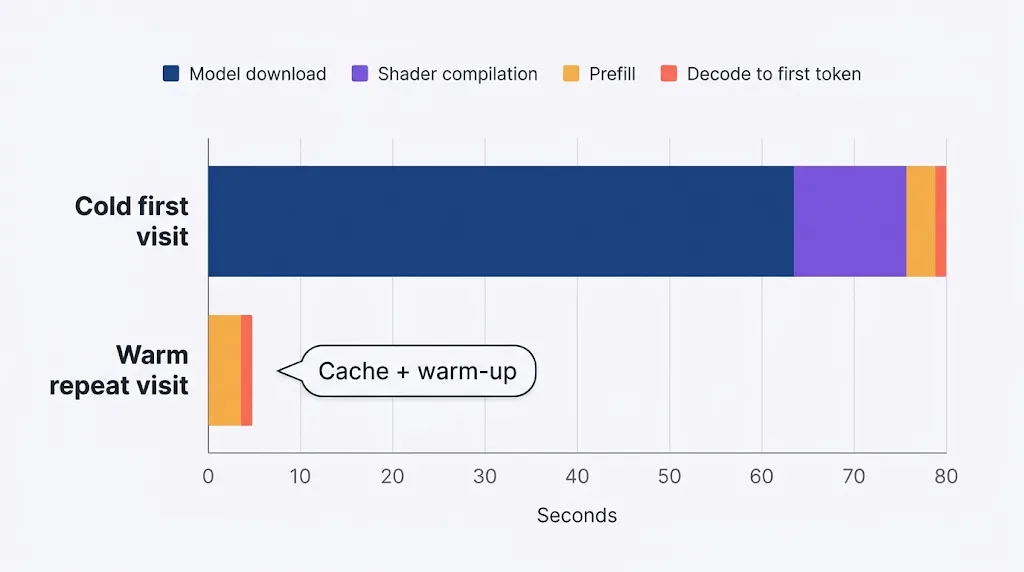
1. Download: Cache Aggressively
The first visit is dominated by downloading hundreds of megabytes. You can't avoid it, but you can make sure it happens once.
- WebLLM and Transformers.js both cache weights in the Cache API by default. Keep that on.
- Ask for persistent storage so the browser doesn't evict a 1 GB model under storage pressure.
- Check quota before you start, and pick a smaller model if space is tight.
async function prepareStorage(requiredMB: number) {
  const persisted = await navigator.storage.persist?.();
  const { quota = 0, usage = 0 } = await navigator.storage.estimate();
  const freeMB = (quota - usage) / (1024 * 1024);

  return { persisted, canFit: freeMB > requiredMB * 1.2 };
}- Don't start a 1 GB download on page load over a metered connection. Gate it behind a user action or check
navigator.connection?.saveData.
2. Shader Compilation: Warm Up Early
The first inference on a fresh WebGPU device compiles dozens of pipelines. Run a tiny throwaway generation (a single token) right after load() while the user is still reading the page. The real first request then skips that cost.
async function warmUp(engine: LocalEngine) {
  const ctrl = new AbortController();
  await engine.stream([{ role: "user", content: "Hi" }], () => ctrl.abort(), ctrl.signal);
}
3. Prefill: Process Fewer Tokens
Prefill is the forward pass over your whole prompt before the first output token. Its cost grows with prompt length, so on a laptop GPU a 2,000-token prompt can easily take a second or more.
- Trim the system prompt. Every word in it is paid on every request. Small models also follow short, specific instructions better than long ones.
- Reuse the KV cache. WebLLM keeps the conversation's KV cache between turns of the same chat, so append to the conversation rather than resending a rebuilt prompt each time. With the Prompt API, create one base session with your system prompt and
clone()it per request, as shown above. - Chunk retrieved context. For RAG over notes, embed chunks locally (Transformers.js with a small embedding model works well) and only send the top 2–3 chunks.
- Tune prefill chunk size where the runtime exposes it. Larger chunks improve throughput but increase peak memory; on low-VRAM devices smaller chunks avoid out-of-memory crashes.
4. Decode: Keep the Pipeline Fed
Decode speed is mostly set by memory bandwidth and quantization, but you can still lose performance through avoidable mistakes:
- Stream tokens to the UI and batch DOM updates with
requestAnimationFrameinstead of re-rendering per token. - Cap
max_tokens. A summary rarely needs 1,000 tokens, and every one of them costs time and battery. - Use greedy decoding or low temperature for extraction tasks. It's more deterministic and slightly cheaper.
// Batch token rendering to one DOM write per frame
let buffer = "";
let scheduled = false;

function onToken(t: string) {
  buffer += t;
  if (!scheduled) {
    scheduled = true;
    requestAnimationFrame(() => {
      outputEl.textContent += buffer;
      buffer = "";
      scheduled = false;
    });
  }
}
WebAssembly SIMD Fallbacks for Cross-Browser Reach
A noticeable share of real-world sessions still lack usable WebGPU: older browsers, enterprise-pinned builds, blocklisted GPU drivers, or WebGPU disabled by policy. For those users, WebAssembly is your safety net.
Detect SIMD and Threads
Both features change CPU inference speed dramatically. SIMD lets one instruction process several values at once, and threads spread the matmuls across cores.
import { simd, threads, relaxedSimd } from "wasm-feature-detect";

export async function hasWasmSimd() {
  return simd();
}

export async function wasmProfile() {
  const [s, t, r] = await Promise.all([simd(), threads(), relaxedSimd()]);
  return {
    simd: s,
    relaxedSimd: r,
    // Threads need SharedArrayBuffer, which needs cross-origin isolation
    threads: t && self.crossOriginIsolated,
    cores: navigator.hardwareConcurrency ?? 2,
  };
}
Enable Cross-Origin Isolation
Multithreaded WebAssembly depends on SharedArrayBuffer, which browsers only expose on cross-origin isolated pages. Set these headers on your HTML responses:
Cross-Origin-Opener-Policy: same-origin
Cross-Origin-Embedder-Policy: require-corp
If third-party embeds break under require-corp, try Cross-Origin-Embedder-Policy: credentialless, which is friendlier to images and scripts from CDNs that don't send CORP headers.
For a Vite dev server:
// vite.config.ts
import { defineConfig } from "vite";

export default defineConfig({
  server: {
    headers: {
      "Cross-Origin-Opener-Policy": "same-origin",
      "Cross-Origin-Embedder-Policy": "require-corp",
    },
  },
  worker: { format: "es" },
  optimizeDeps: { exclude: ["@mlc-ai/web-llm"] },
});
Right-Size the Model on CPU
CPU decode is often 5–10x slower than a decent GPU. Don't pretend otherwise. On the WASM path:
- Drop to the smallest model that still does the job (0.5B or even a 135M–360M model for classification and rewriting).
- Use the WASM path for short tasks like tagging, tone detection and autocomplete, and route long-form generation to the server fallback.
- Show honest UI: a "running on CPU, this may be slower" hint sets expectations.
Architecting Privacy-First, Offline-Capable Apps
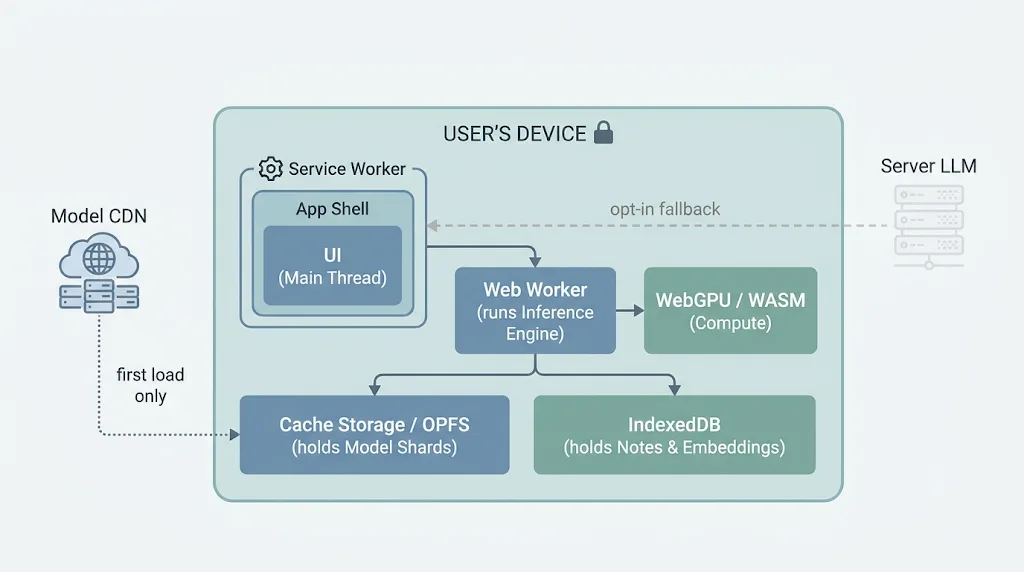
Local inference is only half of a privacy story. The architecture around it matters just as much.
flowchart LR
    subgraph Device["User's Device (nothing leaves by default)"]
        UI[React / Svelte UI] <--> WK[Inference Web Worker]
        WK <--> GPU[(WebGPU / WASM)]
        WK <--> CACHE[(Cache API / OPFS<br/>model shards)]
        UI <--> IDB[(IndexedDB<br/>notes + embeddings)]
        SW[Service Worker<br/>app shell cache] --> UI
    end
    CDN[(Model CDN)] -. first load only .-> CACHE
    API[(Server LLM)] -. explicit opt-in fallback .-> UI
Key design decisions:
- Service Worker for the app shell. Precache your HTML, JS and WASM so the app boots offline. Let the inference runtime manage model caching itself, so you don't double-store gigabytes.
- Self-host or pin model files. Pulling weights from a third-party hub at runtime is fine for prototypes, but in production you want a pinned revision on your own CDN with immutable cache headers, so a model update never silently changes behavior.
- Make the server fallback explicit. If a request might leave the device, tell the user. "Process on our servers?" is a one-line consent dialog that keeps your privacy promise honest.
- Audit your telemetry. It's surprisingly common to run inference locally and then ship the prompt to an error tracker in a stack trace. Scrub inputs from logs and analytics.
- Store derived data locally. Embeddings and summaries can live in IndexedDB next to the notes they came from.
Best Practices
- Always run inference in a Web Worker. Model loading and kernel dispatch will block the main thread and wreck your Interaction to Next Paint (INP) score.
- Feature-detect, never user-agent-sniff. Check
navigator.gpu,requestAdapter(),adapter.featuresandadapter.limits. GPU blocklists change with driver updates. - Treat the model as a versioned dependency. Pin model IDs and revisions, and run your eval set before upgrading, just as you would with a library.
- Handle device loss. Listen to
device.lost(or catch runtime errors) and rebuild the engine. GPUs reset when laptops sleep, drivers update or tabs get backgrounded. - Design for progressive disclosure. Ship the non-AI version of the UI first, then light up AI features when the engine reports ready.
- Measure on real hardware. A MacBook Pro is not your median user. Test on a mid-range Windows laptop with integrated graphics and a two-year-old Android phone.
- Respect the battery. Lower
max_tokens, skip background generation whendocument.hiddenis true, and avoid speculative work on mobile.
Common Mistakes
Downloading the model on page load. Starting a 1 GB fetch before the user has shown intent wastes bandwidth and hurts Core Web Vitals. Trigger it on first use or after an explicit opt-in.
Ignoring buffer-size limits. A model that loads fine on your RTX desktop can fail on an integrated GPU because a single weight tensor exceeds maxStorageBufferBindingSize. Check limits and pick a smaller model rather than crashing.
Forgetting cross-origin isolation. Without COOP/COEP, WebAssembly threads silently fall back to a single thread and your CPU path becomes painfully slow.
Using an SLM like a frontier model. A 1B model won't reliably do multi-step reasoning or recall niche facts. Give it narrow, well-scoped tasks with clear instructions and, where possible, constrained output.
Re-sending the full chat history every turn. If your runtime keeps the KV cache, rebuilding the prompt from scratch throws away that work and inflates TTFT on every message.
Assuming the Prompt API is everywhere. It's Chrome-desktop-only, needs specific hardware and may return "downloadable" or "downloading" instead of "available". Never make it your only path.
Rendering every token synchronously. Updating React state per token at 40+ tokens per second causes jank. Buffer and flush per animation frame.
🚀 Pro Tips
- Prefer
q4f16whenshader-f16exists. On most GPUs it's both smaller and faster than fp32 compute, with negligible quality loss for SLMs. - Kick off shader warm-up during idle time. Use
requestIdleCallbackafter the engine loads so the first real request feels instant. - Split models into shards under ~100 MB. Smaller shards resume better on flaky connections and play nicer with CDN and Cache API limits.
- Use constrained decoding for extraction. Transformers.js 4.3+ supports structured output, and the Prompt API accepts
responseConstraint. JSON that always parses beats clever prompt engineering. - Pair a tiny embedding model with a small generator. Local RAG with a ~20–30M parameter embedding model plus a 1B generator often beats a 3B model with no retrieval, and it's cheaper on every axis.
- Log backend and TTFT to your analytics, not the prompt. Knowing that 18% of users hit the WASM path tells you where to invest without compromising privacy.
- Offer a "download for offline" toggle. Power users love it, and it turns a surprise 1 GB download into a feature they chose.
- Keep a server fallback for long-tail tasks. Hybrid is fine. If 90% of requests run locally, you've still cut your inference bill by 90%.
📌 Key Takeaways
- WebGPU makes the user's GPU your inference server. Quantized SLMs in the 0.5B–3B range now stream tokens at interactive speeds inside a tab.
- Choose the runtime per job. WebLLM for chat, Transformers.js v4 for breadth, LiteRT.js for the
.tfliteand Google ecosystem, and the Prompt API when built-in Gemini Nano is enough. - TTFT is a pipeline problem. Cache weights, persist storage, warm up shaders, shorten prompts and reuse sessions or KV cache.
- Build a capability ladder. Prompt API, then WebGPU, then WebAssembly SIMD with threads, then a consented server fallback, all behind one interface in a Web Worker.
- Privacy is architectural. Local inference only protects users if your logging, analytics and sync features respect the same boundary.
Conclusion
Client-side AI is no longer a demo trick. With WebGPU available across the major browsers and runtimes like WebLLM, Transformers.js v4, LiteRT.js and the Prompt API maturing, a large class of AI features can move from your cloud bill to the user's idle hardware. You get lower costs, better privacy and offline support all at once.
The engineering challenge has shifted from "can we run a model in the browser?" to "how do we run it well across thousands of different devices?" The answers are mostly classic frontend engineering: feature detection, progressive enhancement, aggressive caching, workers for heavy work and honest fallbacks.
Start small. Pick one high-volume, low-complexity feature, like summarizing, tagging or rewriting, and move it on-device with a 0.5B–1.5B model. Measure TTFT and backend distribution in production, keep a server fallback for the long tail, and expand from there. Your users get a faster, more private product, and your finance team gets a smaller invoice.
References
- WebGPU API – MDN Web Docs
- WebGPU Specification – W3C
- WebLLM – MLC AI (GitHub)
- Transformers.js v4: Now Available on NPM – Hugging Face Blog
- Transformers.js Releases – GitHub
- LiteRT.js, Google's High Performance Web AI Inference – Google Developers Blog
- LiteRT for Web with LiteRT.js – Google AI Edge Docs
- The Prompt API – Chrome for Developers
- ONNX Runtime Web Documentation
- wasm-feature-detect – GitHub
- Making your website "cross-origin isolated" using COOP and COEP – web.dev
- Storage for the web – web.dev