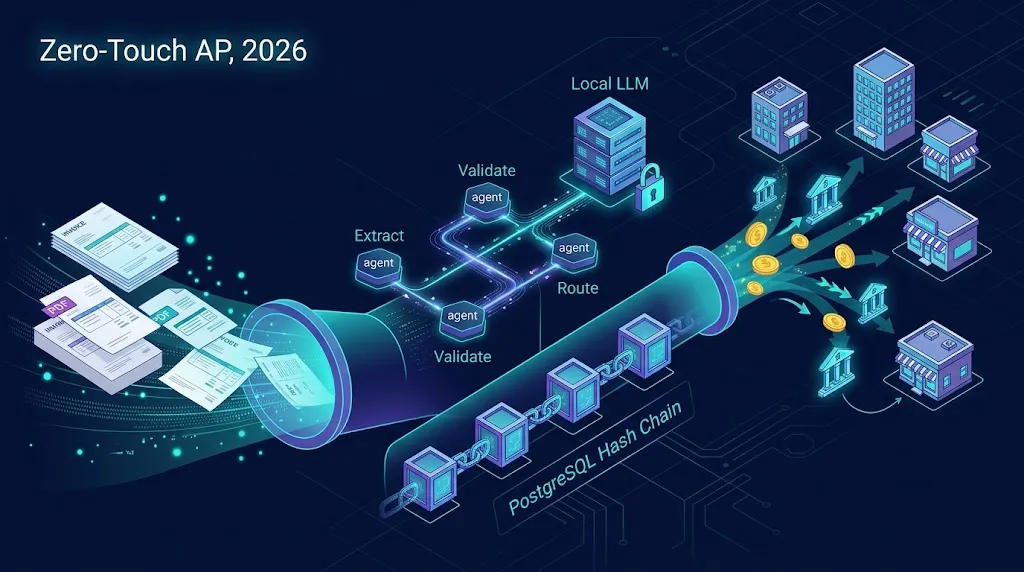
Introduction: Why AP Is the Most Underrated AI Opportunity of 2026
Every company pays its vendors, and almost every company still does it badly.
Walk into the finance team of a mid-market business today and you will still find someone downloading PDF invoices from a shared inbox, keying line items into an ERP, chasing approvers on Slack, and cross-checking purchase orders against goods receipts in a spreadsheet. Then, once a week, someone exports a payment batch and uploads it to a bank portal while praying they did not pay the same invoice twice.
That process is slow, error-prone, and, crucially, extremely well-defined. And well-defined, high-volume, rules-plus-judgment work is exactly where AI agents shine in 2026.
The shift this year is not "AI can read invoices." OCR plus templates have done that for a decade. The shift is that agentic systems can now own the whole reconciliation loop: extract, validate, three-way match, route for approval, pay, and record, while escalating only the genuinely weird cases to a human. Finance leaders have stopped asking for "invoice capture" and started asking for "zero-touch AP."
In this guide, I will walk you through a production-grade blueprint I have used and refined for building exactly that as a SaaS product. We will cover:
- LangGraph + Ollama agents for privacy-first invoice parsing on local LLMs
- Self-hosted n8n for vendor routing and approval workflows
- Node.js REST APIs as the transactional backbone
- PostgreSQL as an append-only, hash-chained financial ledger
- A Next.js + TypeScript + Shadcn UI "Human-on-the-Loop" exception dashboard
- Stripe and Cashfree for B2B disbursements
- Docker on AWS to ship it all
This is a long one. Grab a coffee.
The Core Concept: Agents Propose, Code Disposes
Before any code, let me share the single most important design principle in this entire architecture, because getting it wrong is how fintech AI projects end up in post-mortems:
The LLM never makes a financial decision. It only produces structured claims that deterministic code verifies.
An agent can say "this invoice is from Acme Corp, total 12,450.00 USD, referencing PO-8812." It cannot say "therefore pay it." The decision to pay comes from a rules engine checking that the PO exists, the amounts match within tolerance, the vendor's bank details have not changed, and the approval policy is satisfied.
This gives you the flexibility of AI for messy inputs and the predictability of software for money movement. Auditors love it. Your on-call engineer loves it even more.
Human-in-the-Loop vs. Human-on-the-Loop
These two terms get used interchangeably, but they describe very different products:
| Model | Who acts | Human role | Typical touch rate |
|---|---|---|---|
| Human-in-the-Loop | Human, assisted by AI | Approves every item | 100% |
| Human-on-the-Loop | AI, supervised by human | Resolves exceptions only | 5–15% |
| Fully autonomous | AI | Audits after the fact | ~0% |
We are building Human-on-the-Loop. Agents process the happy path end to end; humans see only exceptions, plus periodic sampling for quality assurance.
High-Level Architecture
Here is the system at a glance:
flowchart LR
    subgraph Ingest
        A[Email / SFTP / Vendor Portal] --> B[n8n Ingestion Workflow]
    end

    subgraph AgentLayer[Agent Layer - Python]
        C[LangGraph Orchestrator]
        D[Extraction Agent]
        E[Validation Agent]
        F[Matching Agent]
        G[(Ollama - Local LLM)]
        C --> D --> E --> F
        D -.-> G
        F -.-> G
    end

    subgraph Core[Core Services - Node.js]
        H[AP REST API]
        I[(PostgreSQL Ledger)]
        H --> I
    end

    subgraph Ops
        J[n8n Routing & Approvals]
        K[Next.js Exception Dashboard]
    end

    subgraph Pay[Disbursement]
        L[Stripe Connect]
        M[Cashfree Payouts]
    end

    B --> H
    H --> C
    F --> H
    H --> J
    J --> K
    K --> H
    J --> H
    H --> L
    H --> M
Each layer has one job:
- n8n handles the edges: ingestion triggers, notifications, approval routing, scheduled payment runs.
- LangGraph handles reasoning: extraction, validation, matching, with checkpoints and interrupts.
- Node.js API is the only component allowed to write to the ledger or move money.
- PostgreSQL is the source of truth and the audit trail.
- Next.js gives humans a focused view of what needs their attention.
Let us build it layer by layer.
Layer 1: The Immutable Ledger in PostgreSQL
I start with the database because in fintech, your data model is your architecture. If the ledger is sound, you can rewrite every other component later.
Event-Sourced Invoice States
Instead of an invoices table with a mutable status column, we record every state transition as an event. The current state is a projection.
-- 001_ledger.sql
CREATE EXTENSION IF NOT EXISTS pgcrypto;

CREATE TYPE invoice_state AS ENUM (
  'RECEIVED', 'EXTRACTED', 'VALIDATED', 'MATCHED',
  'EXCEPTION', 'APPROVED', 'PAYMENT_PENDING', 'PAID', 'REJECTED'
);

CREATE TABLE invoices (
  id              UUID PRIMARY KEY DEFAULT gen_random_uuid(),
  tenant_id       UUID NOT NULL,
  vendor_id       UUID,
  source_uri      TEXT NOT NULL,
  file_sha256     TEXT NOT NULL,
  created_at      TIMESTAMPTZ NOT NULL DEFAULT now(),
  UNIQUE (tenant_id, file_sha256)          -- same file can't be ingested twice
);

CREATE TABLE invoice_events (
  seq             BIGSERIAL PRIMARY KEY,
  tenant_id       UUID NOT NULL,
  invoice_id      UUID NOT NULL REFERENCES invoices(id),
  state           invoice_state NOT NULL,
  actor           TEXT NOT NULL,           -- 'agent:extractor', 'user:42', 'n8n:approval'
  payload         JSONB NOT NULL,
  prev_hash       TEXT,
  hash            TEXT NOT NULL,
  created_at      TIMESTAMPTZ NOT NULL DEFAULT now()
);

CREATE INDEX idx_events_invoice ON invoice_events (invoice_id, seq);
Making It Append-Only and Tamper-Evident
Two things make this table trustworthy. First, a trigger that refuses updates and deletes. Second, a hash chain where each event commits to the previous one, so any retroactive edit breaks the chain.
-- 002_immutability.sql
CREATE OR REPLACE FUNCTION forbid_mutation() RETURNS trigger AS $$
BEGIN
  RAISE EXCEPTION 'invoice_events is append-only';
END;
$$ LANGUAGE plpgsql;

CREATE TRIGGER trg_no_update BEFORE UPDATE OR DELETE ON invoice_events
  FOR EACH ROW EXECUTE FUNCTION forbid_mutation();

CREATE OR REPLACE FUNCTION chain_hash() RETURNS trigger AS $$
DECLARE
  last_hash TEXT;
BEGIN
  -- Serialize chain writes per tenant to avoid forks
  PERFORM pg_advisory_xact_lock(hashtext(NEW.tenant_id::text));

  SELECT hash INTO last_hash
  FROM invoice_events
  WHERE tenant_id = NEW.tenant_id
  ORDER BY seq DESC LIMIT 1;

  NEW.prev_hash := COALESCE(last_hash, 'GENESIS');
  NEW.hash := encode(
    digest(
      NEW.prev_hash || NEW.invoice_id::text || NEW.state::text ||
      NEW.actor || NEW.payload::text || NEW.created_at::text,
      'sha256'
    ), 'hex');
  RETURN NEW;
END;
$$ LANGUAGE plpgsql;

CREATE TRIGGER trg_chain BEFORE INSERT ON invoice_events
  FOR EACH ROW EXECUTE FUNCTION chain_hash();

-- Application role can only INSERT and SELECT
REVOKE UPDATE, DELETE, TRUNCATE ON invoice_events FROM ap_app;
GRANT INSERT, SELECT ON invoice_events TO ap_app;
A nightly job can recompute the chain and alert on mismatches. For extra assurance, periodically anchor the latest hash in an external system (an S3 bucket with Object Lock in compliance mode works nicely).
The Current-State Projection
CREATE VIEW invoice_current AS
SELECT DISTINCT ON (e.invoice_id)
  e.invoice_id, e.tenant_id, e.state, e.payload, e.created_at AS state_since
FROM invoice_events e
ORDER BY e.invoice_id, e.seq DESC;
Add row-level security on tenant_id and you have multi-tenant isolation enforced by the database itself rather than by hopeful WHERE clauses.
Layer 2: Privacy-First Extraction Agents with LangGraph and Ollama
Invoices contain bank account numbers, tax IDs, negotiated pricing, and sometimes employee names. Sending all of that to a third-party API is a non-starter for many enterprise buyers, especially in regulated industries and in regions with strict data residency rules. Running models locally with Ollama inside your own VPC sidesteps the whole conversation.
Choosing Models
In practice, a two-model setup works well:
- A vision-capable model (for example, a Qwen-VL or Llama vision variant) for scanned and photographed invoices
- A strong text model for reasoning over OCR output and PO matching
Benchmark on your customers' invoices. Model rankings change monthly; your invoice distribution does not.
Defining the Agent State
LangGraph models the workflow as a typed state machine. Each node reads and writes part of the state, and the checkpointer persists it after every step, which is what lets us pause for humans and resume days later.
# agents/state.py
from typing import TypedDict, Optional, Literal
from pydantic import BaseModel, Field
from decimal import Decimal

class LineItem(BaseModel):
    description: str
    quantity: Decimal
    unit_price: Decimal
    amount: Decimal

class InvoiceExtraction(BaseModel):
    vendor_name: str
    vendor_tax_id: Optional[str] = None
    invoice_number: str
    invoice_date: str = Field(description="ISO 8601 date")
    currency: str = Field(min_length=3, max_length=3)
    po_number: Optional[str] = None
    subtotal: Decimal
    tax_total: Decimal
    grand_total: Decimal
    line_items: list[LineItem]
    confidence: float = Field(ge=0, le=1)

class APState(TypedDict):
    invoice_id: str
    tenant_id: str
    ocr_text: str
    extraction: Optional[InvoiceExtraction]
    validation_errors: list[str]
    match_result: Optional[dict]
    decision: Optional[Literal["auto_approve", "exception", "reject"]]
    human_resolution: Optional[dict]
The Extraction Node
The trick to reliable local extraction is schema-constrained decoding. Ollama supports passing a JSON schema to the format parameter, which forces the model to emit valid JSON matching your Pydantic model.
# agents/nodes/extract.py
from langchain_ollama import ChatOllama
from agents.state import APState, InvoiceExtraction

llm = ChatOllama(
    model="qwen2.5:14b-instruct",
    base_url="http://ollama:11434",
    temperature=0,
    format=InvoiceExtraction.model_json_schema(),
)

SYSTEM = """You are an accounts payable extraction engine.
Extract ONLY what is printed on the invoice. Never infer or invent values.
If a field is missing, use null. Report your honest confidence from 0 to 1."""

def extract_node(state: APState) -> dict:
    response = llm.invoke([
        ("system", SYSTEM),
        ("human", f"Invoice text:\n\n{state['ocr_text'][:24000]}"),
    ])
    extraction = InvoiceExtraction.model_validate_json(response.content)
    return {"extraction": extraction}
Note temperature=0 and the explicit "never invent" instruction. Hallucinated invoice numbers are the most common failure mode I see with naive setups.
The Deterministic Validation Node
No LLM here. Just arithmetic and business rules.
# agents/nodes/validate.py
from decimal import Decimal
from agents.state import APState

TOLERANCE = Decimal("0.02")

def validate_node(state: APState) -> dict:
    x = state["extraction"]
    errors: list[str] = []

    line_sum = sum((li.amount for li in x.line_items), Decimal("0"))
    if abs(line_sum - x.subtotal) > TOLERANCE:
        errors.append(f"Line items sum {line_sum} != subtotal {x.subtotal}")

    if abs(x.subtotal + x.tax_total - x.grand_total) > TOLERANCE:
        errors.append("Subtotal + tax does not equal grand total")

    for li in x.line_items:
        if abs(li.quantity * li.unit_price - li.amount) > TOLERANCE:
            errors.append(f"Line '{li.description[:40]}' qty x price mismatch")

    if x.confidence < 0.85:
        errors.append(f"Low extraction confidence: {x.confidence:.2f}")

    return {"validation_errors": errors}
Three-Way Matching
The matching node pulls the PO and goods receipt from your API and compares quantities and prices. An LLM helps with one narrow job: fuzzy-matching line descriptions ("HP LaserJet Toner 58A Blk" vs. "Toner cartridge, black, CF258A"). The final match verdict is still computed in code.
# agents/nodes/match.py
import httpx
from agents.state import APState

API = "http://ap-api:4000/internal"

def match_node(state: APState) -> dict:
    x = state["extraction"]
    if not x.po_number:
        return {"match_result": {"status": "NO_PO"}, "decision": "exception"}

    with httpx.Client(timeout=10) as client:
        po = client.get(f"{API}/purchase-orders/{x.po_number}",
                        headers={"x-tenant-id": state["tenant_id"]}).json()
        grn = client.get(f"{API}/goods-receipts", params={"po": x.po_number},
                         headers={"x-tenant-id": state["tenant_id"]}).json()

    variance = abs(float(x.grand_total) - po["total"]) / max(po["total"], 1)
    received_ok = all(r["qty_received"] >= r["qty_ordered"] for r in grn["lines"])

    status = "MATCHED" if variance <= 0.01 and received_ok else "VARIANCE"
    decision = "auto_approve" if status == "MATCHED" and not state["validation_errors"] else "exception"

    return {
        "match_result": {"status": status, "variance": variance, "received_ok": received_ok},
        "decision": decision,
    }
Wiring the Graph with Human-on-the-Loop Interrupts
This is where LangGraph earns its place. The interrupt() primitive pauses the graph, persists state to Postgres via the checkpointer, and waits. When a human resolves the exception in the dashboard, we resume the exact same thread with their decision.
# agents/graph.py
from langgraph.graph import StateGraph, START, END
from langgraph.types import interrupt
from langgraph.checkpoint.postgres import PostgresSaver
from agents.state import APState
from agents.nodes.extract import extract_node
from agents.nodes.validate import validate_node
from agents.nodes.match import match_node

def human_review_node(state: APState) -> dict:
    resolution = interrupt({
        "invoice_id": state["invoice_id"],
        "errors": state["validation_errors"],
        "match": state["match_result"],
        "extraction": state["extraction"].model_dump(mode="json"),
    })
    # resolution comes from the dashboard: {"action": "approve" | "reject", "corrections": {...}}
    return {
        "human_resolution": resolution,
        "decision": "auto_approve" if resolution["action"] == "approve" else "reject",
    }

def route_after_match(state: APState) -> str:
    return "human_review" if state["decision"] == "exception" else "finalize"

def finalize_node(state: APState) -> dict:
    # Hand the verdict to the Node.js API, which owns the ledger.
    import httpx
    httpx.post("http://ap-api:4000/internal/agent-verdicts", json={
        "invoice_id": state["invoice_id"],
        "tenant_id": state["tenant_id"],
        "decision": state["decision"],
        "extraction": state["extraction"].model_dump(mode="json"),
        "match": state["match_result"],
        "human_resolution": state.get("human_resolution"),
    }, timeout=10).raise_for_status()
    return {}

builder = StateGraph(APState)
builder.add_node("extract", extract_node)
builder.add_node("validate", validate_node)
builder.add_node("match", match_node)
builder.add_node("human_review", human_review_node)
builder.add_node("finalize", finalize_node)

builder.add_edge(START, "extract")
builder.add_edge("extract", "validate")
builder.add_edge("validate", "match")
builder.add_conditional_edges("match", route_after_match, ["human_review", "finalize"])
builder.add_edge("human_review", "finalize")
builder.add_edge("finalize", END)

def build_graph(conn_string: str):
    checkpointer = PostgresSaver.from_conn_string(conn_string)
    return checkpointer, builder
Resuming is a one-liner from a small FastAPI wrapper:
from langgraph.types import Command

graph.invoke(Command(resume={"action": "approve", "corrections": {}}),
             config={"configurable": {"thread_id": invoice_id}})
Using the invoice ID as the thread_id gives you a clean one-to-one mapping between business entities and agent runs.
Here is the full lifecycle as a state diagram:
stateDiagram-v2
    [*] --> RECEIVED
    RECEIVED --> EXTRACTED: Extraction agent
    EXTRACTED --> VALIDATED: Rules pass
    EXTRACTED --> EXCEPTION: Math or confidence fails
    VALIDATED --> MATCHED: 3-way match OK
    VALIDATED --> EXCEPTION: Variance / No PO
    EXCEPTION --> APPROVED: Human approves
    EXCEPTION --> REJECTED: Human rejects
    MATCHED --> APPROVED: Policy auto-approve
    APPROVED --> PAYMENT_PENDING: n8n payment run
    PAYMENT_PENDING --> PAID: Webhook confirmed
    PAID --> [*]
    REJECTED --> [*]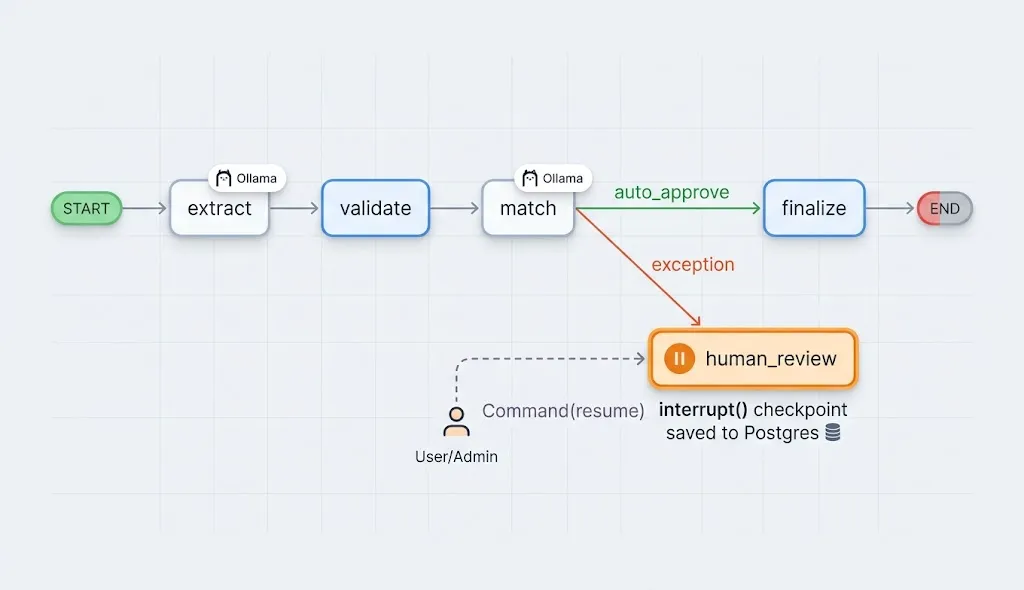
Layer 3: The Node.js REST API, the Only Thing That Touches Money
The API is deliberately boring. It validates input with Zod, writes events to the ledger in transactions, and is the only service holding payment gateway credentials.
// api/src/routes/verdicts.ts
import { FastifyInstance } from "fastify";
import { z } from "zod";
import { pool } from "../db";
import { evaluateApprovalPolicy } from "../policy";

const Verdict = z.object({
  invoice_id: z.string().uuid(),
  tenant_id: z.string().uuid(),
  decision: z.enum(["auto_approve", "exception", "reject"]),
  extraction: z.record(z.any()),
  match: z.record(z.any()).nullable(),
  human_resolution: z.record(z.any()).nullable().optional(),
});

export async function verdictRoutes(app: FastifyInstance) {
  app.post("/internal/agent-verdicts", async (req, reply) => {
    const v = Verdict.parse(req.body);
    const client = await pool.connect();

    try {
      await client.query("BEGIN");
      await client.query("SELECT set_config('app.tenant_id', $1, true)", [v.tenant_id]);

      // Duplicate-invoice fingerprint check
      const dup = await client.query(
        `SELECT 1 FROM invoice_current
         WHERE tenant_id = $1
           AND payload->'extraction'->>'invoice_number' = $2
           AND payload->'extraction'->>'vendor_name' = $3
           AND state IN ('APPROVED','PAYMENT_PENDING','PAID')`,
        [v.tenant_id, v.extraction.invoice_number, v.extraction.vendor_name]
      );
      if (dup.rowCount) throw new Error("DUPLICATE_INVOICE");

      // The agent suggests; policy decides.
      const policy = await evaluateApprovalPolicy(client, v);
      const state =
        v.decision === "reject" ? "REJECTED"
        : policy.requiresApprover ? "EXCEPTION"
        : "APPROVED";

      await client.query(
        `INSERT INTO invoice_events (tenant_id, invoice_id, state, actor, payload)
         VALUES ($1, $2, $3, $4, $5)`,
        [v.tenant_id, v.invoice_id, state, "agent:langgraph",
         { extraction: v.extraction, match: v.match, policy }]
      );
      await client.query("COMMIT");

      // Fire-and-forget to n8n for routing/notifications
      await fetch(process.env.N8N_ROUTING_WEBHOOK!, {
        method: "POST",
        headers: { "content-type": "application/json",
                   "x-signature": sign(v.invoice_id) },
        body: JSON.stringify({ invoiceId: v.invoice_id, state, policy }),
      });

      return reply.code(202).send({ state });
    } catch (err) {
      await client.query("ROLLBACK");
      throw err;
    } finally {
      client.release();
    }
  });
}
Notice that even when the agent says auto_approve, the API runs evaluateApprovalPolicy. An invoice over a tenant's threshold, from a vendor whose bank details changed in the last 30 days, or the first invoice ever from a new vendor will still go to a human. Vendor bank-detail changes are the number one vector for invoice fraud; never let an agent wave them through.
Layer 4: Vendor Routing and Approvals with Self-Hosted n8n
Why n8n and not more code? Because approval matrices change constantly. A new CFO wants everything over 50,000 to hit her desk. Procurement wants IT vendors routed to the IT director. Those are business decisions, and finance ops should be able to edit them in a visual workflow without filing a Jira ticket.
Self-hosting n8n (fair-code license, runs in Docker) also keeps invoice metadata inside your infrastructure.
A Typical Routing Workflow
- Webhook trigger receives the state change from the API (verify the HMAC signature in a Code node first).
- Switch node branches on state:
EXCEPTION,APPROVED,REJECTED. - For
EXCEPTION, an HTTP Request node fetches the approval policy and resolves the approver chain (department head, then finance controller for high amounts). - Slack / Microsoft Teams / Email nodes notify approvers with a deep link into the Next.js dashboard.
- A Wait node with a timeout escalates to the next approver if nobody acts within the SLA.
- For
APPROVED, the invoice is added to the next scheduled payment run.
A separate Schedule Trigger workflow runs payment batches, for example twice a week, honoring early-payment discount terms like "2/10 net 30" by prioritizing invoices whose discount window closes soonest.
// n8n Code node: verify webhook signature and pick discount-eligible invoices
const crypto = require('crypto');
const secret = $env.AP_WEBHOOK_SECRET;

const body = JSON.stringify($json.body);
const expected = crypto.createHmac('sha256', secret).update(body).digest('hex');
if (expected !== $json.headers['x-signature']) {
  throw new Error('Invalid signature');
}

const today = new Date();
return $input.all().filter(item => {
  const due = new Date(item.json.discountDeadline);
  const daysLeft = (due - today) / 86400000;
  return daysLeft >= 0 && daysLeft <= 3;
});
Note: depending on your n8n version and settings, you may need to allow built-in modules like
cryptoin Code nodes via theNODE_FUNCTION_ALLOW_BUILTINenvironment variable.
Layer 5: The Human-on-the-Loop Exception Dashboard
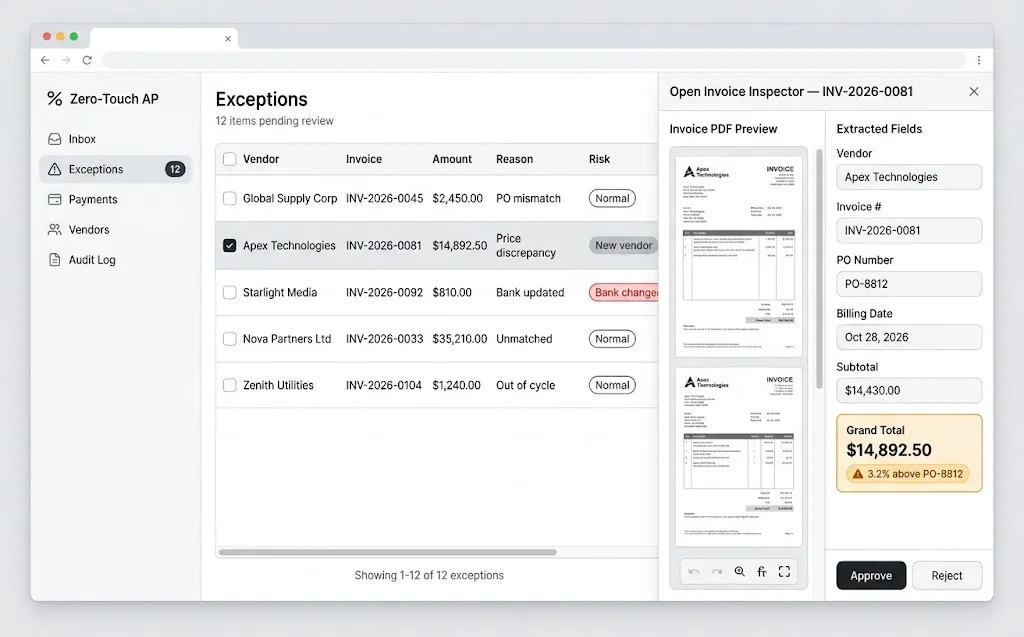
The dashboard is not a general admin panel. It does one thing: help a human resolve an exception in under 30 seconds. Every pixel serves that goal.
What a Good Exception Card Shows
- The original invoice, rendered side by side with extracted fields
- The specific reason for the exception, in plain language ("Grand total is 3.2% above PO-8812")
- The PO and goods receipt lines with mismatches highlighted
- Vendor risk signals (new vendor, recent bank change)
- Two primary actions: Approve and Reject, plus inline field correction
Server Component for the Queue
// app/(dashboard)/exceptions/page.tsx
import { Badge } from "@/components/ui/badge";
import {
  Table, TableBody, TableCell, TableHead, TableHeader, TableRow,
} from "@/components/ui/table";
import { getExceptions } from "@/lib/api";
import { ResolveButtons } from "./resolve-buttons";

export const dynamic = "force-dynamic";

export default async function ExceptionsPage() {
  const exceptions = await getExceptions();

  return (
    <div className="space-y-4 p-6">
      <h1 className="text-2xl font-semibold tracking-tight">Exceptions</h1>
      <Table>
        <TableHeader>
          <TableRow>
            <TableHead>Vendor</TableHead>
            <TableHead>Invoice</TableHead>
            <TableHead className="text-right">Amount</TableHead>
            <TableHead>Reason</TableHead>
            <TableHead>Risk</TableHead>
            <TableHead />
          </TableRow>
        </TableHeader>
        <TableBody>
          {exceptions.map((ex) => (
            <TableRow key={ex.invoiceId}>
              <TableCell className="font-medium">{ex.vendorName}</TableCell>
              <TableCell>{ex.invoiceNumber}</TableCell>
              <TableCell className="text-right tabular-nums">
                {new Intl.NumberFormat("en-US", {
                  style: "currency", currency: ex.currency,
                }).format(ex.grandTotal)}
              </TableCell>
              <TableCell className="max-w-xs truncate">{ex.reason}</TableCell>
              <TableCell>
                {ex.bankDetailsChanged ? (
                  <Badge variant="destructive">Bank changed</Badge>
                ) : ex.isNewVendor ? (
                  <Badge variant="secondary">New vendor</Badge>
                ) : (
                  <Badge variant="outline">Normal</Badge>
                )}
              </TableCell>
              <TableCell>
                <ResolveButtons invoiceId={ex.invoiceId} />
              </TableCell>
            </TableRow>
          ))}
        </TableBody>
      </Table>
    </div>
  );
}
Server Action to Resume the Agent
// app/(dashboard)/exceptions/actions.ts
"use server";

import { revalidatePath } from "next/cache";
import { auth } from "@/lib/auth";

export async function resolveException(
  invoiceId: string,
  action: "approve" | "reject",
  corrections: Record<string, unknown> = {}
) {
  const session = await auth();
  if (!session?.user?.permissions.includes("ap:resolve")) {
    throw new Error("Forbidden");
  }

  const res = await fetch(`${process.env.AP_API_URL}/exceptions/${invoiceId}/resolve`, {
    method: "POST",
    headers: {
      "content-type": "application/json",
      authorization: `Bearer ${session.accessToken}`,
    },
    body: JSON.stringify({ action, corrections }),
  });

  if (!res.ok) throw new Error(`Resolve failed: ${res.status}`);
  revalidatePath("/exceptions");
}// app/(dashboard)/exceptions/resolve-buttons.tsx
"use client";
import { useTransition } from "react";
import { Button } from "@/components/ui/button";
import { toast } from "sonner";
import { resolveException } from "./actions";
export function ResolveButtons({ invoiceId }: { invoiceId: string }) {
const [pending, start] = useTransition();
const handle = (action: "approve" | "reject") =>
start(async () => {
try {
await resolveException(invoiceId, action);
toast.success(action === "approve" ? "Approved" : "Rejected");
} catch {
toast.error("Could not resolve. Try again.");
}
});
return (
<div className="flex gap-2">
<Button size="sm" disabled={pending} onClick={() => handle("approve")}>
Approve
</Button>
<Button size="sm" variant="outline" disabled={pending} onClick={() => handle("reject")}>
Reject
</Button>
</div>
);
}The API's /resolve endpoint enforces segregation of duties (the person who created the vendor cannot approve its first invoice), writes a user:ID event to the ledger, and calls the LangGraph service to resume the thread.
Layer 6: B2B Disbursements with Stripe and Cashfree
Supporting two gateways is not over-engineering; it is market reality. Stripe gives you broad global coverage, especially for paying connected accounts and international vendors. Cashfree Payouts is a strong fit for Indian vendors, with bank transfer rails like IMPS, NEFT, RTGS, and UPI. Many SaaS customers have vendors in both worlds.
A Gateway-Agnostic Payout Interface
// api/src/payouts/types.ts
export interface PayoutRequest {
  invoiceId: string;
  tenantId: string;
  amountMinor: number;        // always integers in minor units
  currency: string;
  vendorRef: string;          // Stripe account ID or Cashfree beneficiary ID
  idempotencyKey: string;     // derived from invoiceId, never random
}

export interface PayoutProvider {
  name: "stripe" | "cashfree";
  send(req: PayoutRequest): Promise<{ providerRef: string; status: string }>;
}
Stripe Connect Transfer
// api/src/payouts/stripe.ts
import Stripe from "stripe";
import { PayoutProvider } from "./types";

const stripe = new Stripe(process.env.STRIPE_SECRET_KEY!);

export const stripeProvider: PayoutProvider = {
  name: "stripe",
  async send(req) {
    const transfer = await stripe.transfers.create(
      {
        amount: req.amountMinor,
        currency: req.currency.toLowerCase(),
        destination: req.vendorRef,
        transfer_group: `invoice_${req.invoiceId}`,
        metadata: { invoice_id: req.invoiceId, tenant_id: req.tenantId },
      },
      { idempotencyKey: req.idempotencyKey }
    );
    return { providerRef: transfer.id, status: "submitted" };
  },
};
Cashfree Payouts Transfer
// api/src/payouts/cashfree.ts
import { PayoutProvider } from "./types";

const BASE = process.env.CASHFREE_PAYOUT_BASE_URL!; // sandbox or production

export const cashfreeProvider: PayoutProvider = {
  name: "cashfree",
  async send(req) {
    const res = await fetch(`${BASE}/payout/transfers`, {
      method: "POST",
      headers: {
        "content-type": "application/json",
        "x-client-id": process.env.CASHFREE_CLIENT_ID!,
        "x-client-secret": process.env.CASHFREE_CLIENT_SECRET!,
        "x-api-version": process.env.CASHFREE_API_VERSION!,
      },
      body: JSON.stringify({
        transfer_id: req.idempotencyKey,          // Cashfree dedupes on transfer_id
        transfer_amount: req.amountMinor / 100,
        transfer_currency: req.currency,
        transfer_mode: "imps",
        beneficiary_details: { beneficiary_id: req.vendorRef },
        transfer_remarks: `INV ${req.invoiceId.slice(0, 8)}`,
      }),
    });
    if (!res.ok) throw new Error(`Cashfree error ${res.status}: ${await res.text()}`);
    const data = await res.json();
    return { providerRef: data.cf_transfer_id ?? req.idempotencyKey, status: data.status };
  },
};
Payment APIs evolve. Always confirm endpoint paths, API version headers, and field names against the current Stripe and Cashfree documentation before going live, and test every flow in sandbox first.
The Payment Sequence
sequenceDiagram
    participant N as n8n Payment Run
    participant A as AP API
    participant DB as PostgreSQL
    participant G as Stripe / Cashfree

    N->>A: POST /payment-runs (approved invoice IDs)
    A->>DB: INSERT payment_intents (UNIQUE invoice_id)
    A->>DB: INSERT event PAYMENT_PENDING
    A->>G: Create transfer (idempotency key)
    G-->>A: 200 submitted
    G-->>A: Webhook: transfer succeeded
    A->>A: Verify webhook signature
    A->>DB: INSERT event PAID (provider ref)
    A->>N: Notify vendor remittance
The payment_intents table with a UNIQUE (invoice_id) constraint is your last line of defense against double payment. Even if n8n retries, even if two workers race, the database refuses the second intent. Combined with deterministic idempotency keys (for example, pay_ plus the invoice ID plus attempt number only after a confirmed failure), duplicate payouts become structurally impossible rather than merely unlikely.
Always treat the gateway webhook, not the API response, as the source of truth for PAID. A 200 response means "accepted," not "money arrived."
Layer 7: Docker Containerization and the AWS Blueprint
Local Development with Docker Compose
# docker-compose.yml
services:
  postgres:
    image: postgres:17
    environment:
      POSTGRES_DB: ap
      POSTGRES_USER: ap_admin
      POSTGRES_PASSWORD: ${PG_PASSWORD}
    volumes: [pgdata:/var/lib/postgresql/data, ./db:/docker-entrypoint-initdb.d]
    healthcheck:
      test: ["CMD-SHELL", "pg_isready -U ap_admin -d ap"]
      interval: 5s

  ollama:
    image: ollama/ollama:latest
    volumes: [ollama:/root/.ollama]
    deploy:
      resources:
        reservations:
          devices: [{ driver: nvidia, count: 1, capabilities: [gpu] }]

  agents:
    build: ./agents
    environment:
      DATABASE_URL: postgresql://ap_admin:${PG_PASSWORD}@postgres:5432/ap
      OLLAMA_URL: http://ollama:11434
    depends_on: { postgres: { condition: service_healthy }, ollama: { condition: service_started } }

  ap-api:
    build: ./api
    ports: ["4000:4000"]
    environment:
      DATABASE_URL: postgresql://ap_app:${PG_APP_PASSWORD}@postgres:5432/ap
      N8N_ROUTING_WEBHOOK: http://n8n:5678/webhook/ap-routing
    depends_on: { postgres: { condition: service_healthy } }

  n8n:
    image: docker.n8n.io/n8nio/n8n:latest
    ports: ["5678:5678"]
    environment:
      DB_TYPE: postgresdb
      DB_POSTGRESDB_HOST: postgres
      DB_POSTGRESDB_DATABASE: n8n
      N8N_ENCRYPTION_KEY: ${N8N_ENCRYPTION_KEY}
    volumes: [n8n:/home/node/.n8n]

  web:
    build: ./web
    ports: ["3000:3000"]
    environment:
      AP_API_URL: http://ap-api:4000

volumes: { pgdata: {}, ollama: {}, n8n: {} }
Pin image tags to specific versions in production; latest is fine on your laptop and dangerous everywhere else.
Production on AWS
flowchart TB
    U[Users] --> CF[CloudFront + WAF]
    CF --> ALB[Application Load Balancer]
    subgraph VPC[Private VPC]
        ALB --> WEB[ECS Fargate: Next.js]
        ALB --> API[ECS Fargate: AP API]
        API --> RDS[(RDS PostgreSQL Multi-AZ)]
        API --> AG[ECS Fargate: LangGraph Agents]
        AG --> GPU[EC2 GPU ASG: Ollama]
        N8N[ECS: n8n main + workers] --> RDS
        N8N --> API
        S3[(S3: Invoices, Object Lock)]
        AG --> S3
    end
    API --> SM[Secrets Manager]
    API --> EXT[Stripe / Cashfree]
Key decisions:
- Fargate for stateless services (web, API, agents). No servers to patch.
- GPU EC2 instances in an Auto Scaling Group for Ollama, since Fargate does not offer GPUs. Scale on queue depth, not CPU.
- RDS PostgreSQL Multi-AZ with automated backups and point-in-time recovery. Your ledger deserves it.
- n8n in queue mode with Redis (ElastiCache) and separate worker containers once volume grows.
- S3 with Object Lock for original invoice files, giving you WORM retention for audits.
- Secrets Manager for gateway keys, injected at runtime. Never bake secrets into images.
- NAT egress allow-listing so only the API can reach payment gateways.
Real-World Example: A 400-Invoice-a-Day Distributor
To make this concrete, consider a scenario based on patterns I have seen: an industrial parts distributor processing around 400 vendor invoices a day across the US and India, with a three-person AP team.
Before automation, the team spent most of its time on data entry and chasing approvals. Average invoice cycle time was well over a week, and they routinely missed early-payment discounts.
After rolling out this architecture in phases:
- Weeks 1–4: Extraction and validation only, with humans reviewing everything (shadow mode). This built a labeled dataset and calibrated confidence thresholds.
- Weeks 5–8: Auto-approval enabled for matched invoices under a low threshold from established vendors.
- Weeks 9–12: Thresholds raised, n8n discount-capture workflow switched on, Cashfree added for Indian vendors.
The outcome pattern you should aim for: the majority of invoices flowing straight through, the AP team shifting from data entry to vendor relationships and exception analysis, and captured early-payment discounts that alone can justify the SaaS subscription. Your mileage will vary with invoice quality and PO discipline, which is exactly why shadow mode matters.
Best Practices
- Use decimals, never floats, for money.
Decimalin Python, integer minor units or a decimal library in TypeScript,NUMERICin PostgreSQL. - Start every tenant in shadow mode. Measure extraction accuracy on their real invoices before enabling auto-approval.
- Version your prompts and models. Store the model name, prompt hash, and graph version in every ledger event so you can explain any historical decision.
- Make thresholds per tenant and per vendor. A 1% variance tolerance is fine for office supplies and terrible for steel.
- Enforce segregation of duties in code. Vendor creators cannot approve; approvers cannot initiate payment runs.
- Treat webhooks as untrusted until verified. Validate signatures from Stripe, Cashfree, and your own services.
- Observe the agents. Trace every LangGraph run (LangSmith or OpenTelemetry) and track touch rate, extraction accuracy, and exception reasons as product metrics.
Common Mistakes to Avoid
- Letting the LLM decide to pay. It will eventually be confidently wrong about something expensive.
- Mutable status columns. The first time an auditor asks "who changed this and when?", you will wish you had events.
- Random idempotency keys. If the key changes on retry, it is not idempotent. Derive it from the invoice.
- Trusting the payout API response as final. Bank transfers can fail or reverse after acceptance. Reconcile against webhooks and settlement reports.
- Auto-approving bank-detail changes. This is the classic business email compromise attack. Always require out-of-band verification.
- Overloading n8n with business logic. n8n should route and notify. Core validation and ledger writes belong in versioned, tested code.
- Skipping OCR quality checks. Garbage in, hallucination out. Detect blurry or rotated scans early and request a better copy.
- One giant "do everything" agent. Narrow nodes are easier to test, debug, and explain to auditors.
🚀 Pro Tips
- Cache vendor layouts. After a few invoices from the same vendor, store a lightweight field-position hint and pass it into the prompt. Accuracy climbs and latency drops.
- Use a smaller model first, escalate to a bigger one. Run a fast 7B-class model; if confidence is low or validation fails, retry with a larger model before bothering a human.
- Sample auto-approved invoices. Route a small random percentage of straight-through invoices to the dashboard for QA. It catches silent drift.
- Expose "exception reasons" as analytics. If 40% of exceptions are "No PO," the fix is a procurement policy, not a better model. This insight is a feature you can sell.
- Build the remittance advice email in n8n. Vendors love knowing exactly which invoices a payment covers, and it cuts "where is my money?" emails dramatically.
- Price on outcomes. Charging per invoice processed straight-through aligns your revenue with customer value and is an easy story for CFOs.
- Run Ollama with keep-alive tuned. Keeping models warm avoids cold-load latency spikes during payment-run rushes.
📌 Key Takeaways
- Agents propose, code disposes. LangGraph nodes extract and suggest; deterministic validation, policy engines, and database constraints make the financial decisions.
- Privacy-first is a selling point. Local inference with Ollama keeps sensitive vendor and banking data inside your VPC, unlocking regulated enterprise buyers.
- Your ledger is your moat. An append-only, hash-chained PostgreSQL event log makes the product auditable by design.
- Human-on-the-Loop scales people, not headcount. LangGraph interrupts plus a focused Shadcn dashboard turn the AP team into supervisors of exceptions.
- Money movement needs three locks. Duplicate detection, unique payment intents, and idempotency keys across Stripe and Cashfree.
- Ship it in phases. Shadow mode, then low-threshold auto-approval, then full zero-touch, with metrics guiding every step.
Conclusion
Zero-touch AP is no longer a demo-day fantasy. The pieces have matured: LangGraph gives us durable, interruptible agent workflows; Ollama makes capable local models practical; n8n hands routing control back to the business; PostgreSQL remains the most trustworthy place to keep financial truth; and modern payout APIs from Stripe and Cashfree let us close the loop all the way to the vendor's bank account.
What separates a toy from an enterprise-grade fintech product is not the model you pick. It is the discipline around it: immutable records, deterministic checks, idempotent payments, and a respectful interface for the humans who still need to make judgment calls.
If you are a full-stack developer looking for a focused, high-value SaaS niche, this is a strong one. Every business has the problem, the ROI is measurable in days of cycle time and captured discounts, and the architecture above gives you a defensible foundation. Start with one customer, one vendor set, and shadow mode. Let the data tell you when to let go of the wheel.
Happy building, and may your ledgers always balance.
References
- LangGraph Documentation
- LangGraph Human-in-the-Loop and Interrupts
- Ollama Documentation and Structured Outputs
- n8n Documentation: Self-Hosting
- PostgreSQL Documentation: Triggers
- PostgreSQL Documentation: Row Security Policies
- Stripe Connect: Transfers
- Stripe API: Idempotent Requests
- Cashfree Payouts Documentation
- Next.js Documentation: Server Actions
- Shadcn UI Components
- AWS: Amazon S3 Object Lock
- AWS: Amazon ECS on AWS Fargate