AI-Assisted Platform Engineering: Automating CI/CD Pipelines and DevOps with Claude Code, LangChain, and Shell Scripting
It is 2:14 a.m. A deploy fails, the pager goes off, and you spend forty minutes scrolling through logs only to discover a missing environment variable. Every platform engineer has lived this night. In 2026, we finally have tools that can take the first pass at it for us.
AI-assisted platform engineering is not about replacing DevOps teams or handing the keys of production to a chatbot. It is about building a delivery platform where an intelligent agent reads the failure, forms a hypothesis, tries a fix in a safe sandbox, and hands you a pull request with an explanation. You wake up, review it over coffee, and merge.
In this guide, we will build that platform step by step. You will learn how to:
- Containerize a React.js frontend and a Node.js API with production-grade Docker builds
- Write advanced Shell scripts for Linux bootstrapping, Nginx configuration, and safe deployments
- Wire Claude Code into GitHub Actions so failed builds produce reviewable fix PRs
- Build a LangChain agent that monitors your running services and reasons about incidents
- Deploy on AWS with short-lived credentials and automatic rollback
Everything here is practical and copy-paste friendly, but I will also explain the thinking behind each decision, because the architecture matters more than any single command.
What Is AI-Assisted Platform Engineering?
Platform engineering is the discipline of building internal tooling and infrastructure so product developers can ship quickly and safely. Think pipelines, base images, deployment scripts, observability, and the paved roads that make the right way the easy way.
AI-assisted platform engineering adds a reasoning layer on top of that foundation. Instead of a pipeline that only follows fixed steps, you have components that can:
- Interpret unstructured data such as stack traces, build logs, and error messages
- Decide what to investigate next based on what they just learned
- Act through a limited set of tools, such as reading a file, running a test, or restarting a container
- Explain what they did in plain language, so humans can audit it
Scripts, Agents, and Where Each Belongs
A common beginner mistake is asking the AI to do everything. A better mental model splits responsibilities by predictability:
| Task | Best tool | Why |
|---|---|---|
| Install Docker on a fresh server | Shell script | Deterministic, repeatable, easy to audit |
| Render an Nginx config from a template | Shell script | Same input should always give the same output |
| Run unit tests and build images | CI pipeline | Fast, cached, cheap |
| Diagnose why a test suddenly fails | Claude Code | Needs to read code and reason about it |
| Watch live services and triage anomalies | LangChain agent | Needs to correlate logs, status, and probes |
| Approve a production rollback | Human (or strict policy) | High blast radius |
If you remember one rule from this article, make it this: deterministic where you can, intelligent where you must.
The Architecture We Are Building
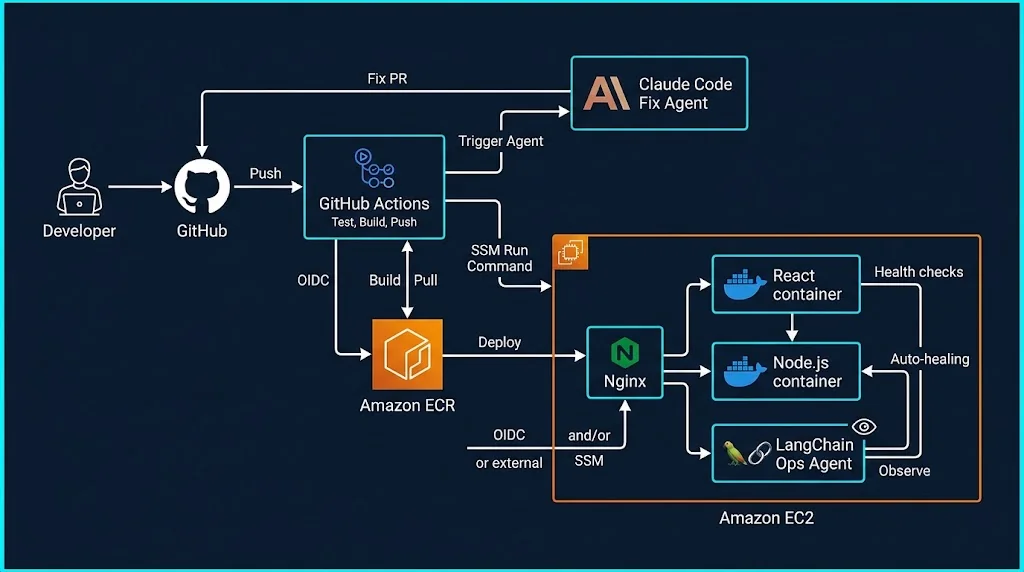
Here is the system at a glance:
- A developer pushes code to GitHub.
- GitHub Actions runs tests, builds Docker images, and pushes them to Amazon ECR.
- A deploy job tells an EC2 instance (through AWS Systems Manager) to run our
deploy.shscript. - The script pulls the new images, restarts the stack behind Nginx, runs health checks, and rolls back automatically if they fail.
- If CI fails, a second workflow invokes Claude Code to analyze the failure and open a fix pull request.
- A LangChain agent runs on the server every few minutes, inspects the stack, and escalates to humans through GitHub Issues when something looks wrong.
Our repository layout looks like this:
.
├── apps/
│   ├── web/                 # React.js (Vite) frontend
│   │   └── Dockerfile
│   └── api/                 # Node.js (Express) backend
│       └── Dockerfile
├── infra/
│   ├── docker-compose.yml
│   ├── nginx/
│   │   └── default.conf.template
│   └── scripts/
│       ├── bootstrap.sh
│       ├── render-nginx.sh
│       └── deploy.sh
├── agents/
│   └── ops_agent.py         # LangChain monitoring agent
├── CLAUDE.md                # Project instructions for Claude Code
└── .github/
    └── workflows/
        ├── ci-cd.yml
        └── self-heal.yml
Step 1: Containerize React.js and Node.js the Right Way
Containers are the contract between your code and your servers. If the contract is sloppy, no amount of AI will save you. Let's start with the Node.js API.
Node.js API Dockerfile
# apps/api/Dockerfile
FROM node:24-alpine AS deps
WORKDIR /app
COPY package*.json ./
RUN npm ci --omit=dev

FROM node:24-alpine AS runtime
ENV NODE_ENV=production
WORKDIR /app

# Run as a non-root user
RUN addgroup -S app && adduser -S app -G app
COPY --from=deps /app/node_modules ./node_modules
COPY . .
USER app

EXPOSE 4000
HEALTHCHECK --interval=15s --timeout=3s --start-period=20s --retries=3 \
  CMD node -e "fetch('http://127.0.0.1:4000/api/health').then(r=>process.exit(r.ok?0:1)).catch(()=>process.exit(1))"

CMD ["node", "src/server.js"]
Three details are worth noticing. First, npm ci --omit=dev gives reproducible installs without dev dependencies. Second, the process runs as a non-root user, which limits damage if the app is compromised. Third, the HEALTHCHECK lets Docker itself report whether the app is alive, and our agent will later read that status.
React.js Frontend Dockerfile
# apps/web/Dockerfile
FROM node:24-alpine AS build
WORKDIR /app
COPY package*.json ./
RUN npm ci
COPY . .
RUN npm run build

FROM nginx:1.27-alpine AS runtime
COPY --from=build /app/dist /usr/share/nginx/html
EXPOSE 80
The multi-stage build keeps Node.js and all your build tooling out of the final image. The result is a tiny container that only serves static files.
Docker Compose for the Whole Stack
# infra/docker-compose.yml
services:
  web:
    image: ${ECR_REGISTRY}/myapp-web:${IMAGE_TAG}
    restart: unless-stopped

  api:
    image: ${ECR_REGISTRY}/myapp-api:${IMAGE_TAG}
    restart: unless-stopped
    env_file: /opt/app/.env
    expose:
      - "4000"

  nginx:
    image: nginx:1.27-alpine
    restart: unless-stopped
    ports:
      - "80:80"
    volumes:
      - /opt/app/nginx/default.conf:/etc/nginx/conf.d/default.conf:ro
    depends_on:
      - web
      - api
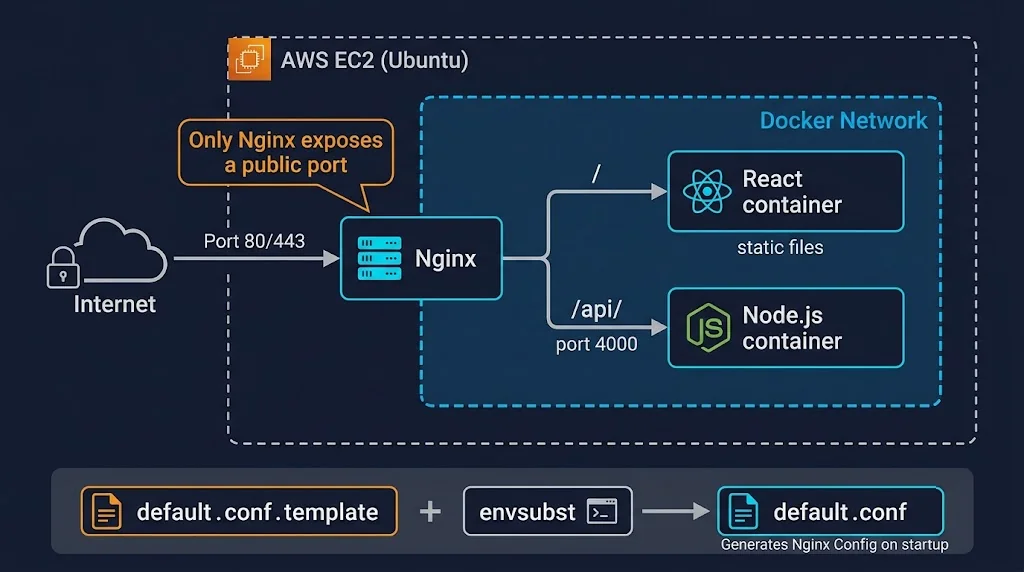
Notice that only Nginx publishes a port to the outside world. The frontend and API live on the internal Docker network, which is exactly what we want from a reverse proxy setup.
Step 2: Shell Scripting for Linux Environments
Shell scripts are the unglamorous backbone of platform engineering. In 2026 they are still the fastest way to glue together Linux, Docker, and AWS tooling. The trick is writing them defensively.
The Safety Header
Start every production script with this:
#!/usr/bin/env bash
set -Eeuo pipefail
IFS=$'\n\t'

trap 'echo "[ERROR] line $LINENO exited with status $?" >&2' ERR
Here is what each flag buys you:
-estops the script when a command fails-utreats unset variables as errors, which catches typos-o pipefailmakes a pipeline fail if any command inside it fails-Eensures theERRtrap also fires inside functions
Without this header, a script can silently continue after a failure and deploy half-broken software. Claude Code is also much better at reviewing and extending scripts that follow a consistent, strict pattern.
Bootstrapping a Fresh Ubuntu Server
#!/usr/bin/env bash
# infra/scripts/bootstrap.sh
set -Eeuo pipefail
IFS=$'\n\t'

APP_DIR="/opt/app"

log() { printf '[%s] %s\n' "$(date -u +%FT%TZ)" "$*"; }

require_root() {
  if [[ $EUID -ne 0 ]]; then
    echo "Run as root (or with sudo)." >&2
    exit 1
  fi
}

install_docker() {
  if command -v docker >/dev/null 2>&1; then
    log "Docker already installed, skipping."
    return
  fi
  log "Installing Docker Engine..."
  apt-get update -y
  apt-get install -y ca-certificates curl gnupg
  install -m 0755 -d /etc/apt/keyrings
  curl -fsSL https://download.docker.com/linux/ubuntu/gpg \
    | gpg --dearmor -o /etc/apt/keyrings/docker.gpg
  echo "deb [arch=$(dpkg --print-architecture) signed-by=/etc/apt/keyrings/docker.gpg] \
https://download.docker.com/linux/ubuntu $(. /etc/os-release && echo "$VERSION_CODENAME") stable" \
    > /etc/apt/sources.list.d/docker.list
  apt-get update -y
  apt-get install -y docker-ce docker-ce-cli containerd.io docker-compose-plugin
  systemctl enable --now docker
}

prepare_dirs() {
  mkdir -p "${APP_DIR}/nginx"
  touch "${APP_DIR}/.env"
  chmod 600 "${APP_DIR}/.env"
}

setup_firewall() {
  apt-get install -y ufw
  ufw default deny incoming
  ufw default allow outgoing
  ufw allow 22/tcp
  ufw allow 80/tcp
  ufw allow 443/tcp
  ufw --force enable
}

require_root
install_docker
prepare_dirs
setup_firewall
log "Bootstrap complete."
Notice the idempotency. You can run this script ten times and get the same server. Idempotent scripts are a gift to AI agents too, because retrying a step is always safe.
Dynamically Configuring Nginx
Hard-coding domain names and ports into Nginx configs leads to copy-paste drift between environments. Instead, we use a template and render it at deploy time.
# infra/nginx/default.conf.template
upstream api_backend {
    server api:${API_PORT};
    keepalive 16;
}

server {
    listen 80;
    server_name ${SERVER_NAME};

    gzip on;
    gzip_types text/css application/javascript application/json image/svg+xml;

    location /api/ {
        proxy_pass http://api_backend;
        proxy_http_version 1.1;
        proxy_set_header Connection "";
        proxy_set_header Host $host;
        proxy_set_header X-Real-IP $remote_addr;
        proxy_set_header X-Forwarded-For $proxy_add_x_forwarded_for;
        proxy_set_header X-Forwarded-Proto $scheme;
        proxy_read_timeout 60s;
    }

    location / {
        proxy_pass http://web:80;
        proxy_set_header Host $host;
    }
}
Now the script that renders it:
#!/usr/bin/env bash
# infra/scripts/render-nginx.sh
set -Eeuo pipefail

: "${SERVER_NAME:?SERVER_NAME is required}"
export API_PORT="${API_PORT:-4000}"

TEMPLATE="/opt/app/nginx/default.conf.template"
OUTPUT="/opt/app/nginx/default.conf"

# Only substitute OUR variables, never Nginx's own $host, $scheme, etc.
envsubst '${SERVER_NAME} ${API_PORT}' < "${TEMPLATE}" > "${OUTPUT}.new"

# Validate before replacing the live config
docker run --rm \
  -v "${OUTPUT}.new:/etc/nginx/conf.d/default.conf:ro" \
  --add-host api:127.0.0.1 --add-host web:127.0.0.1 \
  nginx:1.27-alpine nginx -t

mv "${OUTPUT}.new" "${OUTPUT}"
echo "Nginx config rendered for ${SERVER_NAME}"
The most common bug here is forgetting to restrict envsubst to a specific list of variables. Without that list, it will happily replace $host with an empty string and silently break your proxy headers. Passing the explicit variable list is the fix.
A Deployment Script With Automatic Rollback
This is the script your pipeline and your agents will call. It is deliberately boring, and that is the point.
#!/usr/bin/env bash
# infra/scripts/deploy.sh
set -Eeuo pipefail
IFS=$'\n\t'

NEW_TAG="${1:?usage: deploy.sh <image-tag>}"
APP_DIR="/opt/app"
COMPOSE_FILE="${APP_DIR}/docker-compose.yml"
LAST_GOOD_FILE="${APP_DIR}/.last_good_tag"
HEALTH_URL="http://127.0.0.1/api/health"

export ECR_REGISTRY="${ECR_REGISTRY:?ECR_REGISTRY is required}"

log() { printf '[%s] %s\n' "$(date -u +%FT%TZ)" "$*"; }

compose() { docker compose -f "${COMPOSE_FILE}" "$@"; }

wait_healthy() {
  local attempts=20
  for ((i = 1; i <= attempts; i++)); do
    if curl -fsS --max-time 3 "${HEALTH_URL}" >/dev/null 2>&1; then
      return 0
    fi
    log "Health check ${i}/${attempts} not ready yet..."
    sleep 3
  done
  return 1
}

deploy_tag() {
  export IMAGE_TAG="$1"
  compose pull
  compose up -d --remove-orphans
}

PREVIOUS_TAG="$(cat "${LAST_GOOD_FILE}" 2>/dev/null || true)"

log "Deploying ${NEW_TAG} (previous good: ${PREVIOUS_TAG:-none})"
aws ecr get-login-password --region "${AWS_REGION:-us-east-1}" \
  | docker login --username AWS --password-stdin "${ECR_REGISTRY}"

deploy_tag "${NEW_TAG}"

if wait_healthy; then
  echo "${NEW_TAG}" > "${LAST_GOOD_FILE}"
  docker image prune -f >/dev/null
  log "Deployment ${NEW_TAG} is healthy."
else
  log "Deployment ${NEW_TAG} FAILED health checks."
  if [[ -n "${PREVIOUS_TAG}" ]]; then
    log "Rolling back to ${PREVIOUS_TAG}"
    deploy_tag "${PREVIOUS_TAG}"
    wait_healthy && log "Rollback succeeded." || log "Rollback ALSO unhealthy. Page a human."
  fi
  exit 1
fi
Two things make this script agent-friendly. The exit code tells the truth, and the log lines are written in plain, consistent language. That means any LLM reading the output can understand what happened without guesswork.
Step 3: Teach Claude Code About Your Project
Claude Code works best when it understands your project conventions. The simplest way to do that is a CLAUDE.md file at the repository root. Treat it like onboarding documentation for a new teammate.
# CLAUDE.md

## Project overview
Monorepo with a React (Vite) frontend in apps/web and a Node.js API in apps/api.
Infrastructure scripts live in infra/scripts and must stay POSIX-friendly Bash.

## Commands
- Install: `npm ci` inside each app folder
- Test API: `cd apps/api && npm test`
- Test web: `cd apps/web && npm test`
- Lint: `npm run lint`

## Rules
- Never edit anything under infra/ unless the task explicitly mentions deployment.
- Never touch secrets, .env files, or GitHub workflow permissions.
- Prefer the smallest possible fix. Do not refactor unrelated code.
- Every fix must include or update a test when the failure is a logic bug.
- Shell scripts must start with `set -Eeuo pipefail`.
This single file prevents a surprising amount of unwanted creativity. The agent knows what to run, what to avoid, and how small to keep its changes.
Step 4: Automate CI/CD With GitHub Actions on AWS
Our main pipeline tests, builds, pushes to ECR, and deploys. Notice the use of OpenID Connect (OIDC) instead of long-lived AWS keys. This is the 2026 standard: no static credentials sitting in repository secrets.
# .github/workflows/ci-cd.yml
name: CI/CD

on:
  push:
    branches: [main]
  pull_request:

permissions:
  id-token: write
  contents: read

env:
  AWS_REGION: us-east-1

jobs:
  test:
    runs-on: ubuntu-latest
    steps:
      - uses: actions/checkout@v4
      - uses: actions/setup-node@v4
        with:
          node-version: 24
          cache: npm
          cache-dependency-path: |
            apps/api/package-lock.json
            apps/web/package-lock.json
      - run: npm ci
        working-directory: apps/api
      - run: npm test
        working-directory: apps/api
      - run: npm ci
        working-directory: apps/web
      - run: npm test -- --run
        working-directory: apps/web

  build-and-deploy:
    needs: test
    if: github.ref == 'refs/heads/main'
    runs-on: ubuntu-latest
    steps:
      - uses: actions/checkout@v4

      - uses: aws-actions/configure-aws-credentials@v4
        with:
          role-to-assume: ${{ secrets.AWS_DEPLOY_ROLE_ARN }}
          aws-region: ${{ env.AWS_REGION }}

      - id: ecr
        uses: aws-actions/amazon-ecr-login@v2

      - name: Build and push images
        env:
          REGISTRY: ${{ steps.ecr.outputs.registry }}
          TAG: ${{ github.sha }}
        run: |
          docker build -t "$REGISTRY/myapp-api:$TAG" apps/api
          docker build -t "$REGISTRY/myapp-web:$TAG" apps/web
          docker push "$REGISTRY/myapp-api:$TAG"
          docker push "$REGISTRY/myapp-web:$TAG"

      - name: Deploy through SSM
        env:
          REGISTRY: ${{ steps.ecr.outputs.registry }}
          TAG: ${{ github.sha }}
        run: |
          aws ssm send-command \
            --instance-ids "${{ secrets.EC2_INSTANCE_ID }}" \
            --document-name "AWS-RunShellScript" \
            --comment "Deploy $TAG" \
            --parameters "commands=[\"ECR_REGISTRY=$REGISTRY /opt/app/scripts/deploy.sh $TAG\"]" \
            --output text
Using SSM instead of SSH means you never open port 22 to GitHub's IP ranges, and every command is logged in AWS. It is a quiet security win.
Step 5: The Self-Healing Workflow With Claude Code
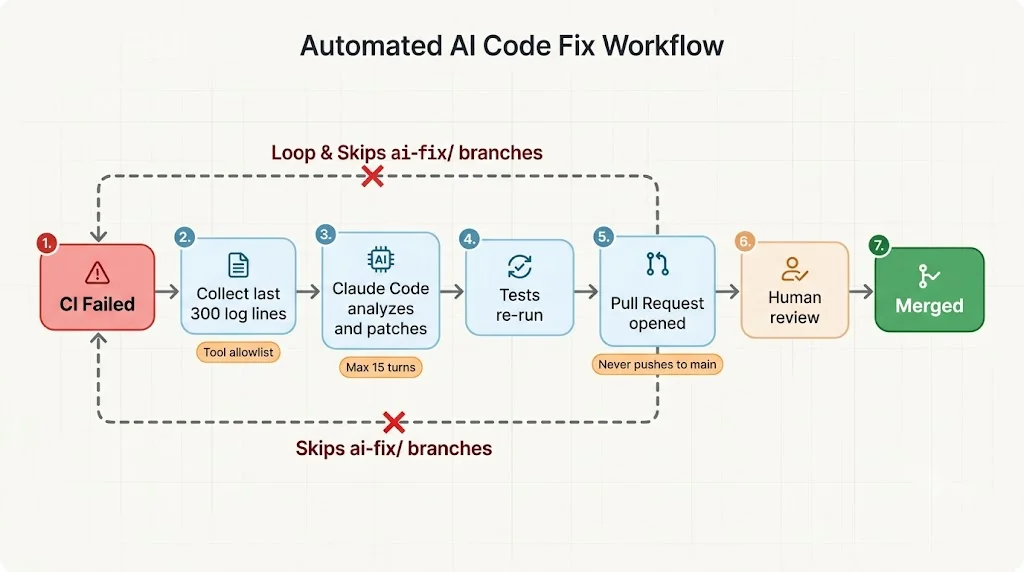
Now for the exciting part. When the main pipeline fails on a branch, we trigger a second workflow. It downloads the failure logs, hands them to Claude Code in headless mode, and opens a pull request with the proposed fix.
# .github/workflows/self-heal.yml
name: Self-Heal

on:
  workflow_run:
    workflows: ["CI/CD"]
    types: [completed]

permissions:
  contents: write
  pull-requests: write
  actions: read

jobs:
  propose-fix:
    if: >
      github.event.workflow_run.conclusion == 'failure' &&
      github.event.workflow_run.head_branch != 'main' &&
      !startsWith(github.event.workflow_run.head_branch, 'ai-fix/')
    runs-on: ubuntu-latest
    timeout-minutes: 20
    steps:
      - uses: actions/checkout@v4
        with:
          ref: ${{ github.event.workflow_run.head_sha }}

      - uses: actions/setup-node@v4
        with:
          node-version: 24

      - name: Install Claude Code
        run: npm install -g @anthropic-ai/claude-code

      - name: Collect failure logs
        env:
          GH_TOKEN: ${{ secrets.GITHUB_TOKEN }}
        run: |
          gh run view ${{ github.event.workflow_run.id }} --log-failed \
            | tail -n 300 > failure.log

      - name: Ask Claude Code for a fix
        env:
          ANTHROPIC_API_KEY: ${{ secrets.ANTHROPIC_API_KEY }}
        run: |
          claude -p "The CI pipeline failed. Read failure.log, find the root cause, \
          and apply the smallest safe fix. Run the relevant tests to confirm. \
          Follow CLAUDE.md. Finish with a short summary of the cause and the fix." \
            --allowedTools "Read,Edit,Bash(npm test:*),Bash(npm run lint:*)" \
            --max-turns 15 \
            --output-format json > claude-result.json

      - name: Open pull request
        uses: peter-evans/create-pull-request@v7
        with:
          branch: ai-fix/${{ github.event.workflow_run.head_branch }}
          base: ${{ github.event.workflow_run.head_branch }}
          title: "AI fix for failed CI on ${{ github.event.workflow_run.head_branch }}"
          body: "Automated proposal from Claude Code. Please review carefully before merging."
          commit-message: "fix: AI-proposed repair for failing CI"
          delete-branch: true
Let's unpack the design decisions, because they matter more than the YAML:
- It never pushes to
main. The AI proposes, humans dispose. - It skips its own branches. The
ai-fix/check prevents an infinite loop of AI fixing AI fixes. - Tools are allowlisted. The agent can read, edit, and run tests and lint. It cannot run arbitrary shell commands, touch the network, or read secrets.
- Turns are capped.
--max-turns 15is your cost and runaway protection. - Logs are truncated. Sending the last 300 lines of failed output keeps the context focused and the bill small.
Step 6: A LangChain Agent That Watches Production
CI covers what happens before deployment. But what about the server at 3 a.m. on a Sunday? This is where a LangChain agent shines. We give it a handful of carefully designed tools and let it reason about what it sees.
Install the dependencies:
python3 -m venv /opt/app/agent-venv
/opt/app/agent-venv/bin/pip install langchain-anthropic langgraph langchain-core
Now the agent:
# agents/ops_agent.py
import os
import subprocess
from langchain_anthropic import ChatAnthropic
from langchain_core.tools import tool
from langgraph.prebuilt import create_react_agent

COMPOSE = ["docker", "compose", "-f", "/opt/app/docker-compose.yml"]
ALLOWED_SERVICES = {"web", "api", "nginx"}
MAX_OUTPUT = 4000


def _run(cmd: list[str], timeout: int = 20) -> str:
    """Run a command safely: no shell, hard timeout, truncated output."""
    try:
        result = subprocess.run(cmd, capture_output=True, text=True, timeout=timeout)
    except subprocess.TimeoutExpired:
        return "ERROR: command timed out"
    return (result.stdout + result.stderr)[-MAX_OUTPUT:]


@tool
def service_status() -> str:
    """Show the status and health of every container in the stack."""
    return _run(COMPOSE + ["ps", "--format", "json"])


@tool
def tail_logs(service: str, lines: int = 100) -> str:
    """Return the most recent log lines for one service: web, api, or nginx."""
    if service not in ALLOWED_SERVICES:
        return f"ERROR: service must be one of {sorted(ALLOWED_SERVICES)}"
    lines = max(10, min(lines, 300))
    return _run(COMPOSE + ["logs", "--no-color", "--tail", str(lines), service])


@tool
def http_probe(path: str = "/api/health") -> str:
    """Probe an HTTP path on the local reverse proxy and return status and latency."""
    if not path.startswith("/") or ".." in path:
        return "ERROR: invalid path"
    return _run([
        "curl", "-s", "-o", "/dev/null", "--max-time", "5",
        "-w", "status=%{http_code} time=%{time_total}s",
        f"http://127.0.0.1{path}",
    ])


_restart_count = {"n": 0}


@tool
def restart_service(service: str) -> str:
    """Restart ONE service. Limited to two restarts per run. Use only after reading logs."""
    if service not in ALLOWED_SERVICES:
        return "ERROR: unknown service"
    if _restart_count["n"] >= 2:
        return "ERROR: restart budget exhausted. Escalate to a human instead."
    _restart_count["n"] += 1
    return _run(COMPOSE + ["restart", service], timeout=60)


@tool
def escalate_to_human(title: str, details: str) -> str:
    """Open a GitHub issue for a human. Use when unsure or when a restart did not help."""
    return _run([
        "gh", "issue", "create",
        "--repo", os.environ["GITHUB_REPO"],
        "--title", f"[ops-agent] {title}"[:120],
        "--body", details[:3000],
        "--label", "incident",
    ])


SYSTEM_PROMPT = """You are an on-call platform engineer for a React and Node.js stack.
Investigate before acting: check status, then logs, then probe the app.
Restart a service only if logs show a clear, recoverable problem.
Never guess. If you are unsure, or a restart does not fix things, escalate.
End with a two-sentence summary of what you found and what you did."""


def main() -> None:
    llm = ChatAnthropic(
        model=os.environ.get("OPS_AGENT_MODEL", "claude-sonnet-5-5"),
        temperature=0,
        timeout=60,
    )
    agent = create_react_agent(
        llm,
        tools=[service_status, tail_logs, http_probe, restart_service, escalate_to_human],
        prompt=SYSTEM_PROMPT,
    )
    result = agent.invoke(
        {"messages": [("user", "Run the routine health review of the production stack.")]},
        config={"recursion_limit": 12},
    )
    print(result["messages"][-1].content)


if __name__ == "__main__":
    main()
Run it on a schedule with a simple cron entry:
*/5 * * * * ANTHROPIC_API_KEY=*** GITHUB_REPO=your-org/your-repo /opt/app/agent-venv/bin/python /opt/app/agents/ops_agent.py >> /var/log/ops-agent.log 2>&1
In production you would load secrets from AWS Secrets Manager or a root-owned environment file rather than inlining them. The cron line is for clarity.
Look at how deliberately limited this agent is. It can look at things, restart one service at most twice, and open an issue. It cannot delete volumes, change configs, or roll back. Those actions have a larger blast radius, so they stay with humans or with the deterministic deploy.sh script.
Why Tool Design Matters More Than Prompts
New builders often spend days tuning prompts and minutes designing tools. It should be the other way around. Good tools:
- Validate input (see the service allowlist and path checks)
- Bound output (truncated to 4,000 characters so logs never flood the context window)
- Fail with helpful messages so the model can recover instead of looping
- Enforce budgets in code rather than politely asking the model to behave
A prompt is a suggestion. A tool boundary is a rule.
Best Practices for AI-Driven DevOps in 2026
1. Use Least Privilege Everywhere
Give the CI job only the AWS permissions it needs, scoped through an OIDC role. Give the agent a Linux user that can only run Docker Compose for one project. Give the GitHub token only the permissions the workflow declares.
2. Keep Humans in the Loop for High-Blast-Radius Actions
Opening a PR is cheap and reversible. Deleting a database is neither. Map every action to a risk level and decide where approval is required.
3. Make Everything Observable
Log every tool call the agent makes, along with its arguments and results. When something strange happens, you need a flight recorder. Tools like LangSmith or plain structured logs shipped to CloudWatch both work well.
4. Pin and Review Your Dependencies
Pin versions of GitHub Actions, base images, and Python packages. Agents amplify supply chain risk because they run with real credentials. Pinning actions to a commit SHA is the strictest option.
5. Test Your Automation Like Product Code
Run shellcheck on every script in CI, add dry-run flags, and keep a staging environment where your agent can practice. The safest agent is the one that failed a hundred times in staging first.
# Add this step to CI to lint all shell scripts
shellcheck infra/scripts/*.sh
6. Control Costs From Day One
Trigger AI only on failures, truncate context, cap turns, and set budgets in your API console. A runaway loop at 3 a.m. should hit a limit rather than your credit card.
Common Mistakes to Avoid
- Giving the agent broad shell access. A generic "run any command" tool turns a helpful assistant into a liability. Build narrow tools instead.
- Letting AI push directly to main. Always route changes through pull requests and branch protection.
- Skipping health checks. If your deploy script cannot tell good from bad, neither can your agent.
- Creating infinite loops. An AI fix that fails CI can trigger another AI fix. Guard with branch naming rules, attempt counters, and timeouts.
- Dumping entire logs into the prompt. More context is not always better. Filter to the failing section and recent lines.
- Forgetting to restrict
envsubst. As covered earlier, unrestricted substitution quietly breaks your Nginx variables. - Storing secrets in images or repositories. Use environment files with strict permissions, AWS Secrets Manager, or SSM Parameter Store.
- Trusting AI output without review. Treat AI-generated PRs like code from a talented but new teammate: helpful, fast, and in need of review.
- Using floating tags like
latest. Deploy by immutable tag, such as the Git commit SHA, so rollbacks are exact.
🚀 Pro Tips
- Write a great
CLAUDE.md. Ten minutes spent documenting your commands and rules saves hours of cleanup. Update it whenever the AI makes the same mistake twice. - Use a dry-run mode in every script. A
--dry-runflag that prints what would happen lets both humans and agents rehearse safely. - Store structured results. Ask the agent to end with JSON containing
cause,action, andconfidence. You can then route low-confidence results to humans automatically. - Add a "kill switch." A single environment variable, such as
OPS_AGENT_ENABLED=false, that stops all automation instantly is worth its weight in gold. - Pre-warm the context. Teach your agent your architecture with a short runbook file it can read. Incident response improves dramatically when it knows what "normal" looks like.
- Review the agent's mistakes weekly. Treat misfires as feature requests for better tools, clearer rules, or tighter permissions.
- Run
docker compose configin CI. It catches broken Compose files long before they hit a server. - Version your prompts. Keep system prompts in the repository, review changes in PRs, and treat them like code.
What Comes Next
Once this foundation is in place, you can extend it naturally:
- Add blue-green deployments using two Compose projects and an Nginx upstream switch
- Introduce HTTPS with Let's Encrypt by adding Certbot to your bootstrap script
- Move from a single EC2 instance to ECS or EKS while keeping the same CI structure
- Give your agent metrics tools that query CloudWatch or Prometheus instead of only reading logs
- Add an AI code reviewer workflow that comments on risky infrastructure changes before merge
The principles stay constant even when the infrastructure grows: narrow tools, strong defaults, human oversight, and clear audit trails.
📌 Key Takeaways
- AI belongs in the reasoning layer of your platform, while Shell scripts and CI handle the deterministic layer.
- Claude Code in GitHub Actions can analyze failures and open fix pull requests, as long as you allowlist tools, cap turns, and block pushes to main.
- A LangChain agent with a small, validated toolset can triage incidents, restart a service within a strict budget, and escalate to humans through GitHub Issues.
- Strict Bash, multi-stage Docker builds, templated Nginx, health checks, and automatic rollback are the foundation that makes AI automation trustworthy.
- OIDC and SSM remove long-lived AWS keys and open SSH ports from your pipeline.
- The most important design principle: a prompt is a suggestion, but a tool boundary is a rule.
Conclusion
AI-assisted platform engineering is not magic, and it is certainly not a reason to stop understanding your infrastructure. If anything, it rewards engineers who understand it deeply. The better your scripts, containers, and pipelines are, the more value an AI agent can add on top of them.
We built a complete picture in this guide: React.js and Node.js containerized with Docker, Nginx configured dynamically from a template, hardened Shell scripts for bootstrapping and deploying, a GitHub Actions pipeline that ships to AWS with short-lived credentials, a Claude Code workflow that turns red builds into reviewable pull requests, and a LangChain agent that keeps watch while you sleep.
Start small. Pick one pain point, perhaps the flaky test failures that eat your mornings, and automate that first. Measure the results, tighten the guardrails, and expand from there. The goal is not a pipeline that never breaks. The goal is a platform that notices quickly, explains clearly, and recovers gracefully, and that gives your team back the nights and the focus they deserve.
References
- Claude Code documentation: https://docs.claude.com/en/docs/claude-code/overview
- Claude Code GitHub Actions guide: https://docs.claude.com/en/docs/claude-code/github-actions
- LangChain documentation: https://docs.langchain.com
- LangGraph documentation: https://langchain-ai.github.io/langgraph/
- Docker multi-stage builds: https://docs.docker.com/build/building/multi-stage/
- Docker Compose documentation: https://docs.docker.com/compose/
- Nginx reverse proxy guide: https://docs.nginx.com/nginx/admin-guide/web-server/reverse-proxy/
- GitHub Actions documentation: https://docs.github.com/en/actions
- GitHub OIDC with AWS: https://docs.github.com/en/actions/how-tos/secure-your-work/security-harden-deployments/oidc-in-aws
- AWS Systems Manager Run Command: https://docs.aws.amazon.com/systems-manager/latest/userguide/run-command.html
- ShellCheck: https://www.shellcheck.net