A few years ago, if you mentioned "carbon footprint" in a sprint planning meeting, you'd probably get a polite nod and a quick pivot back to the backlog. In 2026, that conversation sounds very different.
Cloud bills keep climbing as AI workloads eat into budgets. Large companies operating in Europe are now reporting emissions under the Corporate Sustainability Reporting Directive (CSRD), and those Scope 3 numbers include the cloud services and software they buy. Procurement teams are starting to ask vendors for carbon data alongside SOC 2 reports. And engineering leaders have discovered something that should have been obvious all along: wasted energy is wasted money.
That's why Green Software Engineering has moved out of the conference keynote and into the engineering handbook. It's no longer a "nice to have." It's a performance metric that sits right next to latency, availability, and cost.
In this guide, I'll walk you through what green software actually means in practice, how to measure it, and the concrete techniques teams are using to cut energy consumption without slowing their systems down. There's code, there are diagrams, and there are a few hard lessons I've picked up along the way.

What Is Green Software Engineering?
Green Software Engineering is the practice of building and operating software that emits as little carbon as possible. The Green Software Foundation breaks it down into three core levers:
- Energy efficiency: Consume less electricity to do the same work.
- Hardware efficiency: Use fewer physical resources (servers, storage, devices), because manufacturing hardware has its own carbon cost, known as embodied carbon.
- Carbon awareness: Do more work when and where electricity is cleaner, and less when it's dirtier.
Here's the part that surprises many developers: software itself doesn't emit anything. The electricity it consumes does, and so does the hardware it runs on. Your job as an engineer is to make every watt and every server count.
Why It Matters More in 2026
Several forces have converged to make this a top-tier engineering concern:
- AI is power-hungry. Training and serving large models has pushed data center energy demand up sharply, and inference now runs on every request in many products.
- Regulation has teeth. Sustainability reporting frameworks like the EU's CSRD require companies to disclose emissions across their value chain, which includes digital services.
- Cloud costs are scrutinized. FinOps and GreenOps have merged in many organizations because the dashboards look nearly identical.
- Standards exist now. The Software Carbon Intensity (SCI) specification became an ISO standard (ISO/IEC 21031:2024), giving teams a shared, credible way to measure.
The Happy Overlap: Green, Fast, and Cheap
The most important mental model in this whole field is simple: efficient software is usually green software.
When you remove an unnecessary database query, you reduce latency, CPU cycles, network traffic, and energy all at once. When you shut down an idle staging cluster over the weekend, you save money and carbon. Most green wins are performance wins or cost wins wearing a different hat.
flowchart LR
    A[Less Computation] --> D[Lower Energy Use]
    B[Less Data Movement] --> D
    C[Less Idle Capacity] --> D
    D --> E[Lower Carbon Emissions]
    D --> F[Lower Cloud Bill]
    A --> G[Lower Latency]
    B --> G
    E --> H[Sustainability Goals Met]
    F --> I[FinOps Goals Met]
    G --> J[Better User Experience]
Measuring Before Optimizing: The SCI Score
Every experienced engineer knows the rule: don't optimize what you haven't measured. Green software is no different.
The Software Carbon Intensity (SCI) specification gives you a rate, not a total. That distinction matters. A total ("we emitted 40 tonnes last year") goes up as your business grows, which punishes success. A rate ("we emit 0.3 grams per API request") tells you whether your software is actually getting more efficient.
The formula looks like this:
SCI = ((E × I) + M) per R| Variable | Meaning | Example Source |
|---|---|---|
| E | Energy consumed by the software (kWh) | Kepler, RAPL counters, cloud provider data |
| I | Location-based grid carbon intensity (gCO₂e/kWh) | Electricity Maps, WattTime |
| M | Embodied emissions of the hardware, amortized | Manufacturer data, Cloud Carbon Footprint coefficients |
| R | Functional unit | Per API call, per user, per ML inference, per build |
Choosing the right R is the most important design decision. Pick a unit that maps to the value your software delivers. For a payments API, "per transaction" makes sense. For a CI system, "per pipeline run" works. For a streaming service, "per minute of video served."
A Simple SCI Calculator in Python
Here's a lightweight helper you can drop into a reporting job. It takes measured energy, grid intensity, and embodied emissions, then produces an SCI score per functional unit.
from dataclasses import dataclass


@dataclass
class SCIInputs:
    energy_kwh: float            # E: energy consumed during the window
    grid_intensity_g_per_kwh: float  # I: location-based carbon intensity
    embodied_total_g: float      # Total embodied carbon of the hardware
    hardware_lifespan_hours: float
    window_hours: float          # Time window measured
    resource_share: float        # Fraction of the hardware this app uses (0-1)
    functional_units: int        # R: e.g., number of API requests


def calculate_sci(inputs: SCIInputs) -> float:
    """Return grams of CO2e per functional unit."""
    operational = inputs.energy_kwh * inputs.grid_intensity_g_per_kwh

    # Amortize embodied carbon over the time window and resource share
    time_share = inputs.window_hours / inputs.hardware_lifespan_hours
    embodied = inputs.embodied_total_g * time_share * inputs.resource_share

    if inputs.functional_units == 0:
        raise ValueError("Functional units must be greater than zero")

    return (operational + embodied) / inputs.functional_units


if __name__ == "__main__":
    sci = calculate_sci(
        SCIInputs(
            energy_kwh=12.4,
            grid_intensity_g_per_kwh=320,
            embodied_total_g=1_200_000,   # ~1.2 tonnes for a server
            hardware_lifespan_hours=4 * 365 * 24,
            window_hours=24,
            resource_share=0.25,
            functional_units=1_850_000,
        )
    )
    print(f"SCI: {sci:.5f} gCO2e per request")
Once you have this number, treat it like any other Service Level Objective. Put it on a dashboard. Watch for regressions. Celebrate when it drops.
Tooling That Actually Works in 2026
You don't need to build measurement from scratch. The ecosystem has matured a lot:
- Kepler (Kubernetes-based Efficient Power Level Exporter): Exports per-pod energy estimates to Prometheus using eBPF and hardware counters. Great for Kubernetes shops.
- Cloud Carbon Footprint: An open-source tool that estimates emissions from AWS, Azure, and GCP billing data.
- CodeCarbon: A Python library that tracks emissions of a code block, popular for ML training jobs.
- Cloud provider dashboards: AWS Customer Carbon Footprint Tool, Google Cloud Carbon Footprint, and Microsoft's Emissions Impact Dashboard provide account-level reporting.
- Electricity Maps and WattTime: APIs for real-time and forecast grid carbon intensity.
- Carbon Aware SDK: The Green Software Foundation's SDK for querying the best time and region to run a workload.
Writing Energy-Efficient Code
Now for the part most developers care about: the code itself. Let's be honest up front. Micro-optimizations rarely move the needle on their own. But algorithmic choices, data access patterns, and wasteful loops absolutely do, especially at scale.
1. Algorithmic Complexity Is an Energy Metric
Big-O notation isn't just an interview topic. An O(n²) algorithm running on a million records doesn't just take longer. It burns proportionally more CPU, which means more energy.
Here's a common pattern I see in code reviews: checking membership inside a loop using a list.
# ❌ O(n * m): scans the full list for every order
def find_flagged_orders(orders, flagged_customer_ids: list):
    return [o for o in orders if o.customer_id in flagged_customer_ids]


# ✅ O(n + m): set lookups are O(1) on average
def find_flagged_orders_fast(orders, flagged_customer_ids: list):
    flagged = set(flagged_customer_ids)
    return [o for o in orders if o.customer_id in flagged]
With 100,000 orders and 10,000 flagged IDs, the first version performs up to a billion comparisons. The second performs about 110,000 operations. Same output, a tiny fraction of the energy.
2. Stop Doing Work Nobody Asked For
The greenest computation is the one you never run. Some everyday examples:
- Over-fetching:
SELECT *when you need three columns. - Eager loading: Hydrating entire object graphs for a list view.
- Polling: Checking an endpoint every second instead of using webhooks or server-sent events.
- Redundant serialization: Converting JSON to objects and back several times in a single request path.
Here's a TypeScript example of replacing aggressive polling with an event-driven approach:
// ❌ Polls every 2 seconds, even when nothing changes
setInterval(async () => {
  const res = await fetch("/api/orders/123/status");
  const { status } = await res.json();
  updateUI(status);
}, 2000);

// ✅ Server pushes updates only when status actually changes
const events = new EventSource("/api/orders/123/stream");

events.addEventListener("status", (event) => {
  const { status } = JSON.parse(event.data);
  updateUI(status);
  if (status === "DELIVERED") events.close();
});
Multiply that polling loop by 50,000 concurrent users and you've got a fleet of servers doing almost nothing useful, around the clock.
3. Cache Intelligently
Caching is one of the most effective green techniques because it trades a tiny amount of memory for a large reduction in repeated computation and network transfer.
package pricing

import (
	"context"
	"time"

	"github.com/redis/go-redis/v9"
)

type Service struct {
	cache *redis.Client
	db    PriceRepository
}

func (s *Service) GetPrice(ctx context.Context, sku string) (string, error) {
	key := "price:" + sku

	// Serve from cache when possible
	if cached, err := s.cache.Get(ctx, key).Result(); err == nil {
		return cached, nil
	}

	price, err := s.db.FetchPrice(ctx, sku)
	if err != nil {
		return "", err
	}

	// Short TTL keeps data fresh while absorbing traffic spikes
	_ = s.cache.Set(ctx, key, price, 5*time.Minute).Err()
	return price, nil
}
Don't forget HTTP-level caching either. Proper Cache-Control headers and a CDN can keep a huge share of requests from ever reaching your origin servers.
4. Batch Instead of Chatter
Every network round trip has overhead: TLS, headers, context switches, and wake-ups on both ends. Batching reduces that overhead dramatically.
import asyncio


class BatchWriter:
    """Buffers events and flushes them in batches to reduce I/O calls."""

    def __init__(self, sink, max_size=500, max_wait_s=2.0):
        self.sink = sink
        self.max_size = max_size
        self.max_wait_s = max_wait_s
        self.buffer = []
        self._lock = asyncio.Lock()

    async def add(self, event):
        async with self._lock:
            self.buffer.append(event)
            if len(self.buffer) >= self.max_size:
                await self._flush()

    async def run_periodic_flush(self):
        while True:
            await asyncio.sleep(self.max_wait_s)
            async with self._lock:
                await self._flush()

    async def _flush(self):
        if not self.buffer:
            return
        batch, self.buffer = self.buffer, []
        await self.sink.write_many(batch)  # One call instead of hundreds
5. Choose the Right Language for the Hot Path
You've probably seen the well-known study ranking programming languages by energy use, where C, Rust, and C++ sit at the top and interpreted languages trail behind. It's a useful signal, but please don't rewrite your whole Django app in Rust because of it.
A more practical approach:
- Profile first and find the hot path, usually a small part of the code.
- Move only that path to a more efficient runtime if it's genuinely CPU-bound. Rust extensions via PyO3 or WebAssembly modules are popular options.
- Keep the rest of the codebase in whatever language your team is productive in.
6. Shrink What You Send Over the Wire
Data transfer consumes energy across networks, routers, and client devices. A few quick wins:
- Serve modern image formats like AVIF and WebP with responsive sizes.
- Enable Brotli or Zstandard compression.
- Use binary protocols like gRPC with Protocol Buffers for internal service traffic.
- Lazy-load below-the-fold content and code-split JavaScript bundles.
- Paginate API responses and support field selection.
Optimizing Cloud Resource Consumption
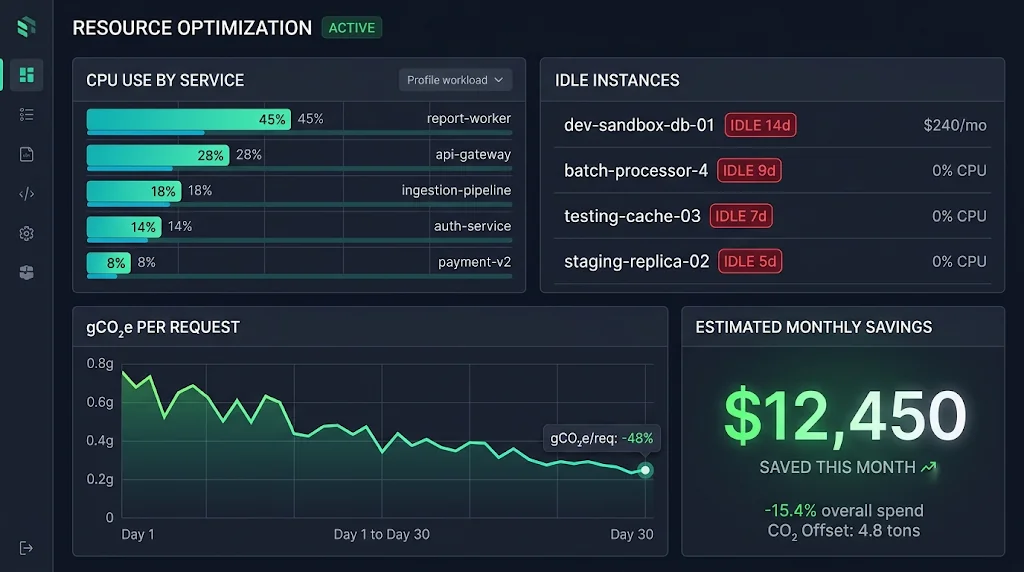
Here's the uncomfortable truth: in most organizations, the biggest energy waste isn't in the code. It's in the infrastructure. Industry surveys repeatedly find that a large share of cloud spend goes to idle or overprovisioned resources.
Rightsize Everything
That m5.4xlarge someone provisioned "just in case" three years ago is probably running at 8% CPU. Every major cloud provider offers rightsizing recommendations. Use them, and automate the review.
Scale to Zero When Idle
Not every service needs to run 24/7. Development environments, internal tools, and batch processors can often scale down to nothing. Here's a KEDA ScaledObject that scales a Kubernetes worker to zero when its queue is empty:
apiVersion: keda.sh/v1alpha1
kind: ScaledObject
metadata:
  name: report-worker
  namespace: analytics
spec:
  scaleTargetRef:
    name: report-worker
  minReplicaCount: 0        # Scale to zero when idle
  maxReplicaCount: 20
  cooldownPeriod: 300
  triggers:
    - type: rabbitmq
      metadata:
        queueName: report-jobs
        mode: QueueLength
        value: "25"
      authenticationRef:
        name: rabbitmq-auth
Switch to Energy-Efficient Hardware
ARM-based processors like AWS Graviton, Azure Cobalt, and Google Axion generally deliver better performance per watt than comparable x86 instances for many workloads. If your stack runs on containers and mainstream runtimes, migrating is often as simple as building multi-architecture images:
docker buildx build \
  --platform linux/amd64,linux/arm64 \
  -t registry.example.com/api:2.4.0 \
  --push .
Clean Up Storage and Data
Storage feels free, but it isn't. Every byte sits on spinning disks or SSDs that draw power and get replicated across zones.
- Apply lifecycle policies to move cold data to archival tiers.
- Delete orphaned snapshots, unattached volumes, and stale container images.
- Set retention limits on logs and traces. Do you really need debug logs from 2023?
Tag and Shut Down Non-Production
A simple scheduled job that stops non-production environments outside working hours can cut their runtime by about two-thirds. That's one of the easiest wins in the whole playbook.
Carbon-Aware Computing: Running Work at the Right Time and Place
Electricity isn't equally dirty everywhere or all the time. Grid carbon intensity changes hour by hour depending on how much solar, wind, hydro, gas, or coal is feeding it. A grid that's very clean at noon on a sunny day might be several times dirtier at 7 p.m.
Carbon-aware computing takes advantage of that by shifting flexible workloads:
- Time shifting: Delay a job until the grid is cleaner.
- Location shifting: Run a job in a region with a cleaner grid.
- Demand shaping: Reduce the quality or intensity of work when the grid is dirty (for example, lower video bitrate or fewer recommendations).
sequenceDiagram
    participant Scheduler
    participant CarbonAPI as Carbon Intensity API
    participant Queue as Job Queue
    participant Region as Cloud Region

    Scheduler->>CarbonAPI: Request forecast for next 12h (eu-north, eu-west, us-east)
    CarbonAPI-->>Scheduler: Return intensity forecast per region and hour
    Scheduler->>Scheduler: Pick lowest-carbon window within job deadline
    Scheduler->>Queue: Enqueue job with start time and region
    Queue->>Region: Dispatch job at optimal window
    Region-->>Scheduler: Report energy used and completion status
A Carbon-Aware Job Scheduler
Here's a simplified Python example that picks the greenest window for a deferrable batch job, while respecting its deadline:
from datetime import datetime, timedelta, timezone
from typing import List, Tuple

import httpx

CARBON_API = "https://carbon-aware-api.internal/emissions/forecasts/current"


def best_window(
    locations: List[str],
    duration_minutes: int,
    deadline: datetime,
) -> Tuple[str, datetime, float]:
    """Return (location, start_time, avg_intensity) with the lowest carbon."""
    params = {
        "location": locations,
        "dataStartAt": datetime.now(timezone.utc).isoformat(),
        "dataEndAt": deadline.isoformat(),
        "windowSize": duration_minutes,
    }
    response = httpx.get(CARBON_API, params=params, timeout=10)
    response.raise_for_status()

    best = None
    for forecast in response.json():
        option = forecast["optimalDataPoints"][0]
        candidate = (
            option["location"],
            datetime.fromisoformat(option["timestamp"]),
            option["value"],
        )
        if best is None or candidate[2] < best[2]:
            best = candidate

    if best is None:
        # Fail safe: run now in the default region rather than miss the SLA
        return locations[0], datetime.now(timezone.utc), float("nan")
    return best


if __name__ == "__main__":
    region, start, intensity = best_window(
        locations=["swedencentral", "westeurope", "eastus"],
        duration_minutes=90,
        deadline=datetime.now(timezone.utc) + timedelta(hours=10),
    )
    print(f"Run in {region} at {start:%H:%M} UTC (~{intensity:.0f} gCO2e/kWh)")
Notice the fallback. Reliability always comes first. If the carbon API is down, the job still runs. Green software should never become the reason you miss an SLA.
Good Candidates for Carbon Awareness
- ML model training and fine-tuning
- Nightly ETL and data warehouse refreshes
- Video transcoding and media processing
- Large CI test suites and dependency scans
- Backups and data replication
Bad candidates are anything user-facing and latency-sensitive. Nobody wants their checkout page to wait for the wind to pick up.
Green AI: Taming the Biggest Energy Consumer
No 2026 discussion of green software is complete without talking about AI. For many products, model inference is now the single largest contributor to compute energy.
Practical techniques teams are using:
- Right-size the model. Not every task needs your largest model. Route simple classification or extraction tasks to smaller, faster models.
- Quantize. 8-bit or 4-bit quantization can dramatically cut memory and energy with modest accuracy loss for many tasks.
- Cache responses and embeddings. Semantic caches avoid re-running inference on near-duplicate prompts.
- Use prompt caching. Many providers now cache repeated prompt prefixes, which saves both compute and money.
- Batch inference. GPUs are most efficient when fully utilized, so group requests where latency budgets allow.
Here's a minimal model router that sends easy requests to a smaller model:
type Task = { prompt: string; complexity: "low" | "medium" | "high" };

const MODEL_BY_COMPLEXITY = {
  low: "small-fast-model",
  medium: "mid-tier-model",
  high: "frontier-model",
} as const;

export async function routeInference(task: Task) {
  const cacheKey = await hashPrompt(task.prompt);
  const cached = await semanticCache.get(cacheKey);
  if (cached) return cached; // Zero inference energy

  const model = MODEL_BY_COMPLEXITY[task.complexity];
  const result = await llmClient.generate({ model, prompt: task.prompt });

  await semanticCache.set(cacheKey, result, { ttlSeconds: 3600 });
  return result;
}
Real-World Example: Greening a Reporting Platform
Let me walk through a composite scenario based on patterns I've seen across several teams. A SaaS company runs an analytics reporting platform on Kubernetes. Customers request PDF reports that pull data from a warehouse, render charts, and email the results.
Before the green initiative:
- 40 worker pods ran 24/7, sized for peak Monday-morning traffic.
- Every report re-queried the warehouse, even for identical date ranges.
- Chart rendering used a headless browser started fresh for each report.
- Reports were generated immediately, even though most customers only read them the next morning.
- All workloads ran on x86 instances in a single, relatively carbon-intensive region.
What the team changed:
- Measured first. They deployed Kepler and built an SCI dashboard using "per report generated" as the functional unit.
- Added query result caching keyed on tenant, query hash, and date range.
- Reused a pool of browser instances instead of cold-starting one per report.
- Scaled workers to zero overnight with KEDA, driven by queue length.
- Made scheduled reports carbon-aware, letting non-urgent jobs pick a cleaner window before the 8 a.m. delivery deadline.
- Migrated workers to ARM instances with multi-arch images.
The outcome: Results of this kind of effort typically show a substantial drop in both the cloud bill and SCI score, often by half or more, while p95 report generation time improves because of caching and warm browser pools. The key lesson is that none of these changes hurt reliability. Most of them improved it.
flowchart TD
    A[Measure: Kepler + SCI Dashboard] --> B{Where is the waste?}
    B -->|Repeated queries| C[Add Result Caching]
    B -->|Cold starts| D[Pool Browser Instances]
    B -->|Idle pods| E[Scale to Zero with KEDA]
    B -->|Inflexible timing| F[Carbon-Aware Scheduling]
    B -->|Inefficient hardware| G[Migrate to ARM]
    C --> H[Re-measure SCI]
    D --> H
    E --> H
    F --> H
    G --> H
    H --> A
Making Green Software Part of Your Engineering Culture
Tools and techniques only go so far. Lasting change comes from making sustainability part of how your team works every day.
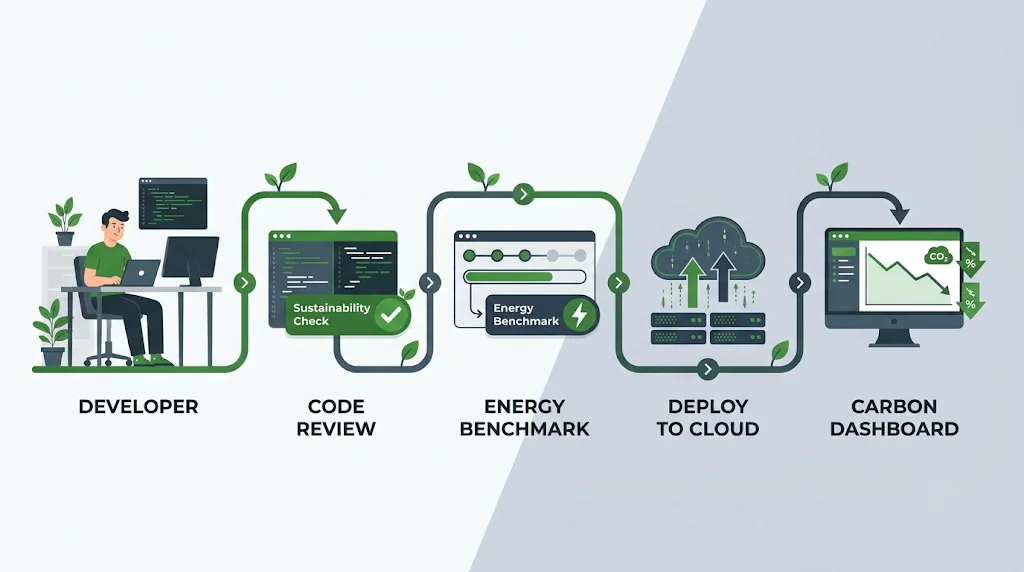
Add Carbon to Your Definition of Done
Just as you check for test coverage and security issues, add a lightweight sustainability check to code reviews:
- Does this change introduce polling, N+1 queries, or unbounded loops?
- Are new resources tagged, sized appropriately, and set to scale down?
- Does this feature need to run in real time, or can it be deferred?
Put Energy in Your CI Pipeline
You can track energy regressions the same way you track performance regressions. Here's a GitHub Actions sketch that runs a benchmark with CodeCarbon and fails the build if emissions spike:
name: energy-regression-check

on:
  pull_request:
    branches: [main]

jobs:
  energy-benchmark:
    runs-on: ubuntu-latest
    steps:
      - uses: actions/checkout@v4

      - uses: actions/setup-python@v5
        with:
          python-version: "3.13"

      - name: Install dependencies
        run: pip install -r requirements.txt codecarbon

      - name: Run benchmark with energy tracking
        run: python benchmarks/run_with_codecarbon.py --output emissions.json

      - name: Compare against baseline
        run: python benchmarks/compare_energy.py --current emissions.json --baseline benchmarks/baseline.json --max-increase 10
Keep in mind that shared CI runners produce noisy energy measurements. Use the results as a trend signal, run benchmarks multiple times, and set tolerance thresholds rather than treating single runs as gospel.
Best Practices for Green Software Engineering
Here's a consolidated checklist you can share with your team:
- Measure with SCI and pick a functional unit tied to business value.
- Treat carbon like a performance budget with targets, alerts, and dashboards.
- Eliminate idle resources first, since they're the easiest and biggest wins.
- Rightsize continuously using provider recommendations and real utilization data.
- Prefer event-driven designs over polling and always-on loops.
- Cache aggressively at the CDN, application, and database layers.
- Batch I/O and network calls wherever latency budgets allow.
- Adopt efficient hardware such as ARM instances and modern GPUs with better performance per watt.
- Shift flexible workloads to cleaner times and regions.
- Set data retention policies for logs, backups, and analytics data.
- Right-size AI models and use caching, quantization, and batching for inference.
- Design for longevity on the client side so older devices keep working, reducing e-waste.
Common Mistakes to Avoid
Even well-meaning teams fall into these traps:
- Optimizing without measuring. Spending a week shaving microseconds off a function that runs once a day while a forgotten GPU cluster idles in another region.
- Using market-based numbers to hide real impact. Renewable energy certificates have their place in corporate reporting, but the SCI spec deliberately uses location-based intensity so engineering changes show up in the numbers.
- Sacrificing reliability for carbon. Carbon-aware scheduling must always have deadlines and fallbacks. Missing an SLA is not a green win.
- Ignoring embodied carbon. Constantly upgrading hardware or forcing users onto new devices through bloated frontends shifts emissions rather than reducing them.
- Chasing language rewrites. Rewriting an entire service in a "faster" language is expensive and risky. Target hot paths instead.
- Treating it as a one-off project. Green improvements decay as systems grow. Without ongoing measurement, waste creeps back in.
- Making it one person's job. A single "sustainability champion" can't fix a whole architecture. It works only when it's baked into reviews, CI, and planning.
🚀 Pro Tips
- Start with your cloud bill. Sort services by cost. The most expensive ones are almost always your biggest energy consumers, and they're where you'll find the fastest wins.
- Pair GreenOps with FinOps. Present carbon reductions alongside dollar savings. Leadership approves projects that save money, and the carbon savings come along for free.
- Use "per request" SCI in PR descriptions for performance-sensitive changes. It builds awareness without extra process.
- Schedule non-prod shutdowns on day one of every new environment. Retrofitting is always harder.
- Check your region's grid mix before launching new infrastructure. Choosing a cleaner region at the start costs nothing and pays off for years.
- Profile in production-like conditions. Energy hot spots in staging often look completely different from those under real traffic.
- Watch your frontend weight. Heavy JavaScript bundles drain batteries on millions of user devices, an emissions source that never shows up on your cloud dashboard.
- Add a "green" label in your issue tracker so sustainability improvements are visible, countable, and easy to celebrate.
📌 Key Takeaways
- Green software is efficient software. The techniques that cut carbon usually cut latency and cost too.
- Measure with SCI (ISO/IEC 21031) using a meaningful functional unit, and track it like any other SLO.
- Infrastructure is where the biggest wins hide. Rightsizing, scaling to zero, ARM migration, and cleaning up idle resources often outperform code-level tweaks.
- Code still matters at scale. Better algorithms, caching, batching, and event-driven design compound across millions of requests.
- Carbon-aware computing is low-hanging fruit for deferrable workloads like ETL, ML training, and backups.
- AI workloads need special attention. Model routing, quantization, and caching can significantly reduce inference energy.
- Never trade reliability for carbon. Always build in deadlines and fallbacks.
Conclusion
Green Software Engineering in 2026 isn't about guilt or grand gestures. It's about craftsmanship. It's about writing software that does exactly what it needs to do, with no wasted cycles, no idle servers, and no unnecessary bytes crossing the network.
The good news is that you don't need a sustainability team or a massive budget to start. Pick one service. Measure its SCI score. Find the biggest source of waste, whether that's an idle cluster, a chatty API, or an oversized model, and fix it. Then measure again.
Do that consistently, and you'll end up with systems that are faster, cheaper, more reliable, and kinder to the planet. That's not a trade-off. That's just good engineering.
References
- Green Software Foundation
- Software Carbon Intensity (SCI) Specification
- ISO/IEC 21031:2024 – Software Carbon Intensity (SCI) Specification
- Green Software Practitioner Course
- Carbon Aware SDK (GitHub)
- Kepler: Kubernetes-based Efficient Power Level Exporter
- Cloud Carbon Footprint
- CodeCarbon
- Electricity Maps
- WattTime
- AWS Well-Architected Framework: Sustainability Pillar
- KEDA: Kubernetes Event-Driven Autoscaling
- Directive (EU) 2022/2464 – Corporate Sustainability Reporting Directive
- Pereira et al., "Energy Efficiency across Programming Languages" (SLE 2017)